
This article explains how to create the lead sound heard in Perfume's ‘Chocolate Disco’. Learn practical synthesizer techniques including saw-wave oscillator settings, monophonic glide, spatial effects using reverb and delay, and tone shaping with a low-pass filter. From beginners to intermediate producers, readers can learn step by step how to build a lead sound used in a real song and apply these ideas to their own music.
A Lead Sound That Adds Color to the Song

Part four of our Valentine's Day special!
Synth Recipe: Perfume's ‘Chocolate Disco’
We conclude the series with the lead sound.
Reference Track
This lead is added in the latter half of the song.
It adds color to the repeating arrangement, helping keep the listener engaged.
This sound uses techniques characteristic of lead sounds.
How to Create the Sound
Applying Effects
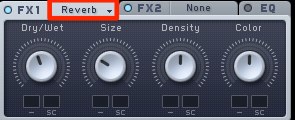
Apply reverb to create a sense of space.
Adjust the amount to suit the song.
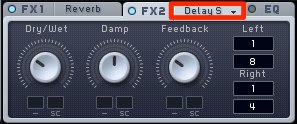
For the delay, select ‘Delay Synced’ to synchronize it to the tempo.
Changing the note values for the left and right channels creates a wider sense of space.
Applying the Filter
Finally, use the filter to shape the sound.
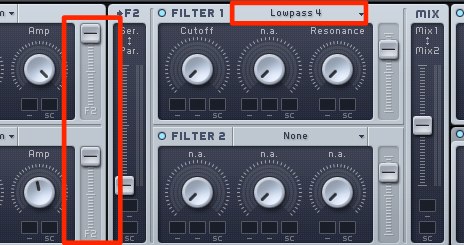
To reduce harsh high frequencies,
use the standard LP (low-pass) filter.
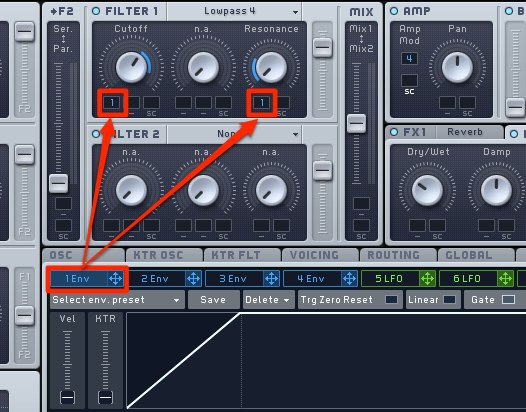
Making the sound change as each note begins
gives the tone even more movement.
Here, we use ENV 1
to control that movement.
The sound is now complete!
Frequently Asked Questions
Q1. Why is a saw wave recommended for creating lead sounds?
A saw wave contains rich harmonics, giving it a bright, prominent tone suited to lead sounds. Layering it in octaves can create an even fuller sound.
Q2. What should I keep in mind when using glide?
To use glide, set the note mode to ‘Monorotate’ or ‘Legato Triller’ in the VOICING tab, then adjust its speed with the Time parameter in the OSC tab.
Q3. How should I use reverb and delay?
Use reverb to create space and depth, and a tempo-synced delay to create width between the left and right channels. Adjust the balance to suit the whole song.
Q4. Why apply a low-pass filter?
It shapes the sound by reducing potentially harsh high-frequency components. Using ENV 1 to control the filter over time creates more dynamic tonal changes.
NEW ARTICLES
Latest English Articles




























































































































































































































































































































































































































































































































































































