
Guitar chopping is a production technique in which you cut a guitar recording and rearrange the pieces on eighth-, sixteenth- and thirty-second-note positions. It creates new rhythmic patterns and a distinctive chopped texture. Placing the pieces across multiple tracks with different pan positions can also make the sound seem to move across the stereo field.
Chop and Rearrange Guitar Audio
In this production recipe, we’ll use guitar chopping:
cutting the waveform and rearranging the pieces on eighth-, sixteenth- and thirty-second-note positions.
You can create a new rhythm from the source material
and give it a distinctive chopped feel.
Sound Creation
Split the Audio
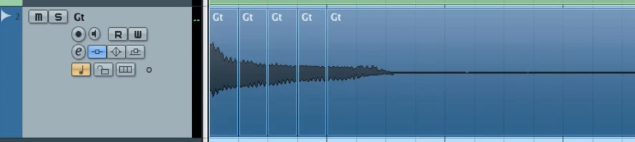
Cut the source audio into pieces.
Arrange the Pieces
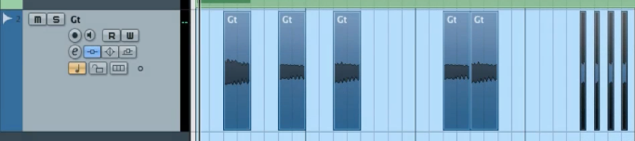
Move the pieces to eighth-, sixteenth- and thirty-second-note positions.
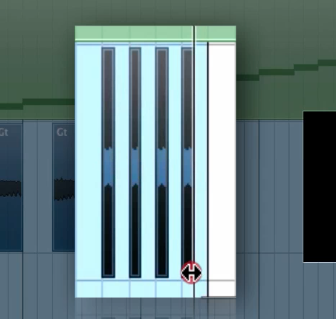
Adjust the length of the sounds to change the groove.
An Additional Technique
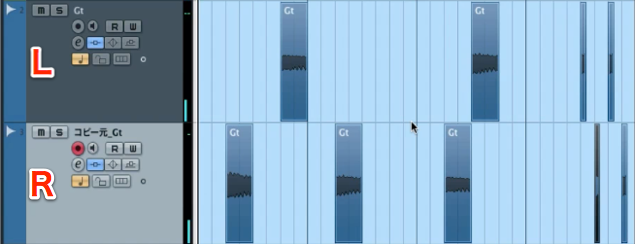
Place the pieces on two or more tracks and set different pan positions.
This can create a groove in which the sound appears to move.
The sound is now complete.
Frequently Asked Questions
Q1. What equipment or DAW do I need for guitar chopping?
No special equipment is required: a standard DAW such as Cubase or Logic Pro will do. The technique involves cutting and rearranging a guitar audio file, making it approachable for beginners.
Q2. What are some tips for guitar chopping?
Place the pieces accurately on eighth-, sixteenth- or thirty-second-note grid positions. Adjust their length to shape the groove, and experiment with panning across multiple tracks for a more spacious effect.
Q3. Can I use chopping on instruments other than guitar?
Yes. You can apply it to audio files such as drums or synths. Cut and rearrange the waveform to adapt the technique to a range of genres.
NEW ARTICLES
Latest English Articles





































































































































































































































































































































































































































































































































































































