
Cubase 7.5 introduces two features designed to make music production more efficient: Track Versions and Re-record mode. Track Versions lets you save and edit multiple takes on a single track, making it easy to compare and switch between different performances. Re-record mode lets you discard a mistake and start a new take without stopping playback. These features support MIDI as well as audio, chord, tempo, and signature tracks, improving the recording workflow in your DAW.
Save Multiple Takes on a Track with Cubase 7.5 Track Versions
The new features in Cubase 7.5 include improvements to recording.
Both are likely to become essential tools for users.
- Track Versions: Save and edit multiple takes on one track
- Re-record mode: Immediately discard a failed recording and start again
Let’s look at each feature.
Related articles for a deeper understanding

Cubase 7.5 New Features Video Series
Cubase 7.5 Free Update & Installation Guide
New Feature 1: Show and Hide Tracks
New Feature 2: Enhanced VST Instruments
New Feature 3: Track Versions and Re-record Mode — You are here
New Feature 4: Added Effects
Video Highlights: Manage Multiple Takes Efficiently
This useful feature lets you save multiple takes on a single track.
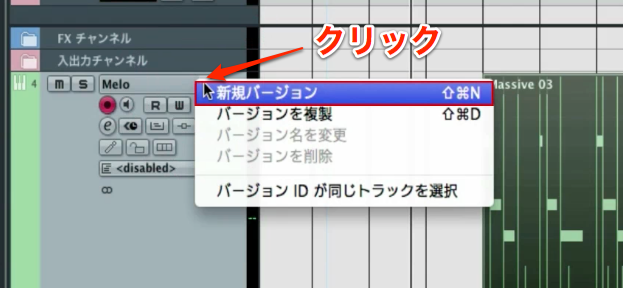
Hover over the right side of the track name,
and click the triangle icon that appears.
Select “New Version” from the menu.
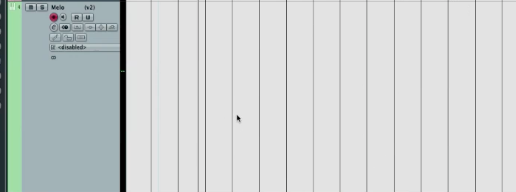
The track switches to a different version.
This version starts completely empty.
Now record as you normally would.
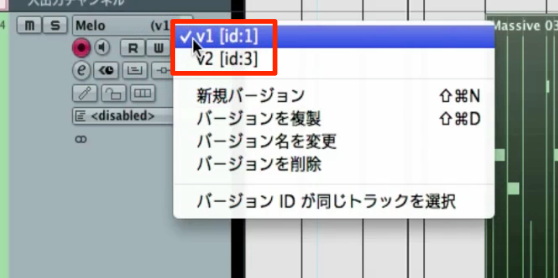
You can switch between the different versions you create.
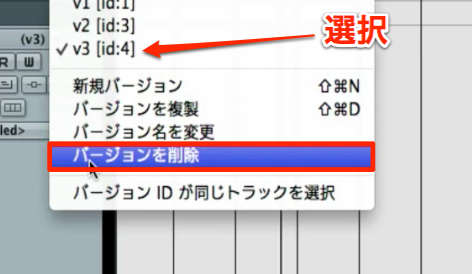
To delete an unneeded version,
select the take from the menu and choose “Delete Version.”
Track Versions works with MIDI and also with
audio, chord, tempo, and signature tracks.
Video Highlights: Re-record Mode
If you want to start over while recording,
the feature to use is Re-record mode.
It lets you record again without stopping.
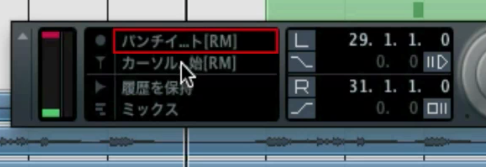
Click the control outlined in red in the transport section.
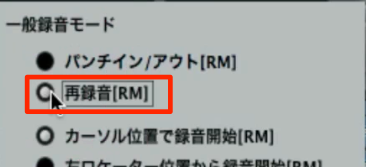
Select “Re-record” from the menu.
You are now ready.
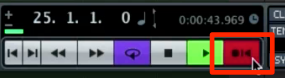
When you start recording, the recording indicator changes from its usual appearance.
Click the recording indicator
to discard the recording and begin again from the start.
You can record continuously without stopping playback, making your workflow much more efficient.
Frequently Asked Questions
Q1. Which track types support Track Versions?
Track Versions can be used with MIDI, audio, chord, tempo, and signature tracks. You can manage different approaches on the same track and choose the best take later.
Q2. How do I discard a recording in Re-record mode?
Click the recording indicator while recording to discard the current recording and start again from the beginning. Playback does not need to stop, making the process more efficient.
Q3. How do I delete an unwanted track version?
Select the take you want to remove from the menu and click “Delete Version.” You can keep the versions you prefer and organize the rest.
NEW ARTICLES
Latest English Articles


















































































































































































































































































































































































































































































































































































































