
This guide explains how to make a noise-based sound effect for music production. Combine a noise oscillator with a filter to create a versatile transition for pop, electronic music, and other styles. It can smooth the change between sections or build energy gradually. Shape the filter with an envelope and add reverb for depth.
A Useful Effect for Transitions Between Sections
This versatile effect can work in pop, electronic music, and many other genres.
Use it to connect song sections smoothly or build energy gradually.
The key ingredients are the noise oscillator and a filter.
How to Make the Sound
Questions and Answers from the YouTube Video

I always enjoy your videos. I would like to use noise like this in a song, but if I open a separate Massive instance for an effect used only in one section, I end up needing many instances and get CPU overload errors. If only it had separate outputs like Kontakt! Is there a way to reduce the number of instances for instruments such as Massive or Absynth 5 that cannot do this? For example, could I use a Massive instance already playing a lead synth to play only noise from bars 11–14? That might be impossible, though. Also, how much CPU does one Massive instance use? Is it OK to open several, and how does its load compare with BFD3 or Trilian? Sorry for the long, rambling question, and thank you for your help.

Thank you for watching. We have not benchmarked Massive’s CPU usage, so it is difficult to give a definitive comparison. Subjectively, it feels lighter than BFD3 or Trilian. You can switch sounds in Massive; because this is difficult to explain in writing and others may have the same question, we made a video. Please take a look and give it a try: https://youtu.be/1P7r63BdkOk Thank you for your continued support.
Select the Noise Oscillator
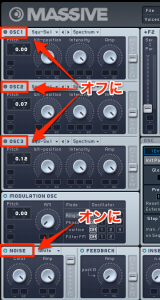
Turn on the oscillator’s Noise section.
Turn off the regular OSC sections so they do not sound.
Set Up the Filter
Add movement to the filter over time.
Raising resonance emphasizes a sharper sound.
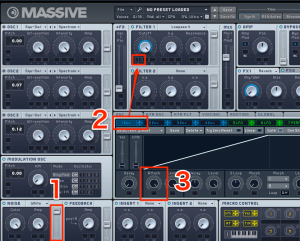
- 1. Filter balance: Move it fully toward the filter you are using.
- 2. Envelope: Assign an available envelope to the filter.
- 3. Attack: Adjust the attack to control how quickly the filter changes.
Add Spatial Effects Such as Reverb
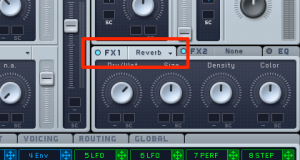
Adding depth with reverb or a similar effect gives the sound a more polished finish.
Frequently Asked Questions
Q1. What do I need to create a noise-based effect?
A noise oscillator and a filter are the key ingredients. Enable the noise oscillator, add movement to the filter, and adjust the envelope attack to shape the effect.
Q2. When are noise effects useful?
They work especially well at transitions between sections and in gradual builds. They can be used across many styles, including pop and electronic music.
Q3. How can I refine the texture of the noise?
Spatial effects such as reverb add depth. Increasing filter resonance can emphasize a sharper tone and open up more sound-design possibilities.
NEW ARTICLES
Latest English Articles





























































































































































































































































































































































































































































































































































































































