
The new effects added in Cubase 7.5 are powerful tools that make professional music production accessible even to beginners. LoopMash FX brings instant creative effects to a track, Revelation provides warm, natural reverb, and Magneto 2 adds analog tape-like character and distortion. Learning to use these effects can improve the quality of your sounds and enhance the perceived loudness and sense of space in a mix. They can be applied to individual tracks, group channels, or the master track, opening up many creative possibilities.
Powerful New Effects
In this look at Cubase 7.5’s new features, we explain the added effects.
Each effect is powerful and easy to use,
so you can put it to work right away.
Cubase 7.5 New Features Video Series
Cubase 7.5 Free Update & Installation Guide
New Feature 1: Show and Hide Tracks
New Feature 2: Enhanced VST Instruments
New Feature 3: Track Versions and Re-recording Mode
New Feature 4: Added Effects — You are here
Video Highlights: LoopMash FX
The LoopMash
instrument available in earlier versions can now be used as an effect.
Simply insert it on a track to apply its effects.
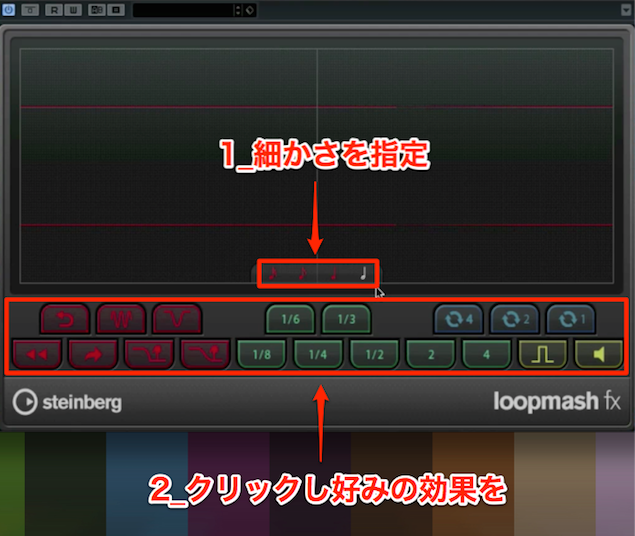
- 1. Choose the note value that determines the playback subdivision.
- 2. Click to apply various effects.
Use it on individual tracks, group channels, or the master track: the possibilities depend on your ideas.
The instrument version of LoopMash is also covered in the following article.
URL: https://sleepfreaks-dtm.com/softsynth/loopmash-1/
Video Highlights: Revelation
This reverb is characterized by a particularly warm ambience.
Its natural sound makes it suitable for many situations and tracks.
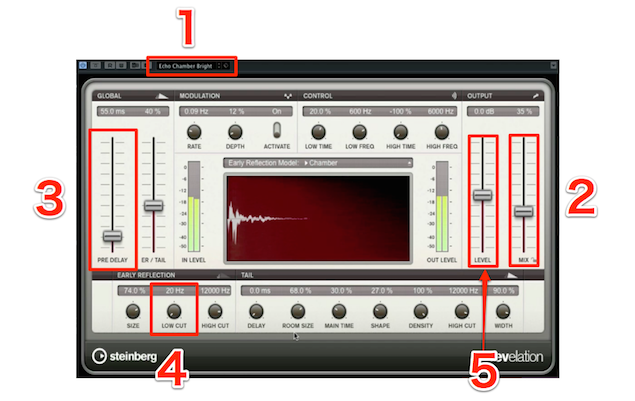
- 1. Select a preset.
- 2. Set the balance between the dry signal and the reverb.
- 3. Set the delay between the dry signal and the reverb
to create a natural sound. - 4. Cut low frequencies to lighten the reverb.
- 5. Adjust the overall volume.
Video Highlights: Magneto 2
Add analog character and distortion reminiscent of sound passed through tape.
This can soften a track’s peak levels or make its tone more mellow.
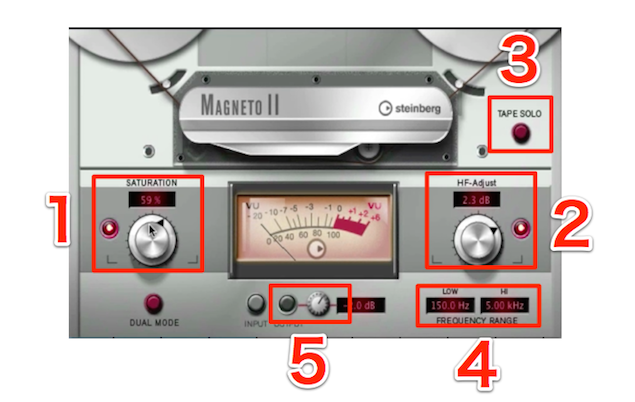
- 1. Set the amount of distortion on the track.
- 2. Adjust the high-frequency emphasis to clarify the sound.
- 3. Solo the distortion to hear it on its own.
It can also produce a cool sound when used this way. - 4. Set the frequency range affected by distortion.
This helps avoid excessive low-end buildup and harsh highs. - 5. Adjust the final volume.
Frequently Asked Questions
Q1. Can beginners use the new Cubase 7.5 effects?
Yes. New effects such as LoopMash FX and Revelation have simple interfaces, and selecting a preset and making a few adjustments can produce useful results quickly. They are especially helpful tools for beginners.
Q2. How does LoopMash FX differ from the original LoopMash plug-in?
The original LoopMash was a software instrument, while the version introduced in 7.5 works as an effect. Insert it directly on an existing audio track to easily add rhythmic processing and creative effects.
Q3. What matters when creating a tape-like sound with Magneto 2?
The amount of distortion, high-frequency emphasis, and frequency range affected by distortion are important. Adjusting them appropriately helps retain analog character while avoiding excessive bass and unpleasant highs.
Q4. Should reverb be inserted directly on the master track?
When sharing the same reverb across multiple tracks, using a send and return is recommended to reduce CPU load. This is more efficient than inserting it directly on the master track.
NEW ARTICLES
Latest English Articles

















































































































































































































































































































































































































































































































































































































