
Changing a song's key is a frequent part of music production in Cubase. This article explains the Transpose Track, a more convenient alternative to standard transposition functions. It lets you quickly transpose specific bars or sections in semitone steps instead of changing the whole song, making complex arrangements and songs with multiple key changes easier to manage. You will also learn why the Independent setting is important for preventing unintended transposition of material such as drum tracks, where pitch has a different role.
Change a Song's Key Quickly with the Transpose Track
Cubase offers a range of transposition features.
Here we will look at the Transpose Track and how it makes transposition even more convenient.
It is also useful when you want to change the key of just one section.
Using the Transpose Track
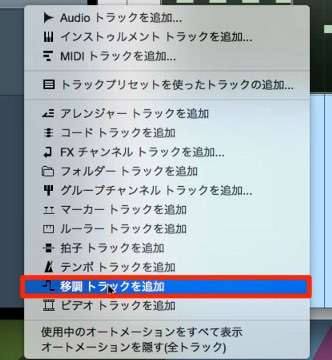
First, create a Transpose Track.
You can create one in the same way as a regular track.

Insert a Transpose Track event at the point where you want the key to change.
As with a regular event, use the Pencil tool and click to add it.
The number shown at the lower left indicates the number of semitones to transpose.
Drag up or down to set the value in semitone steps.
That is all there is to it.
The performance in that section will play back transposed by the specified amount.
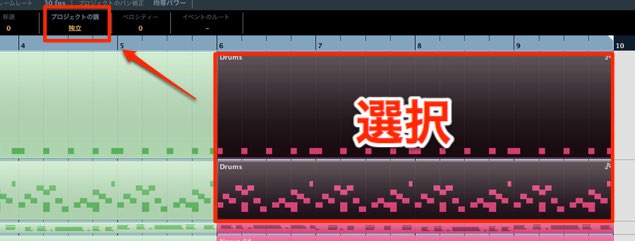
If drum events and other material without conventional pitch are transposed, the drum sounds in the kit may change.
Set them to Independent to prevent transposition and make sure you do not forget this step.
Frequently Asked Questions
Q1. How do I create a Transpose Track in Cubase?
Create one in the same way as a regular track, then use the Pencil tool and click to insert a Transpose Track event where you want the key to change. Drag the displayed number up or down to specify the transposition in semitone steps.
Q2. Are drum tracks affected by the Transpose Track?
Yes. Transposing tracks such as drums, where notes do not represent conventional pitches, can change the kit sounds. Enable the Independent setting to prevent unintended transposition.
Q3. Can the Transpose Track change the key of just part of a song?
Yes. The Transpose Track is well suited to changing the key of specific sections rather than the whole song, making complex arrangements with multiple key changes easier to create.
NEW ARTICLES
Latest English Articles









































































































































































































































































































































































































































































































































