
Cubase 8’s Chord Pads and Chord Track make it easier to explore chord progressions. Even without prior chord knowledge, you can play chords from the pads and vary them with transposition, voicings and added tensions. Chord Assistant suggests possible chords, while the circle of fifths helps you explore relationships between them. The two features can work together as you build a song.
Expand your songwriting options with the Chord Track

This installment of our Cubase 8 new-features series covers Chord Pads and the Chord Track.
You can explore suggested chords and incorporate them into your song.
Even without prior chord knowledge, you can use a variety of progressions.
This article provides useful background.
Cubase 8 video tutorials
Moving smoothly to Cubase 8 from earlier versions
Cubase 8: Render in Place
Cubase 8: VCA Faders
Cubase 8: Direct Routing
Cubase 8: Chord Pads (this page)
Using Chord Pads in Cubase 8
Let’s start with Chord Pads, which make playing chords easy.
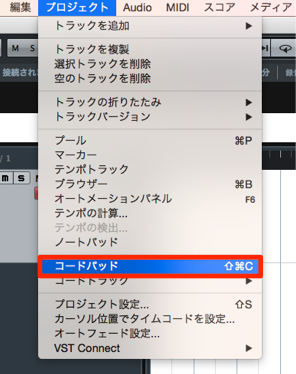
From the top menu, choose Project → Chord Pads to display the pads.
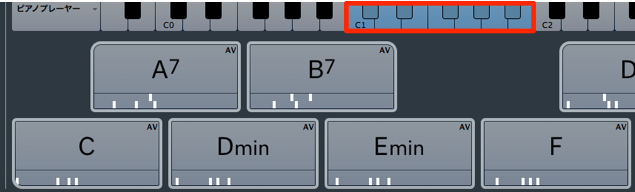
Chords are assigned across the octave starting at C1.
You can also play them by clicking the pads directly.
Transposing Chord Pads
The pads already have chords assigned, and you can transpose them.
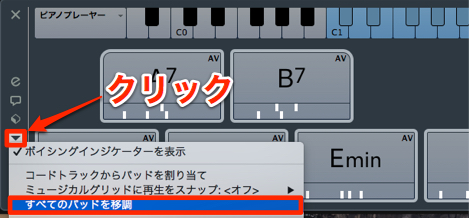
In the area outlined in red, select Transpose All Pads.
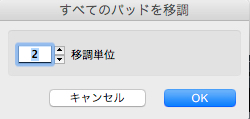
You can transpose in semitone steps.
Chord Pad voicings
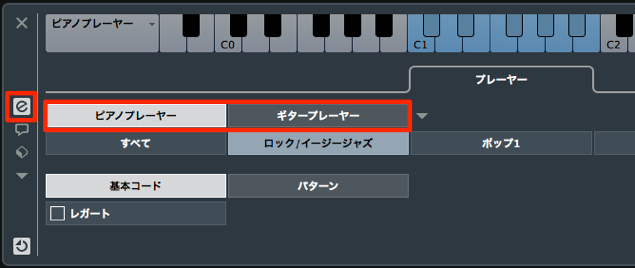
You can choose voicing styles such as piano or guitar.
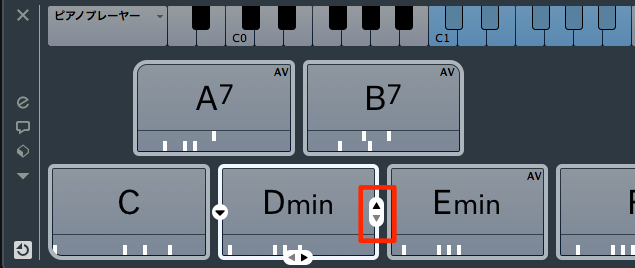
Here you can select a chord inversion.
Changing the inversion alone can significantly alter the character of a chord.
Try different options to suit your song.
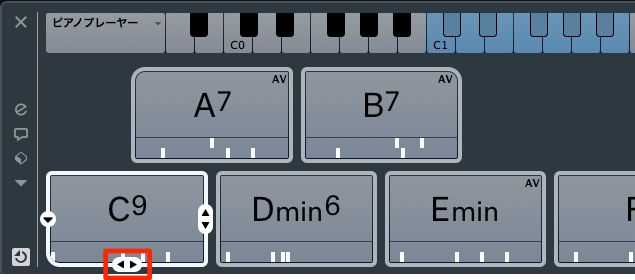
You can add tensions using the controls below the pads.
This is useful when you want to add some extra color to a chord.
Chord Pad presets
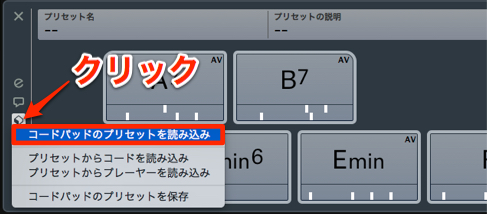
Chord presets let you load a range of chord patterns.
Use them as a starting point for a song or as a way to study chord progressions.
Using the Chord Track in Cubase 8
The Chord Track was introduced in Cubase 7.
In Cubase 8 it works with Chord Pads and offers more chord suggestion options.
Cubase 7: Chord Assistant
Creating and recording a Chord Track
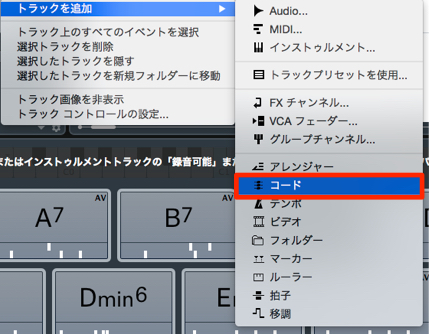
First, create a Chord Track.
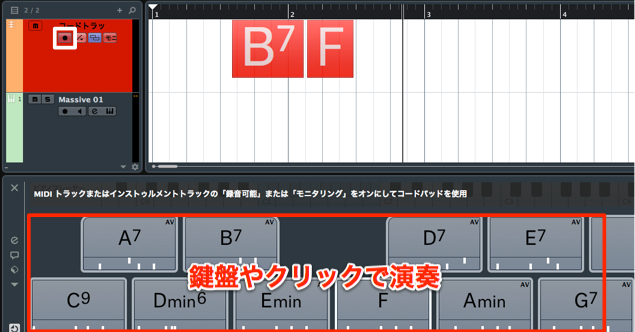
Enable its record button and start recording;
the chords and pads you play will be recorded.
This is also useful for checking which chords you are playing.
The enhanced Chord Assistant
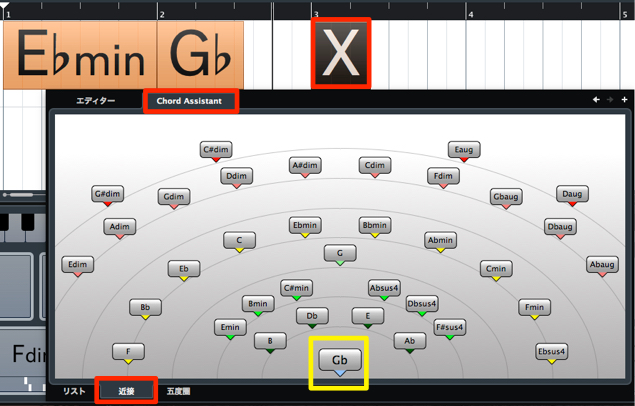
Chord Assistant, which suggests chords for parts of a progression you have not yet decided, has been enhanced.
Under Chord Assistant → Proximity, it considers the previous chord and suggests candidates for the next one.
Chords closer to the center of the circle are more closely related.
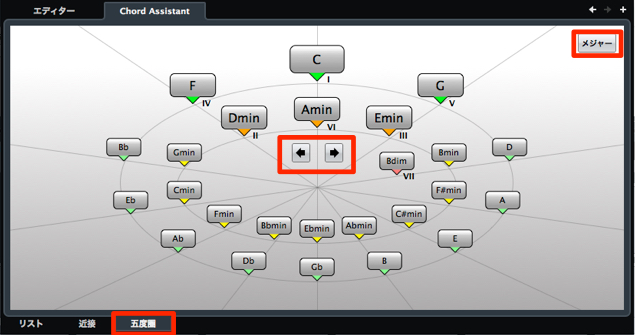
In the Circle of Fifths view, select a chord
to explore diatonic chords and relationships between chords.
Using Chord Track and Chord Pads together
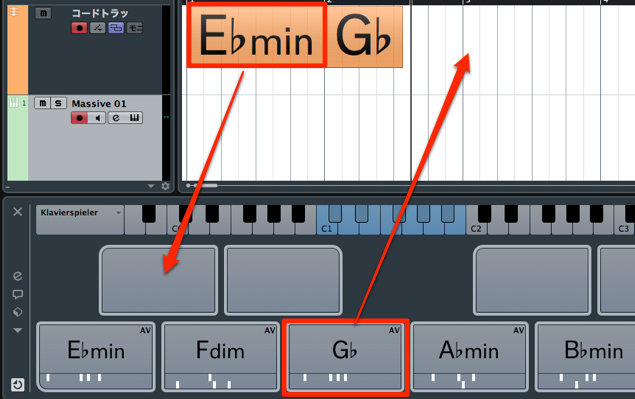
The Chord Track and Chord Pads work closely together:
you can transfer chords between them.
Frequently asked questions
Q1. What is the difference between Chord Pads and the Chord Track?
Chord Pads are an intuitive way to play and enter chords. The Chord Track records and edits progressions, and Chord Assistant suggests possible next chords. They can be used together.
Q2. Can I use these features without knowing chord theory?
Yes. Chord Pad presets and Chord Assistant suggestions provide ways to explore progressions without prior theory knowledge, making them useful starting points for beginners.
Q3. When should I use voicings and tensions?
Voicings and inversions change the sound of a chord; added tensions introduce extra color. Adjust them to suit the genre and feel of your song.
Q4. What is the Circle of Fifths useful for?
It provides a visual way to explore diatonic chords and relationships between chords, helping you study and build progressions.
NEW ARTICLES
Latest English Articles






























































































































































































































































































































































































































































































































