Cubase automation can change not only volume and pan but also plug-in parameters such as EQ, compression, and reverb. You can add more reverb to a particular passage, distort part of a vocal, or apply a filter to an entire song, expanding your arrangement possibilities. To set it up, show automation on the track containing the plug-in, select the effect under insert effects, and double-click the parameter you want to control. You can then record automation to fit the song.
Automate plug-in controls
In Cubase, you can apply automation not only to Volume and Pan,
but also to plug-ins such as EQ, compressors, and reverb.
- Add more reverb to just one part of a track
- Distort part of a vocal
- Apply a filter to an entire song
These are just a few ways to expand your arrangement possibilities.
Setting up automation in Cubase
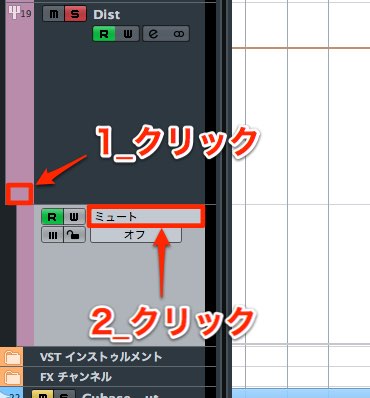
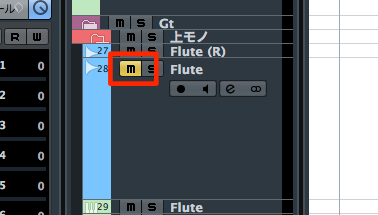
Find the track with the plug-in you want and click ‘1’.
After showing the automation controls, click ‘2’.
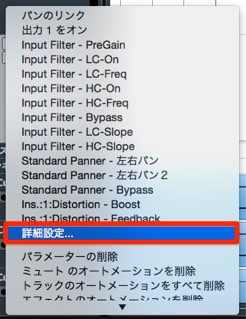
A menu like this appears.
Select ‘More’ from the menu.
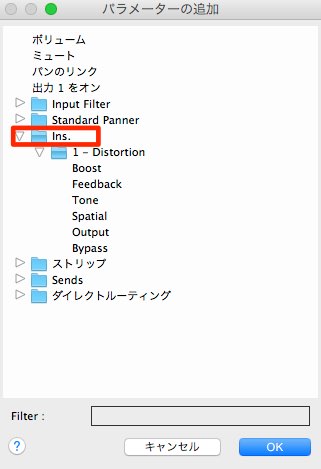
The ‘Ins.’ section contains the insert effects.
Select the effect you have loaded and double-click the parameter you want to control.
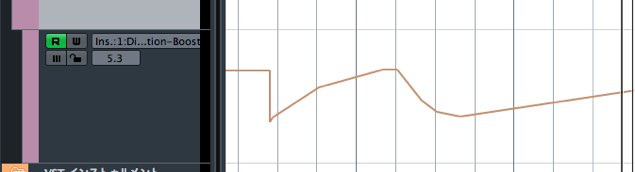
Now record the automation to fit your song.

It is easy to set up and can add a variety of effects to your music.
Give it a try.
Frequently asked questions
Q1. How do I automate a plug-in in Cubase?
Show the track's automation controls and select ‘More’. Then choose the insert effect under ‘Ins.’ and double-click the parameter you want to control.
Q2. Can I automate any plug-in control?
Yes. Automation can be applied to virtually all controls on most plug-ins, including EQs, compressors, and reverbs.
Q3. What can automation help me achieve?
Changing effect depth in a specific passage or applying effects gradually can help create professional arrangements and greatly expand your creative options.
NEW ARTICLES
Latest English Articles