Using sidechain in Ableton Live lets you create the pumping sound that is a staple of club music. This technique automatically lowers the volume of a bass or synthesizer in time with the kick drum and can easily be set up with a compressor plug-in. Enable the Sidechain option and route one track to another to create the dynamic sound used in genres such as EDM and progressive house. Adjusting parameters such as threshold, ratio, attack and release gives you detailed control over the groove, making it possible for beginners to create professional-sounding effects.
Live: Sidechain, a Club Music Staple

First, listen to this sound.
That pumping sound.
You have probably heard it before.
This sound is created using a technique called sidechain.
This is a common technique in club music:
the volume of the bass or synthesizer is set to decrease whenever the kick hits.
Here we will show you how to set up sidechain.
Sidechain Video
View product details

How to Set Up Sidechain
We will set the volume of the bass or synthesizer
to decrease in time with the kick.
For this, we use a volume-control plug-in called a
Compressor.
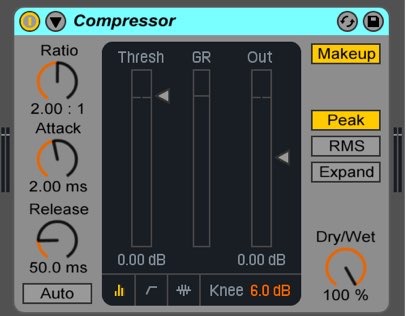
Apply a Compressor to the track you want to link to the kick.
Here, we apply it to the synthesizer track.
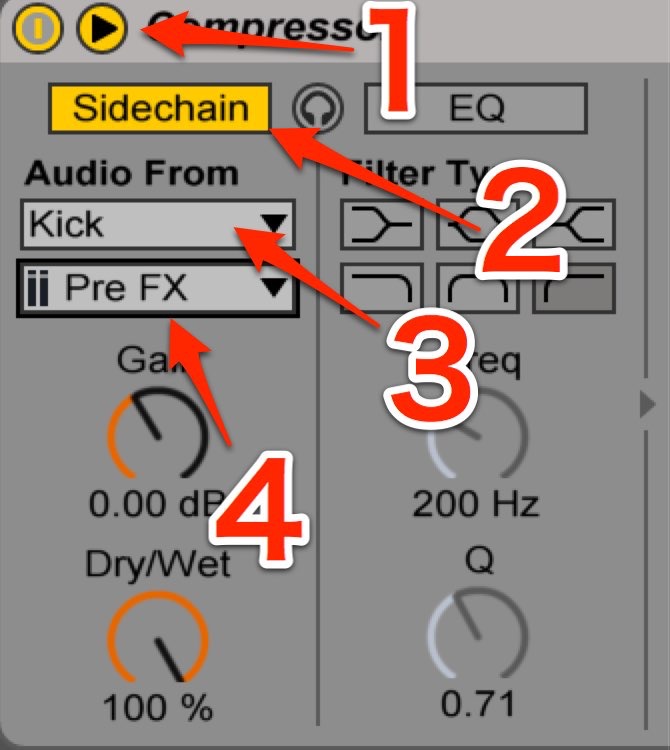
- 1. Click the triangle tab.
- 2. Turn on Sidechain.
- 3. Select the track you want to use as the trigger.
- 4. Change the setting to Pre FX.
The setup is now complete.
The synthesizer track’s volume will change in time with the kick.
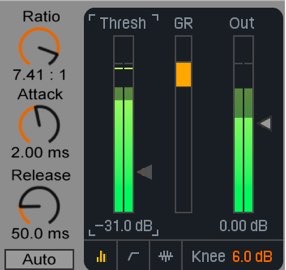
Lower the threshold,
raise the ratio,
use a fast attack,
and adjust the release to shape the groove of the pumping effect.
We used a synthesizer here,
but you can choose any combination.
You can apply the same technique to bass and other sounds.
Experiment with different combinations to create interesting sounds.
Frequently Asked Questions
Q1. Can sidechain be used in DAWs other than Ableton Live?
Yes. Sidechain is available in major DAWs such as Logic Pro, FL Studio and Cubase. The setup differs by software, but the basic concept and effect are the same.
Q2. Can I use a sound other than a kick as the sidechain trigger?
Yes. You can use sources such as hi-hats, snares, percussion, or other synthesizer and bass tracks as triggers to create a variety of effects.
Q3. Which sidechain parameters are most important?
Attack and release are particularly important. A fast attack makes the compressor respond immediately to the kick, while the release shapes the groove of the pumping sound.
NEW ARTICLES
Latest English Articles