
MASCHINE is a powerful drum production tool from Native Instruments that integrates with a DAW to make programming drum patterns efficient. This article covers the process after choosing a kit, including the Rec button, tempo synchronization with a DAW, quantization, and saving kits and patterns. These features can help beginners quickly create precise, high-quality drum tracks and improve their music production workflow.
Quickly Program Patterns in MASCHINE Alongside Your DAW
Once you have chosen a kit, program a drum pattern.
Sorry about my poor playing!
Let MASCHINE quantize it for us.
MASCHINE Video Tutorials
- 1Main Windows
- 2Programming Drum Patterns (this article)
- 3Understanding Effects
- 4MIDI Integration with a DAW
- 5Using MASCHINE as a MIDI Controller
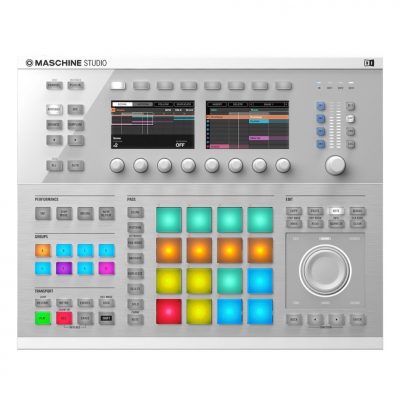
Video Tip: Activating the Rec Button

Click the Rec button so it lights up.
Then play your DAW and perform on the pads to record your performance.
Video Tip: Setting the Tempo

When you change the tempo in your DAW, MASCHINE synchronizes to it.
Video Tip: Quantization

Select the notes you want to quantize,
then press Shift + Pad 5 on MASCHINE.
Video Tip: Saving Kits and Patterns

Save sounds and patterns using Save As at the location indicated by the arrow.
Frequently Asked Questions
Q1. How do I synchronize MASCHINE’s tempo with my DAW?
Change the tempo in your DAW and MASCHINE’s tempo synchronizes automatically. No special settings are needed for seamless integration.
Q2. What should I do if my timing is off when programming a drum pattern?
Use quantization. Select the notes you want to quantize and press Shift + Pad 5 on MASCHINE to correct their timing automatically.
Q3. How do I save a drum kit or pattern I have created?
Use Save As to save your sounds and patterns so you can reuse your settings later.
Q4. How do I record a performance in MASCHINE?
Click the Rec button so it lights up, start playback in your DAW, and play the pads to record your performance.
NEW ARTICLES
Latest English Articles











































































































































































































































































































































































































































































































































































































































































