
This historical guide covers the Cubase 7.5 grace-period update and installation process, from installing eLicenser Control Center and checking eligibility to installing Cubase 7.5. The update introduced track visibility controls, improved VST instruments, Track Versions, re-recording mode, and additional effects. Historical notice: Steinberg discontinued the eLicenser service on May 20, 2025, so the online steps described below are no longer current. See Steinberg’s support information: https://helpcenter.steinberg.de/hc/en-us/articles/26725149349394-Steinberg-Download-Assistant-1-38-x-without-eLicenser-Control-Center-installation
About the Cubase 7.5 Grace Period Update
Cubase 7.5 has been released. Alongside information for new Cubase users,
the original article described an offer for Cubase 7 and Cubase Artist 7 users who registered their eLicenser between October 15 and December 3, 2013:
a free upgrade was available. Steinberg’s original announcement described eligibility in terms of activating Cubase 7 or Cubase Artist 7 from October 15, 2013; it did not specify the December 3 end date stated here. See https://forums.steinberg.net/t/cubase-7-5-and-cubase-artist-7-5-update-released/38959
Cubase 7.5 New Features Video Series
Cubase 7.5 Grace Period Update and Installation Guide — You are here
New Feature 1: Show and Hide Tracks
New Feature 2: Enhanced VST Instruments
New Feature 3: Track Versions and Re-record Mode
New Feature 4: Additional Effects
Video Highlights: Historical Installation Steps
Download and install the latest eLicenser Control Center.
URL: http://japan.steinberg.net/jp/support/downloads/elcc.html
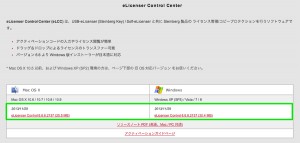
Download the version for your computer: Mac or Windows.
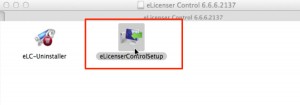
Once the download finishes, open “eLicenseControlSetUp” and complete the installation.
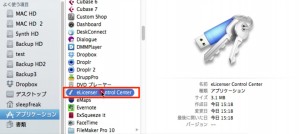
Next, launch eLicenser Control Center.
- On a Mac:
Applications → eLicenser Control Center - On Windows:
Start → (All) Programs → eLicenser → eLicenser Control Center
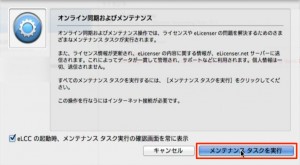
Click “Perform Maintenance Tasks.”
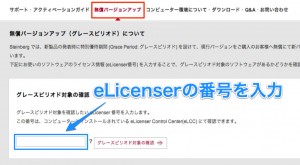
URL: http://japan.steinberg.net/jp/support/grace_period.html
Under the free upgrade section, enter your eLicenser number in the field,
then click the button to check grace-period eligibility.
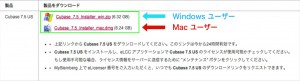
Download the version for your computer: Mac or Windows.
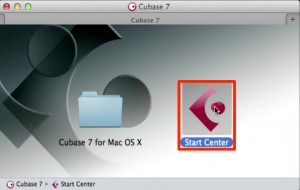
Open the Start Center.

Select your language. The example uses Japanese.

Click “Install.”
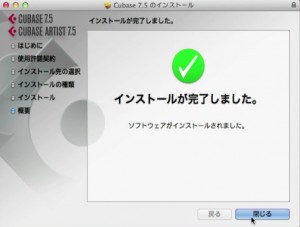
Continue through the installer to finish.
The Cubase 7.5 new features will be introduced in future videos.
Stay tuned!
Frequently Asked Questions
Q1. Who was eligible for the Cubase 7.5 free update?
The original guide described Cubase 7 or Cubase Artist 7 owners who registered an eLicenser between October 15 and December 3, 2013. Steinberg’s announcement instead referred to activation of the earlier product from October 15, 2013. The eLicenser service has since been discontinued, and the historical online check is no longer current.
Q2. Was eLicenser Control Center required?
Yes, for the historical process described here. Users installed and launched eLicenser Control Center, then entered their eLicenser number on the grace-period page to check eligibility. The online service has since been discontinued.
Q3. What were the main new features in Cubase 7.5?
These included track visibility controls, enhanced VST instruments, Track Versions, re-recording mode, and additional effects. The original article announced videos covering them in more detail.
Q4. Were installation steps different on Mac and Windows?
The method for opening eLicenser Control Center differed, while the Cubase 7.5 installation steps were otherwise shared. The original guide instructed users to select their operating system when downloading.
NEW ARTICLES
Latest English Articles
























































































































































































































































































































































































































































































































































































































