
This article explores the LFO and effects in Mojito, a synthesizer included with Studio One. Learn how Drive adds thickness, how key follow changes the filter response across the keyboard, and how the LFO can animate filter cutoff and effect values. The tutorial also demonstrates adjusting settings while looping a phrase.
Mojito: Refine your sound with LFO and effects
Studio One includes the synthesizer Mojito.
Its structure is very simple,
but it is a useful way to learn synthesis fundamentals.
Here we focus on effects such as Drive and FX
and explain the essential LFO.
Mojito video series
Video focus: Drive
Drive adds distortion
to make the sound thicker.

Mojito has two types of Drive.
Filter Drive

This is a natural-sounding drive that does not change the character of the sound very much.
It is useful when you want a little more thickness.
FX Drive

This changes the harmonic content more dramatically
and is useful when you want a more extreme tonal change.
It produces a dirty sound.
Video focus: Key follow

The function that changes
how the filter responds according to pitch is called key follow.
- Knob turned left: The cutoff range stays fixed as the pitch changes.
- Knob turned right: The cutoff range changes along with the pitch.
Try looping a phrase
and adjusting the control until you get the sound you want.
Video focus: LFO
The LFO can apply
wave-like modulation to filter cutoff or effect values.
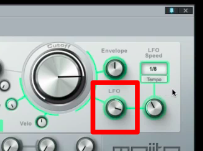
This control adjusts the modulation depth.
Turn it to the right for a stronger effect.
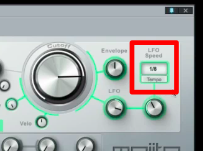
This control sets the rate.
You can synchronize the rate to the song tempo
to create rhythmic movement at quarter-note, eighth-note, or sixteenth-note rates.
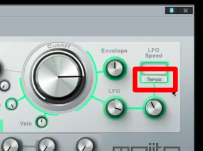
Click the LFO tempo control
to create movement independent of the song tempo.
This is also useful for sound effects.
Learn more about LFOs at the following URL:
https://sleepfreaks-dtm.com/synth-basic/synth-lfo/

Frequently asked questions
Q1. What is the difference between Filter Drive and FX Drive in Mojito?
Filter Drive adds natural-sounding distortion and thickness, while FX Drive changes the harmonics more substantially for a dirtier sound. Choose between them according to the sound you want.
Q2. When is key follow useful?
Key follow can raise the filter cutoff as pitch rises, helping maintain a more consistent tonal balance across the keyboard. This can be useful for phrases that span several notes.
Q3. When should I use tempo sync versus a free-running LFO?
Tempo sync creates rhythmic movement tied to the song, while a free-running LFO can be useful for distinctive sounds such as effects. Choose the mode that suits your goal.
NEW ARTICLES
Latest English Articles

















































































































































































































































































































































































































































































































































































































































