
This article explores practical techniques for programming the supporting instrumental tracks in a contemporary J-pop production inspired by YOASOBI. For the guitar, it covers doubled, brushed-chord cutting, creating a light feel with phrases that enter on offbeats, and using moderate crunch rather than excessive distortion to retain impact. For the piano, cutting the release emphasizes the attack and helps the part work with dance-oriented beats. By using Cubase’s Sampler Track and plug-in settings, you can create a modern, programmed feel effectively.
Analyzing the Guitar and Piano Parts That Color a Song

This is the final installment in our Contemporary J-pop series.
Here, we’ll look at the guitar and piano parts—the supporting tracks that shape a song’s character.
Pay attention to how their phrases build on the drums and bass covered in the previous installment.
Lyrics and vocals: Yui Mugino
Website: http://www.yui-mugino.com/
Composition and arrangement: Tomoki Miyakawa
Twitter: https://bit.ly/3qMyJ5R
Contemporary J-pop: Analyzing the Supporting Tracks (Video)
- 1 Three Key Points for Writing a Contemporary J-pop Melody
- 2 Analyzing the Drums and Rhythm Tracks in Contemporary J-pop
- 3 Analyzing the Supporting Tracks in Contemporary J-pop
Download the Cubase project for this song here.
How to Build the Rhythm Guitar Part
The guitar in this song focuses on basic chord backing, or cutting, and plays an important role in giving the arrangement its rhythmic feel.
Use doubling to add impact and contrast to the stereo image
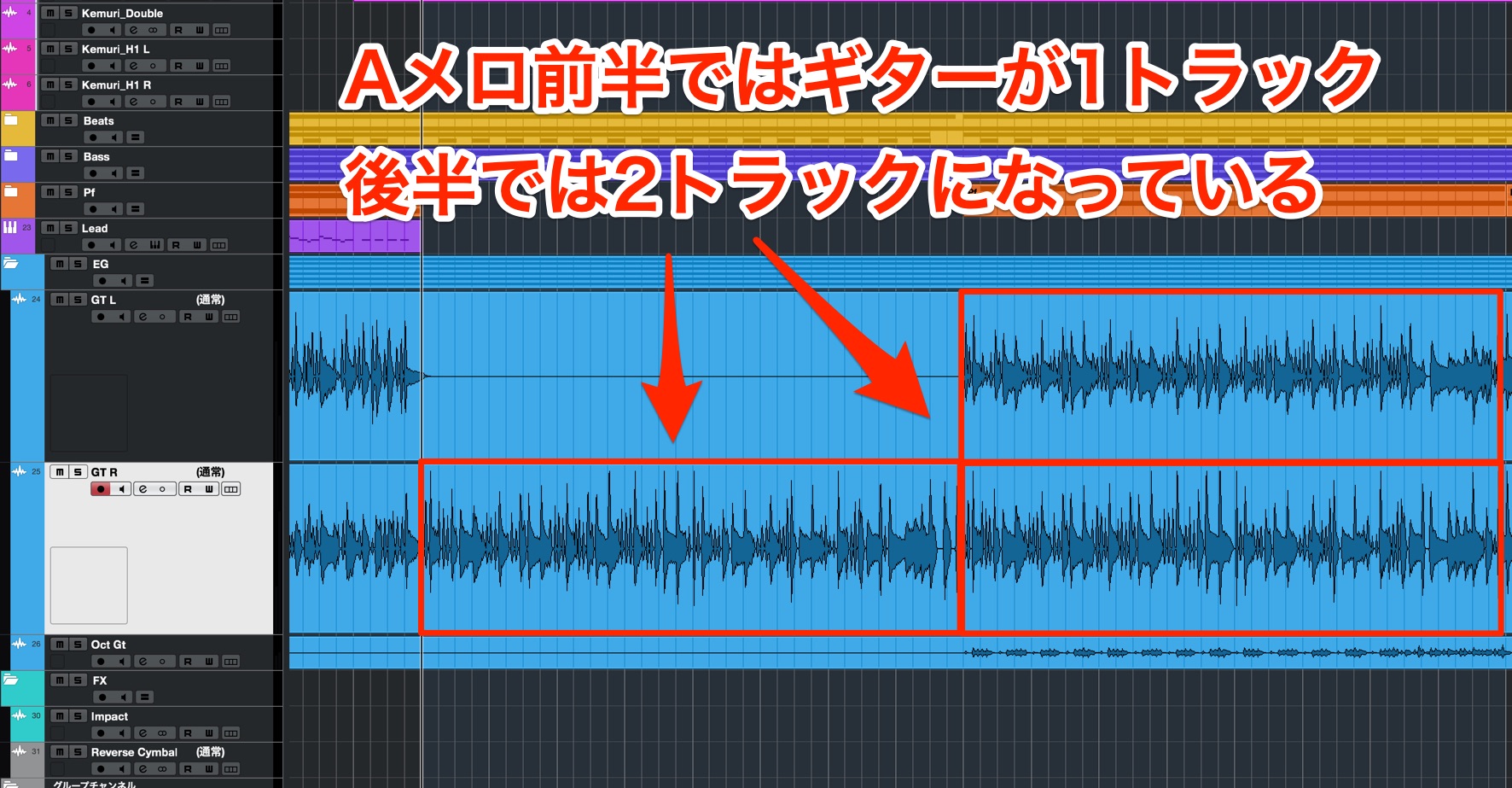
The backing part is built around two guitar tracks, panned left and right.
This technique is called “doubling” and is a classic production method.
In the first half of the A section, the left-panned track is intentionally muted, then brought back in for the second half.
The guitar changes between the first and second halves of the A section
Verse guitar: first and second halves
The added stereo width gives the arrangement more contrast.
Build a cutting phrase with Sampler Track
The cutting phrase includes muted, percussive strums (“brushing”), a technique that adds rhythmic texture.
Brushing has little or no definite pitch and functions much like percussion. Combining it with pitched chords creates rhythmic variation.
If you don’t play guitar, you can slice and rearrange an audio guitar loop instead.
Cubase 11 introduced a slicing function for Sampler Track.
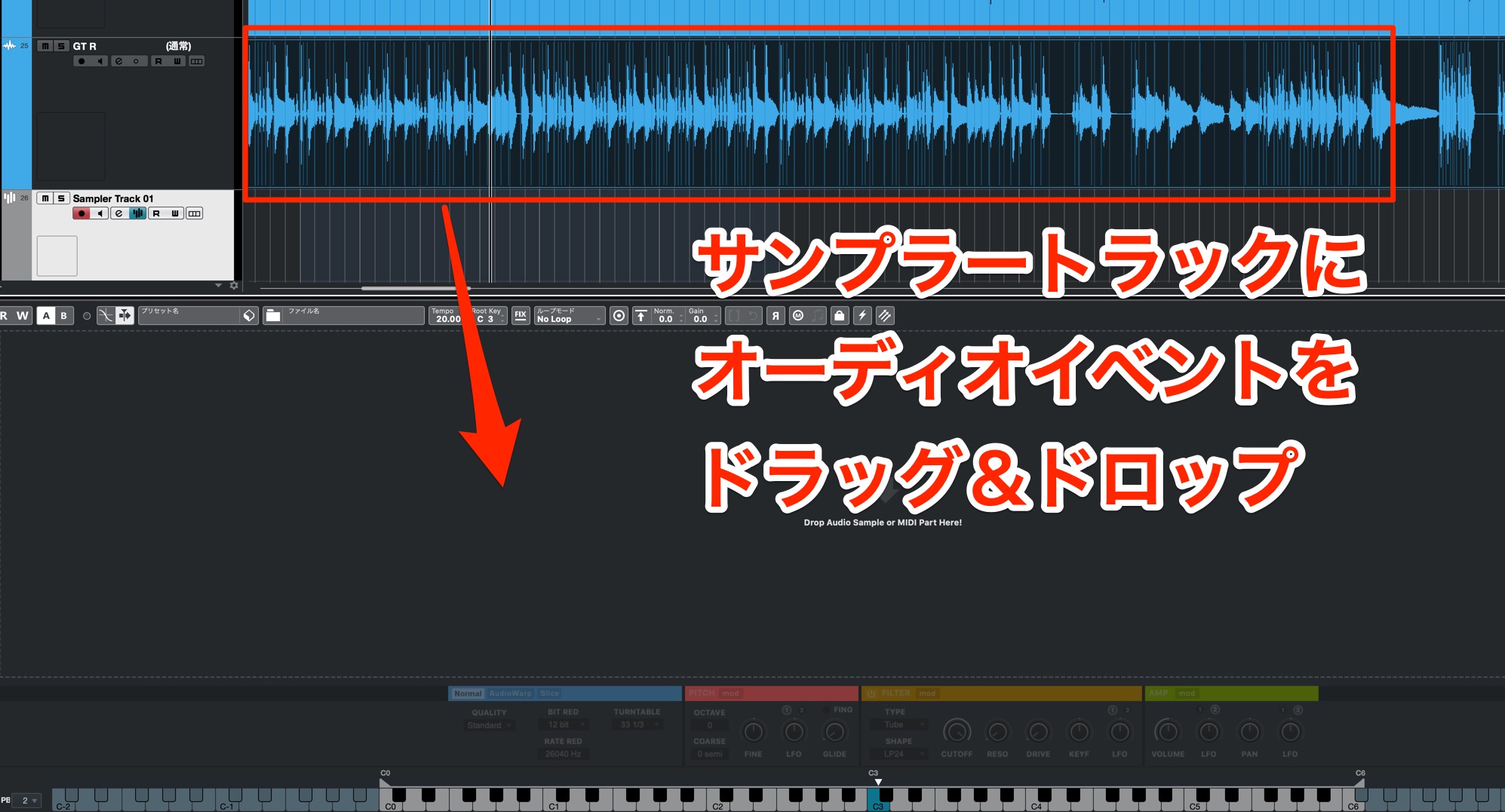
Drag an audio event onto a new Sampler Track.
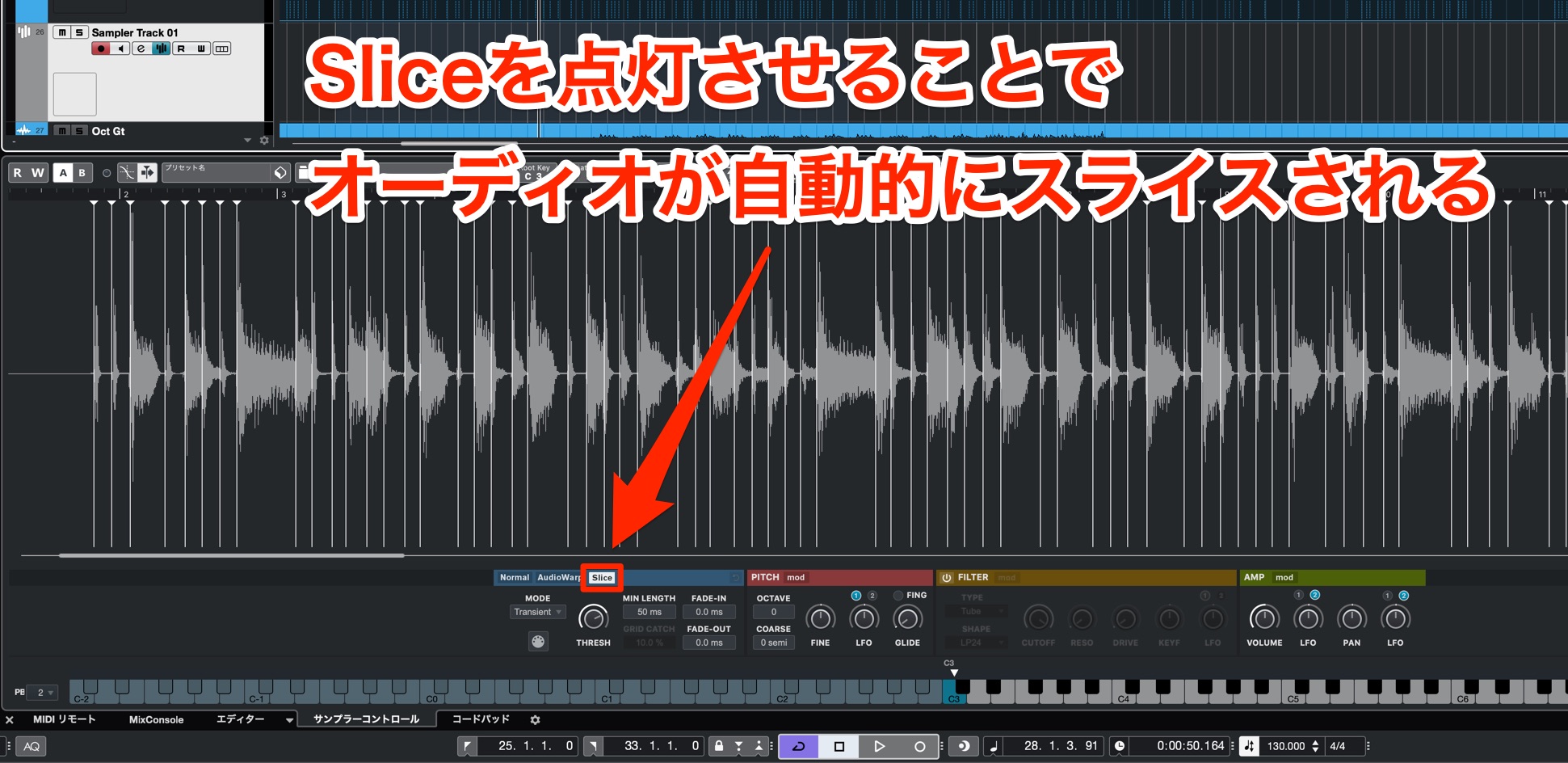
When you enable Slice, Cubase detects the transients in the audio event and assigns the slices to individual keys.

Because you can control the phrase with MIDI, you can rearrange the muted strums and pitched notes to create a new pattern.
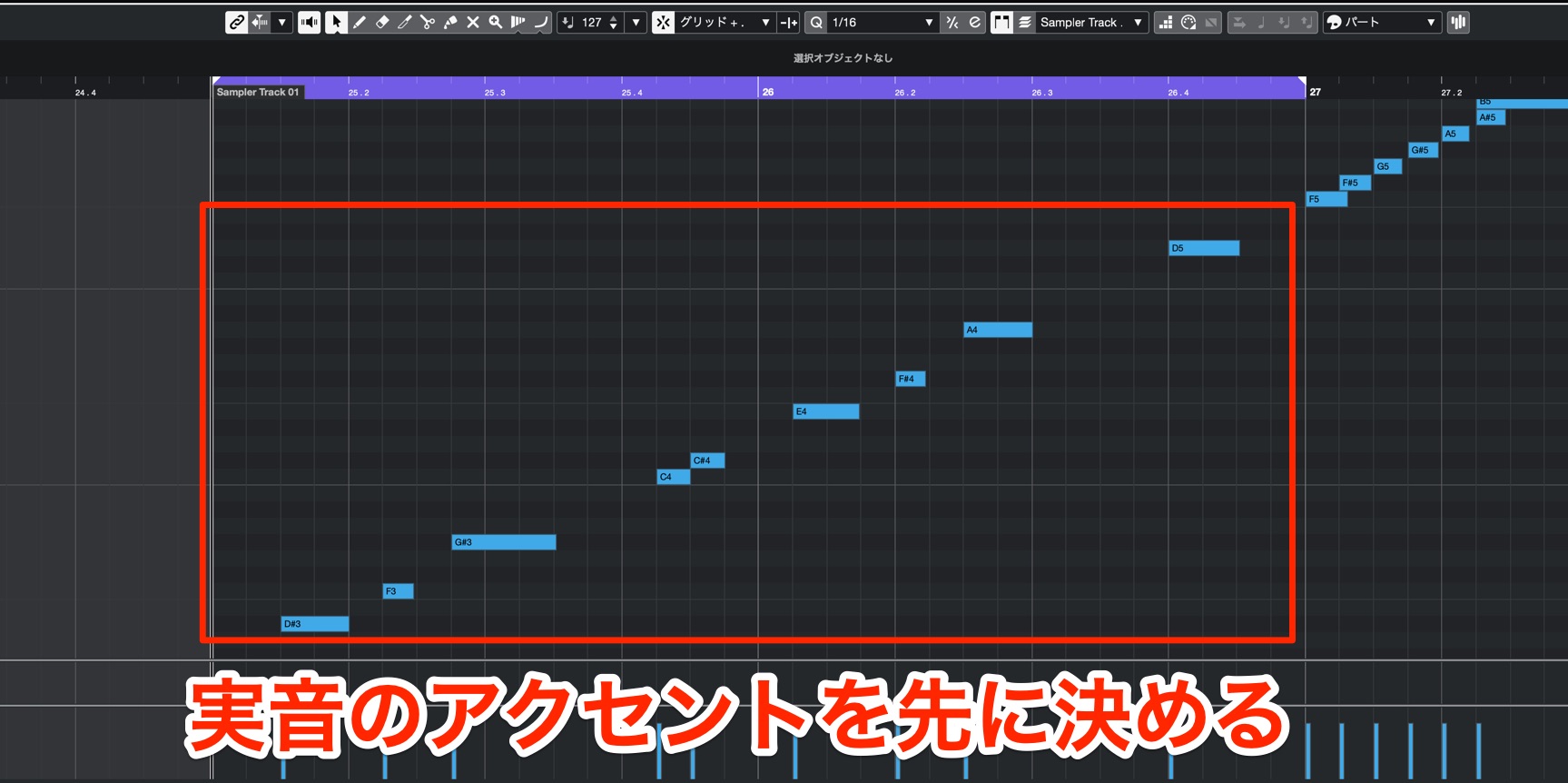
There’s a simple approach to building a cutting pattern.
First, use the pitched notes to establish the rhythmic accents.
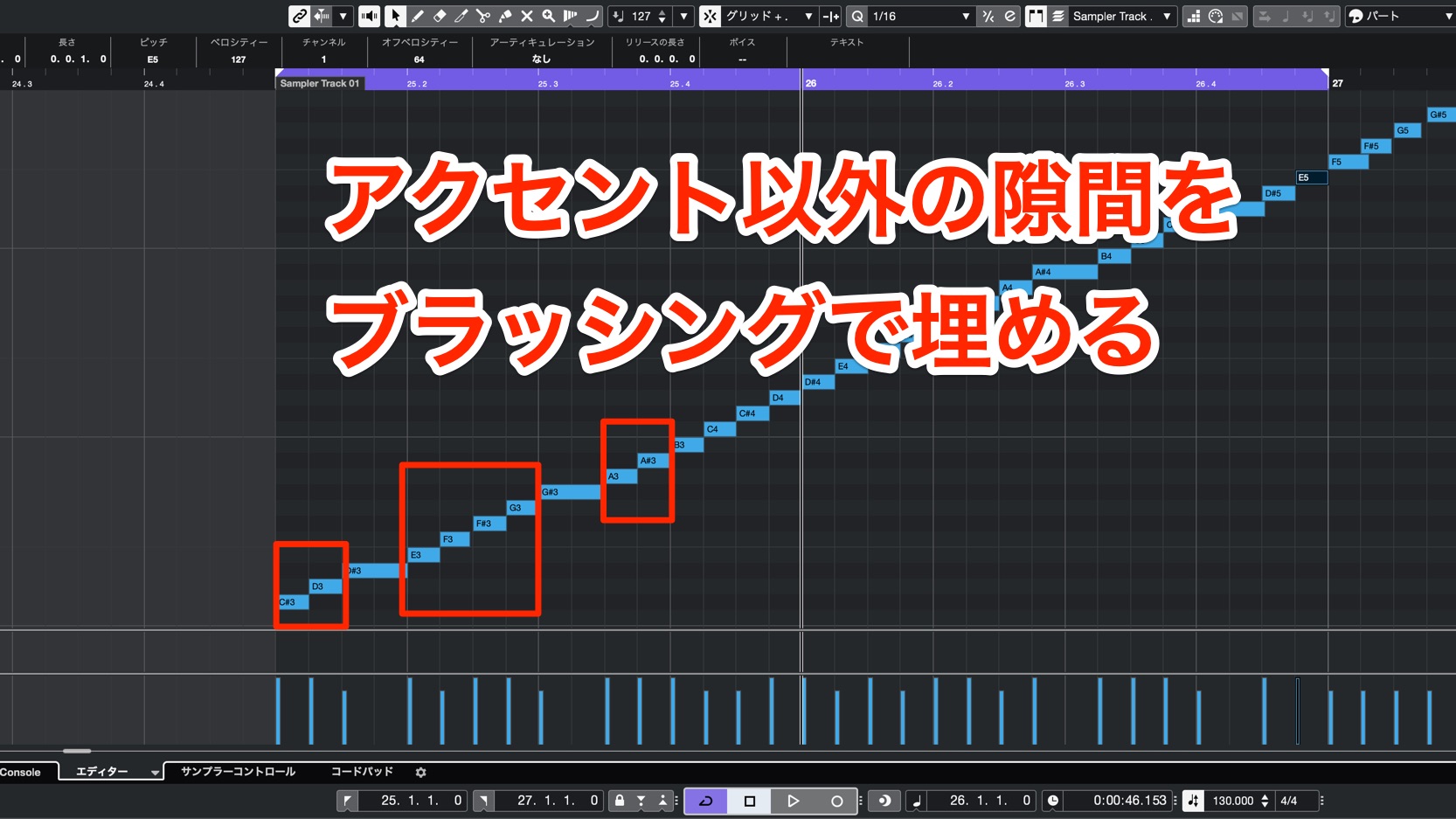
Then add the muted strums to create the groove.
Following these steps makes it easy to build a guitar cutting phrase.
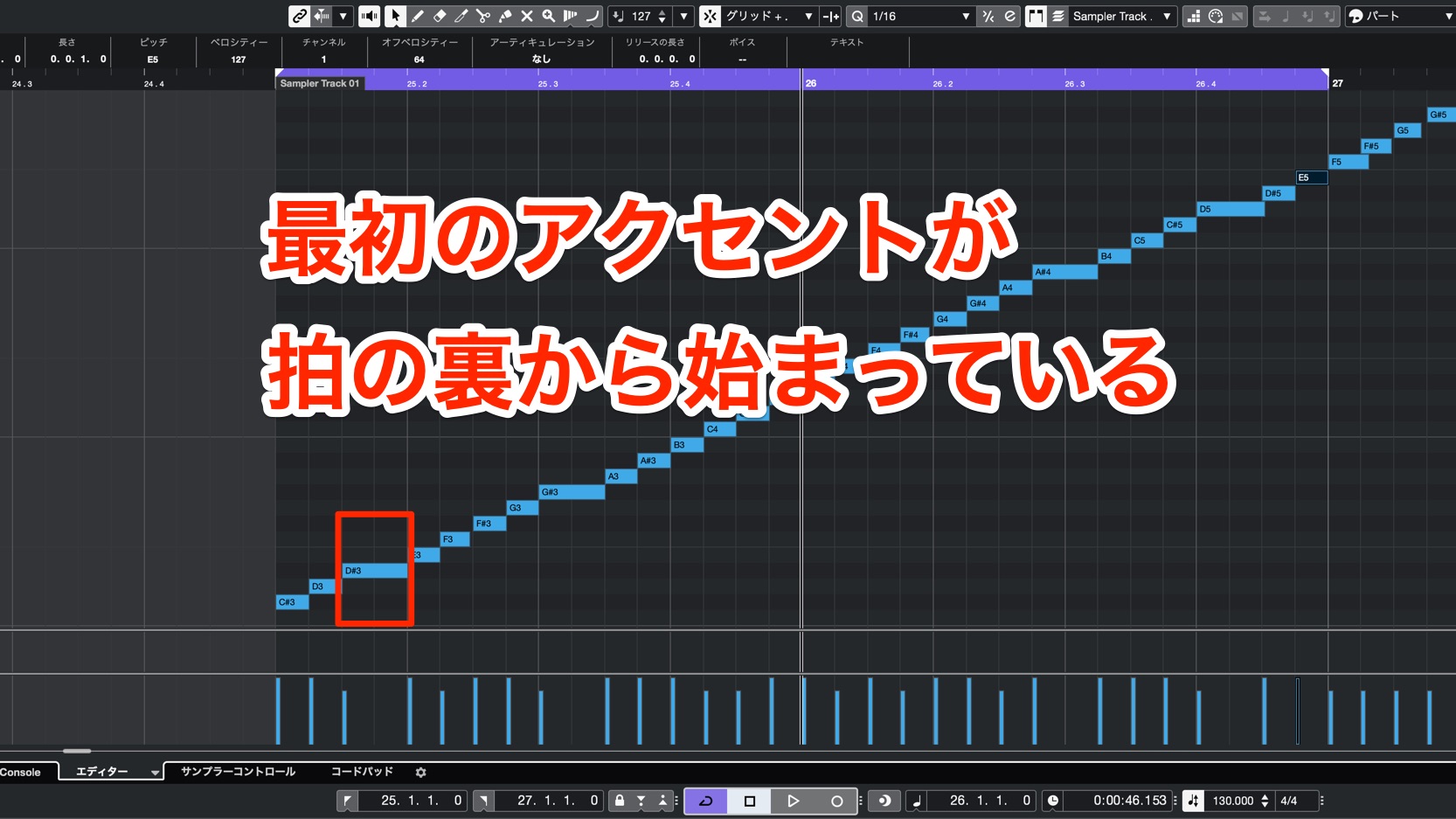
In this pattern, the first beat of each bar is left open; the phrase enters on the eighth-note offbeat.
This creates a sense of forward motion and a contemporary feel.
Compare it with a phrase that accents the beginning of the bar.
Original phrase
Original offbeat guitar phrase
Phrase with an accent at the start of the bar
Guitar accented on the downbeat
The offbeat entrance feels lighter and fits the song better.
Balance sustained notes with cutting
Cutting is the main guitar technique throughout the song, but sustained notes appear in selected sections to add contrast.
From the B section through the chorus, the part shifts from cutting to sustained notes and then to a coordinated hit.
The guitar in the B section
B-section guitar
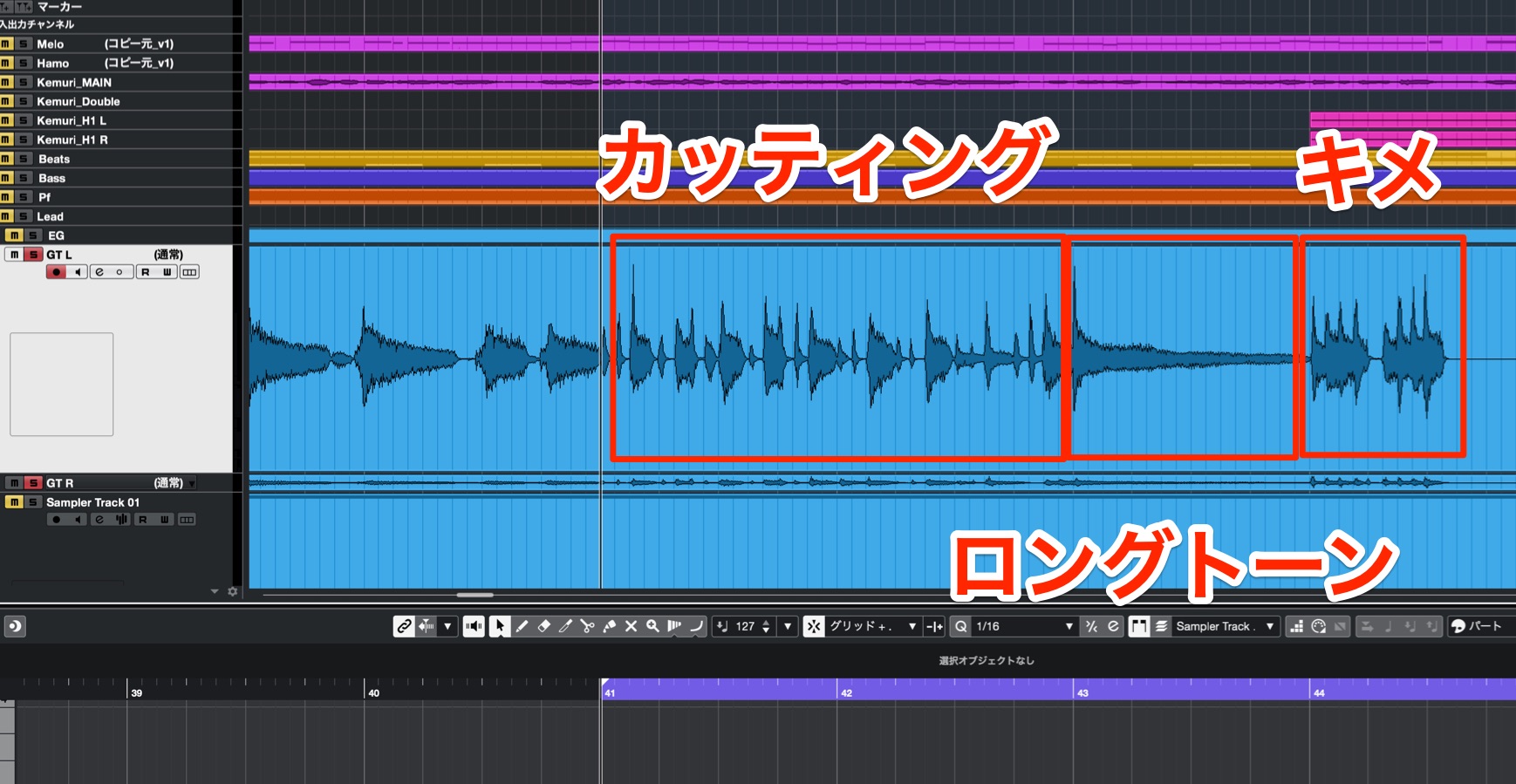
The sustained note just before an important hit is especially effective: it creates contrast in the rhythm and makes the hit stand out.
Even when you play only chord backing, changing the rhythm can keep the part from sounding repetitive.
Shaping the guitar tone
Cutting does more than fill out the chords; it also drives the groove. The tone should make the pick attack clear.
The key is not to use too much distortion.
Distortion can make a sound feel bigger and can hide rough playing, so it is tempting to add too much. The trade-off is a loss of attack and definition.
Listen to how the character changes with different amounts of distortion.
Clean tone with no distortion
Clean guitar tone
A lightly distorted crunch tone (the sound used in the song)
Crunch guitar tone used in the song
A heavily distorted drive tone
Heavily distorted guitar tone
The drive tone is too distorted for this part because it obscures the fine rhythmic detail of the cutting.
The clean tone is crisp and has a nice character, but the crunch tone has a little more impact.

For this song, we chose a crunch tone: the amount of distortion changes with how hard the strings are played.
A Release-Cut Piano That Adds Color to the Arrangement
The piano is the song’s most distinctive track. Rather than imitate a live performance, it deliberately emphasizes the character of programmed parts.
One way to do this is to remove the release and bring out the piano’s attack.
A piano sound with this short, sharply cut-off tail—very different from an acoustic piano—is commonly called a “release-cut piano.”
First, compare a conventional piano sound with a release-cut piano.
Conventional piano sound
Conventional piano
Release-cut piano
Release-cut piano
Its crisp, rhythmic backing has made this a familiar sound in contemporary pop.
Because this song is built around dance-oriented beats, the release-cut piano is important to its rhythmic feel. Let’s look at how to shape the sound and write the part.
Setting up the instrument
First, load a piano preset from HALion Sonic SE, included with Cubase.
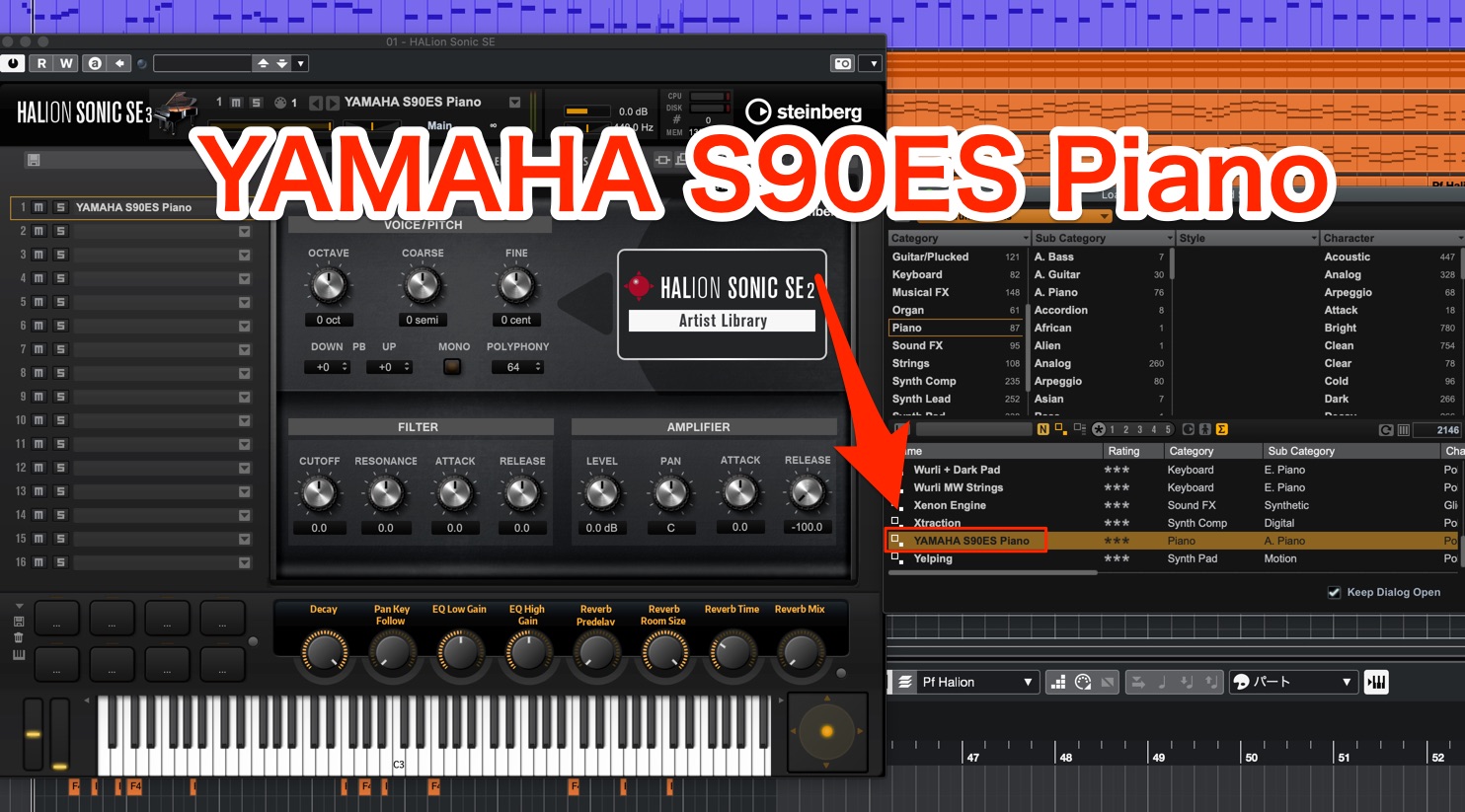
You can choose any tone you like. Here, we use the “YAMAHA S90ES Piano” preset, a typical grand piano sound.
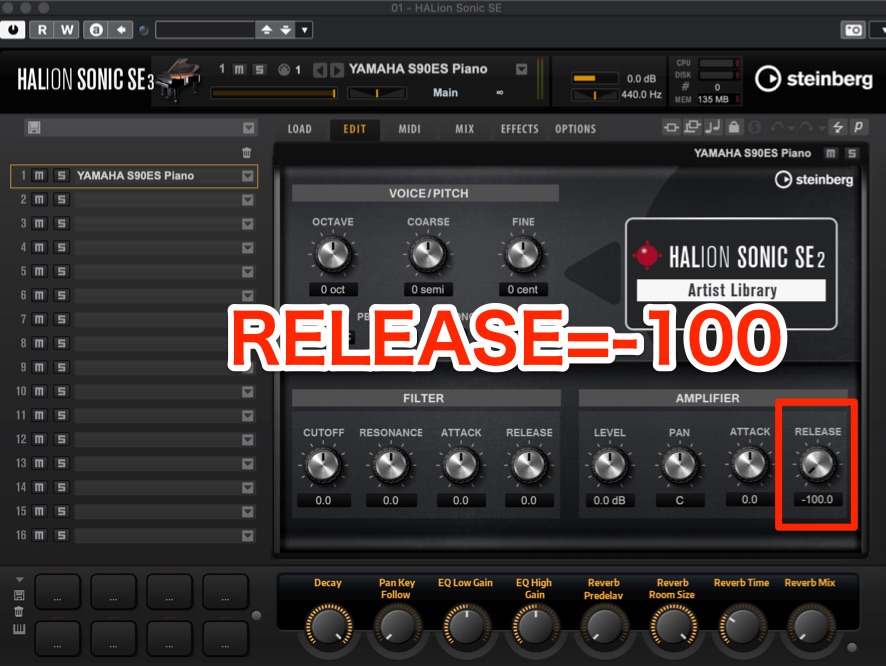
In HALion Sonic SE, the EDIT page’s AMPLIFIER section has a Release knob for controlling the tail. Set it to -100.
That single setting creates a sharply gated sound with virtually no tail.
Piano with its release intact
Piano with release
Piano with the release removed
Piano without release
Setting the velocity
Next, we’ll make the sound brighter and more present in the mix.
The most important step is to enter notes at the maximum velocity.
A release-cut piano is intended to produce a character unlike a natural piano,
so you don’t need to imitate the expressive dynamics of a live performance.

Setting every note to maximum velocity gives the sound its brightest tone and strongest attack, creating a crisp, sharply defined part.
Compare it with a lower-velocity setting.
All notes at velocity 100
Piano at velocity100
All notes at maximum velocity (127 in MIDI 1.0; the original example is labeled “128”)
Maximum-velocity piano (source label128)
With an acoustic instrument library, velocity can greatly change the tone, so set it deliberately.
Using an effect
To make the attack stand out more, we’ll add an effect.
A classic technique is to use a compressor.
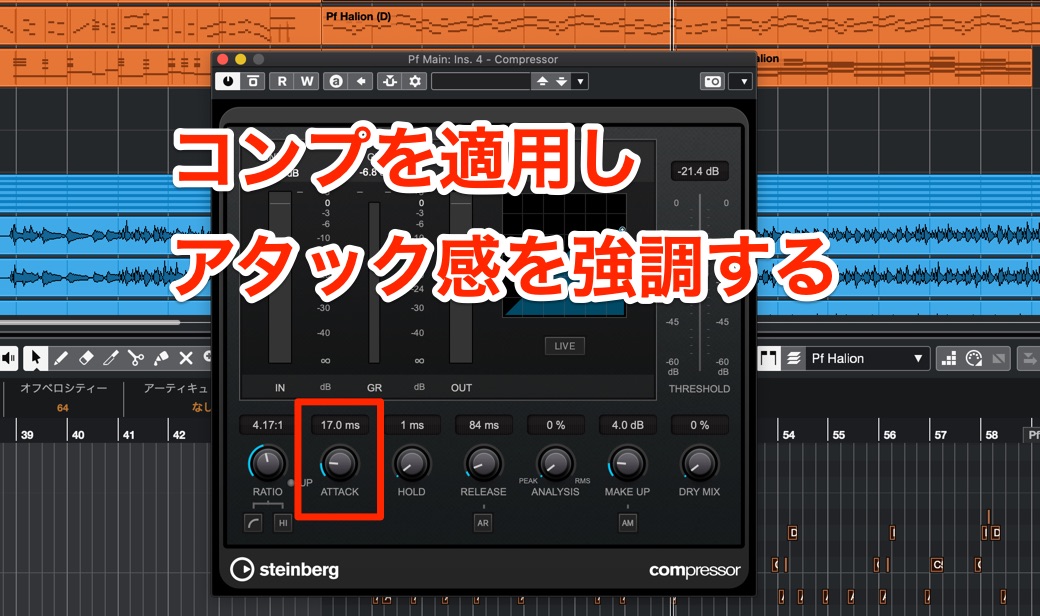
With a suitable attack time, compression can reduce the body of the sound relative to its initial transient, making the attack feel more prominent.
Before compression
Before piano compression
After compression
After piano compression
Reinforce the attack with a Sampler Track
To make the piano attack even more percussive, add a short attack sample using Sampler Track.
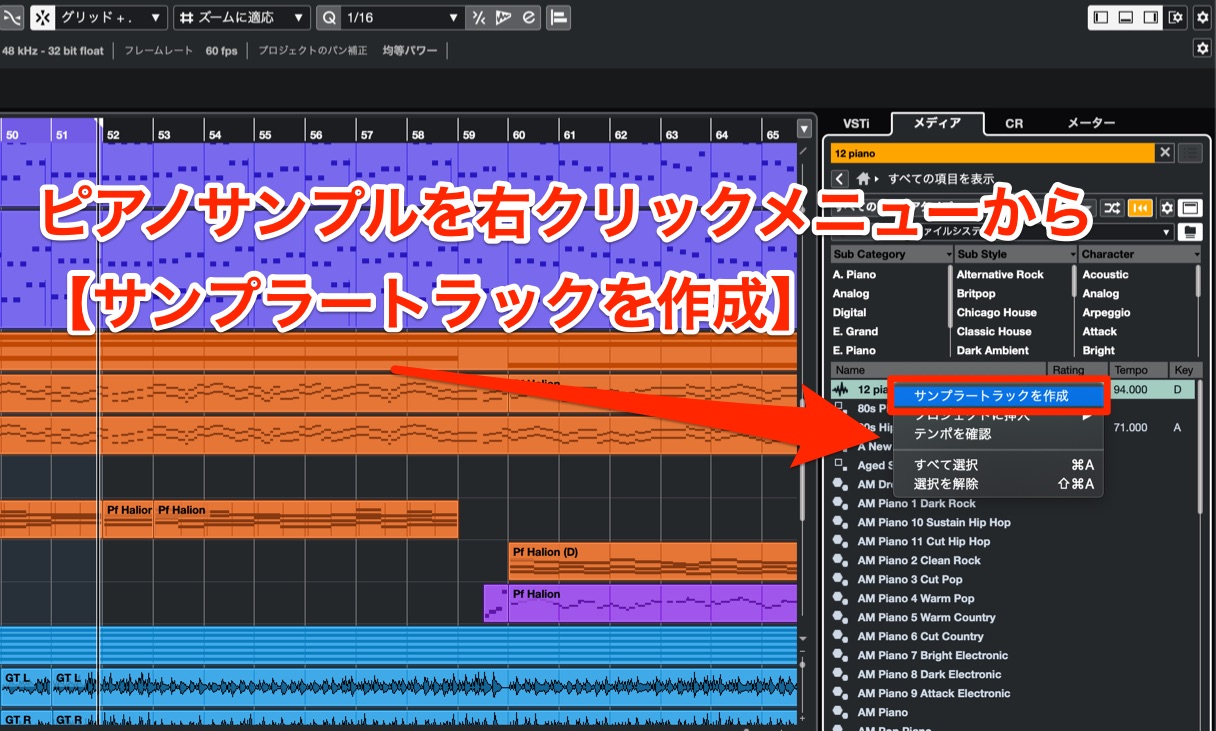
Choose a piano sample with a clear attack from the MediaBay and load it into a new Sampler Track.
Since you’ll use only the attack, focus on its transient when choosing a sample, whether it is a one-shot or a loop.
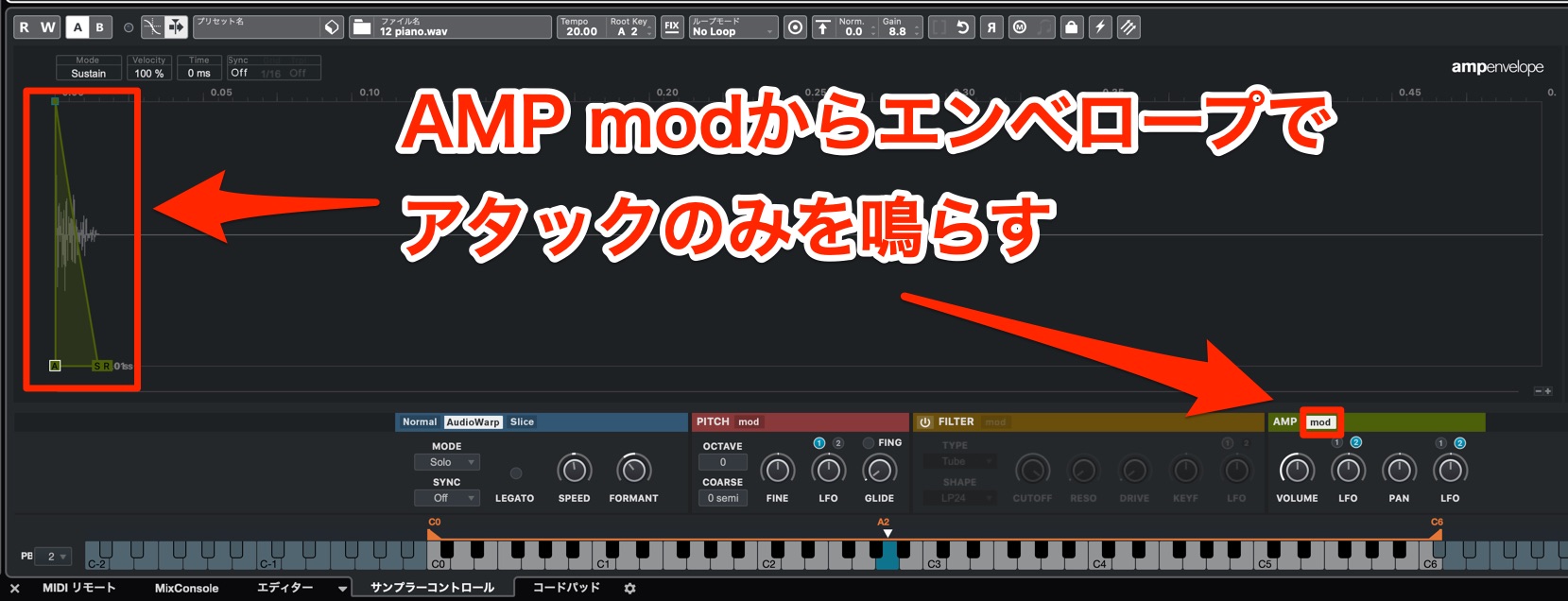
Then adjust the Sampler Track volume envelope so that only the attack plays.
Before reinforcing the attack
Piano before attack layer
After reinforcing the attack
Piano with attack layer
The result has a sharper onset and is less likely to get buried in the arrangement.
Writing the piano phrase
The piano part is the only accompaniment track that breaks away from the usual backing role, using bold movement to build excitement.
An active supporting part can clash with the melody or chord tracks, so it needs careful arrangement.
Here are a few points to keep in mind.
Choosing a scale
For the moving piano phrases, we use the same scale as the melody: a pentatonic scale with the seventh note of the major scale added.
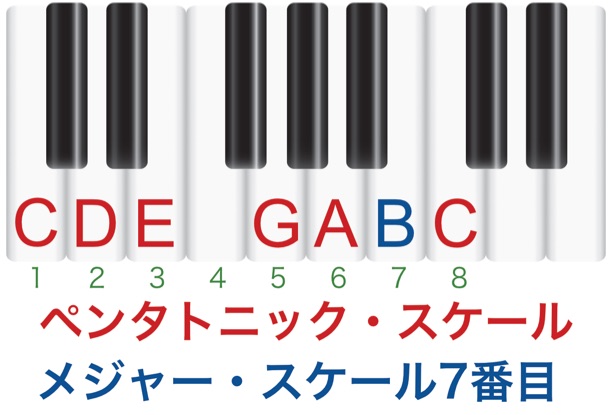
Another way to describe it is a major scale with the fourth note omitted.
That fourth note can be an avoid note over the Imaj, IIIm, and VIm chords in the major diatonic scale, so it may sound dissonant against those chords.
The sound of a chord containing an avoid note
Avoid-note chord example
As you can hear, the fourth scale degree can create an unpleasant sound in this context.
Leaving out notes that are likely to clash makes it easier to move freely.
Phrasing with the melody in mind
The piano part is meant to add color to the song, so it keeps moving even when the melody is active—especially in the chorus.
In that situation, shape the piano line so it supports the melody instead of getting in its way.
A good starting point is to avoid notes next to the melody whenever possible.

There are a few spots where the piano takes priority and its notes sit next to the melody, but most of the time they are at least a third apart.
Another important point is to align the rhythms.

When the melody is moving, match the piano accents to it so the overall rhythm does not become cluttered.
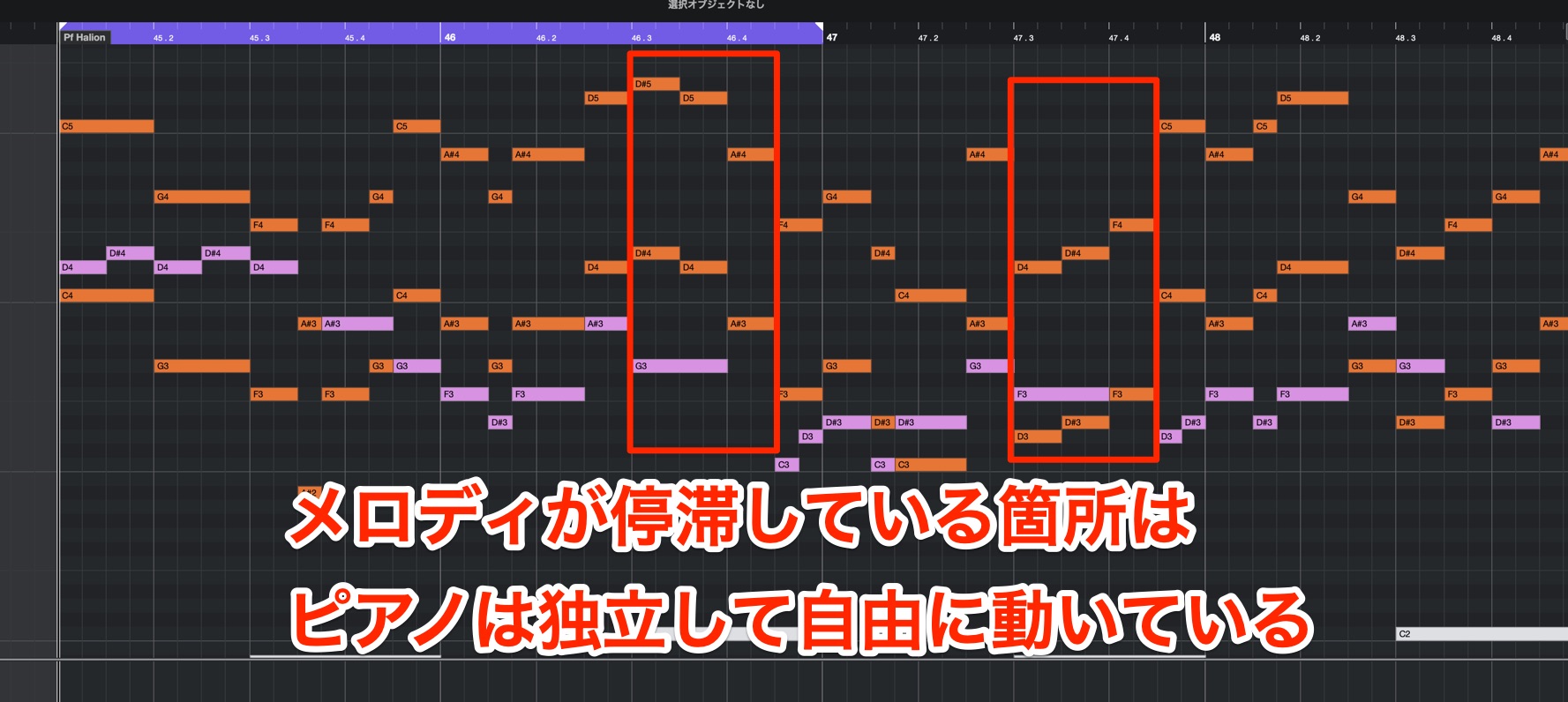
When the melody holds back, the piano can move more freely on its own.
These adjustments let the piano stay active without getting in the way of the melody.
Here’s an example of what happens when the piano is written without considering the melody.
Original phrase
Piano phrasing with the melody
Phrase written without considering the melody
Piano phrasing without the melody
This is an intentionally extreme example, but with the melody and piano moving independently in different directions, the result feels disjointed and difficult to listen to.
Piano arrangements for each section
The piano moves continuously in the chorus, while its role changes in the other sections.
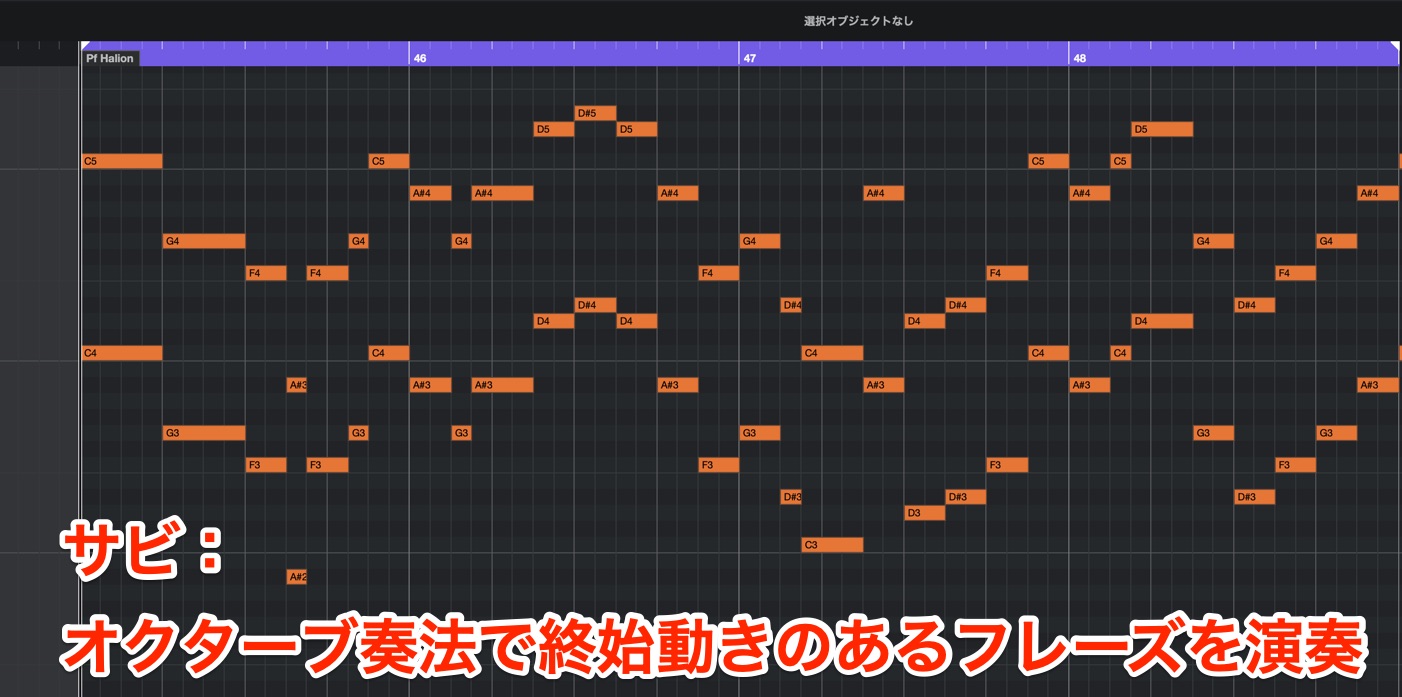
As noted above, the chorus uses an active phrase to make the arrangement sound fuller and more energetic.
The octave technique also helps the piano phrase stand out in the arrangement.

In the A section, the piano uses longer notes to add color when the melody is busy, then fills the gaps with more movement when the melody settles.
Toward the end of the A section, a busier fill leads into the B section. The phrase finishes with a coordinated chord hit alongside the other tracks.
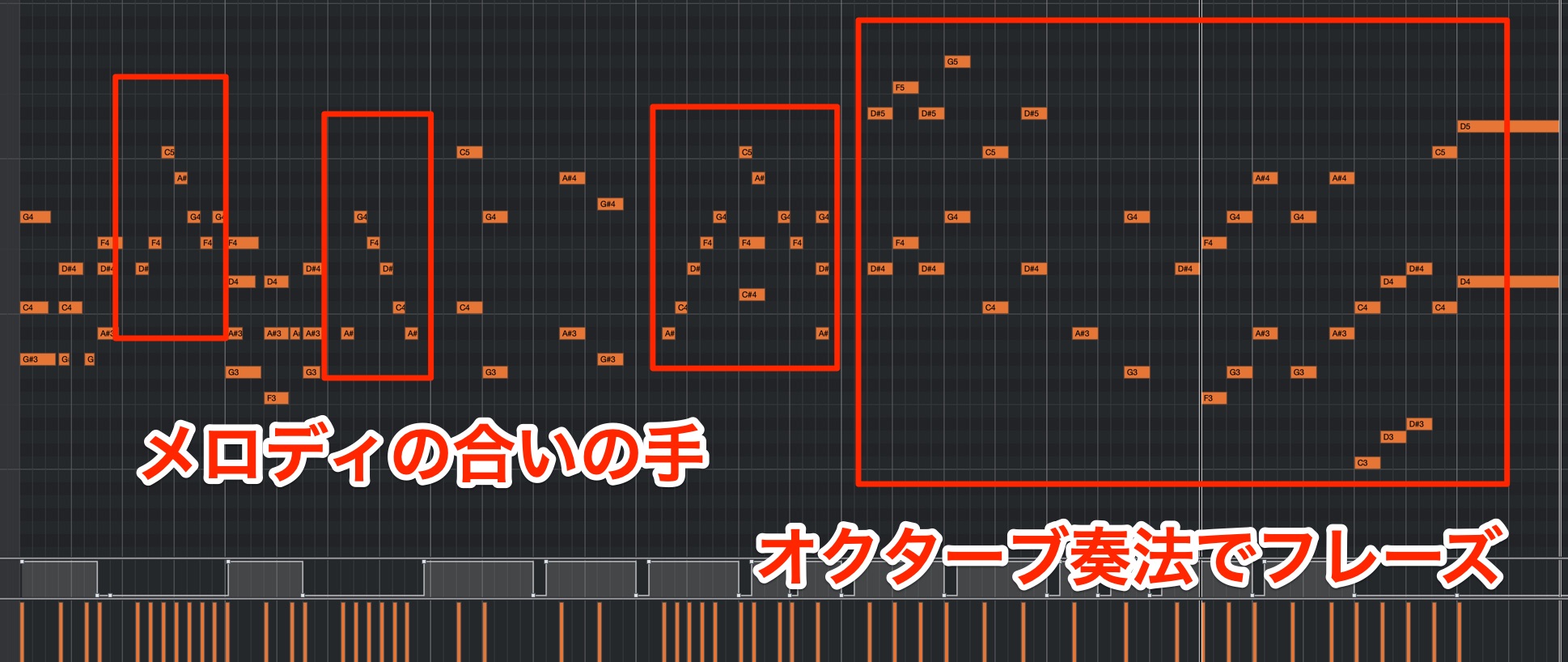
In the B section, the piano again acts as a response to the melody, adding more movement when the melody holds back.
In the latter half, it plays a lead line in octaves, changing its role actively within the B section, much like the guitar.
Switching between lead and backing roles keeps the arrangement from sounding repetitive and gives it a sense of movement.
This is especially useful when arranging for a smaller ensemble, so give it a try.
What did you think?
It can be challenging to consider both the part’s role and how to stay out of the melody’s way, but when it works, the arrangement gains stability and color.
Try applying these ideas as you arrange your own music.
Thanks for following the entire series!
Frequently Asked Questions
Q1. How can I create a YOASOBI-style cutting guitar part?
Combine muted strums with pitched chords, and build a phrase that enters on the offbeat. Avoid excessive distortion; a crunch tone that responds to picking strength preserves the fine rhythmic detail.
Q2. Can I make a cutting phrase if I don’t play guitar?
Yes. In Cubase 11, drag a guitar loop into Sampler Track and use its Slice function to divide it automatically. You can then use MIDI to build a new pattern.
Q3. What is a release-cut piano?
It is a piano sound with the tail cut off to emphasize the attack. In HALion Sonic SE, set the Release knob to -100. This technique is widely used in contemporary pop.
Q4. How does doubling work?
Pan two guitar tracks left and right, then mute or unmute a track in different sections. This adds contrast and a wider, more spacious sound.
Q5. What is the key to a modern J-pop sound?
Create rhythmic contrast. Combine cutting, sustained notes, and coordinated hits, and use details such as an offbeat entrance to give the arrangement forward motion and a polished feel.
NEW ARTICLES
Latest English Articles



































































































































































