
FabFilter Pro-Q 4 is part of the EQ plug-in series trusted by professionals around the world since its original release in 2009. It introduces features such as Instance List for more efficient session management, EQ Sketch for intuitive curve creation, and Spectral Dynamics, which responds to frequency bands. Three character modes—Clean, Subtle, and Warm—also let you shape your sound for different genres and applications, balancing speed and sound quality in everything from mixing to mastering.
A New Evolution in Professional EQ
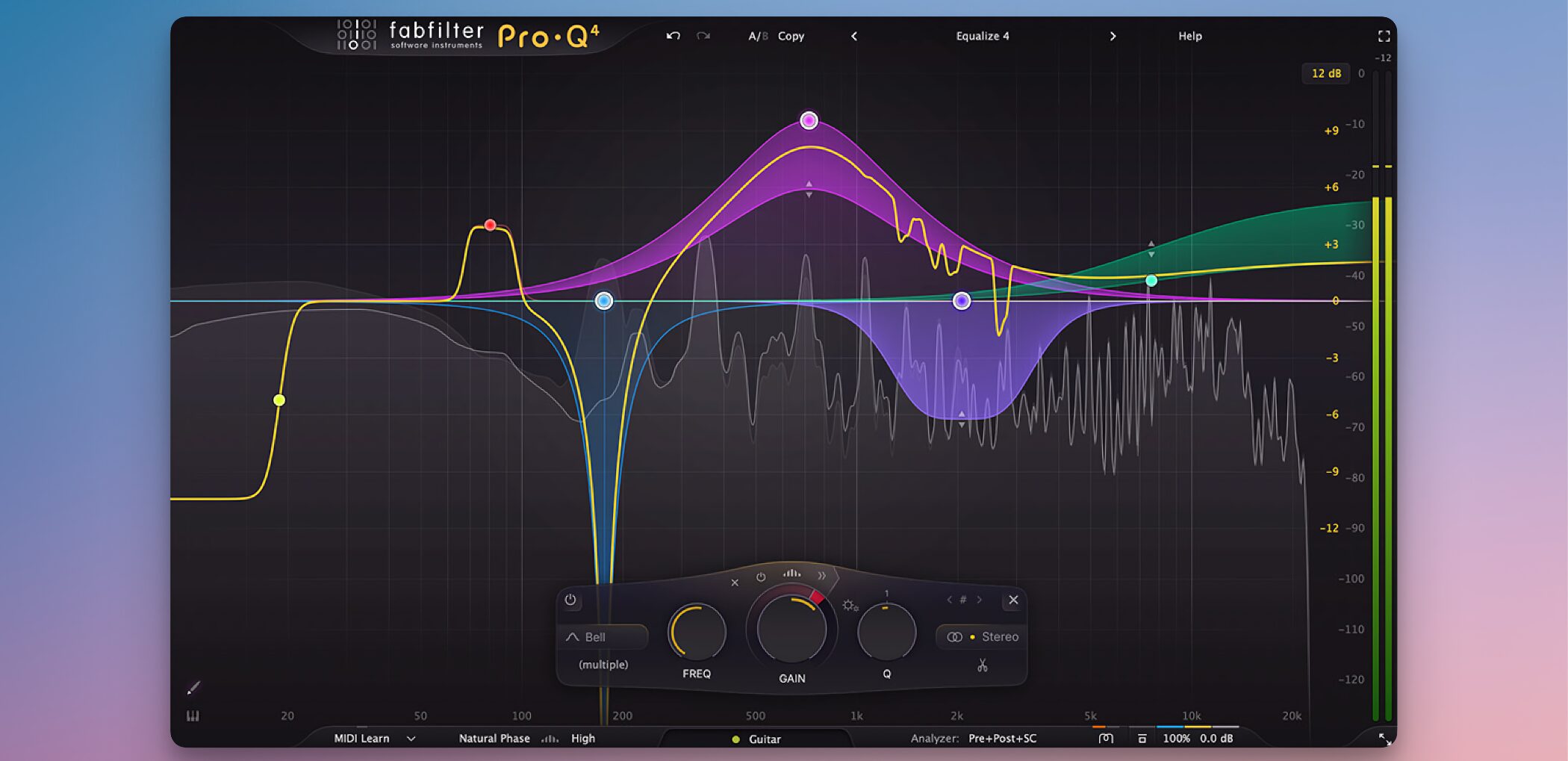
In music production and mastering, precise tonal shaping is essential, but working efficiently is also a major concern.
An innovative EQ plug-in that addresses both challenges: FabFilter Pro-Q 4 has arrived!
Since the first version arrived in 2009, Pro-Q has earned a broad following among engineers and producers worldwide for its excellent sound quality, refined workflow, and versatility.
This latest version takes another step forward with features that improve efficiency and creative freedom, giving it the potential to become an essential tool in modern music production.
This article explores what makes FabFilter Pro-Q 4 appealing and takes a look at its new features.
Video Guides (in Japanese)
- 1FabFilter Pro-Q (Japanese)
- 2FabFilter Pro-Q 2: Auto Gain and More New Features (Japanese)
- 3FabFilter Pro-Q 2: Spectrum Grab and EQ Match (Japanese)
- 4FabFilter Pro-Q 3: Enhancements to Mid/Side Mode (Japanese)
- 5FabFilter Pro-Q 3: Dynamic EQ (Japanese)
- 6FabFilter Pro-Q 3: Brickwall Slope, Flat Tilt, and Masking Detection (Japanese)
- 7FabFilter Pro-Q 4 Is Here: A Closer Look at Its Standout New Features (Japanese)
Efficient Session Management: Instance List
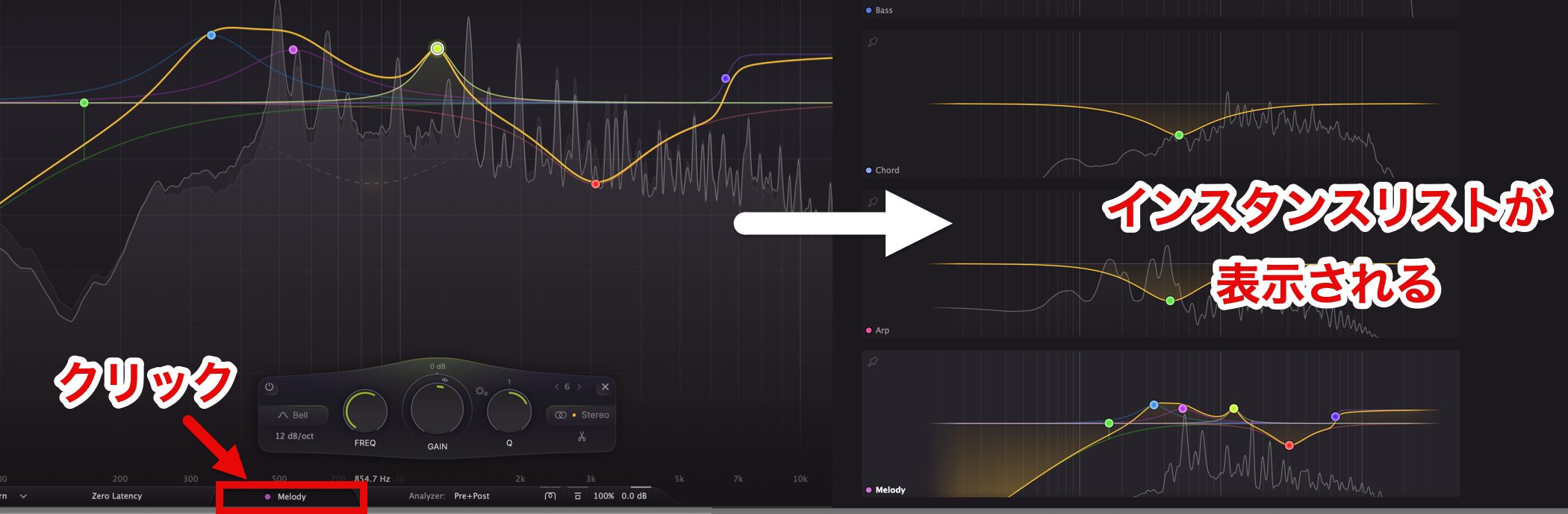
You can now manage other Pro-Q 4 instances in your sessiontogether from a single window.
This makes it easier to review and adjust EQ settings, even in complex mix sessions, substantially reducing thetime and effortrequired across your workflow.
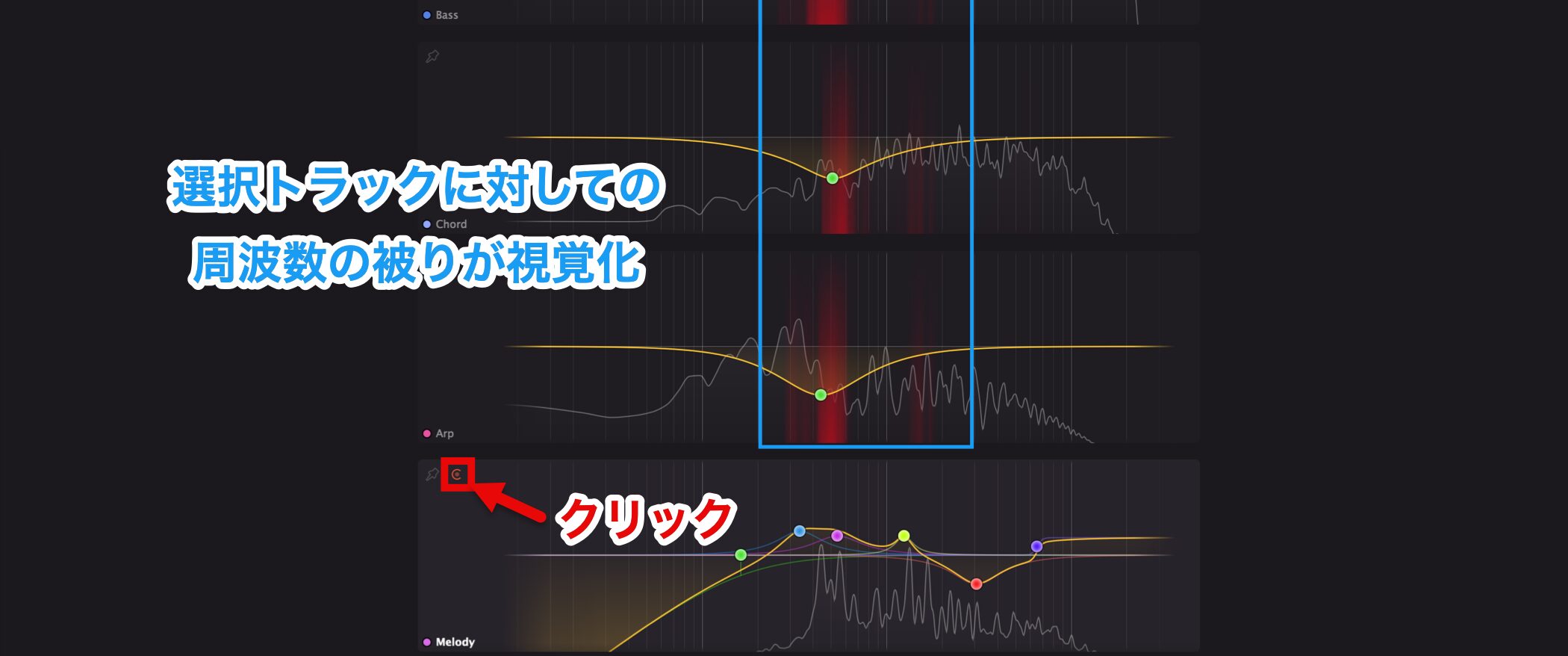
Clicking the button outlined in red alsovisualizes frequency overlapbetween the selected track and other tracks, helping you quickly identify important frequency ranges while mixing.
Intuitive Operation: EQ Sketch
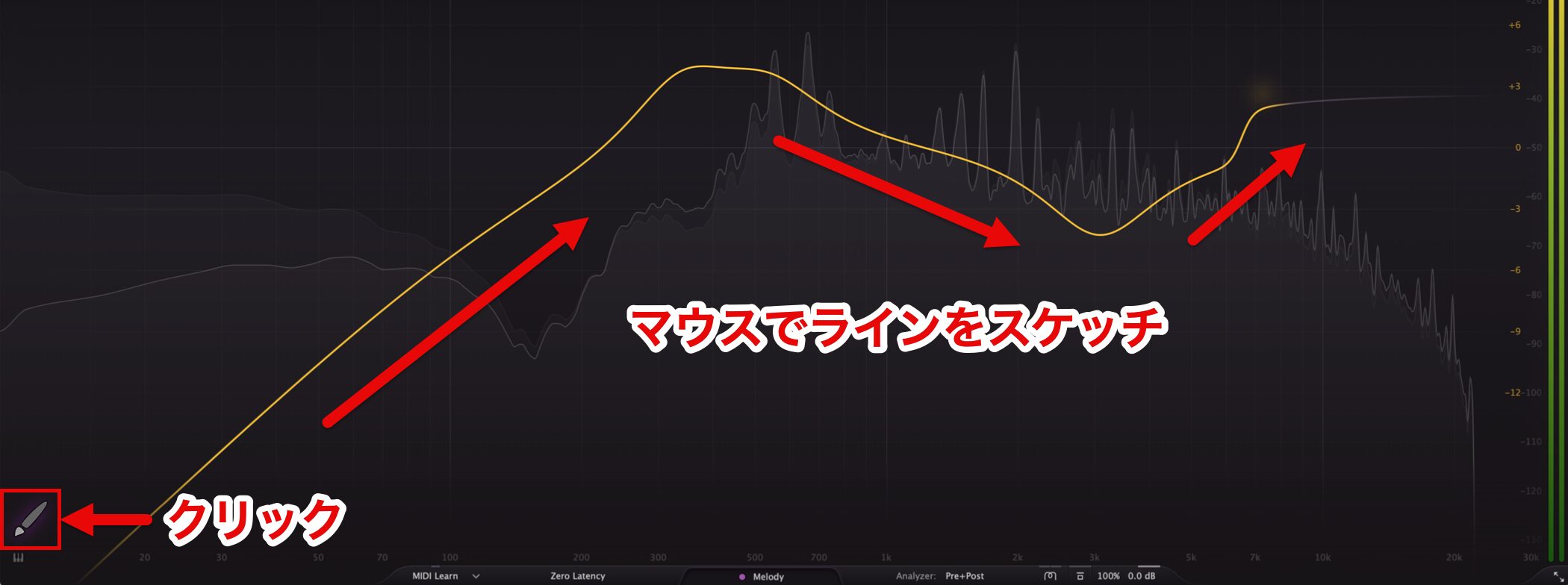
EQ curves can becreated easily as if you were sketching by handwith EQ Sketch, making the workflow smoother than ever.
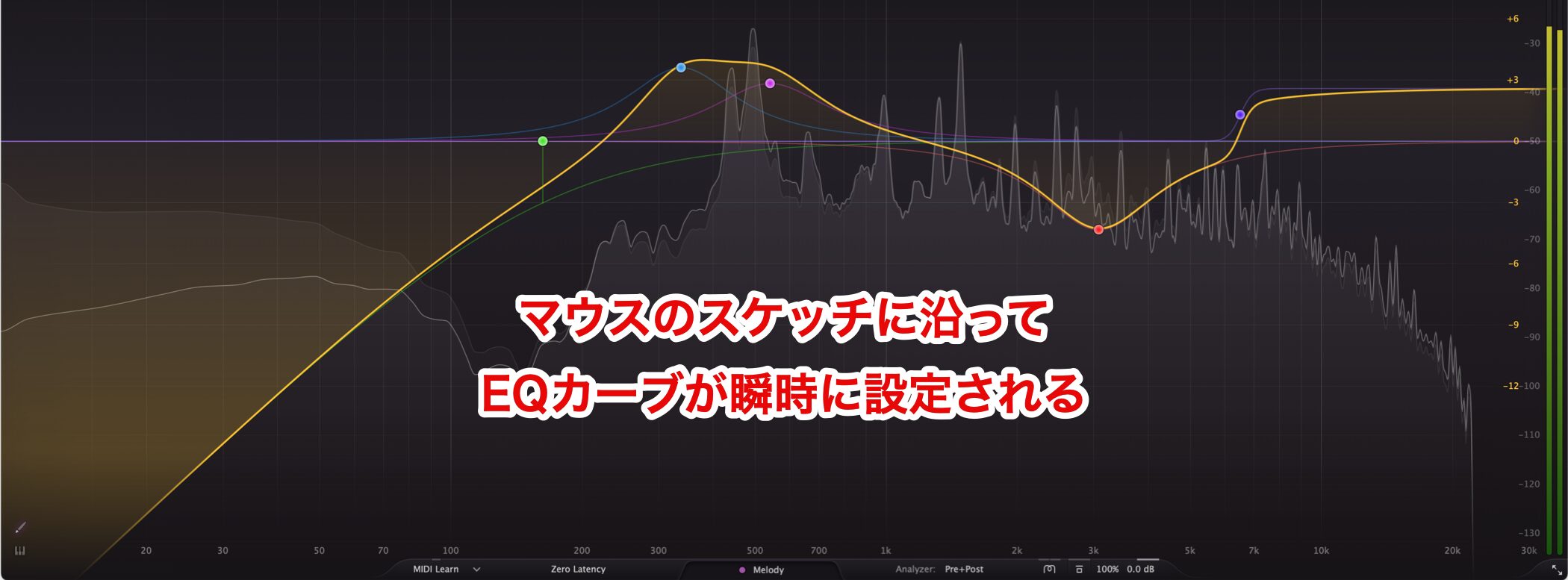
Low-cut, high-shelf, and bell filters, among others, areapplied immediately, reducing setup time.
You can also fine-tune an existing curveintuitively with your mouse, so you can work more efficiently.
A New Approach to Tone: Spectral Dynamics
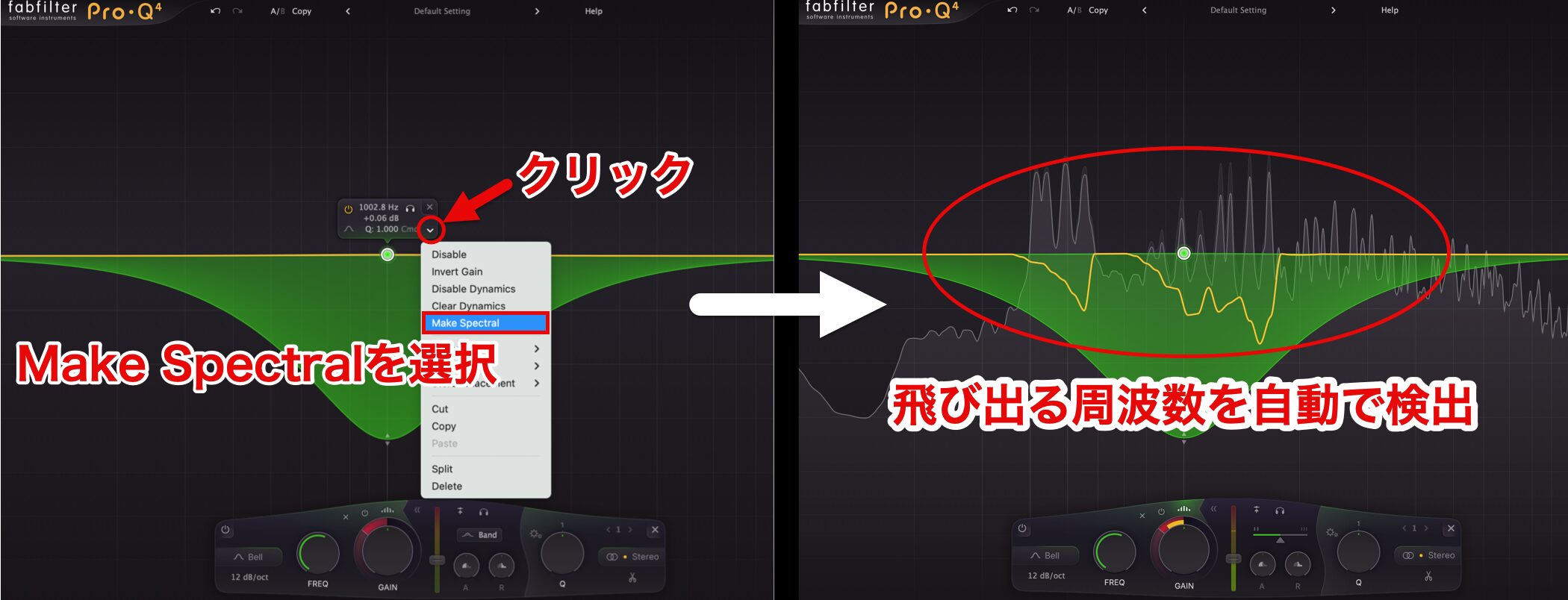
Spectral Dynamics is an evolved processing approach to conventional dynamic EQ.
Rather than responding to the input signal level, this moderesponds only to prominent frequency bands.
This lets you control only the ranges that need attention, allowingprecise adjustments without compromising the overall sound.
It is particularly useful for taming harsh resonances or bringing specific frequency ranges forward.
Switching the Sound Character: Character Modes
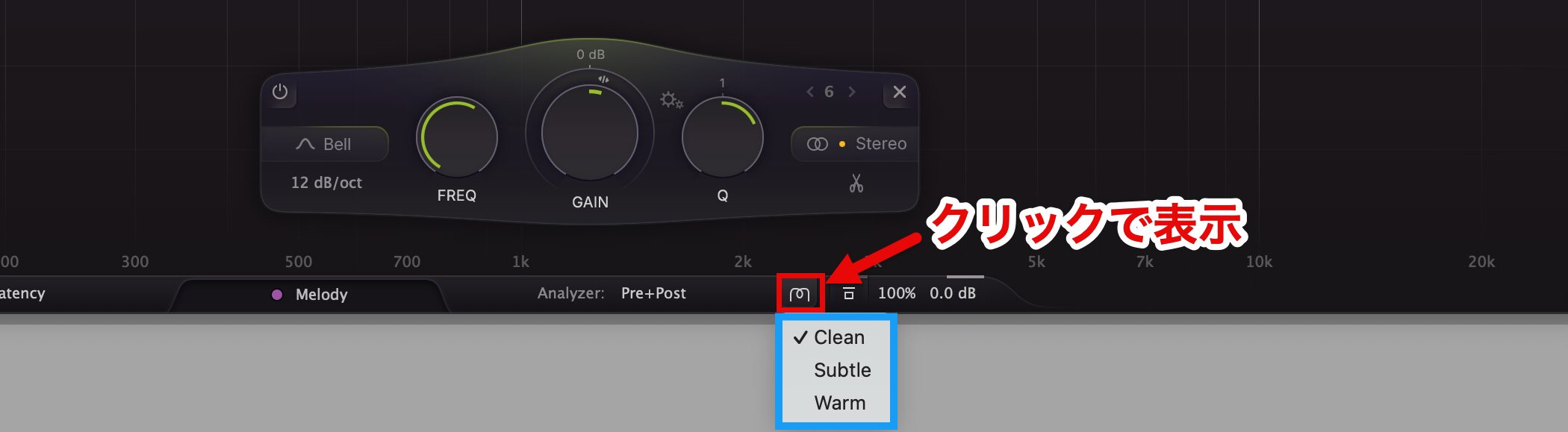
Clean, Subtle, and Warm are the three character modes—each offering a different approach to sound design.
- Clean mode: Preserves a clear, transparent sound while reducing interference with other sounds.
- Subtle mode: Adds gentle vintage-style saturation for a touch of warmth.
- Warm mode: Adds presence and richness with tube-like saturation.
By choosing the mode that suits your needs, you can pursuethe ideal tonal balancefor different genres and applications.
Other New Features and Improvements
- Free Sidechain Filtering: Allows independent processing of frequency bands.
- Fractional Slope Settings: Enables fine-grained settings such as 3.5 dB/oct.
- Improved Linear-Phase Processing Accuracy: Also suitable for mastering applications.
- New All-Pass Filter Shape: Enables more flexible sonic effects.
- Dynamic EQ Processing That Preserves Clarity: Enables more precise control with less noise than before.
System Requirements

Windows
• Supported OS: Windows 11, 10, 8, 7, and Vista (32-bit/64-bit)
• Supported formats: VST 2/3, CLAP, and Pro Tools
Mac
• Supported OS: macOS 10.13 or later (64-bit only)
• Supported processors: Intel or Apple silicon
• Supported formats: VST 2/3, AU, CLAP, and Pro Tools
Pricing
The Japanese source article lists three price options.
- Full version: ¥33,000 (tax included)
- Upgrade version: ¥14,850 (tax included)
- Education version: ¥23,100 (tax included)
FabFilter Pro-Q 4 should make mixing and mastering even smoother.
Give it a try to experience its ease of use and high-quality sound for yourself!
Frequently Asked Questions
Q1. How has FabFilter Pro-Q 4 evolved from Pro-Q 3?
Instance List lets you manage multiple instances in a session together, while EQ Sketch lets you create curves as if drawing by hand. Spectral Dynamics also enables advanced dynamic EQ processing that responds only to prominent frequency bands.
Q2. Can FabFilter Pro-Q 4 be used on a Mac?
Yes. It supports macOS 10.13 or later and runs on both Intel processors and Apple silicon. It is available in VST 3, AU, CLAP, and Pro Tools plug-in formats.
Q3. Can beginners learn to use FabFilter Pro-Q 4 effectively?
EQ Sketch makes operation intuitive, even for beginners. The three character modes also make it easy to try different sounds and learn through an efficient workflow.
Q4. Who is eligible to purchase the upgrade version?
The source article states that owners of Pro-Q 3 or an earlier version can purchase the upgrade version (¥14,850). It lists the full version at ¥33,000 and the education version at ¥23,100.
Q5. What is Spectral Dynamics useful for?
Because it responds to frequency bands rather than input level, it is particularly effective for targeted adjustments in mastering and vocal processing, such as reducing harsh resonances or emphasizing specific ranges.
NEW ARTICLES
Latest English Articles





















































