
This practical guide helps beginners build piano accompaniment for J-pop-style songs in ten steps. Starting with simple chords, we'll add a left-hand part, adjust voicings, develop rhythms, and introduce arpeggios and countermelodies to create a more colorful, energetic piano track. Understanding the piano's roles as both chordal accompaniment and a source of melodic phrases helps you arrange a part that supports the whole song.
Creating Piano Parts for J-Pop-Style Songs
If you're unsure how to build a piano backing track for a pop song, this guide takes you through ten steps for creating useful phrases with movement and variety.
How to Create Piano Accompaniment — Video
First, compare a version containing only simple chords with a more active arrangement using the techniques we'll explain.
The example uses the chorus melody and chord progression of “Zankyosanka.”
Simple Chord Accompaniment
Full Piano Arrangement
Adding movement to the piano makes the whole song feel more colorful and energetic.
- 1Piano Basics
- 2Step 1: Enter the Chords
- 3Step 2: Add the Left Hand
- 4Step 3: Keep the Voicings in a Similar Register
- 5Step 4: Add Rhythm
- 6Step 5: Give Each Hand a Different Rhythm
- 7Step 6: Vary the Chord Register
- 8Step 7: Use Non-Chord Tones
- 9Step 8: Use Arpeggios
- 10Step 9: Add a Countermelody
- 11Step 10: Combine Steps 1–9
Piano Basics
Before getting into the details, let's consider the piano's usual roles and what it plays.
Two common elements are:
- Chordal accompaniment
- Melodic phrases such as countermelodies and obbligato lines
A richly arranged piano track often includes both.
Accompaniment gives chords a rhythmic pattern, helping shape the song's development and groove.
For a simple example, in a song performed by a singer with just a piano or guitar, the instrumental part is the accompaniment.
A melodic phrase is a sequence of notes that can move independently of the accompaniment's rhythm and chord tones.
Its purpose is to add color without getting in the way of the main melody, such as the vocal.
Step 1: Enter the Chords
Start by entering the chords in root position.
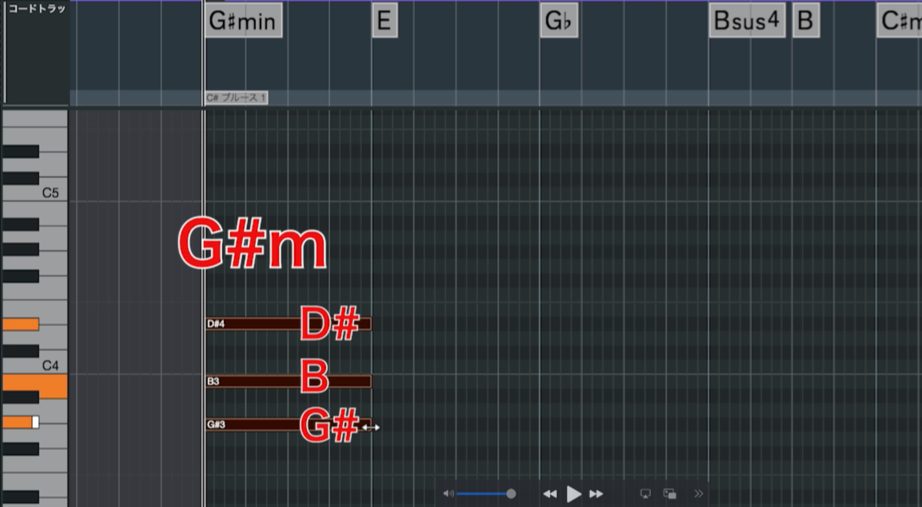
In root position, the root is the lowest note and the remaining chord tones are stacked above it, as shown.
For example, a G-sharp minor chord in this song contains G♯ at the bottom, followed by B and then D♯.
If you'd like to learn more about chords, see this music theory tutorial.

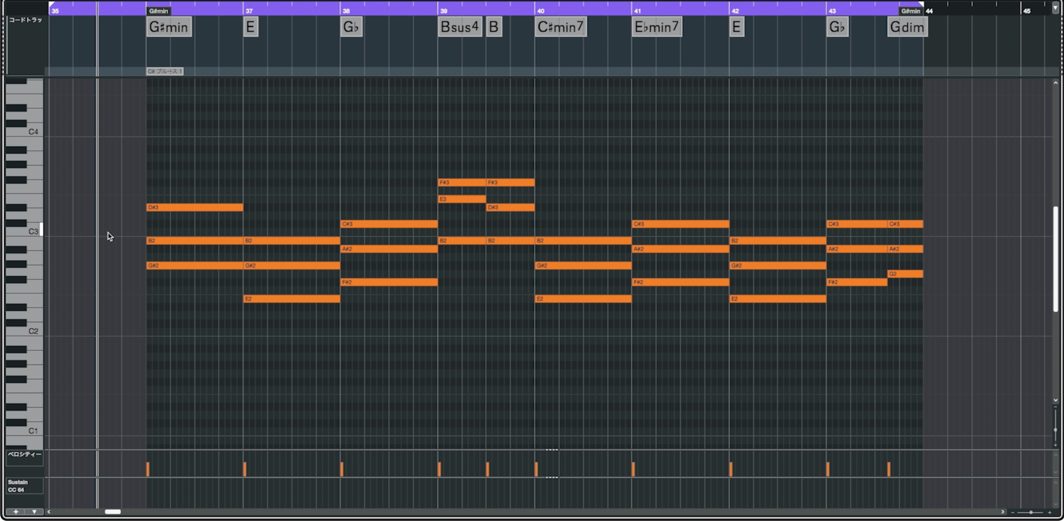
Entering all the chords this way gives the following result.
Step 1 — Root-Position Chords
Step 2: Add the Left Hand
Next, add a left-hand part so that both hands are playing.
A basic piano accompaniment has the right hand play the chords and the left hand play their roots.
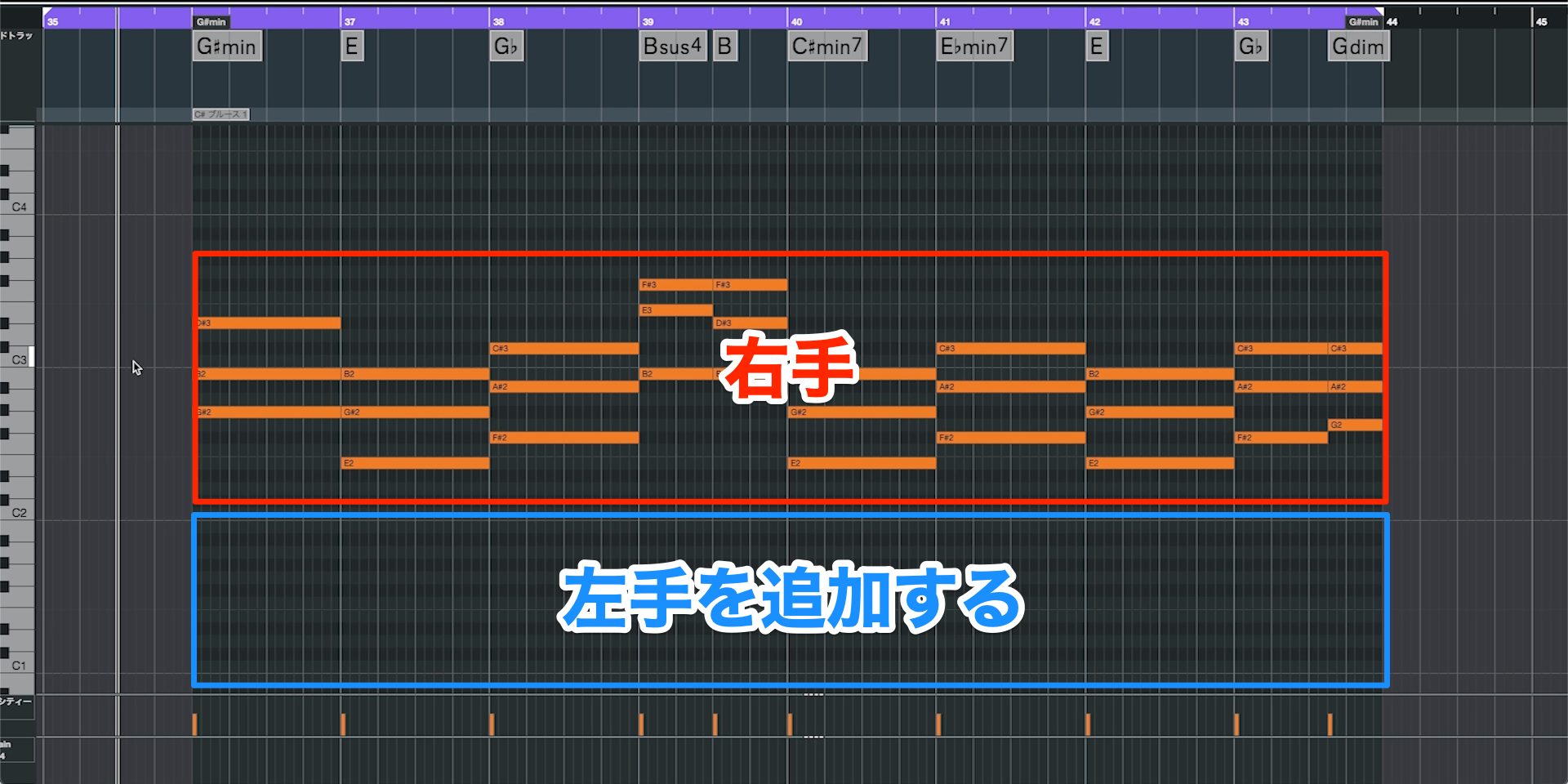
Let's add the following three common left-hand patterns to the chords entered above, then look at a fourth pattern combining them.
Play Only the Root
The simplest pattern uses just the root.
For G♯m, the root is G♯, so enter that note in the left-hand part.
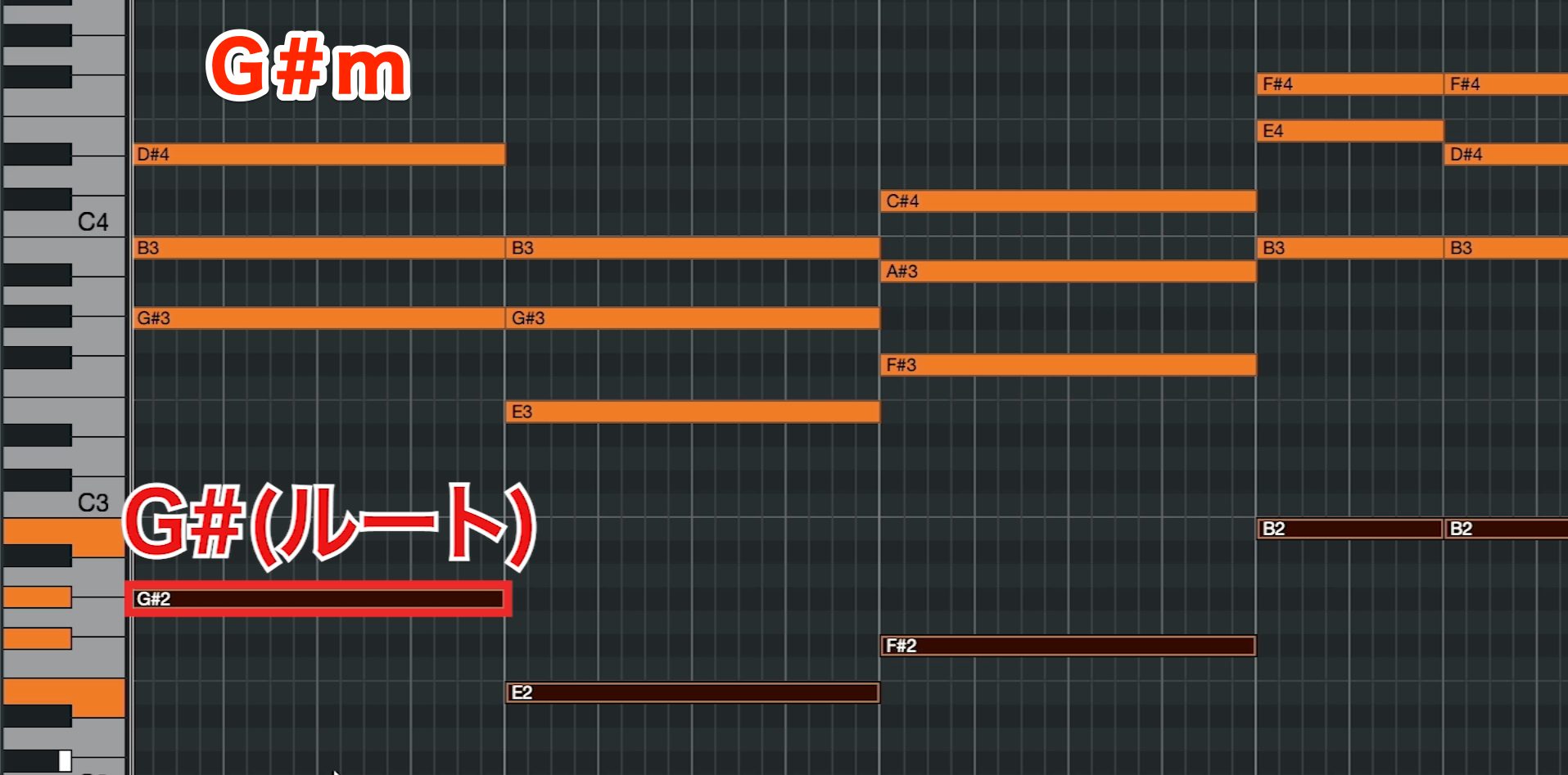
Step 2 — Single Roots
Choose a register below the right hand that suits the sound: lower notes tend to feel weightier, while higher placements can feel lighter.
Double the Root in Octaves
Next, try doubling the root in octaves.
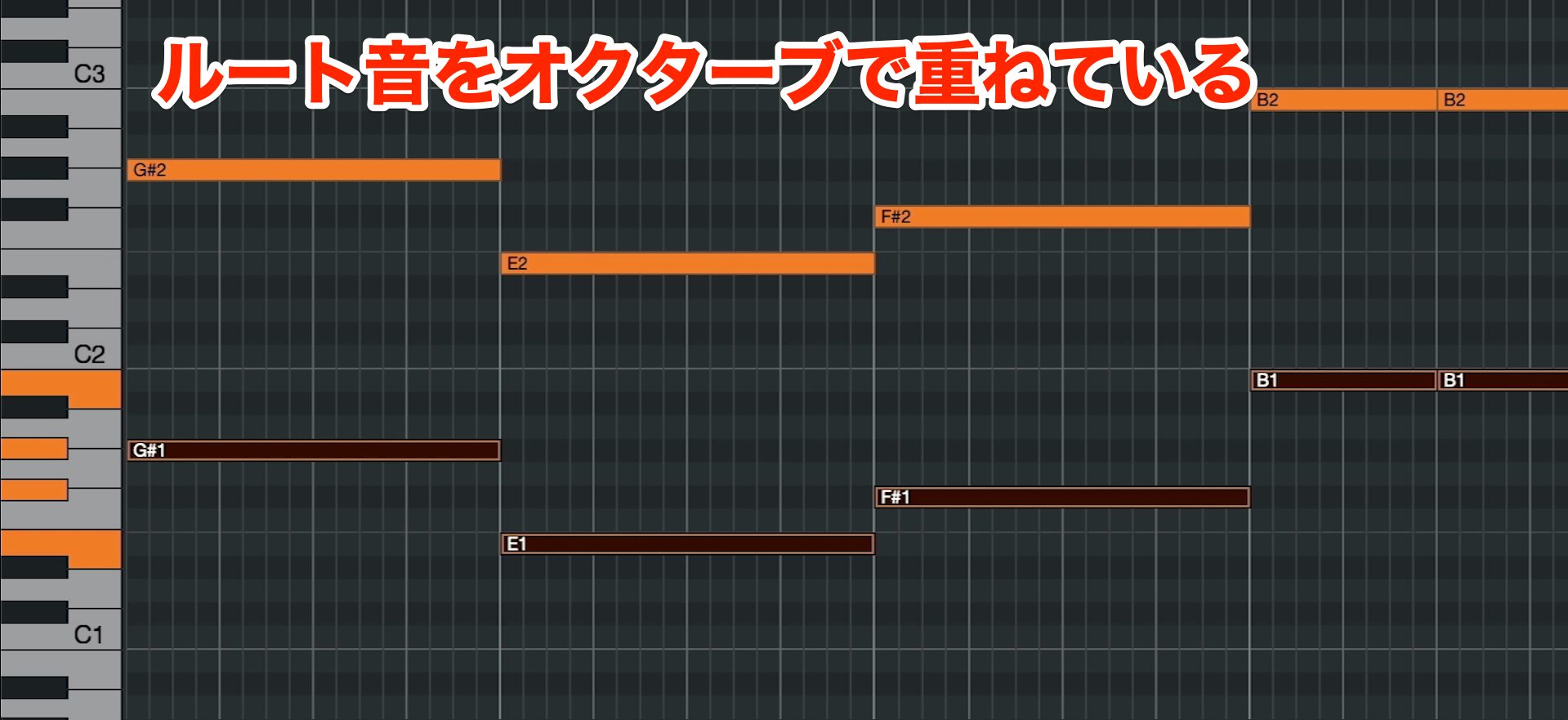
Add the same note one octave above or below the root you've already entered to give the accompaniment more weight.
Step 2 — Octave Roots
Choose the octave placement that suits your taste and the song's atmosphere.
Combine the Root and Fifth
The third pattern adds the fifth to the root.
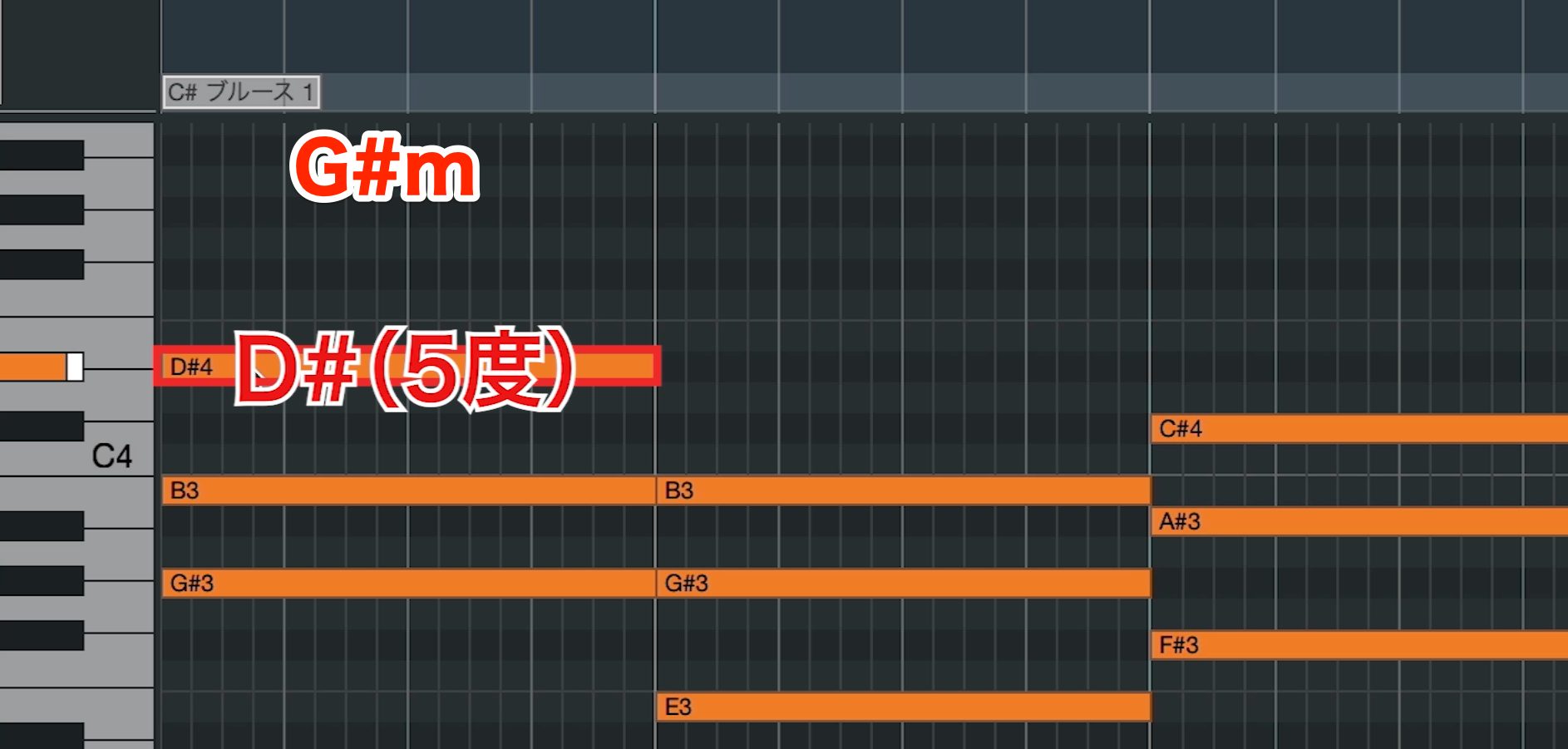
In a root-position triad, the fifth is the third chord tone counting upward from the root. In G♯m, it is D♯, as shown.
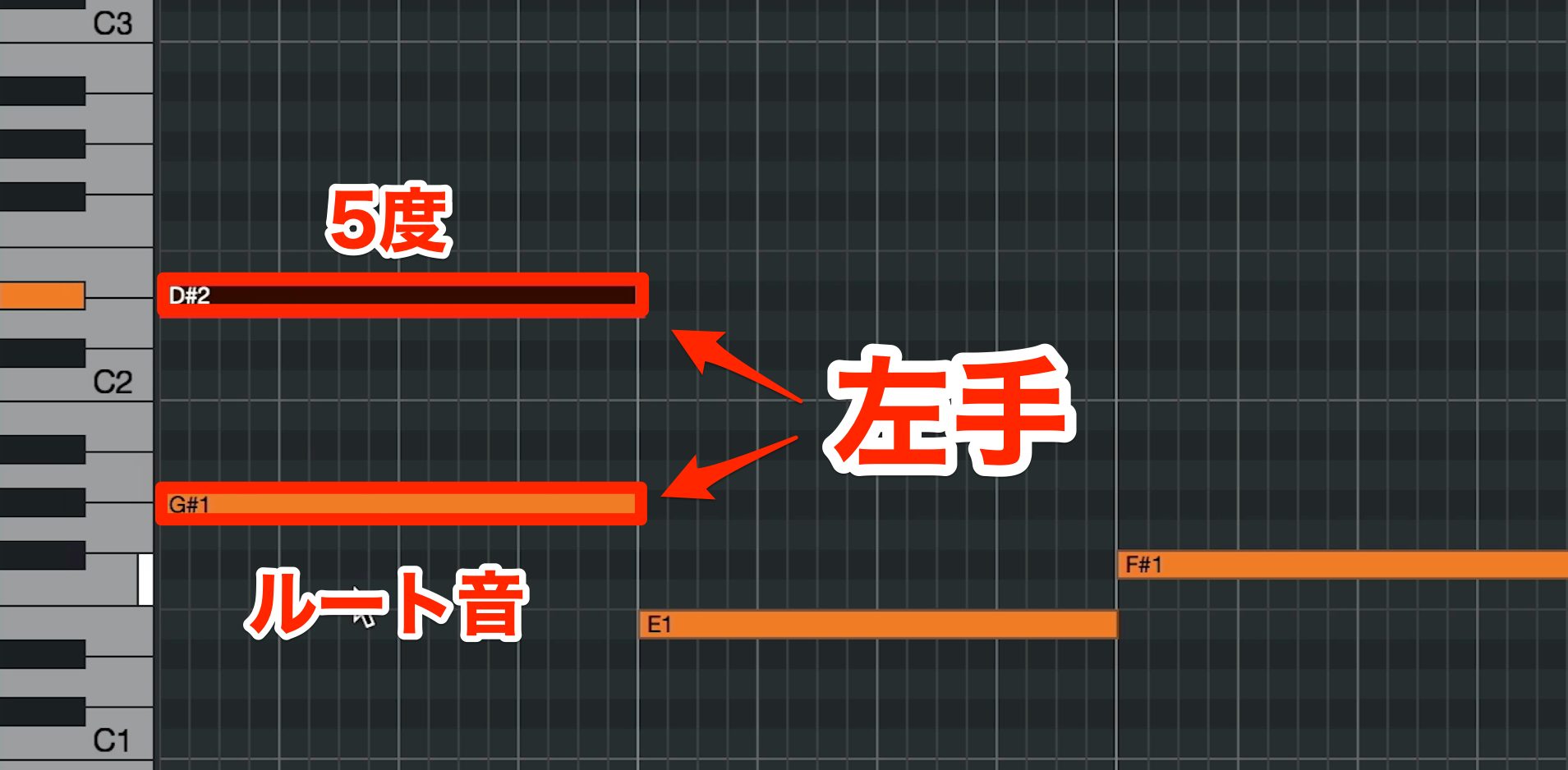
Place it above the left-hand root to thicken the part.
Compared with doubling the root in octaves, adding the fifth gives this example a richer, weightier sound.
Step 2 — Root and Fifth
In these examples, the sound becomes fuller as we move from a single root to octave roots, then to root plus fifth.
Play All Three Notes
You can also combine the patterns discussed above.
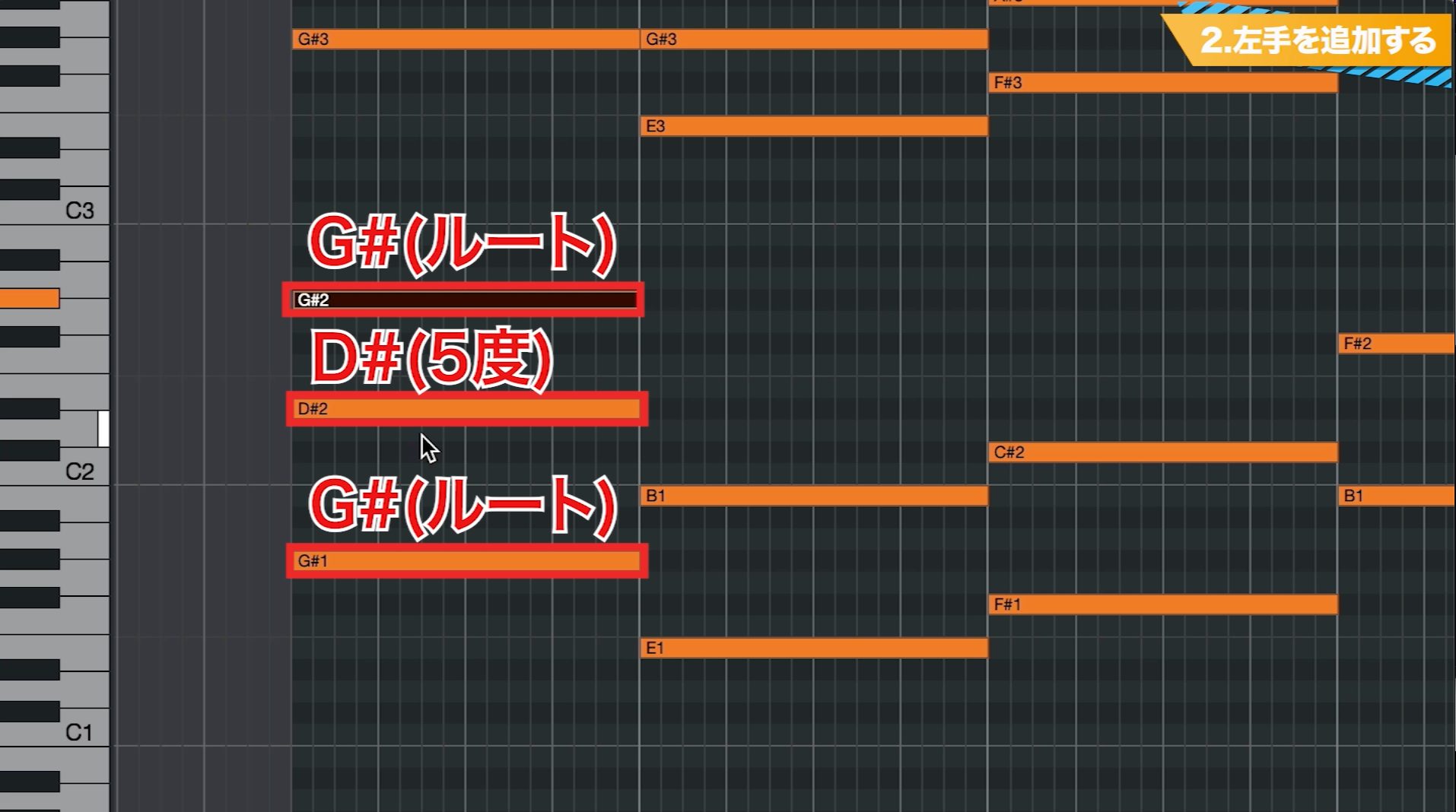
Play the root, fifth, and root one octave higher: three notes in the left hand. Use this when you want a particularly full piano sound.
Step 2 — Root, Fifth and Octave
There are many other left-hand patterns, but these four are common starting points. Try each one.
Programming Tip
When the left hand supplies the root in this accompaniment, you can omit it from the right-hand chord.
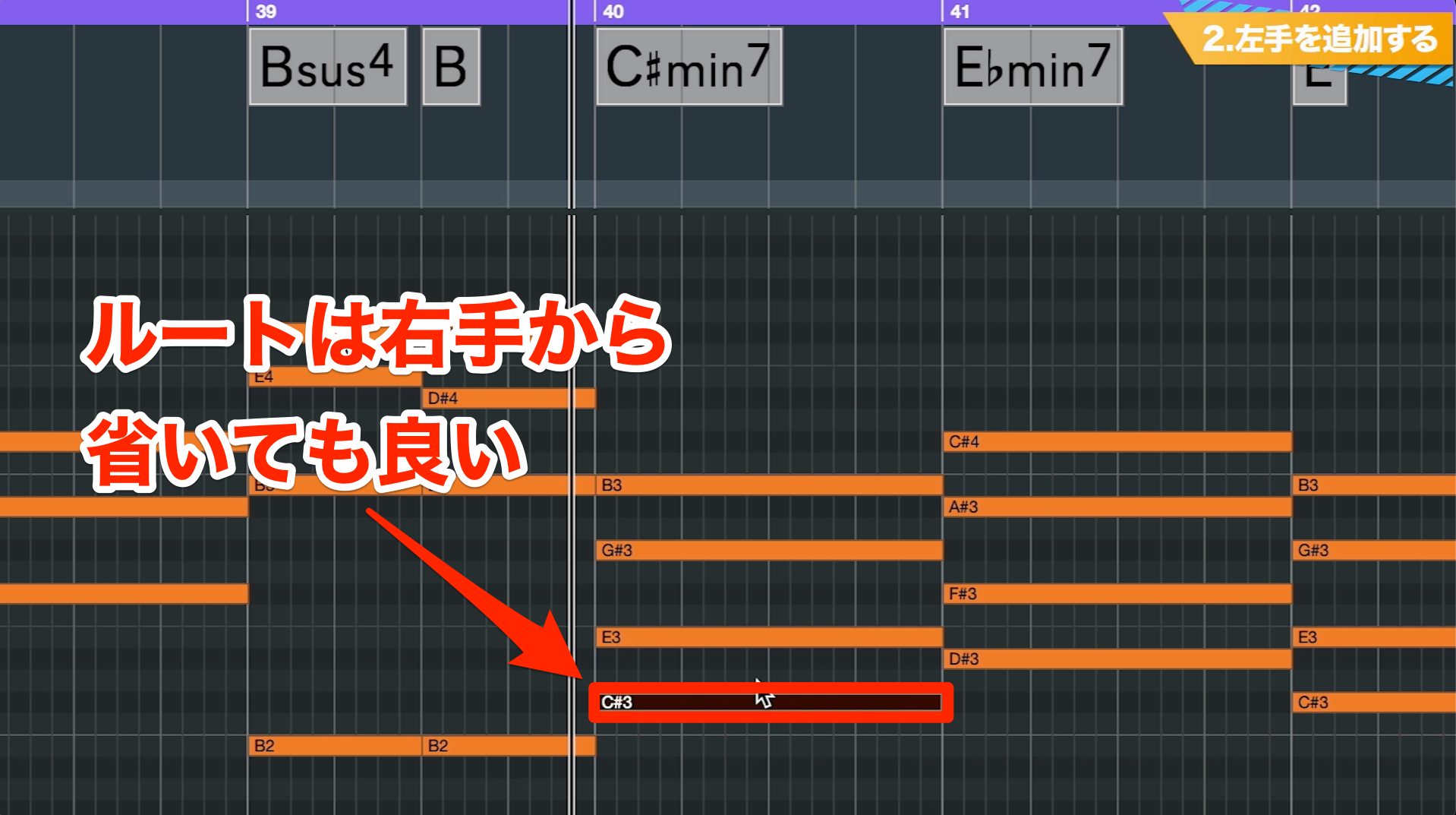
This is particularly useful for seventh chords and chords with four or more notes: omitting the right-hand root can remove unnecessary density and make the harmony clearer.
It can also keep the number of right-hand notes closer to that of the triads, helping smooth out chord changes.
Keyboard players often use this approach. Try it when programming accompaniment that feels like a live performance.
Step 3: Keep the Voicings in a Similar Register
Now adjust the notes of successive chords so their registers stay reasonably close together.
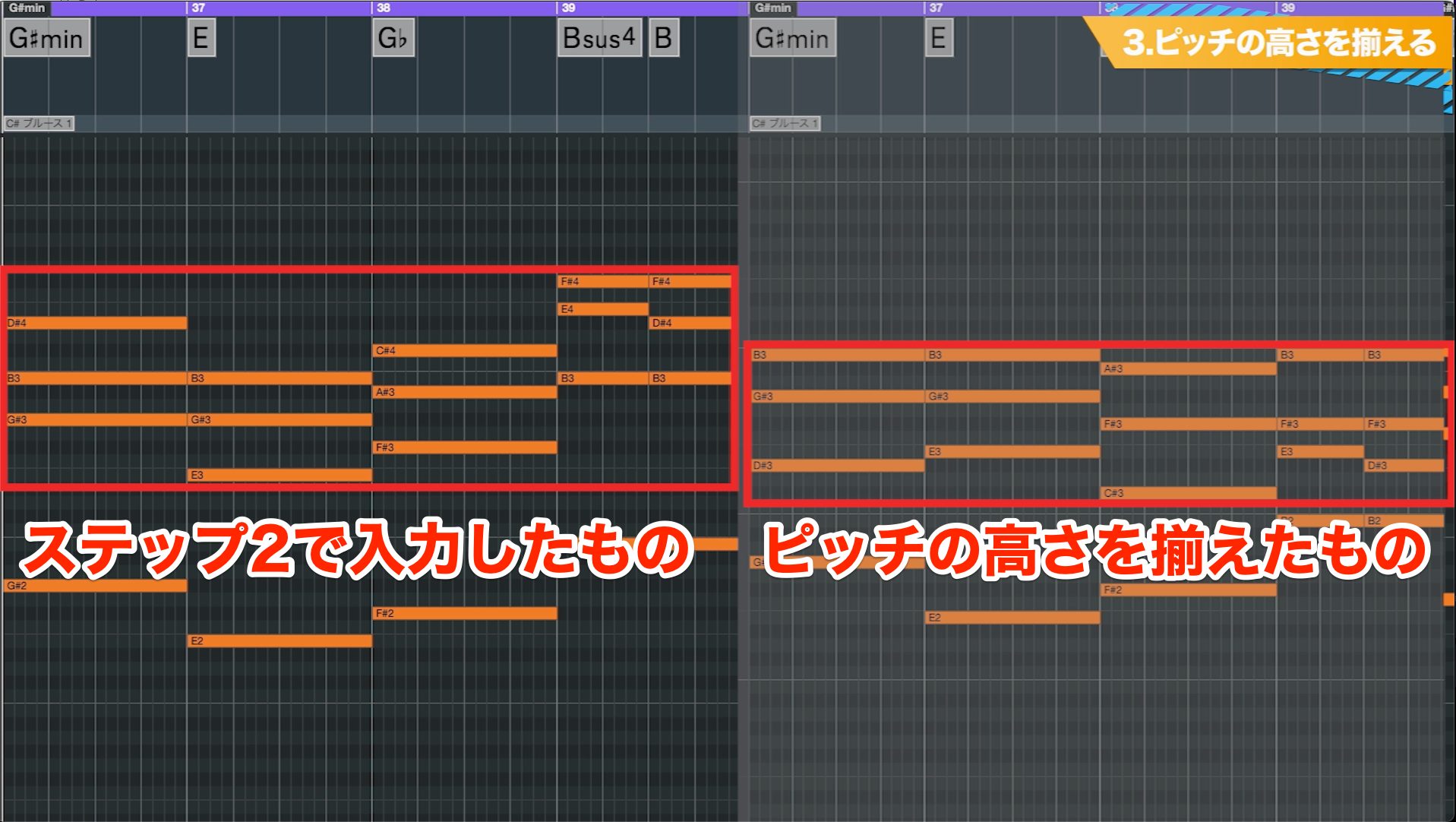
Compare the root-position chords from Step 2 with accompaniment using closer voicings.
Before — Root-Position Chords
After — Closer Voicings
The Step 2 version works as accompaniment, but keeping the voicings in a similar register gives a steadier sound.
You may wonder whether moving notes changes the chord. Reordering its chord tones into a different voicing does not necessarily change its harmonic identity.
Use this to place each chord in a register close to its neighbors.
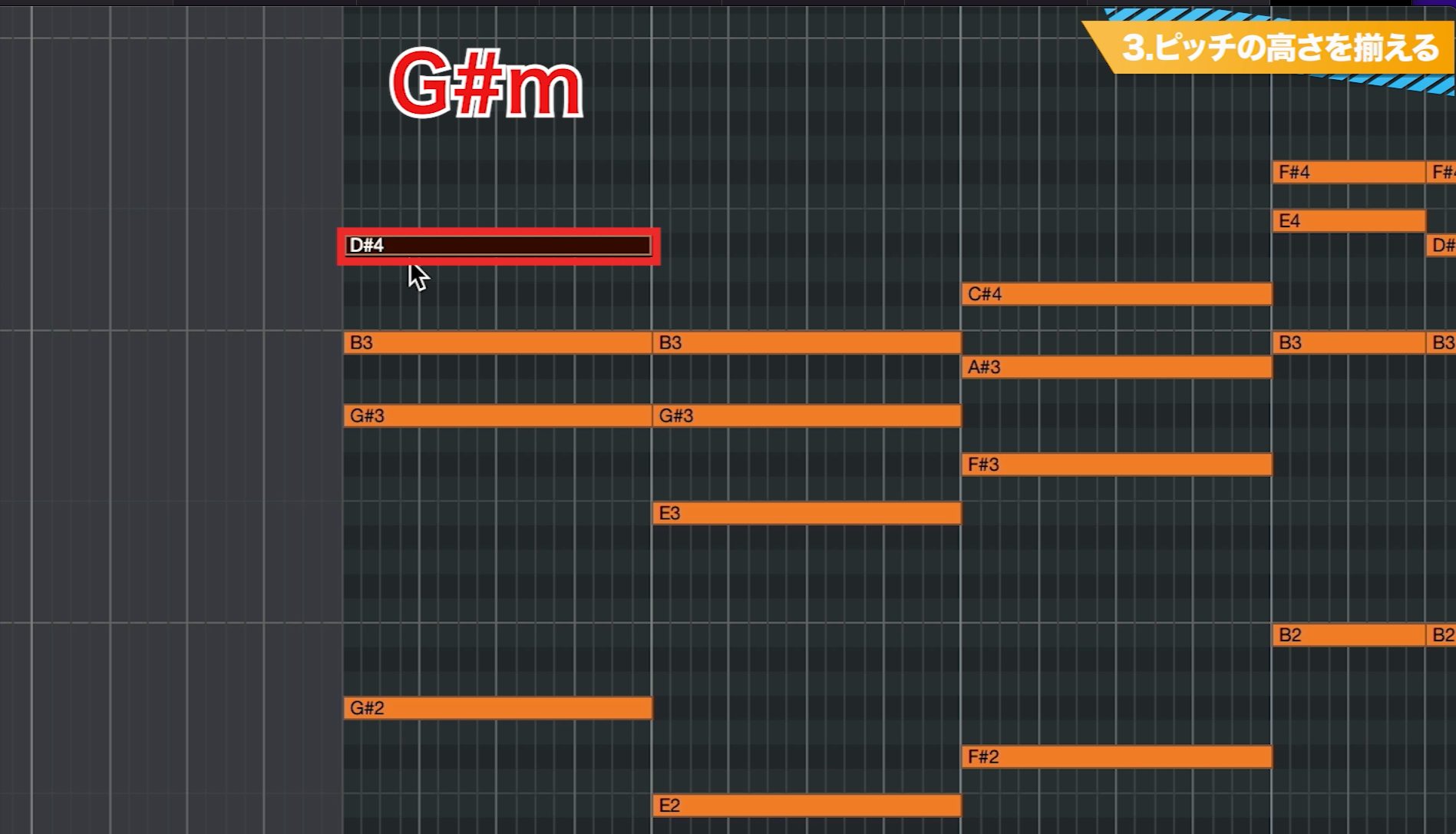
For G♯m, the right-hand notes in the image are G♯, B, and D♯ from bottom to top.
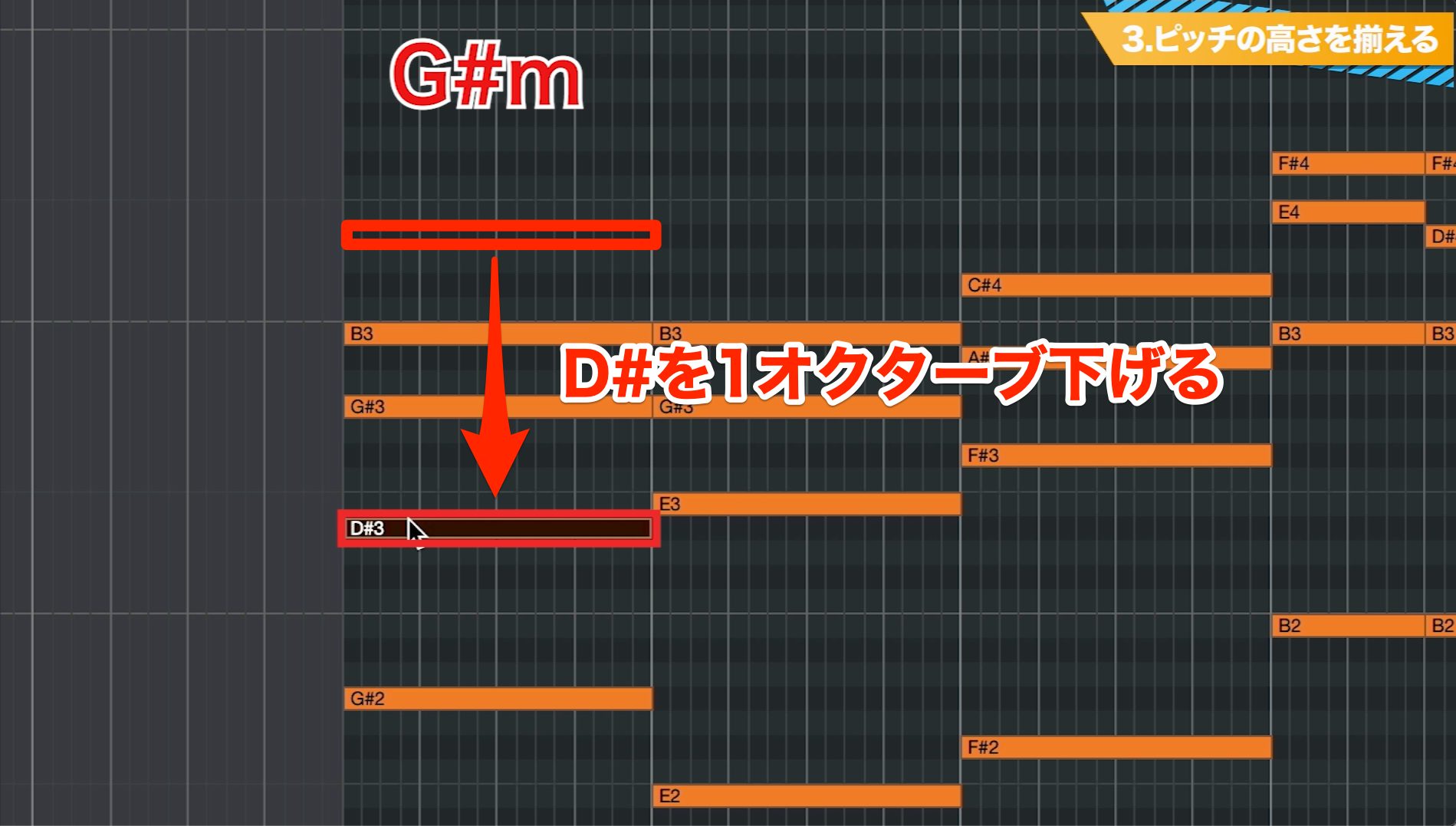
Move the highest D♯ down an octave. The same chord tones remain; this changes the right-hand voicing into an inversion.
Programming Tip
Keep the following in mind when adjusting the register.
You can invert the right-hand voicing freely. For the root-position bass approach used in this exercise, keep the lowest left-hand note on the root.
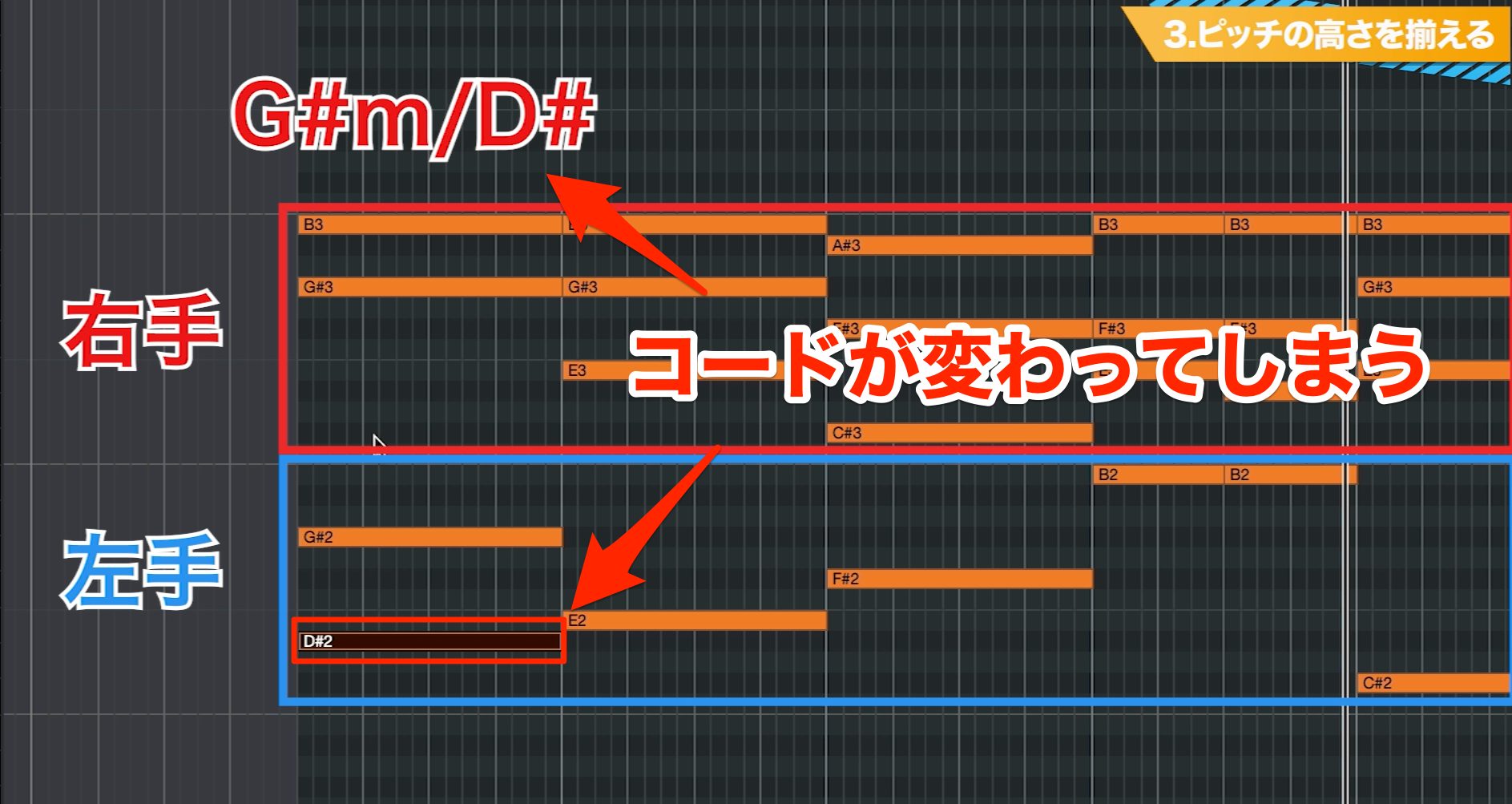
Moving the bass away from the root changes the inversion and bass relationship; it does not automatically create an entirely different chord. For this exercise, keep the root lowest unless a slash chord such as G/B specifies another bass note—the note after the slash.
Step 4: Add Rhythm
We've explored how to voice the chords. Now let's add rhythm.
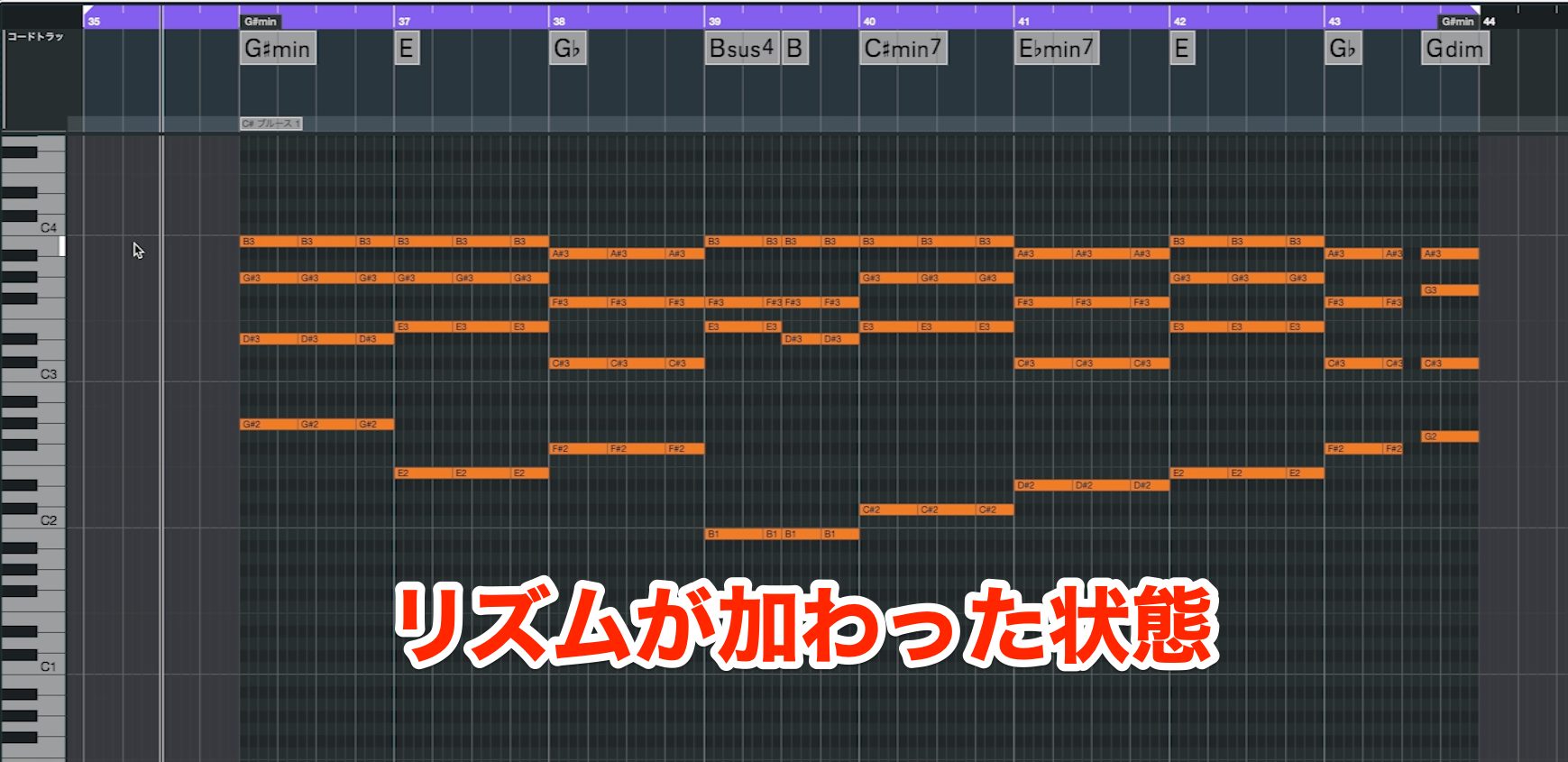
Step 4 — Rhythmic Accompaniment
The piano has a clear attack, so rhythmic articulation can make the whole song feel more lively.
There are many possible patterns. Here, we'll start with a common approach: following the drums.
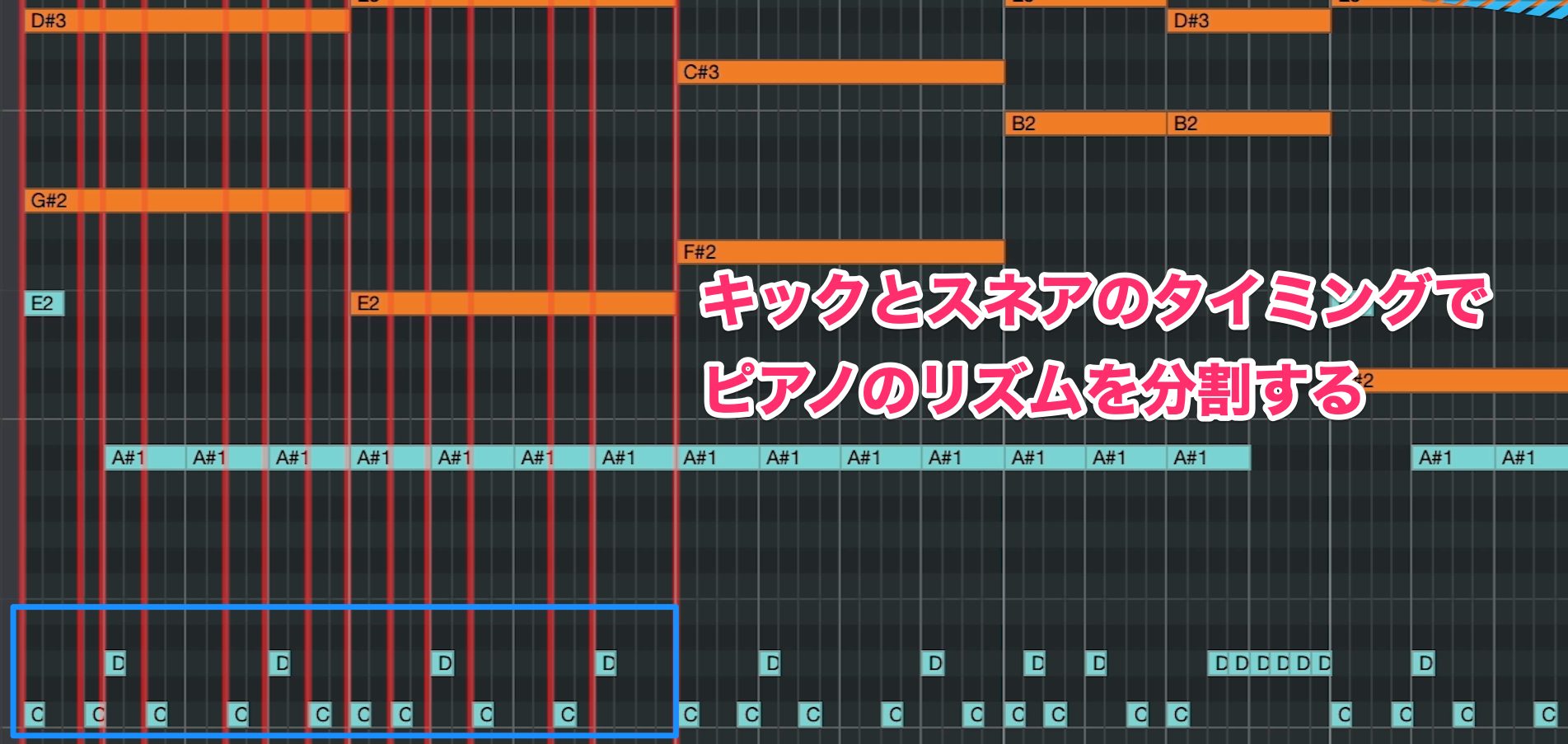
Display the piano and drum tracks together, then divide the piano notes to line up with the kick and snare rhythm.
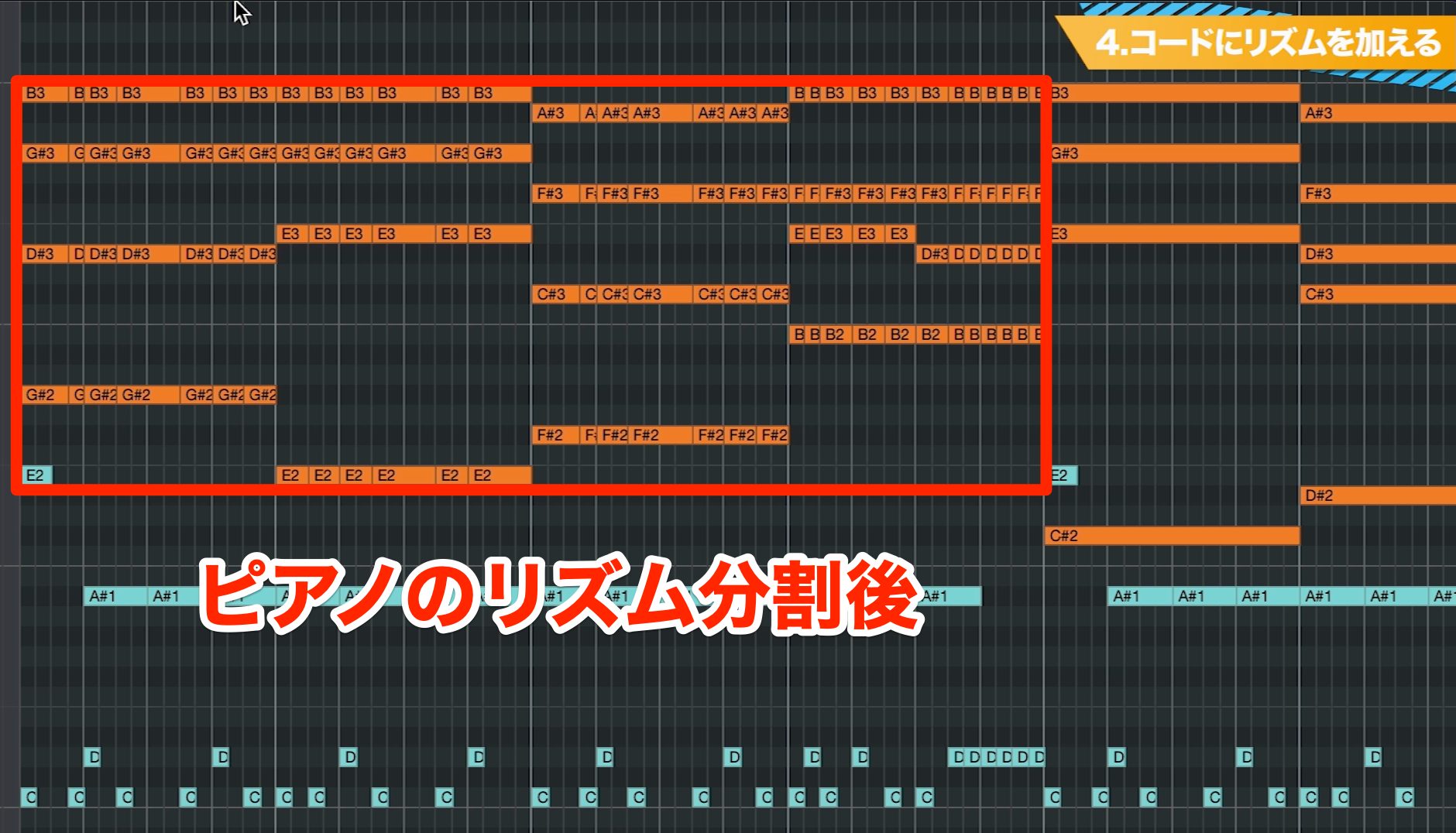
Initially, we've split the piano chords at every kick and snare hit.
Chords at Every Kick and Snare Hit
Listening back, this feels too busy, so let's remove some notes.
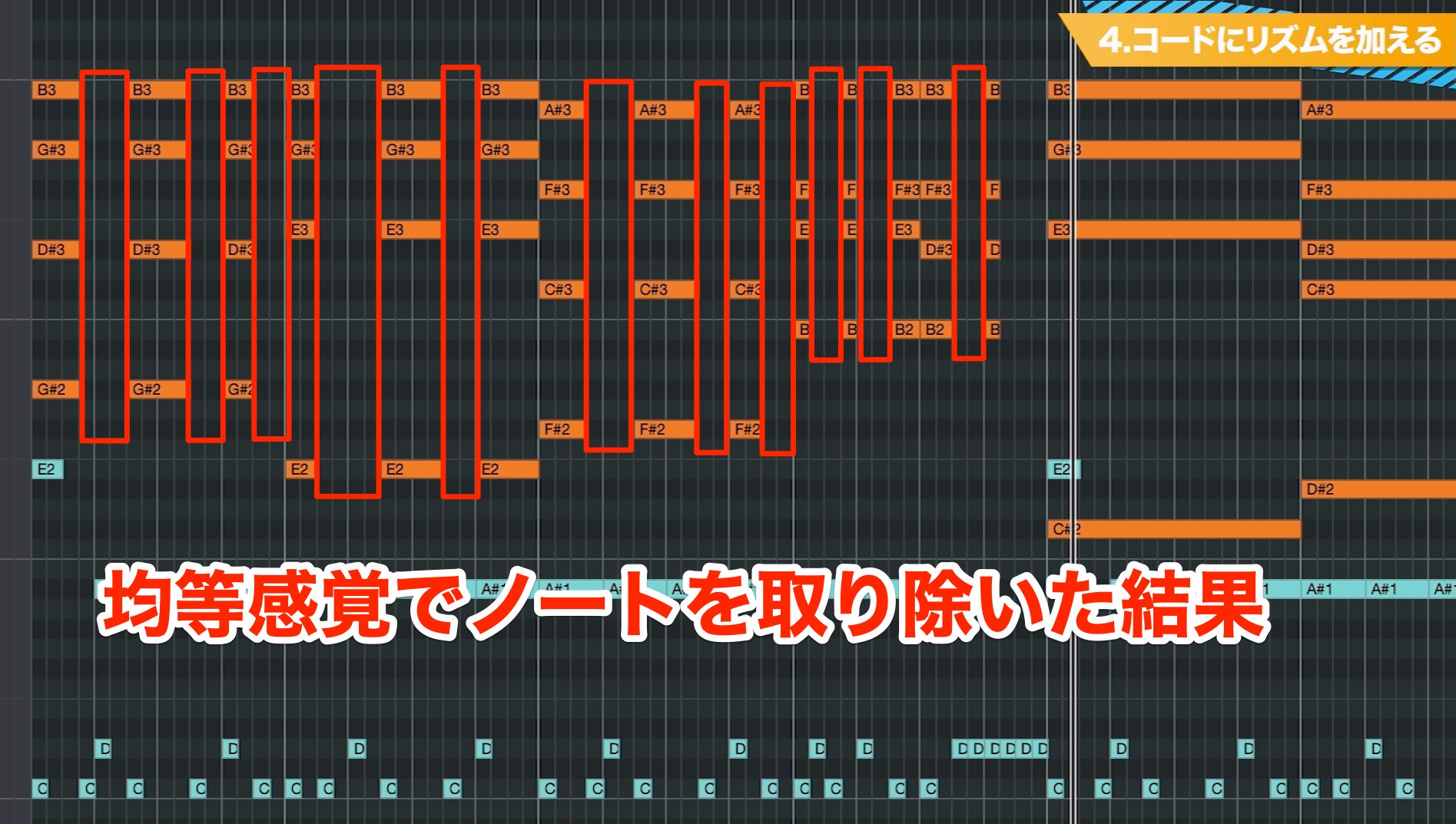
Here's the result after deleting some of those repeated chord hits at reasonably regular intervals.
Simplified Drum-Based Rhythm
This gives us a clearer, more natural rhythm while retaining a connection to the drums.
Step 5: Give Each Hand a Different Rhythm
Now add some differences between the hands to the shared rhythm from Step 4.
There's nothing wrong with both hands playing together, but different movements can produce a more detailed rhythmic pattern.
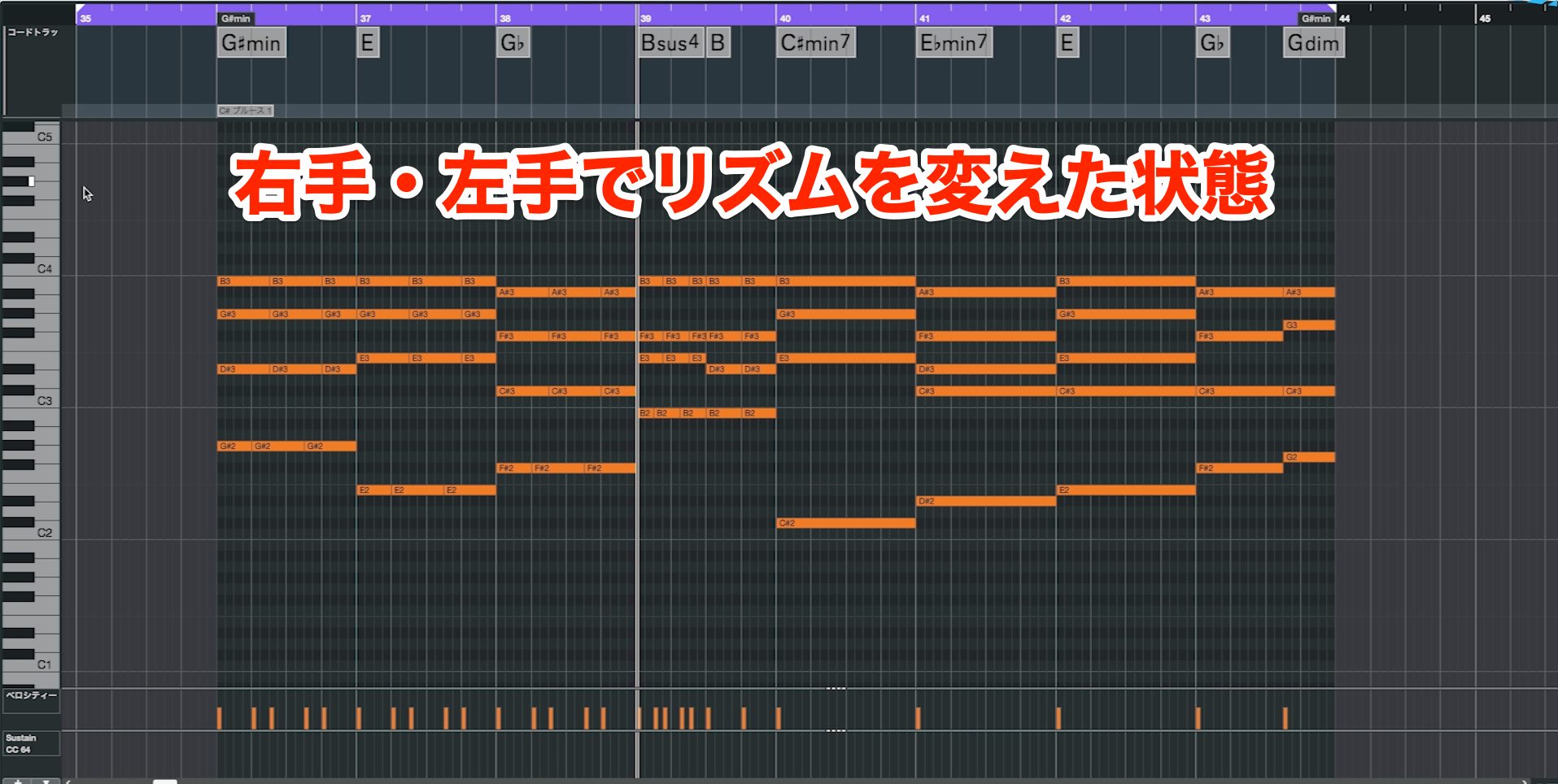
First, listen to a version with different left- and right-hand rhythms.
Step 5 — Independent Hand Rhythms
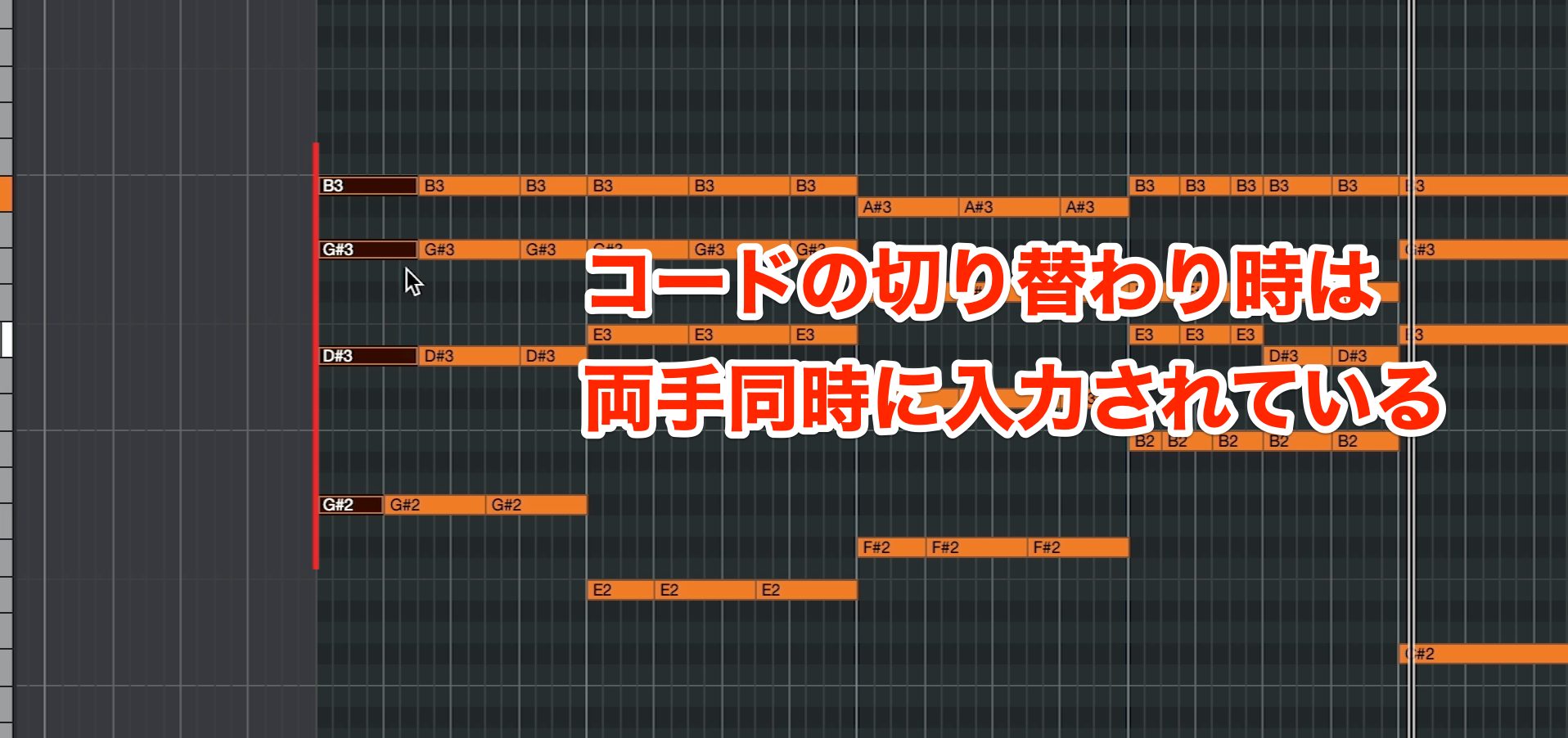
Both hands play together at the beginning of each chord change.
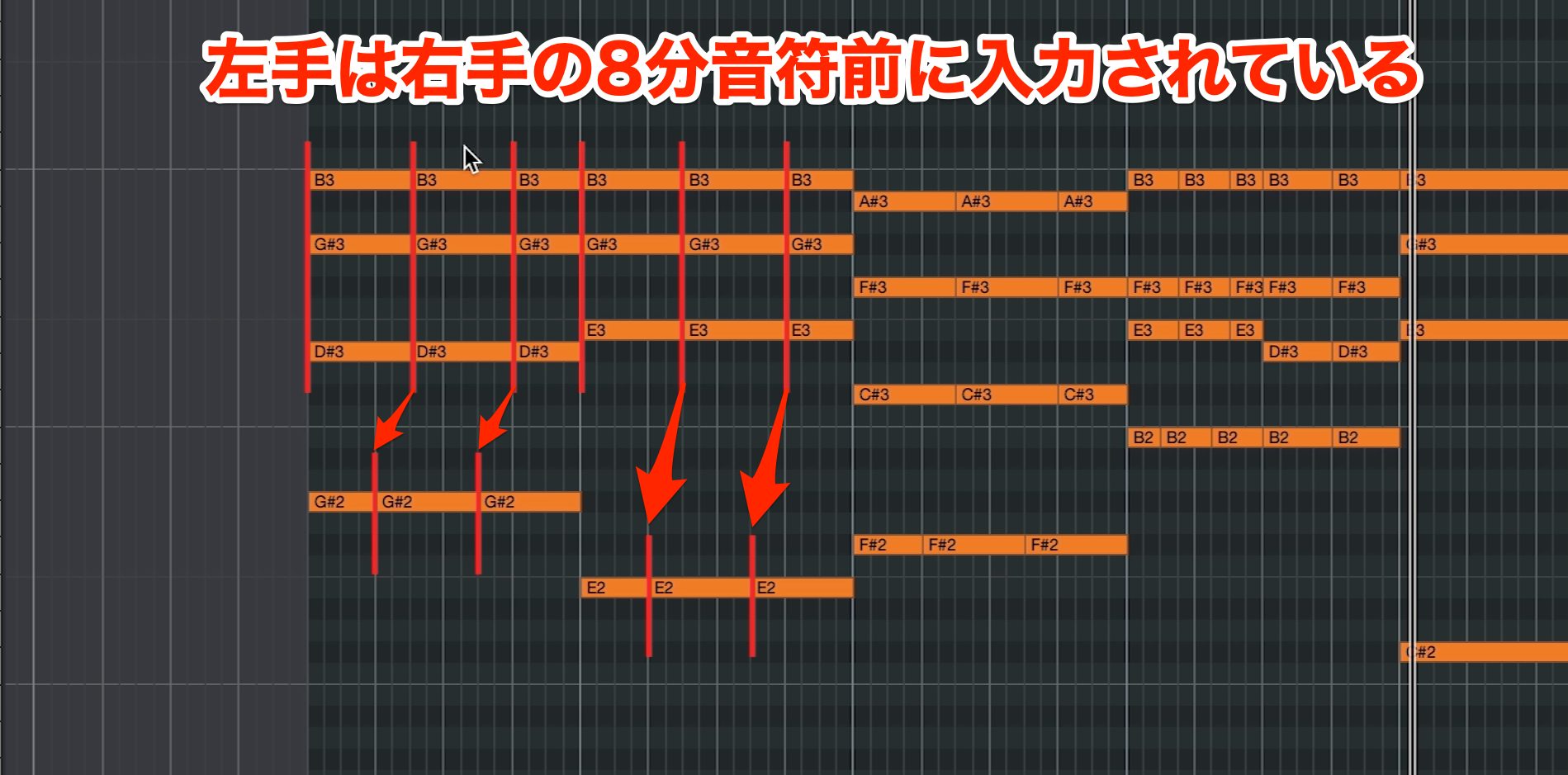
Elsewhere in this example, the left hand enters before the right.
This creates momentum: the left hand leads into an accent from the right hand.
There are many possible left-hand rhythms, but placing it just before the right hand is a useful, common option to try.
Step 6: Deliberately Vary the Chord Register
Step 3 kept successive voicings in a similar register. Now let's deliberately vary their height.
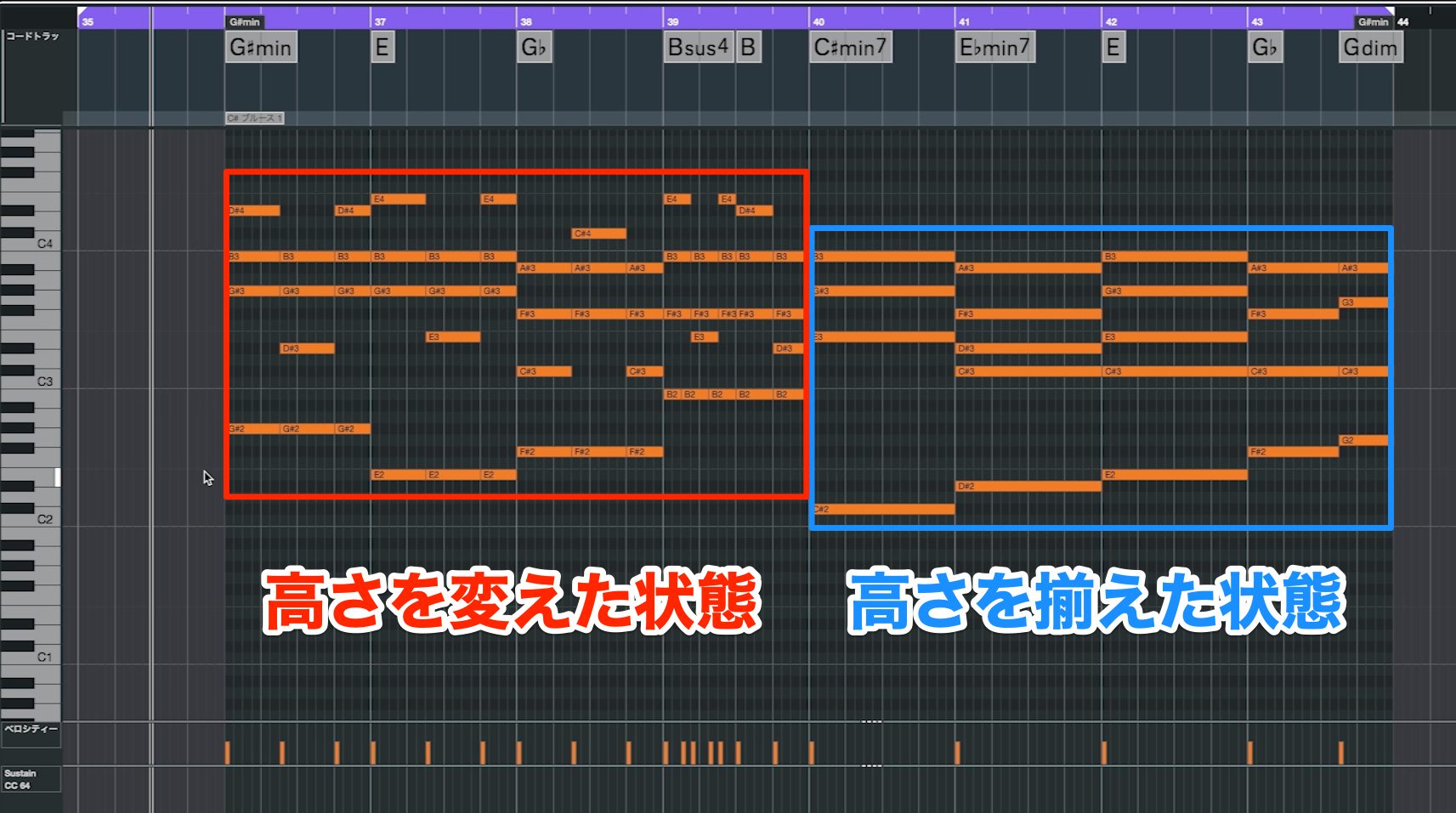
Compare a version with an even register against one with intentional changes.
Before — Even Register
After — Varied Register
The even version feels stable and clearly accompanimental, while changing the register introduces a more melodic quality.
The highest note, or top note, is especially noticeable. As it rises and falls, we hear its movement as something like a melody.
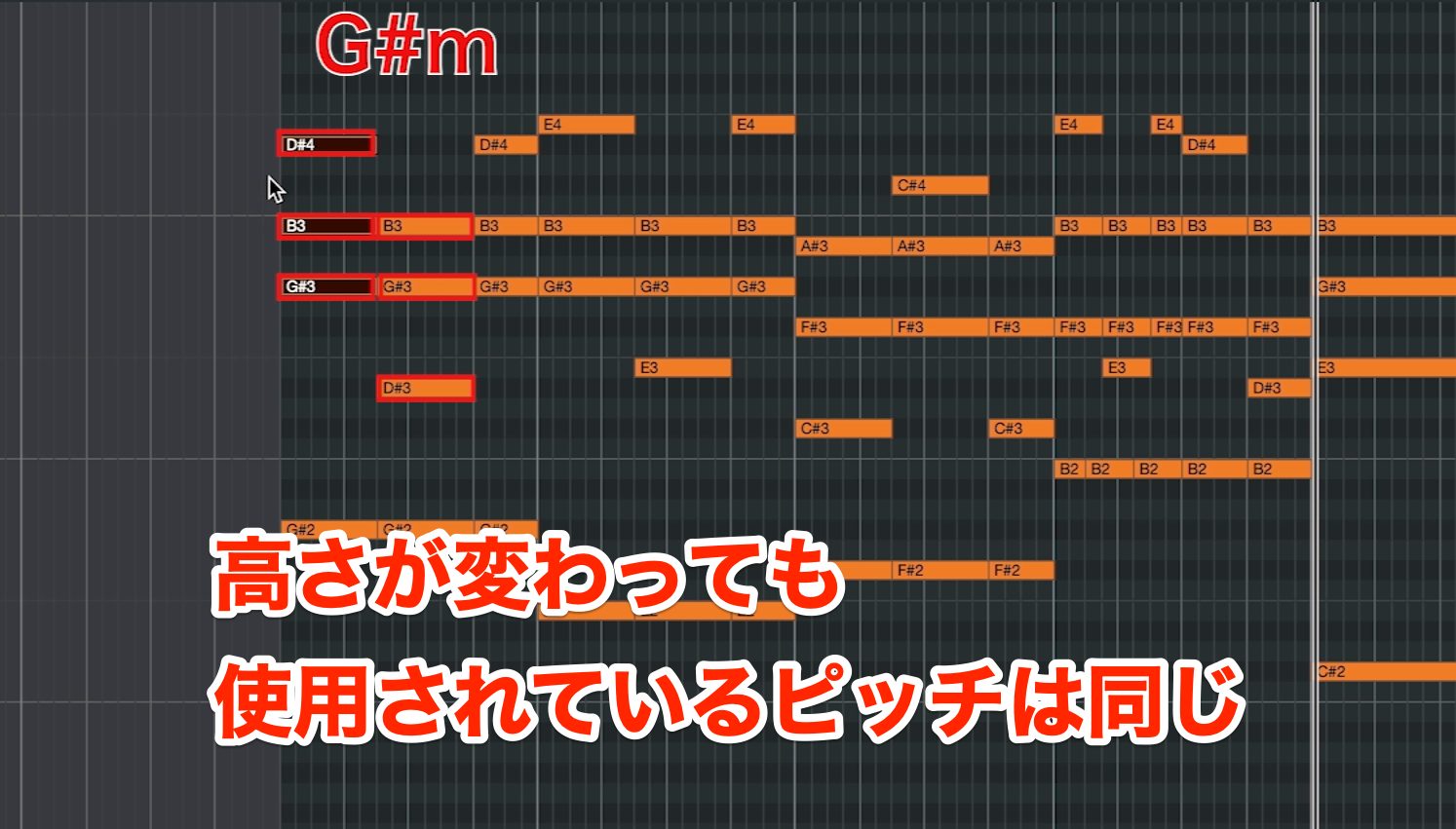
Looking closely, a G♯m chord still uses only G♯, B, and D♯, despite the changes in register.
As in Step 3, we're moving chord tones into different octaves and inversions.
You can vary the register freely, but be careful with extreme jumps.
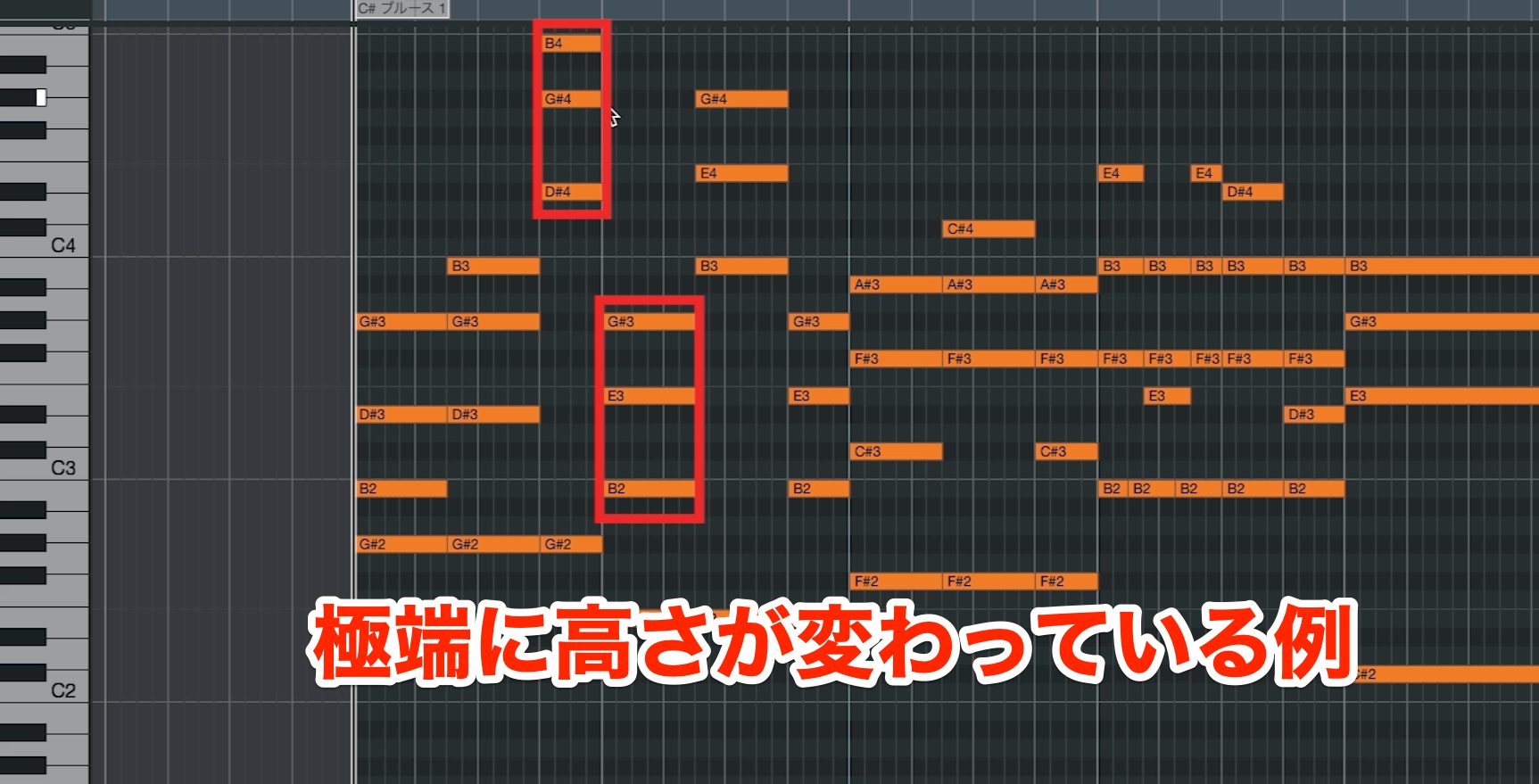
Without a clear intention, large leaps can turn high notes into arbitrary accents and make the part feel disconnected.
Example — Excessive Register Jumps
Step 7: Use Non-Chord Tones
So far, we've used only chord tones. Now let's add notes outside the chord to create more colorful phrases.
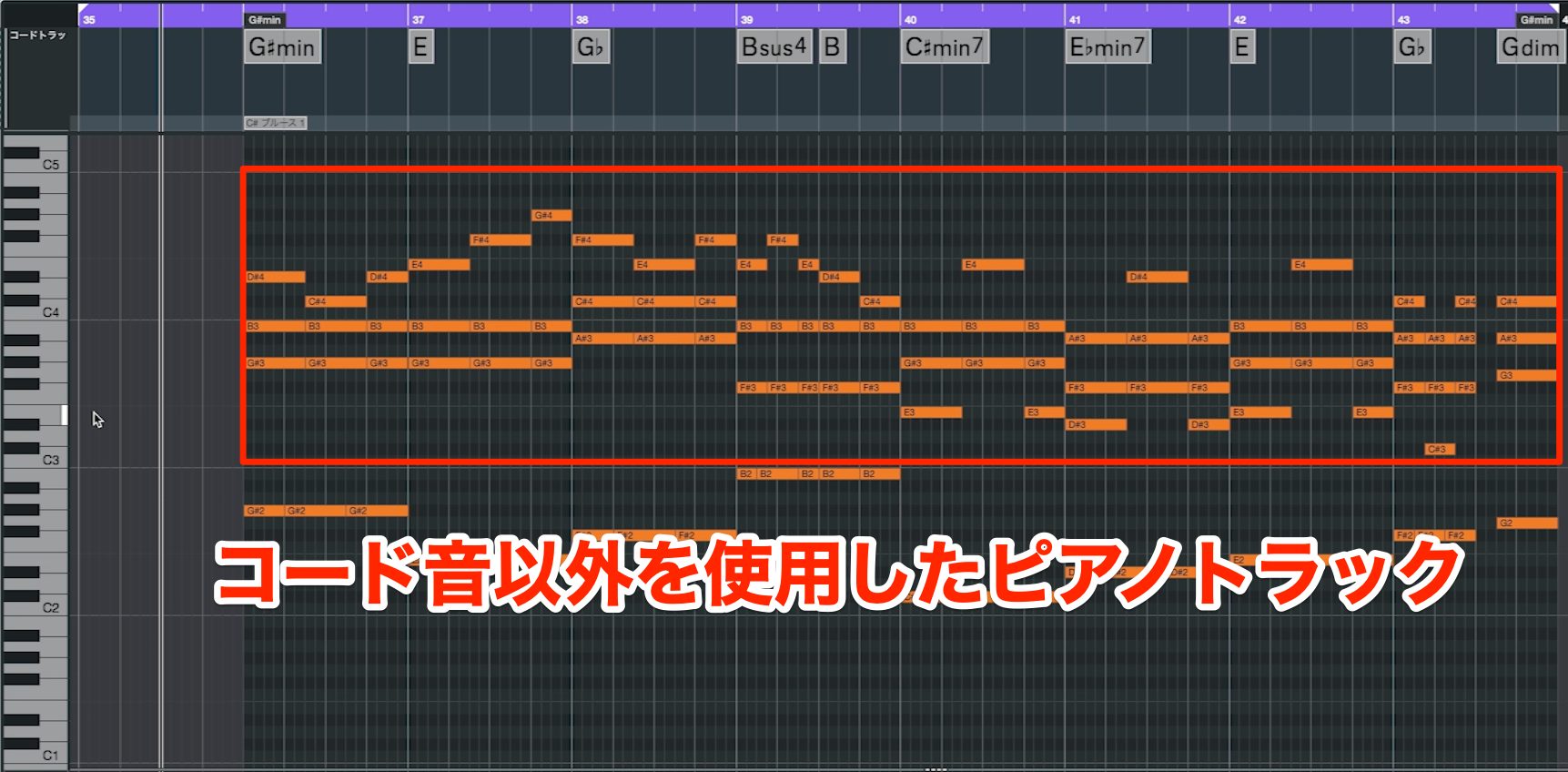
First, listen to an example containing non-chord tones.
Step 7 — Non-Chord Tones
The piano sounds even more melodic than it did in Step 6.
This is useful when you want the piano accompaniment to stand out a little more.
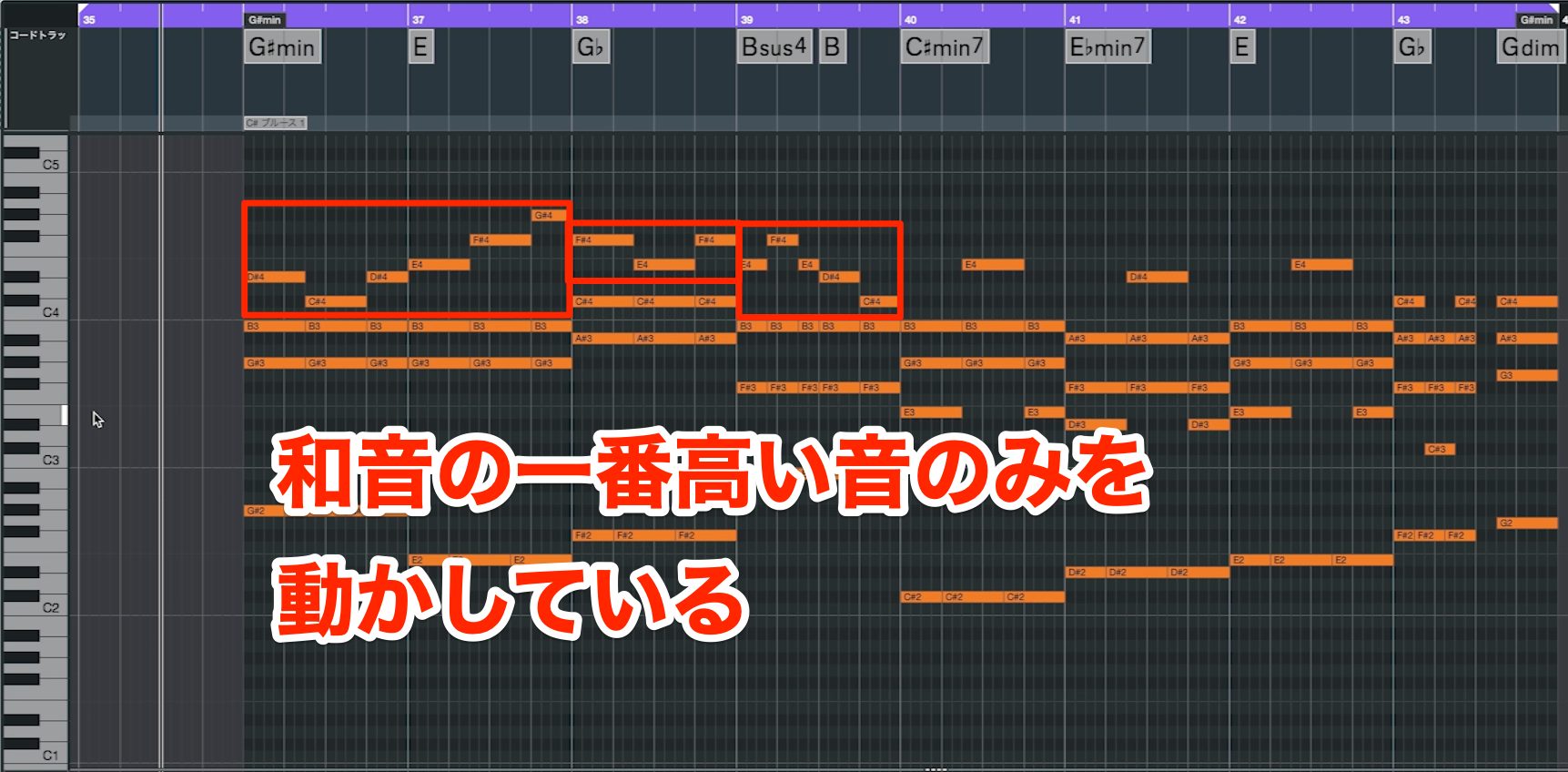
Notice that only the highest note moves outside the chord in this example.
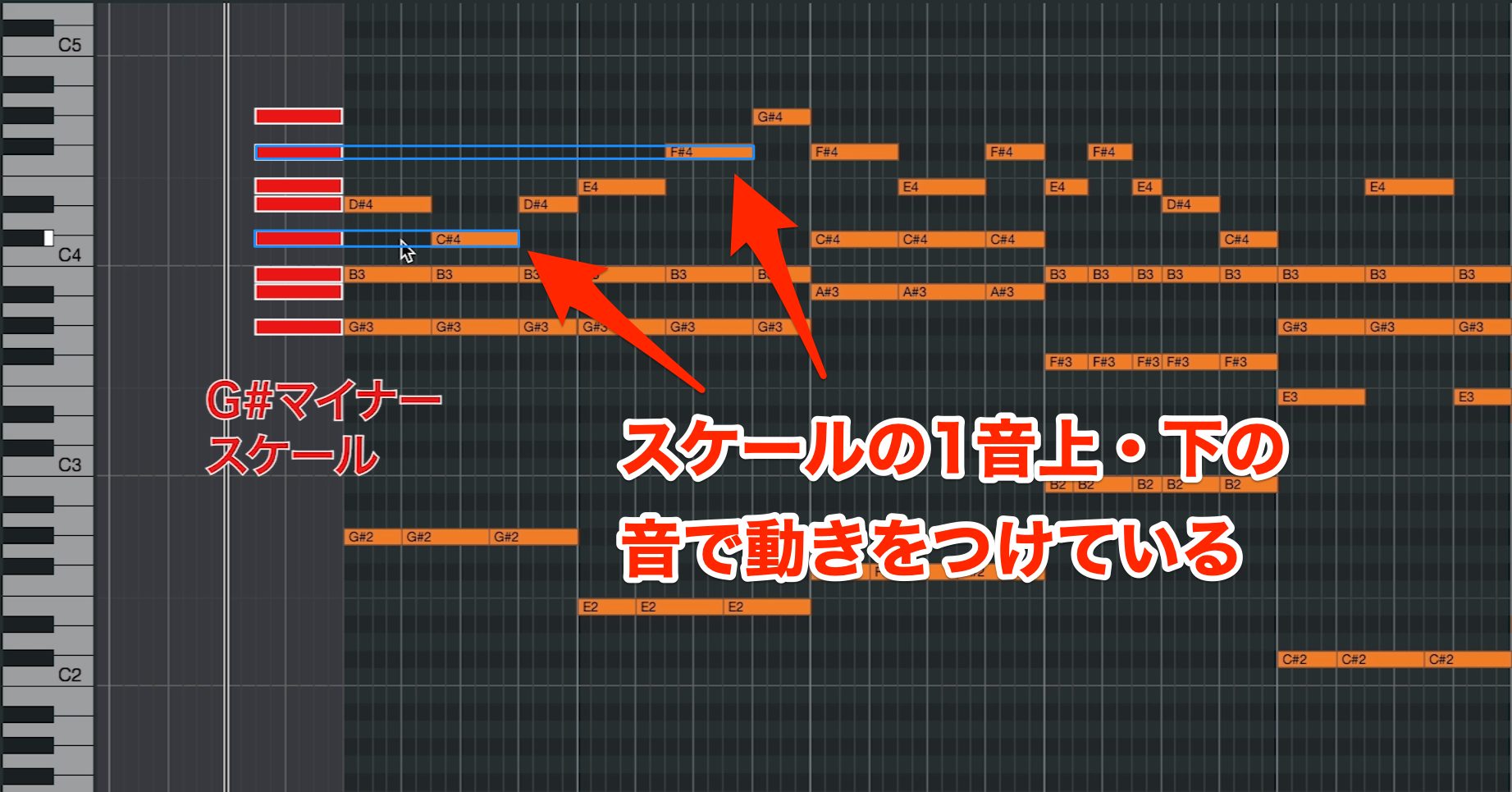
It moves one scale step above or below a chord tone—to a neighboring scale note—to create a stable, flowing line.
Sometimes, though, you may want a larger leap upward or downward.
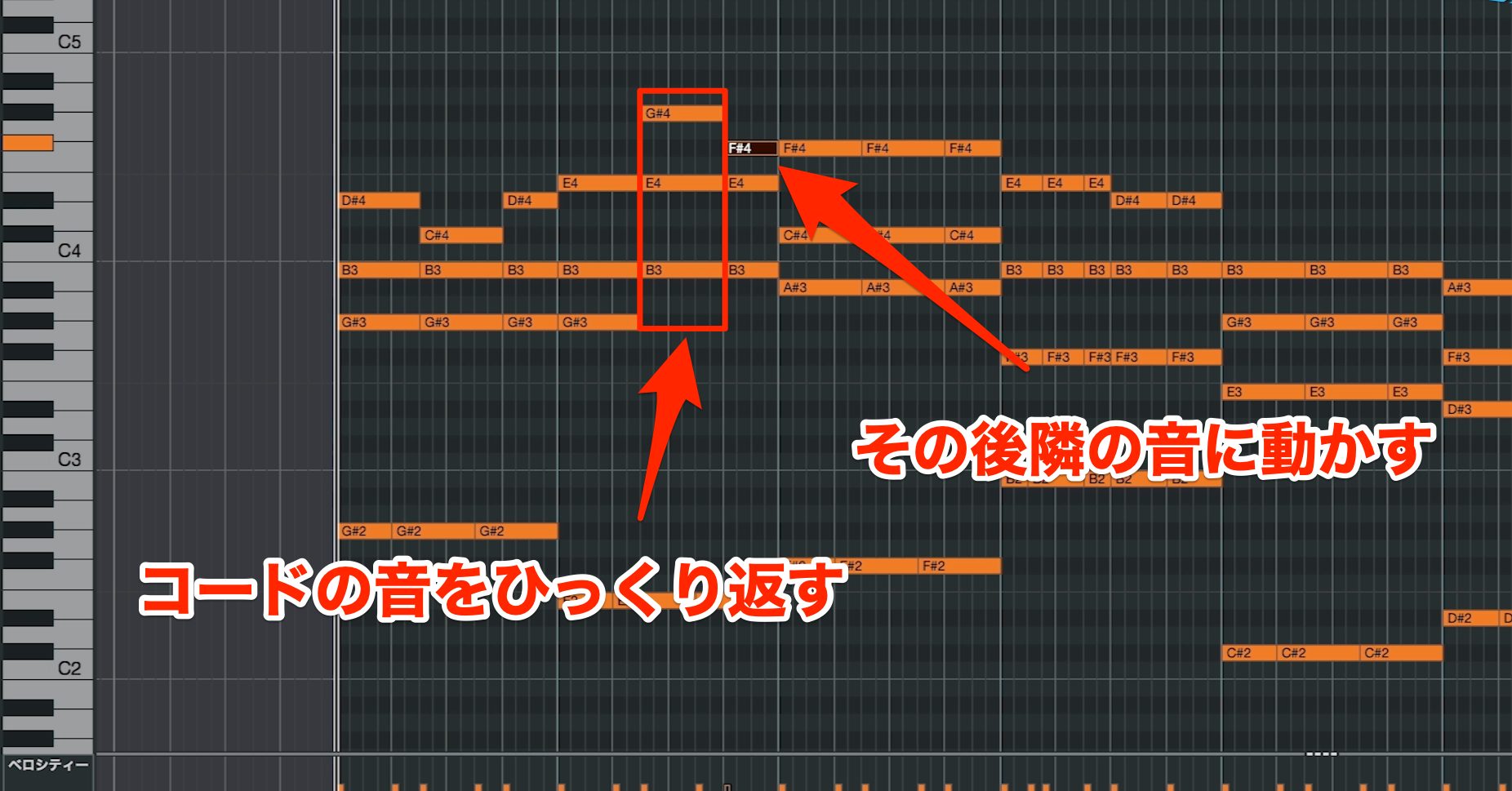
In that case, first change the voicing as in Step 6, then move to a neighboring scale note. This helps a larger change in register retain a melodic flow.
Programming Tip
For this exercise, use only chord tones at the moment each chord changes.
This lets you add pitch movement while maintaining a clear harmonic foundation. It is a useful starting approach rather than a universal rule for every arrangement.
Step 8: Use Arpeggios
Next, we'll introduce one of the piano's familiar techniques: arpeggios.
An arpeggio, or broken chord, plays the notes of a chord separately rather than all at once.
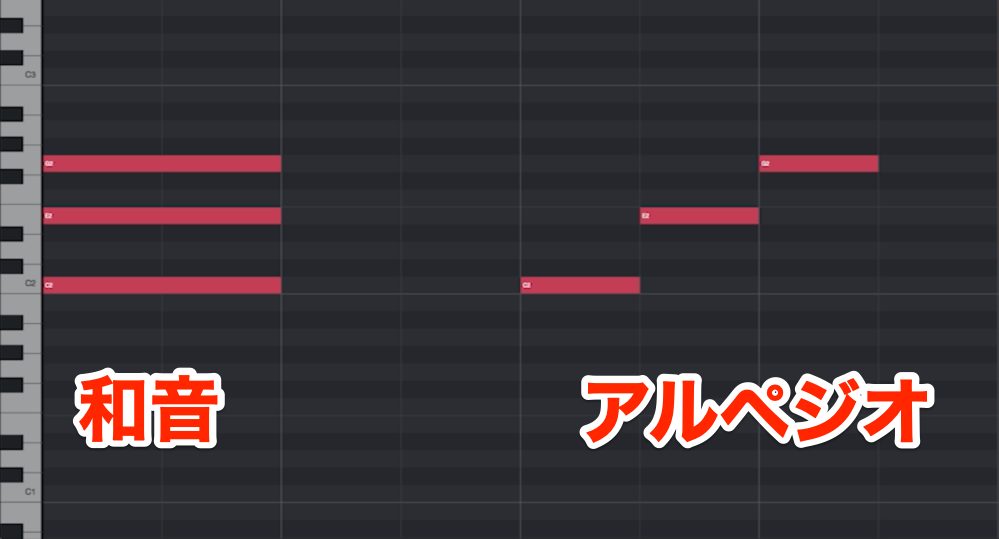
The basic idea is to stagger the chord tones in time, as shown above.
Let's hear a pattern using arpeggios.
Step 8 — Arpeggios
It has less of the force of simultaneous chord strikes, but gives the accompaniment a smoother, more melodic and colorful character.
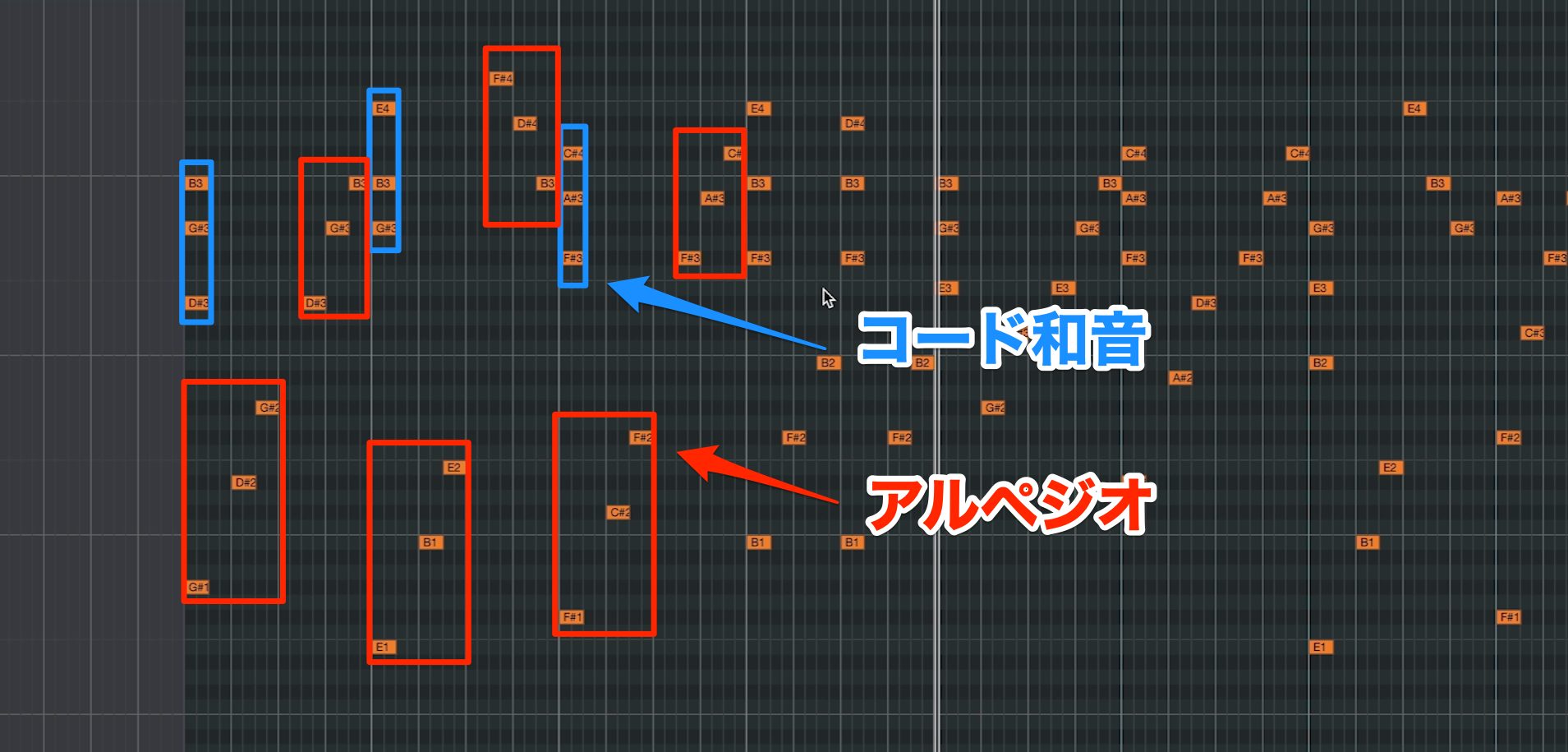
This example doesn't use arpeggios throughout: it strikes the chord at each change, then moves into an arpeggio.
Playing everything as arpeggios is also possible. Alternating between full chords and broken chords, however, creates contrast.
This arpeggio phrase is based on the chord voicings adjusted in Step 6.
You can therefore change the register of the arpeggio notes too, while retaining the chord tones.
Programming Tip
Pianists commonly use the sustain pedal, also called the damper pedal, when playing arpeggios.
It allows notes to overlap while the chord is played one note at a time. This is especially useful for arpeggios with wide leaps or fast movement.
When programming, it also saves you from extending every note manually and makes the piano roll easier to read.
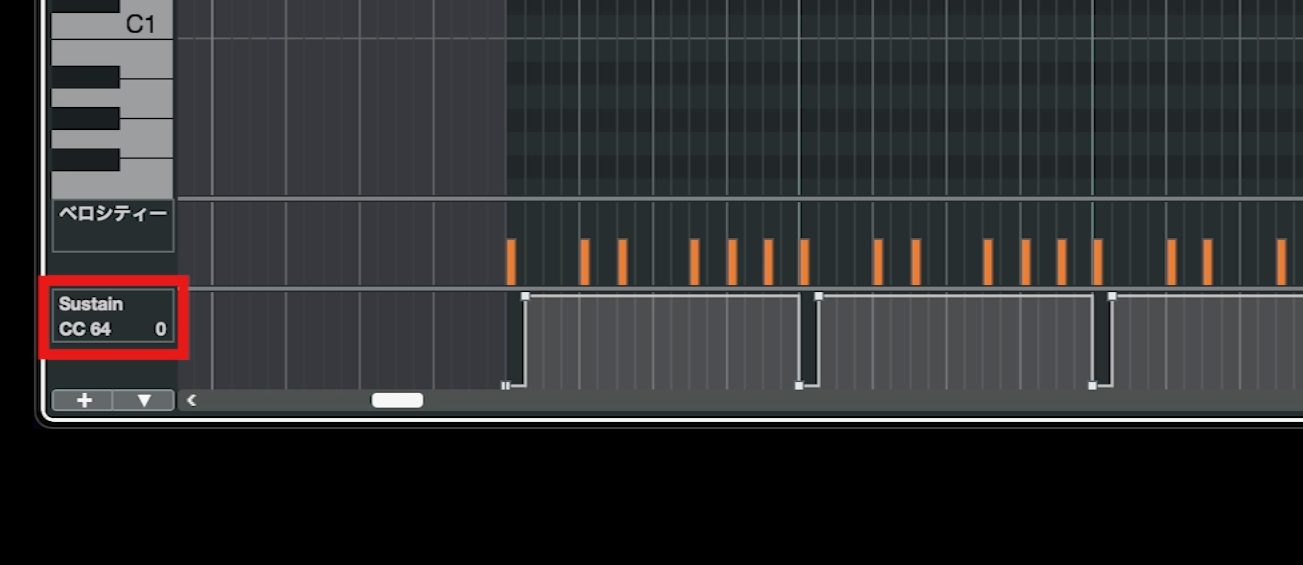
Most piano instruments use MIDI CC64 to control the sustain pedal.
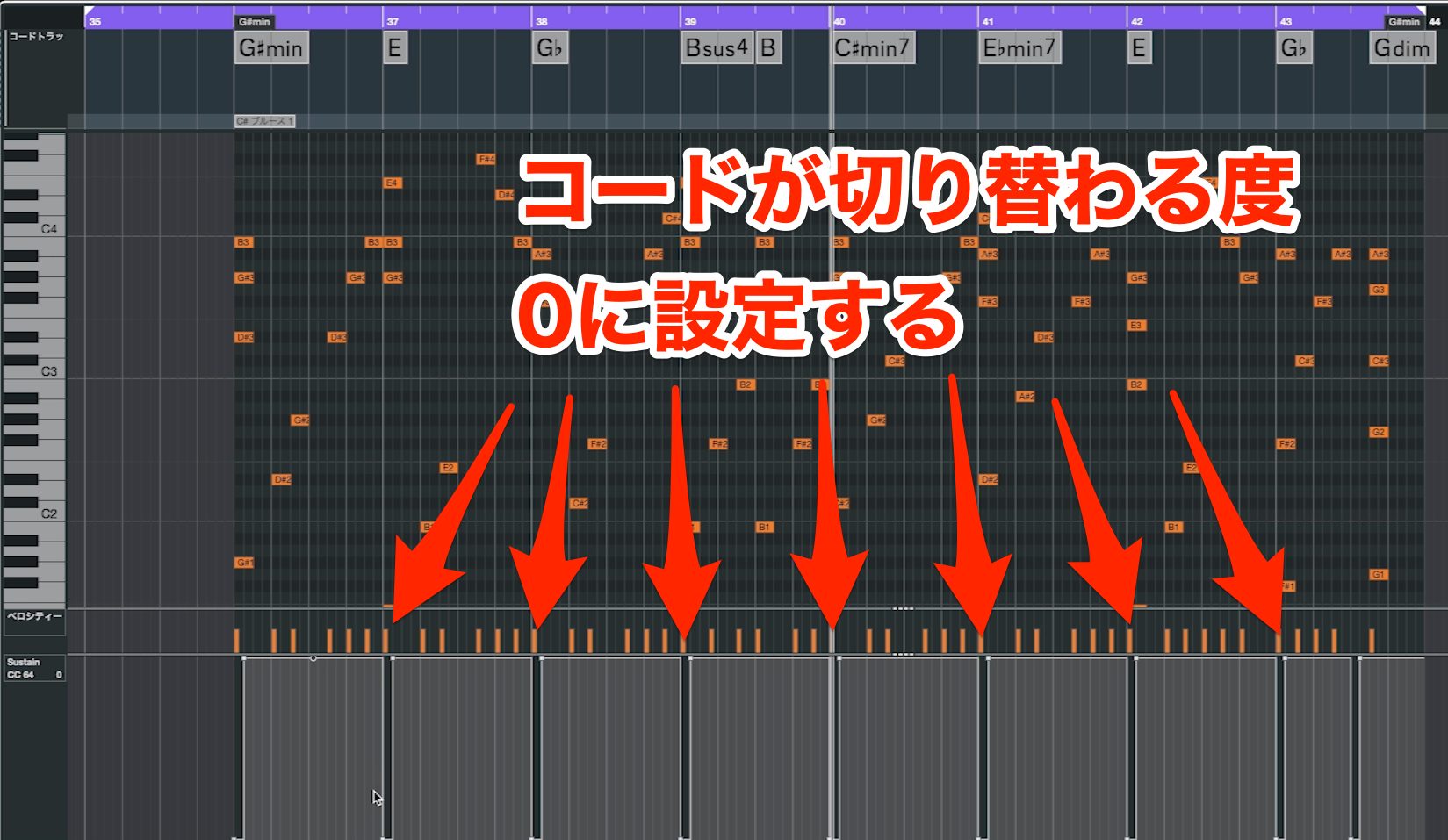
For the pattern shown here, reset CC64 to 0 on the first beat of each chord change before reapplying sustain. Otherwise, notes from the previous chord may keep ringing and clash with the new harmony.
Step 9: Add a Countermelody
Now give the piano a second melodic role behind the main melody.
Depending on its function, this may be called a countermelody, an inner melodic line, or an obbligato.
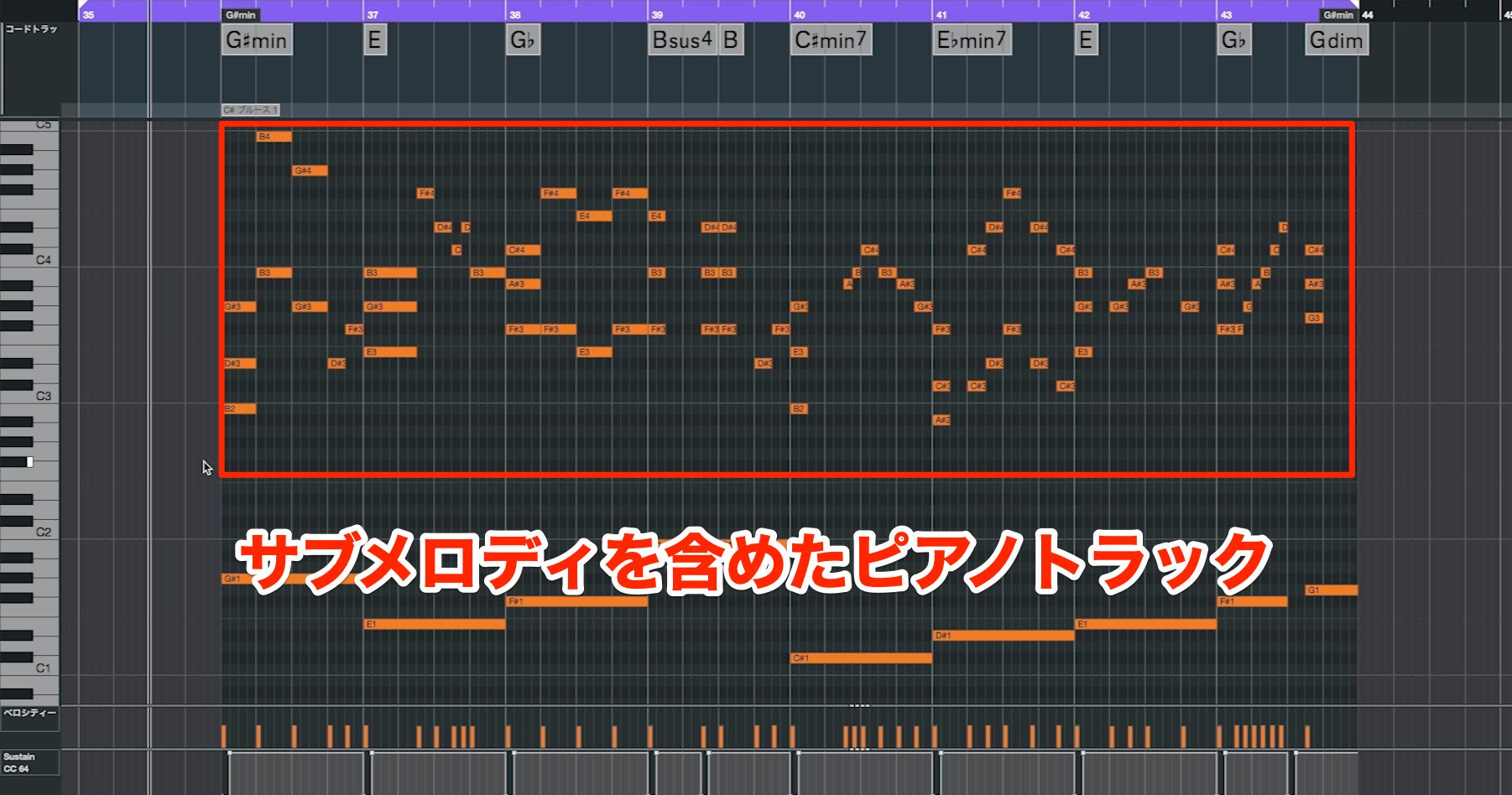
First, listen to the example.
Step 9 — Countermelody
If accompaniment provides stability, a countermelody adds movement and color.
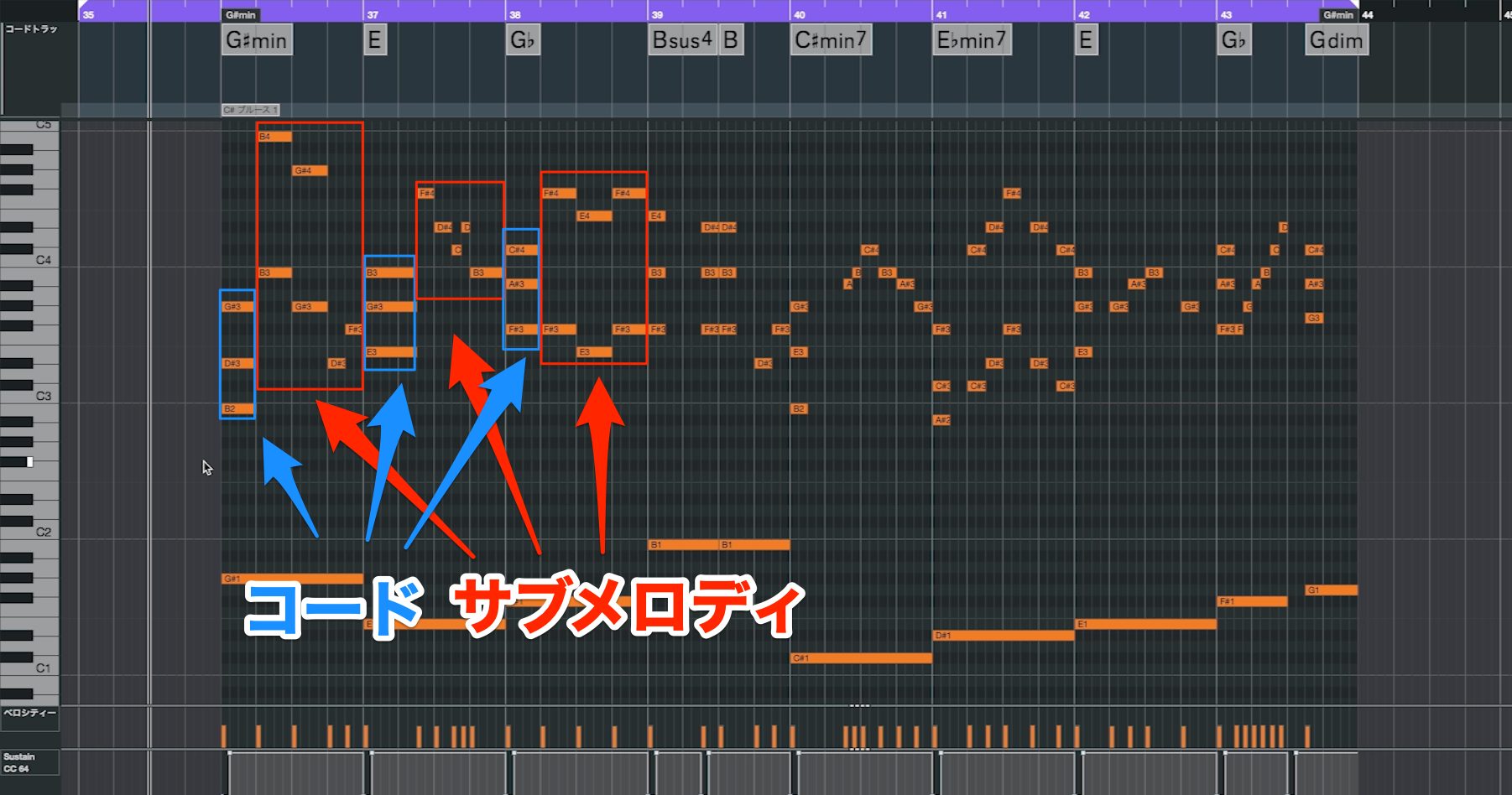
The example plays full chords at each chord change, then follows with a countermelody.
You can use a countermelody throughout, but if the piano must also provide accompaniment, combining the two roles is a useful approach.
A countermelody needn't remain a single-note line. Doubling it in octaves can make it more powerful.
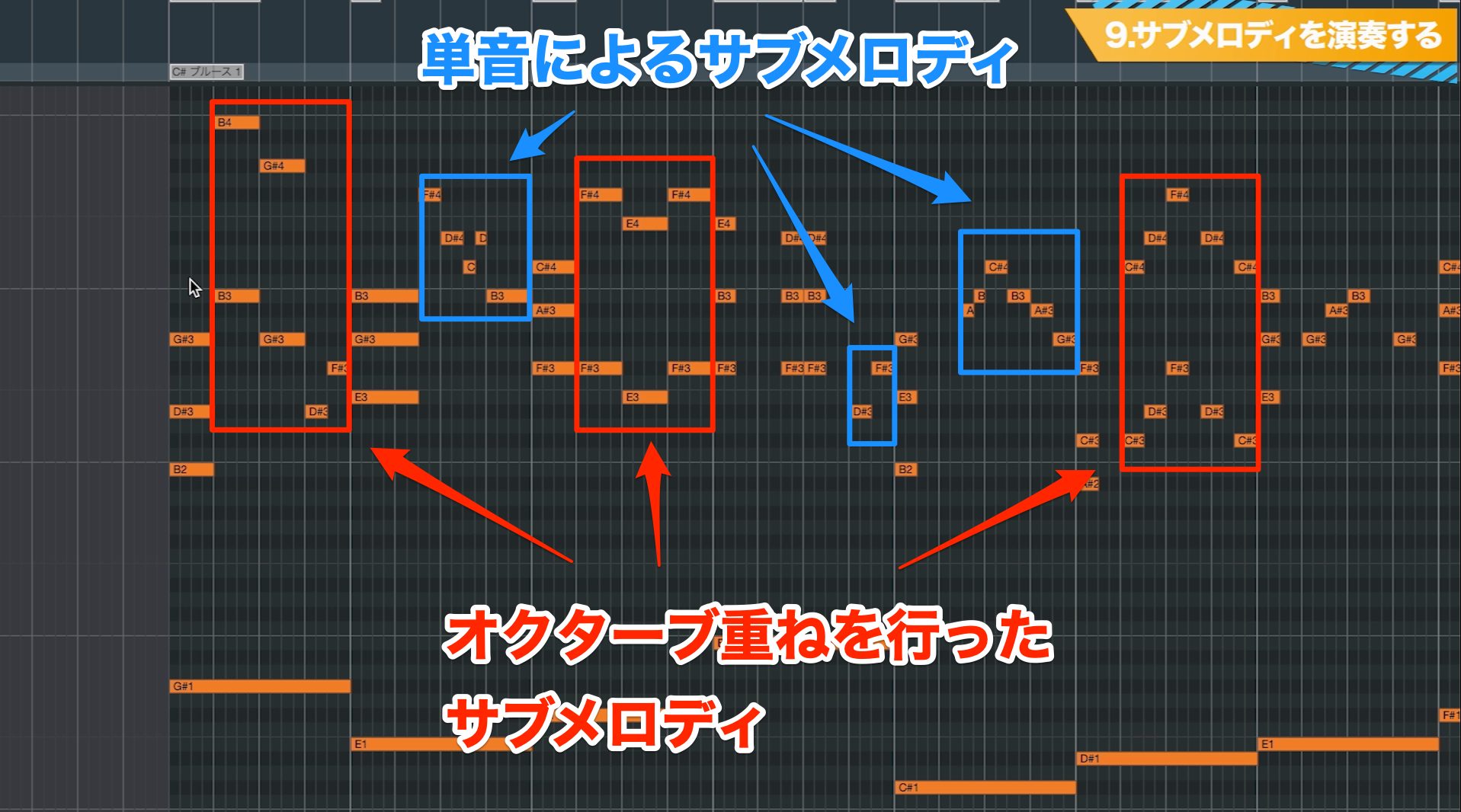
Alternating between single notes and octave doubling gives the line contrast.
Programming Tip
Make sure the countermelody doesn't get in the way of the main melody.
When the main melody is busy, give the piano broader rhythms. When the melody rests or holds a note, let the piano take on more detailed movement.
This way, the main melody and countermelody can support each other and both become more memorable.
Step 10: Combine Steps 1–9
Finally, combine the techniques from Steps 1–9 into a complete piano track.
The varied, active version you heard at the beginning was created in this step.
Step 10 — Full Arrangement
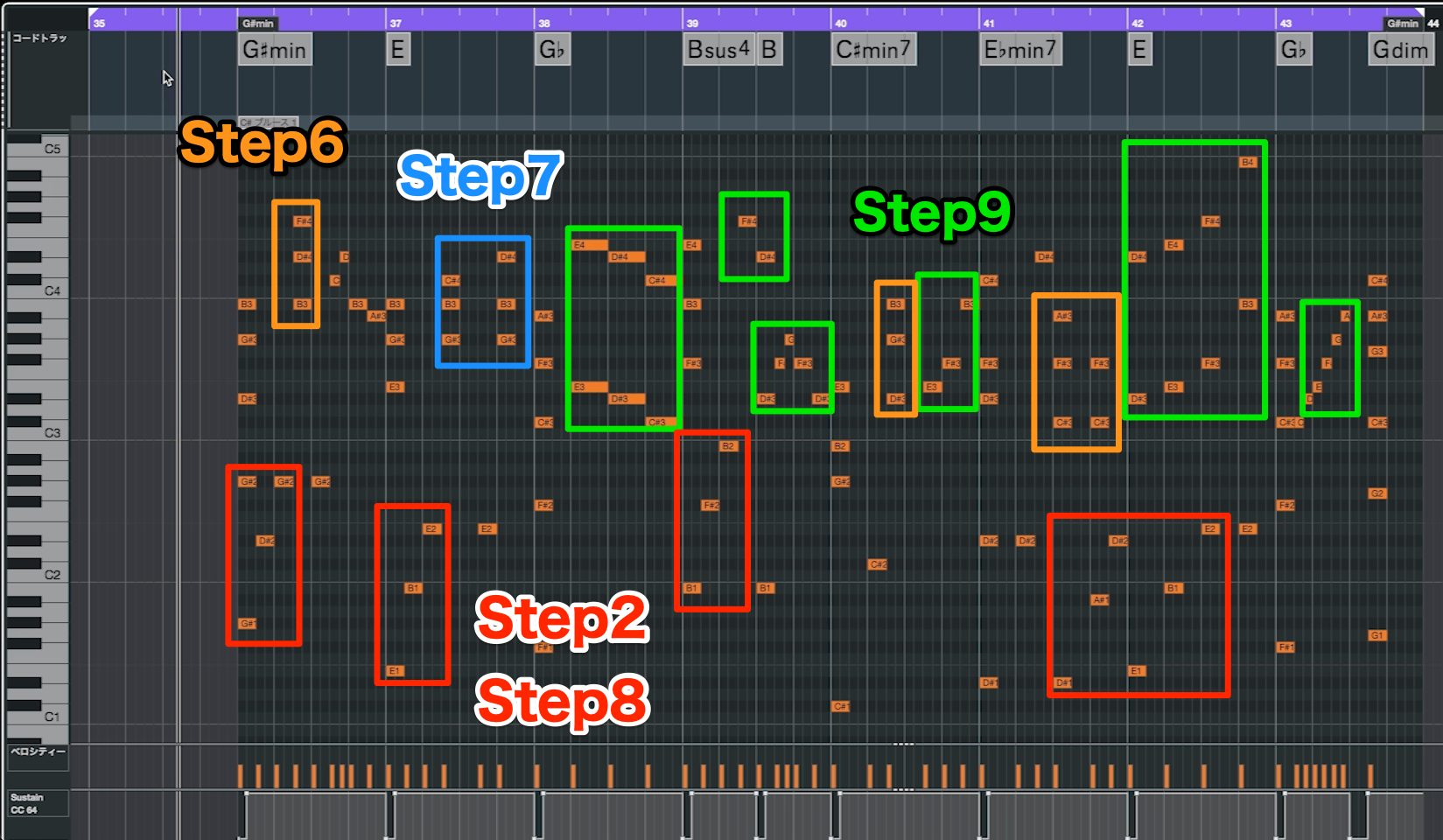
It may sound complicated, but each part comes from one of the steps we've covered.
The left hand uses octave roots and fifths from Step 2, with arpeggios from Step 8 adding contrast.
The right hand combines the inversions from Step 6, scale-based movement from Step 7, and countermelodies from Step 9 to build energy and drama.
Learning and combining a few patterns like these can greatly expand your piano arrangements.
This guide mainly explains how to create accompaniment patterns, but how you distribute them across a song matters too.
For example, use simple chords in the verse, a countermelody in the pre-chorus, and the fuller Step 10 approach in the chorus. Contrast between sections helps the track develop.
We hope to explore that topic further another time.
How to Create Piano Accompaniment in 10 Steps — A Beginner's Guide
Learn to turn simple chords into active piano phrases for J-pop-style songs in ten steps.Details: https://t.co/kGPrlZKA7D #MusicProduction #MusicProducer pic.twitter.com/l9VBj6HoME
— SLEEP FREAKS (@SLEEPFREAKS_DTM) June 14, 2022
Frequently Asked Questions
Q1. Can a beginner program piano accompaniment?
Yes. This guide starts with root-position chords and builds up gradually. Follow the ten steps to work toward more active, detailed piano phrases.
Q2. What should the left hand play?
Roots are the starting point here. The four patterns are a single root, octave roots, root plus fifth, and root–fifth–octave. Choose a pattern that suits the song.
Q3. Why add movement to a piano part?
Movement can make the whole song feel more colorful and energetic. Compared with simple block chords, these techniques offer more variety and help develop a polished arrangement.
Q4. How should I handle seventh chords and other four-note chords?
When the left hand supplies the root, try omitting it from the right-hand voicing. This can reduce unnecessary density, clarify the chord, and smooth transitions.
NEW ARTICLES
Latest English Articles
















































































































