
Cubase lets you integrate a hardware synthesizer into your workflow much like a software instrument. In this tutorial, the video walks through registering an external synthesizer and using it from MIDI tracks, including programming multiple sounds. VST Connections helps bring external equipment into your setup through an audio interface. This integrated setup can help streamline production and support improved sound quality.
Use a Hardware Synthesizer Like a Software Instrument in Cubase

This is a useful feature for anyone using a hardware synthesizer.
It lets you work with an external synthesizer much like a software instrument.
Reading this first will help you understand the tutorial in more depth:
17. Programming with an External Synthesizer
Video Tip: Registering an External Synthesizer
First, register the synthesizer.
From the top menu, choose Devices → VST Connections.
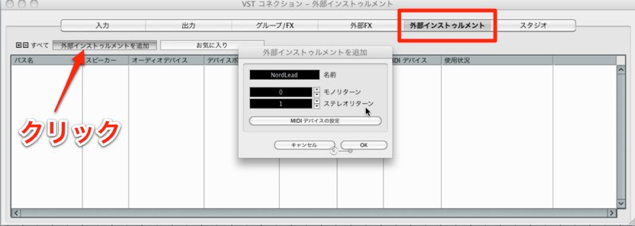
Enter the synthesizer name and set the number of returns, then click OK.
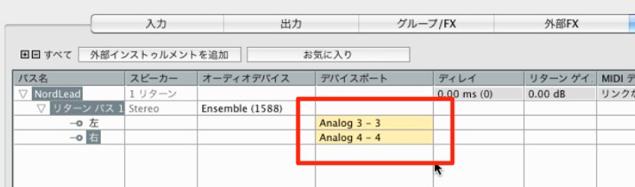
Set the ports.
Choose the audio interface channels to which the synthesizer is connected.
Video Tip: Using the External Synthesizer
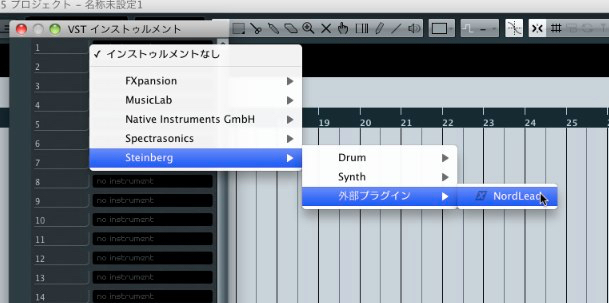
You can use it much like an ordinary software instrument.
“External Plug-ins” appears in the instrument list, where you can select the synthesizer you registered.
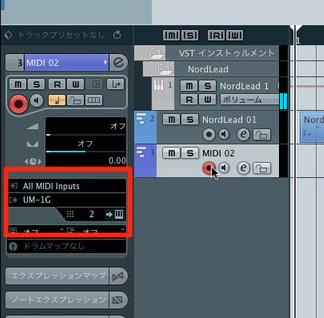
By setting MIDI track channels, you can also program multiple sounds.
Trouble with Audio Mixdown?
Frequently Asked Questions
Q1. What setup is needed to use a hardware synthesizer in Cubase?
From the Devices menu, choose VST Connections and set the synthesizer name and number of returns. Then configure the ports on your audio interface to integrate the hardware synthesizer with the DAW.
Q2. My hardware and software synthesizers both play at once. What should I do?
Check the track settings and MIDI destinations so that only the intended instrument receives the part. Review each track’s channel settings and adjust the routing as needed.
Q3. Can I use multiple hardware synthesizers?
Yes. Register each synthesizer and select the appropriate instrument for each track, using MIDI track channel settings to work with different sounds.
NEW ARTICLES
Latest English Articles










































































































































































































































































































































































































































































































































































































































































