
RealGuitar 3 is a guitar instrument plug-in capable of producing sounds close to a live performance. This practical guide covers programming guitar parts, from understanding minor seventh chord tones to using keyswitches in Solo mode for articulations. By entering the essential chord tones and adding effects such as slides with keyswitches, you can make guitar parts in your DAW sound more natural and convincing.
Use Articulations for a More Realistic Sound
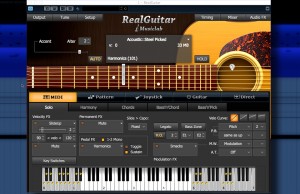
The previous article covered the basics of RealGuitar.
This time, we'll explore more practical uses of RealGuitar 3.
RealGuitar Video Guides
- 1Authorization
- 2Basics and Patterns
- 3RealGuitar 3 in Practice: Chords and Articulations (this article)
- 4RealGuitar 3 in Practice: Expressive Arpeggios
- 5How to Use the SONG Feature in RealGuitar 4
Purchase the Product
Excerpts from Questions and Answers on the YouTube Video

After dragging a strumming pattern into the piano roll, can I change the pattern there?

The imported pattern is recorded as MIDI notes. You can edit it to your liking by changing note lengths, rearranging notes and so on. https://app.box.com/s/b7munagfolvcks4dy4vpttbnywxn8kqs
Can I program parts in other tunings, such as tuning down a semitone, in both Electri6ity and RealGuitar?
In Electri6ity, you can change tuning under Settings > Strings | Tuning. The default is E, and it can be changed down to C. In RealGuitar 3, use Tune (the tuning panel) at the upper left, then Pitch > Coarse (±12 semitones, in semitone steps).
Video Point: Programming a Minor Seventh Chord
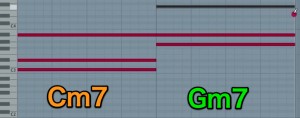
To program Cm7, the notes of a minor seventh chord are:
root, minor third, perfect fifth and minor seventh.
- Root C alone: a C major chord sounds.
- Add the minor third E♭: Cm sounds.
- Then add the minor seventh B♭: Cm7 sounds.
Even without adding the perfect fifth G, entering the essential chord tones
produces a clear Cm7.
Video Point: Using Keyswitches in Solo Mode
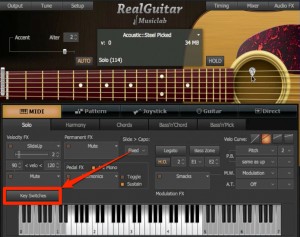
To program lead guitar in RealGuitar, choose Solo mode.
Click Key Switches...
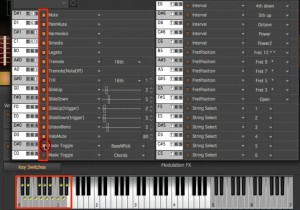
The keyswitch panel opens.
Click the LED to the left of a menu item to light it up;
that keyswitch is now active and available.
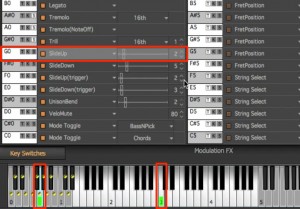
In this example, pressing G0 produces SlideUp.
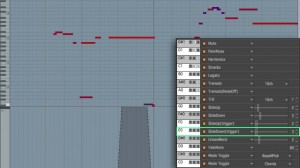
Program the articulations you want in MIDI
to bring the part closer to a real guitar performance.
Purchase the Product
Frequently Asked Questions
Q1. Do I need every chord tone to program a minor seventh in RealGuitar 3?
No. The root, minor third and minor seventh can establish the minor seventh chord even without entering the fifth. This keeps programming simple while retaining the chord's character.
Q2. Which mode should I use to program solo guitar?
Use Solo mode for lead guitar. Open the Key Switches panel and activate keyswitches to use articulations such as SlideUp.
Q3. How can I make RealGuitar 3 sound more like a live guitar performance?
Use keyswitches to add articulations. Programming the desired articulation information in MIDI can make the performance sound more natural and closer to a real guitar.
NEW ARTICLES
Latest English Articles



































































































































































































































































































































































































































































































































































































































