
This article explains how to create automatic backing patterns with the Performer in the MASSIVE synthesizer. Learn to set the volume envelope, draw a tempo-synchronized Performer pattern, and add movement with filters and effects. Combining these techniques can give a sustained backing sound more rhythm and expression.
MASSIVE: Automatically Create a Backing Rhythm
We start with a phrase played as sustained notes.

In this recipe, we will add rhythm to that phrase and turn it into a repeating backing part.
The Performer lets you add
subtle nuances beyond a simple rhythmic pulse.
How to Create the Sound
Excerpts from Questions and Answers on YouTube

Excuse me! I love listening to music and want to compose in GarageBand. What should I start with, and what should I learn? I like EDM!

Please see the music production tab on the page below, which describes an EDM production workflow in GarageBand: https://sleepfreaks-dtm.com/start_dtm/ Thank you for your support.
Controlling the Volume
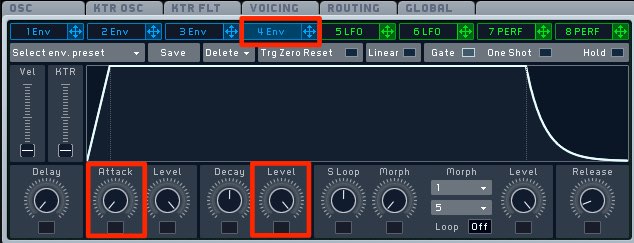
Use 4 ENV to control the volume.
To make the sound start immediately and stay at its level,
set Attack to its fastest setting and Level to maximum.
Creating the Backing Pattern
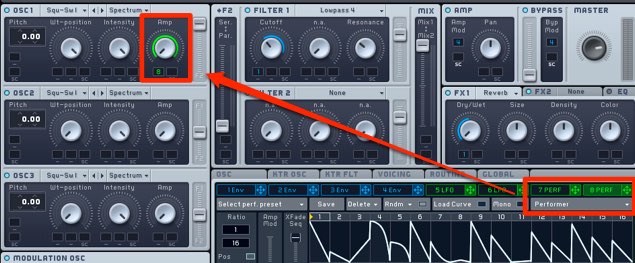
Select PERF and assign it to the oscillator’s AMP control.
Drag the modulation amount up or down to set the desired range to maximum.
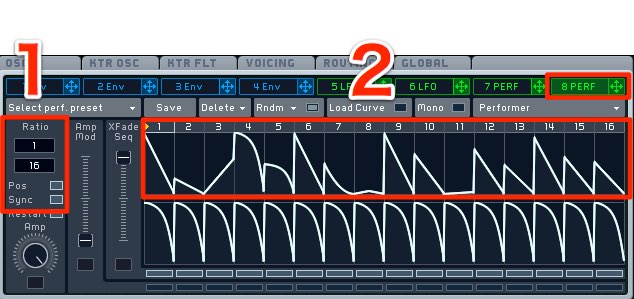
- 1. Turn on Sync to align the movement to the tempo,
then set the backing speed. The article suggests 16 as a starting point. - 2. Drag to draw the volume movement.
Add Movement with Other Features
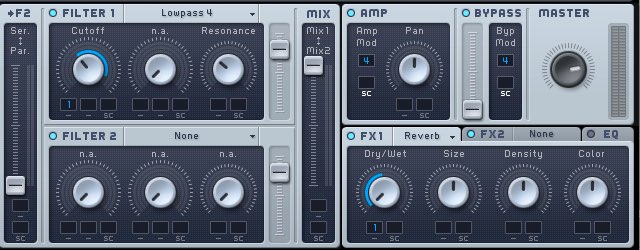
Add movement to the filters or effects as desired
to create a richer backing pattern.
Frequently Asked Questions
Q1. What is MASSIVE’s Performer?
The Performer automatically modulates parameters such as oscillator amplitude and filter settings over time. You can draw a pattern and synchronize it to the tempo to create rhythmic backing parts.
Q2. What tempo-sync setting should I use for a backing rhythm?
The article recommends 16 as a starting point. In MASSIVE’s synchronized ratio, the lower value 16 specifies sixteenth-note units; the upper value determines how many of those units each step lasts. Adjust the ratio to suit the pattern.
Q3. How can I make the backing sound richer?
Try varying filter cutoff, adding spatial effects, or combining modulation with an LFO. Movement across multiple parameters can make the backing more expressive and spacious.
NEW ARTICLES
Latest English Articles






































































































































































































































































































































































































































































































































