
Sidechain compression in Cubase can automatically lower the volume of a bass or synthesizer when the kick drum hits, creating the pumping sound commonly heard in club music. Cubase 10 and later offer an Add Side-Chain Input button for quick routing; in Cubase 9.5 and earlier, the setup uses a compressor's sidechain and a send. Adjusting threshold, ratio and release lets you shape the movement, while different source and target combinations open up creative possibilities.
Sidechaining in Cubase: A Club Music Staple

First,
listen to this sound.
That pumping sound
is probably familiar to you.
It is created using a technique called sidechaining.
This is a standard technique in club music:
the bass or synthesizer is set to drop in volume whenever the kick hits.
Let's look at how to set up sidechaining.
Selected Questions and Answers from the YouTube Video

I'd like to sidechain reverb or delay, but I couldn't find a clear explanation of how to do it. Could you explain?

Set up the reverb or delay on an effects channel, then insert a compressor after it and configure its sidechain as shown in the video. When the effects channel carries only the wet signal, this ducks the reverb or delay without compressing the dry signal.
How can I sidechain several audio or instrument tracks together? I tried using an FX channel, but couldn't get it to work.
In Cubase, route the tracks to a group channel and apply the sidechain compressor to the combined signal. https://sleepfreaks-dtm.com/for-advance-cubase/lesson6-5/
Sidechain Setup in Cubase 10 and Later
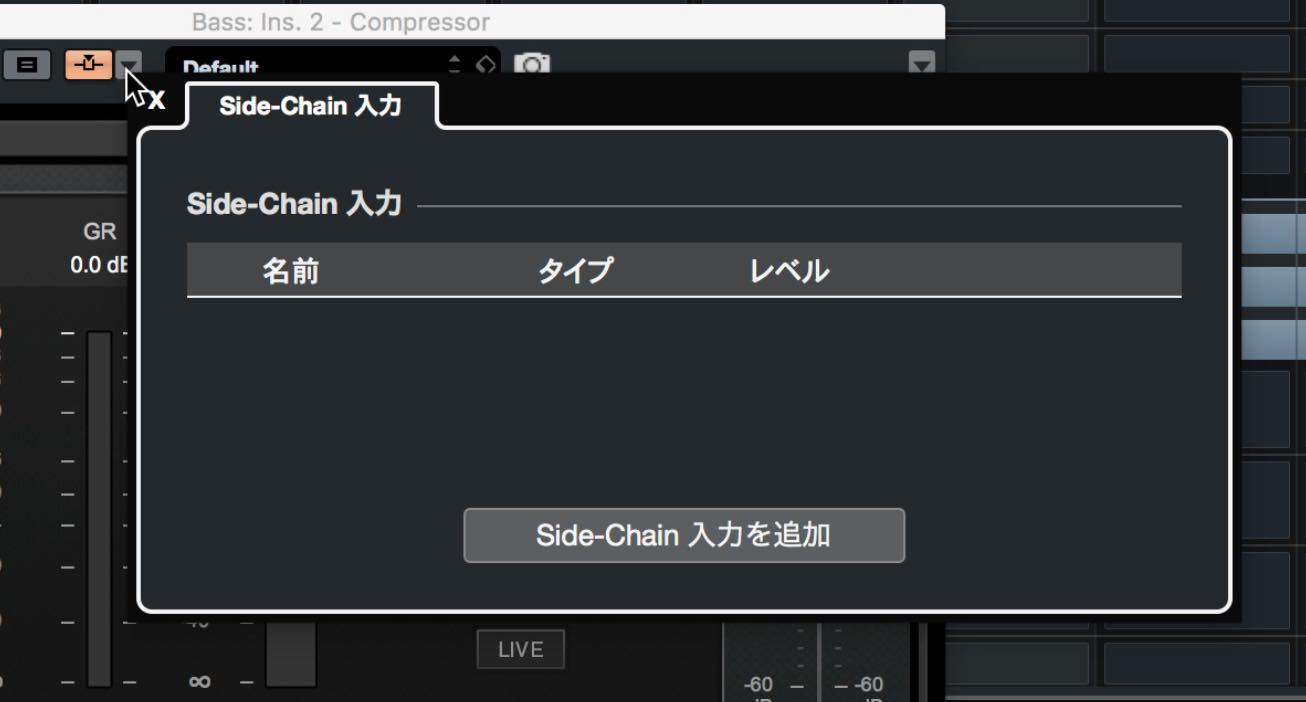
Click the arrow next to the Activate Side-Chain button, then click Add Side-Chain Input in the pop-up.
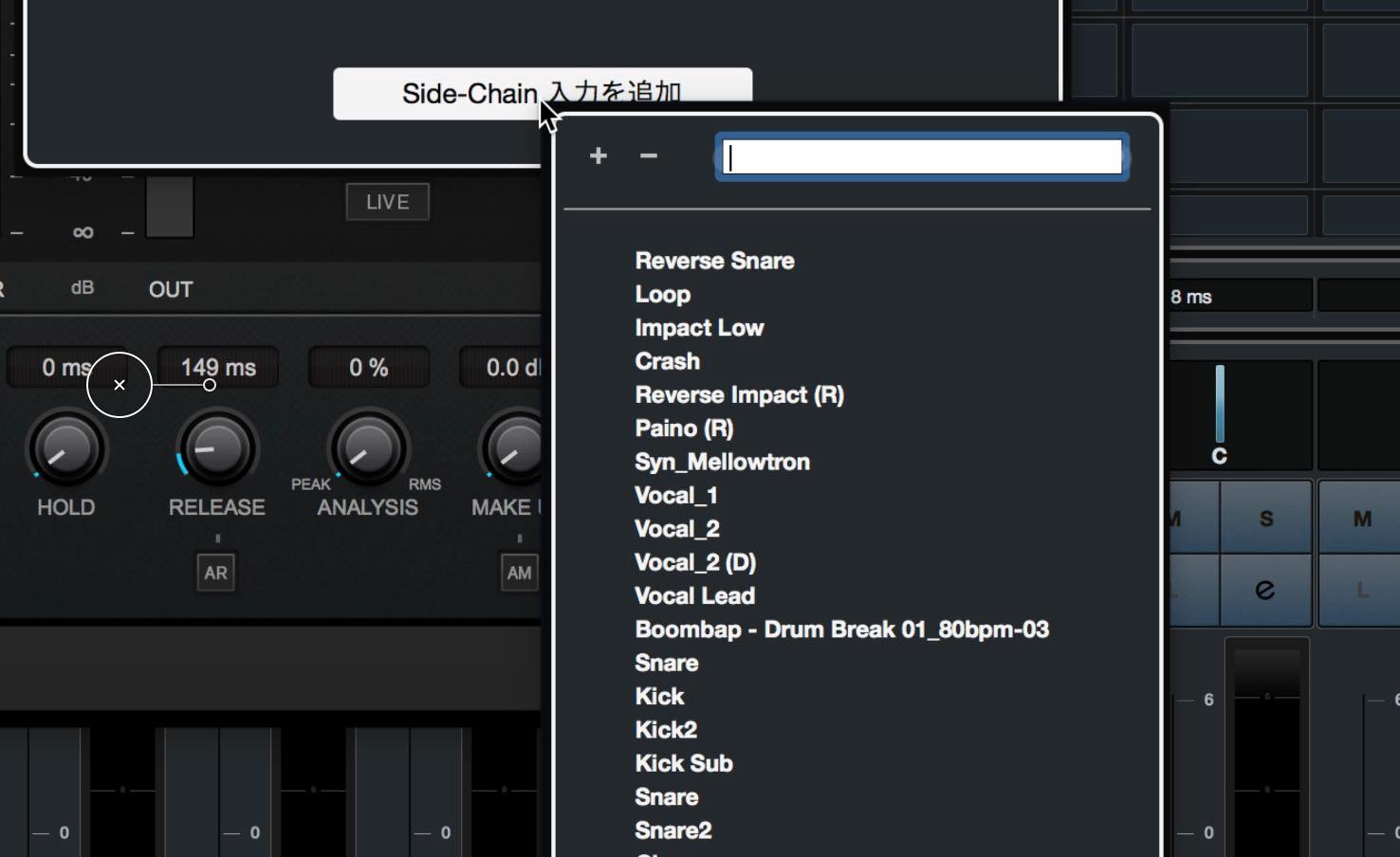
A list of available tracks appears; choose the track you want to use as the source.
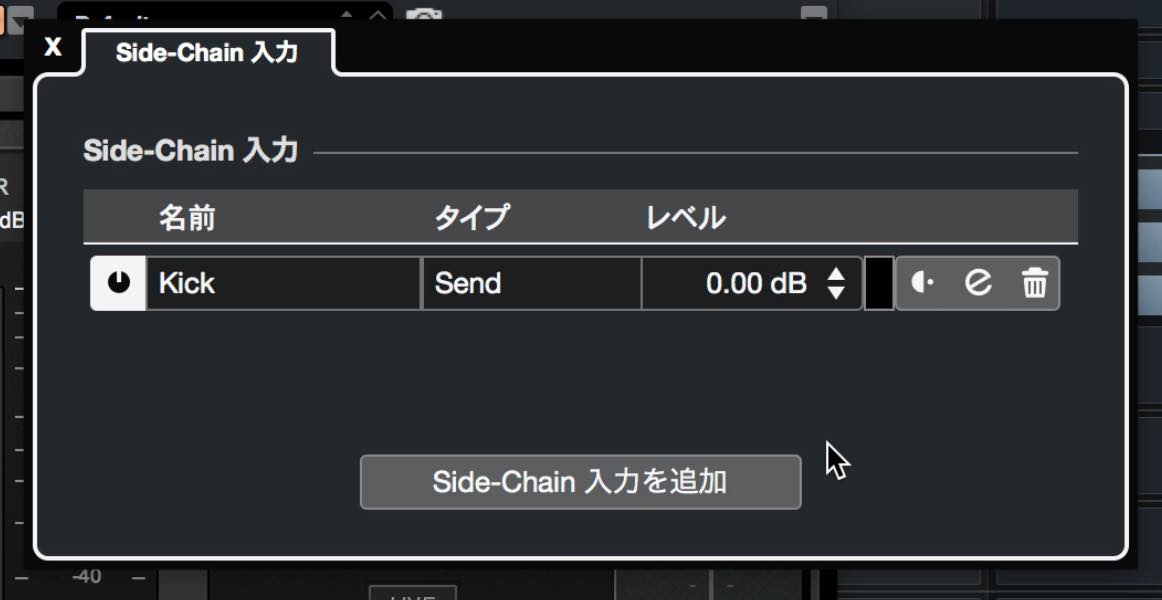
Set the send level and pre- or post-fader option as needed. It's a quick way to route the signal.
Sidechain Setup in Cubase 9.5 and Earlier
We'll set up the bass and synthesizer
to drop in volume when the kick plays.
To do this, we'll use a volume-processing plug-in:
a compressor.

↑ Insert a compressor on the track you want to respond to the kick.
Here we'll use the bass track.

↑ This is the bass compressor window.
Click the highlighted control to activate its sidechain.

↑ Open the sends on the kick track;
the compressor will appear as a destination. Select it.

↑ Set the send level to 0.
The routing is now complete.
The bass level changes in response to the kick.

↑ This is the compressor on the bass track.
Use the threshold, ratio and release
to adjust the shape of the pumping effect.
Let's listen to the sound at this stage.
Before sidechaining
After sidechaining
Use the same approach on the synthesizer track:
insert a compressor and enable its sidechain.

↑ Insert a compressor on the track.

↑ Enable the sidechain.

↑ Set up the send from the kick track.
The pumping sound is complete.
Full mix
We've used kick, bass and synthesizer here,
but you can choose your own combinations.
Experiment and create some interesting sounds!
Frequently Asked Questions
Q1. What is sidechaining in Cubase?
In this example, a compressor uses the kick track as its sidechain signal to reduce the level of another track, such as bass or synth. This creates the rhythmic pumping sound often heard in club music.
Q2. Does the setup differ between Cubase 10 and earlier versions?
Yes. Cubase 10 and later provide an Add Side-Chain Input button for routing. In the Cubase 9.5-and-earlier method shown here, insert compressors on the target tracks and route kick sends to their sidechain inputs.
Q3. What do threshold, ratio and release do?
These compressor settings shape the movement: threshold sets the level at which compression begins, ratio controls how strongly the signal is compressed above the threshold, and release controls how quickly compression eases after the triggering signal drops.
Q4. Can I use a track other than the kick as the sidechain source?
Yes. You can experiment with other source tracks, such as hi-hat or snare, and different target tracks to create a variety of effects.
NEW ARTICLES
Latest English Articles






















































































































































































































































































































































































































































































































































































































































































