
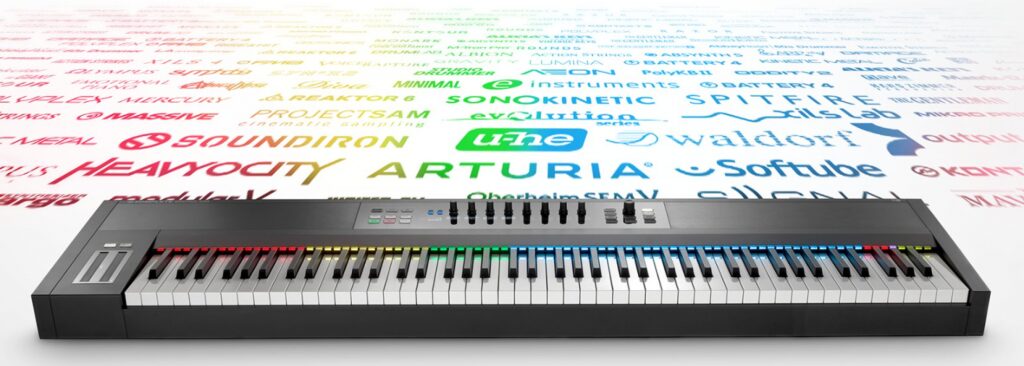
KOMPLETE KONTROL Ver 1.5 is a major update to Native Instruments' keyboard controller for music production. Its biggest feature is the introduction of the new "NKS" format, which achieves full compatibility with third-party plug-ins. Even in DAWs that don't support the VST format, such as Pro Tools and Logic, you can use VST instruments by going through KOMPLETE KONTROL. It also offers scale, automatic chord generation, and arpeggiator functions, greatly contributing to more efficient and creative music production. Macro controller assignments can also be customized, allowing flexible use tailored to your production style.
KOMPLETE KONTROL Ver 1.5 and 88-key hardware released at the same time

Go to the manufacturer's product overview page
The highlight of the update is integration with third-party products.
You can load the plug-ins you use inside Komplete Kontrol, which is revolutionary.
Here, we look at an overview of Komplete Kontrol Ver 1.5 and its new features.
How to update to KOMPLETE KONTROL 1.5
It can be used with the entire Komplete Kontrol series.

First, launch "Service Center."
- Mac: "System HDD" → "Applications" → "Native Instruments"
- Windows: "C drive" → "Program Files" → "Native Instruments"
It is stored in these locations.
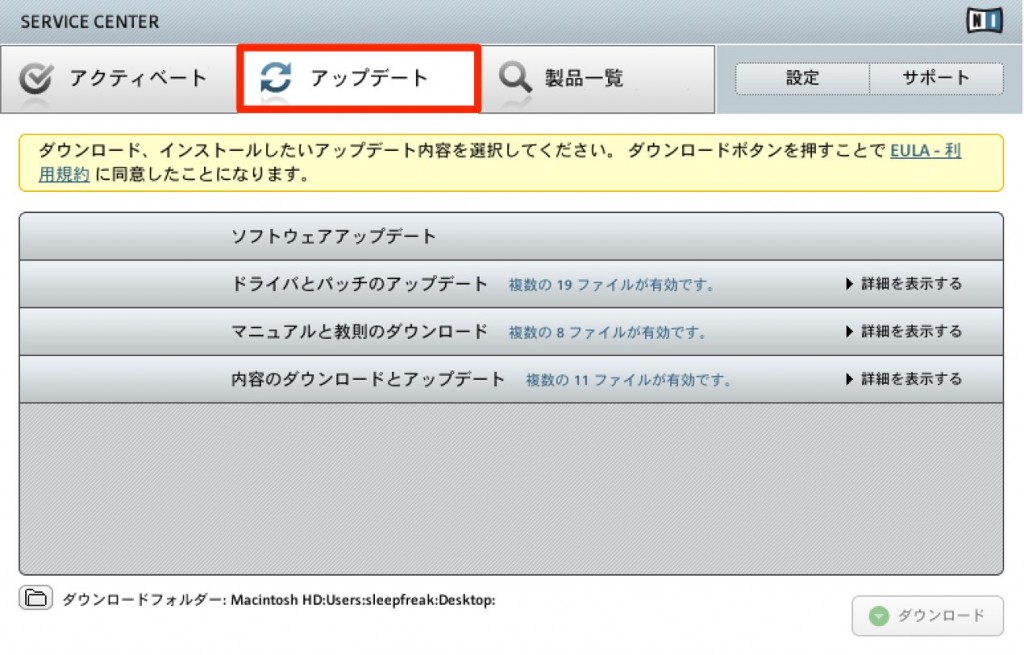
It appears under "Update," so download and install it to complete the update.
Access to updates and tutorial videos so far

- 1Product overview
- 2Browse function
- 3Light Guide and Clear-View display
- 4Scale function
- 5Chord function
- 6Arpeggiator function
- 7Automation and MIDI mode
- 8Komplete Kontrol 1.1 new features
- 9KOMPLETE KONTROL Ver 1.5: New Features Explained
- 10KOMPLETE KONTROL Ver 1.6.2: New Features Explained
- 11KOMPLETE KONTROL Ver 1.9.3: Building a Comfortable Production Environment with "DAW Control"
- 12Komplete Kontrol Ver 1.9.3 "Host Integration": Cubase Edition
- 13KOMPLETE KONTROL Ver 2.0 New Feature: NKS FX
- 14Maschine / Komplete Kontrol Favorites Function
NKS: full compatibility with third-party products
The highlight feature of the update is the newly developed "NKS" format.
Because they support the "NKS" format,
even third-party products can use the following features in a state optimized for Komplete Kontrol.
KOMPLETE KONTROL Browse Function
A browse function that lets you smoothly call up huge numbers of presets and control them flexibly.
KOMPLETE KONTROL Light Guide and Clear-View Display
Things such as the instrument's "sound layout" and "key switches" are shown in different colors, and the main parameters are automatically assigned to the knobs.
Check the products that currently support "NKS" at the link below.
http://www.native-instruments.com/jp/products/komplete/keyboards/komplete-kontrol-s-series/nks/
Also, for a limited time, you could purchase Arturia's NKS-compatible V Collection 4 at half price.
http://www.native-instruments.com/jp/specials/an-exclusive-deal/
Load VST-format plug-ins
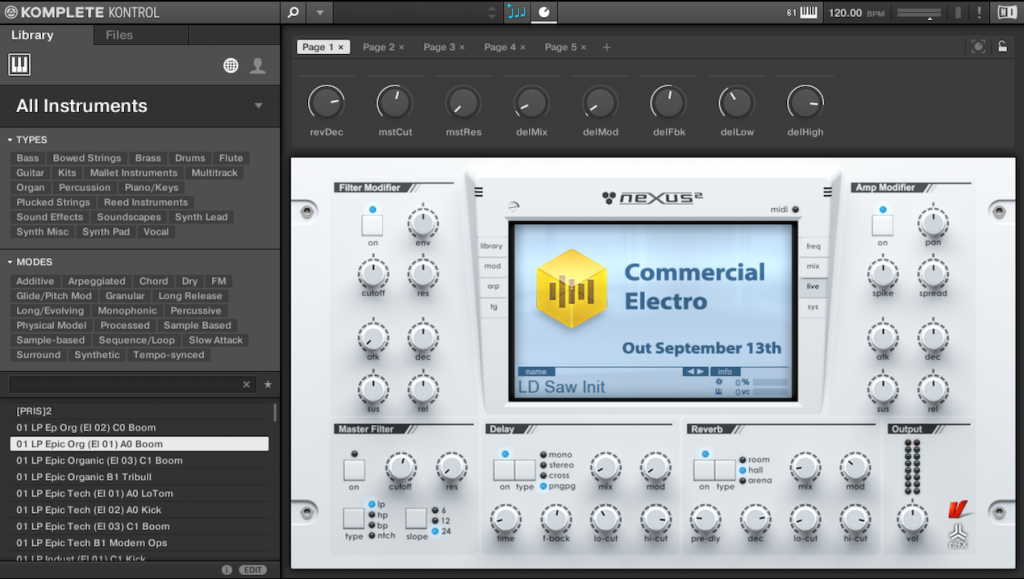
Even if they don't currently support "NKS," VST instruments can be loaded.
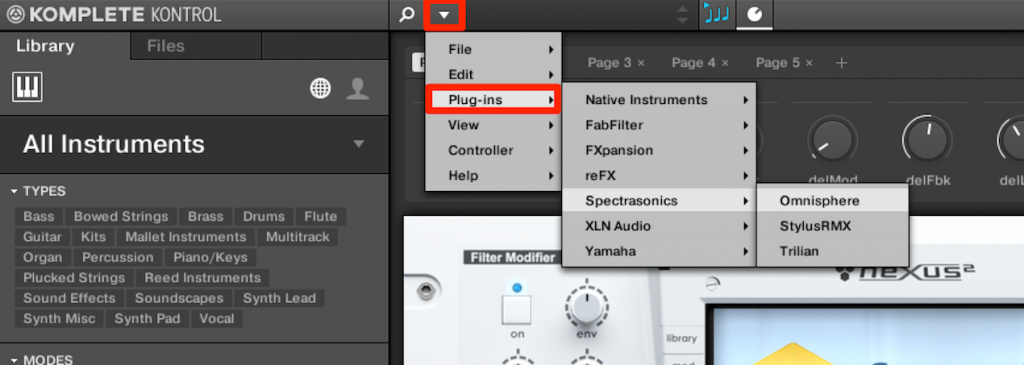
Click the triangle and go to the instrument you want from "Plug-ins."
This lets you use the following features with VST instruments.
In addition, even DAWs such as Pro Tools and Logic, which don't support the VST format,
can use them in the DAW by going through Komplete Kontrol.
Scale Function
By specifying the song's "key" and "major/minor/other scale," you can map only the scale's notes onto the keyboard and even play them all on the white keys.
Chord Function
Because it generates chords automatically, even people without chord knowledge can easily add suitable chords to their songs.
Arpeggiator Function
You can create original arpeggios combined with the "chord function."
If the instrument doesn't appear, try the following.
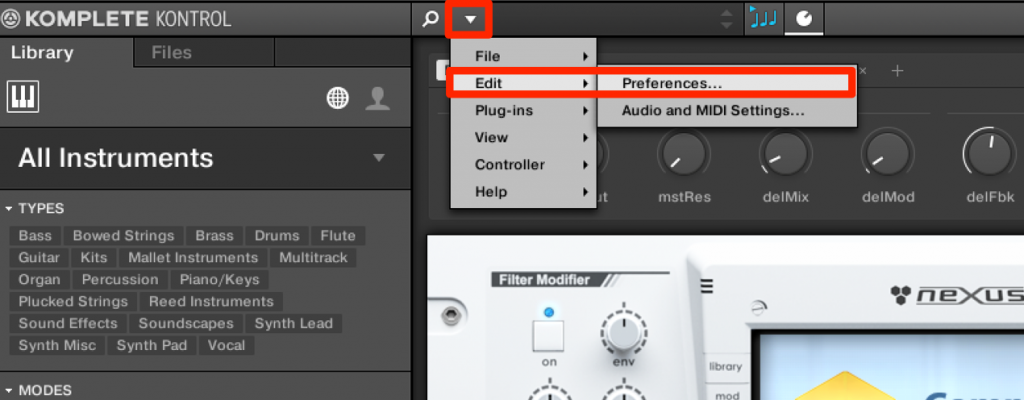
Click the triangle and go to "Preferences" from "Edit."
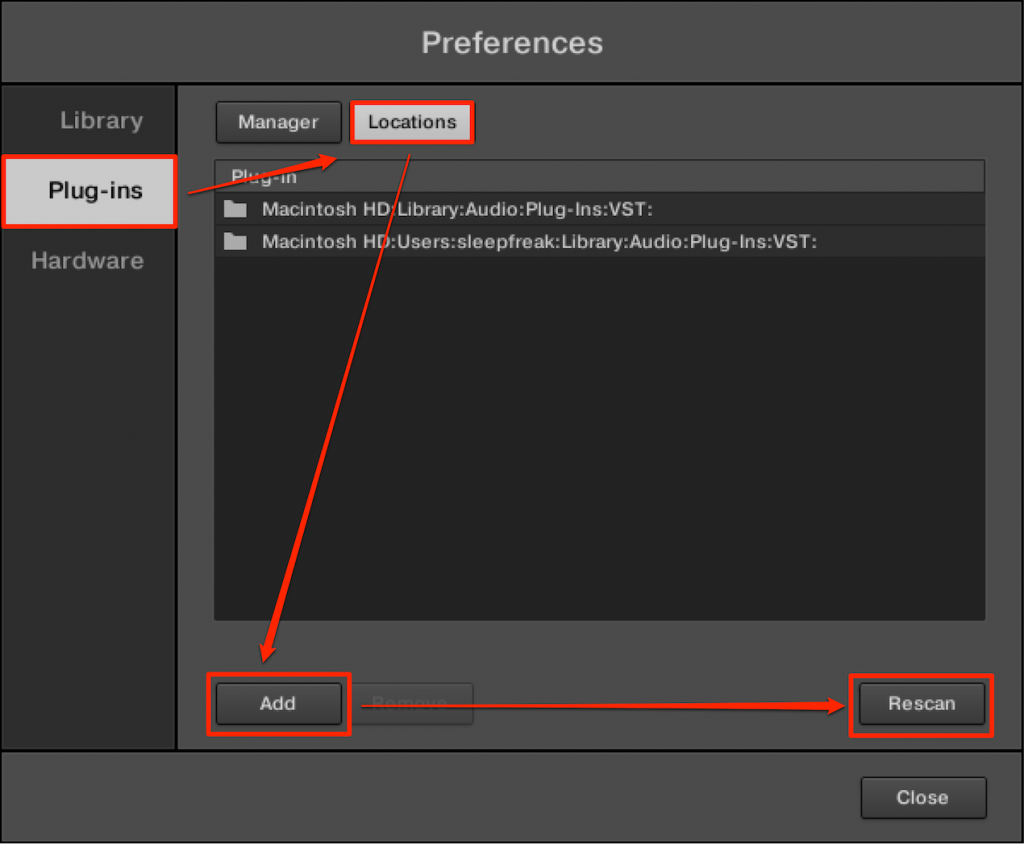
Select "Locations" under "Plugin," click "Add," and specify the VST folder you want to add.
Finally, click "Rescan" to load the plug-ins.
*Scanning may take some time
Customizable Macro controller assignments
You can arrange and rearrange the assigned parameters to suit your purpose.
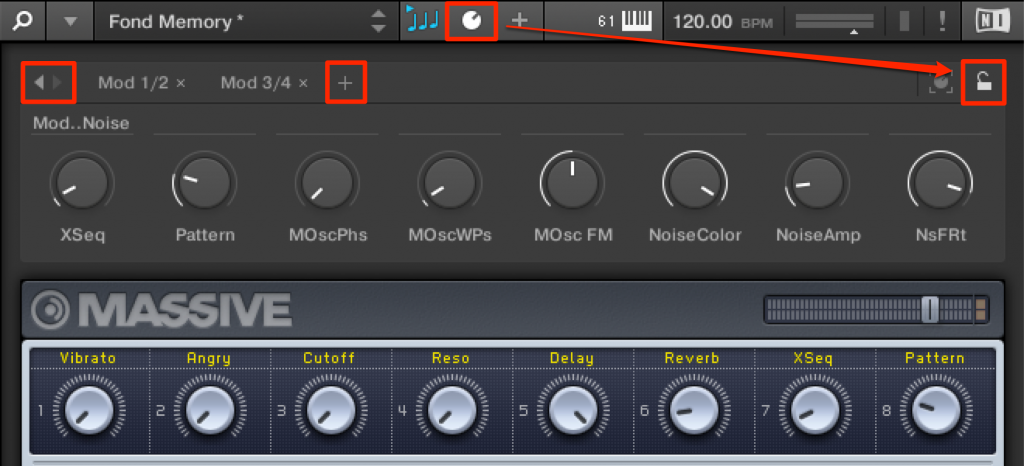
Click the parameter icon, then click the "lock icon."
You can switch pages with the "left/right arrows" on the left.
To add a page, click "+" to create a new page.
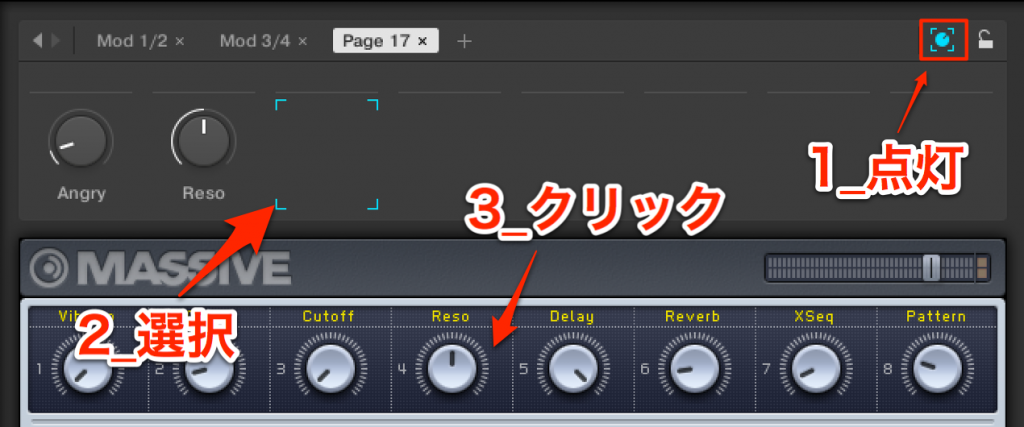
Click the "knob icon" and specify where to assign.
Then click the parameter you want to link to complete the assignment.

To remove an assigned parameter, click the "×" at the top right.
Frequently asked questions
Q1. Which versions can be updated to KOMPLETE KONTROL Ver 1.5?
It can be used with the entire Komplete Kontrol series. Simply launch Service Center and download and install it from the "Update" tab to complete the update easily.
Q2. If few products support NKS, can't I use third-party plug-ins?
Even without NKS support, VST-format plug-ins can be loaded. However, hardware optimization and the Light Guide feature available with NKS-compatible products can't be used.
Q3. Can I use third-party VST instruments in Pro Tools or Logic?
Yes, by going through KOMPLETE KONTROL. This lets you use VST instruments, the scale function, and automatic chord generation even in DAWs that don't support VST.
Q4. What should I do if loaded VST instruments don't appear?
Select "Locations" under "Plugin" in Preferences, add your VST folder, and run Rescan. Note that scanning may take some time.
Q5. Can I customize the Macro controller assignments?
Yes, you can customize them freely from the parameter icon. You can easily create multiple pages, change knob assignments, and remove parameters you don't need.
NEW ARTICLES
Latest English Articles











