
Logic Pro supports only the AU format, so VST plug-ins can't be used. This problem can be solved by installing Native Instruments' KOMPLETE KONTROL Ver 1.5 or later. This article explains in detail how to run VST plug-ins in Logic, how to download and install the software, and how to use handy features such as the scale and chord functions. Free VST instruments are supported too, greatly increasing the flexibility of your production environment.
Run VST plug-ins without being limited to AU
Logic's plug-in format is AU, which is not compatible with VST plug-ins.
This means instruments that support only VST can't be used.
This problem can be solved by using "KOMPLETE KONTROL Ver 1.5 or later."
You can also use free VST instruments.
This article will deepen your understanding.

The product line centers on hardware, but
if you own Komplete 9 or later, you can download KOMPLETE KONTROL Ver 1.5 for free.
Downloading the software

To use "KOMPLETE KONTROL," you need dedicated software.
If you purchased "Komplete 10" from Native Instruments,
you will receive a download link for the software.
If you didn't receive the email or lost it,
please contact them via the following URL.
http://www.native-instruments.com/jp/support/contact-support/
After downloading, install the software.
If you have "Komplete 9," Native Instruments sent you a notification email in the past.
Use the link and serial number from that email.
Using VST instruments
After installation is complete,

launch Komplete Kontrol just like any other soft synth.
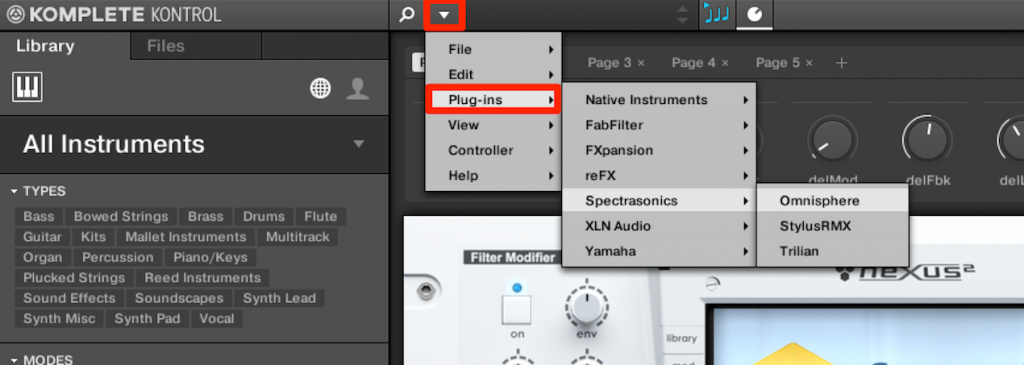
Click the triangle and go to the instrument you want from "Plug-ins."
This doesn't just launch the instrument; it also lets you use the following features.
Scale Function
By specifying the song's "key" and "major/minor/other scale,"
you can map only the scale's notes onto the keyboard and even play them all on the white keys.Chord Function
Because it generates chords automatically, even people without chord knowledge can easily add suitable chords to their songs.
Arpeggiator Function
You can create original arpeggios combined with the "chord function."
If the instrument doesn't appear, try the following.
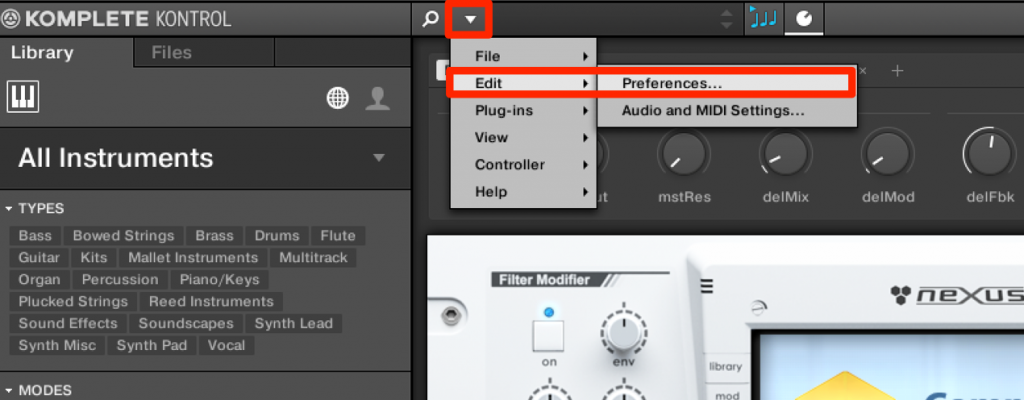
Click the triangle and go to "Preferences" from "Edit."
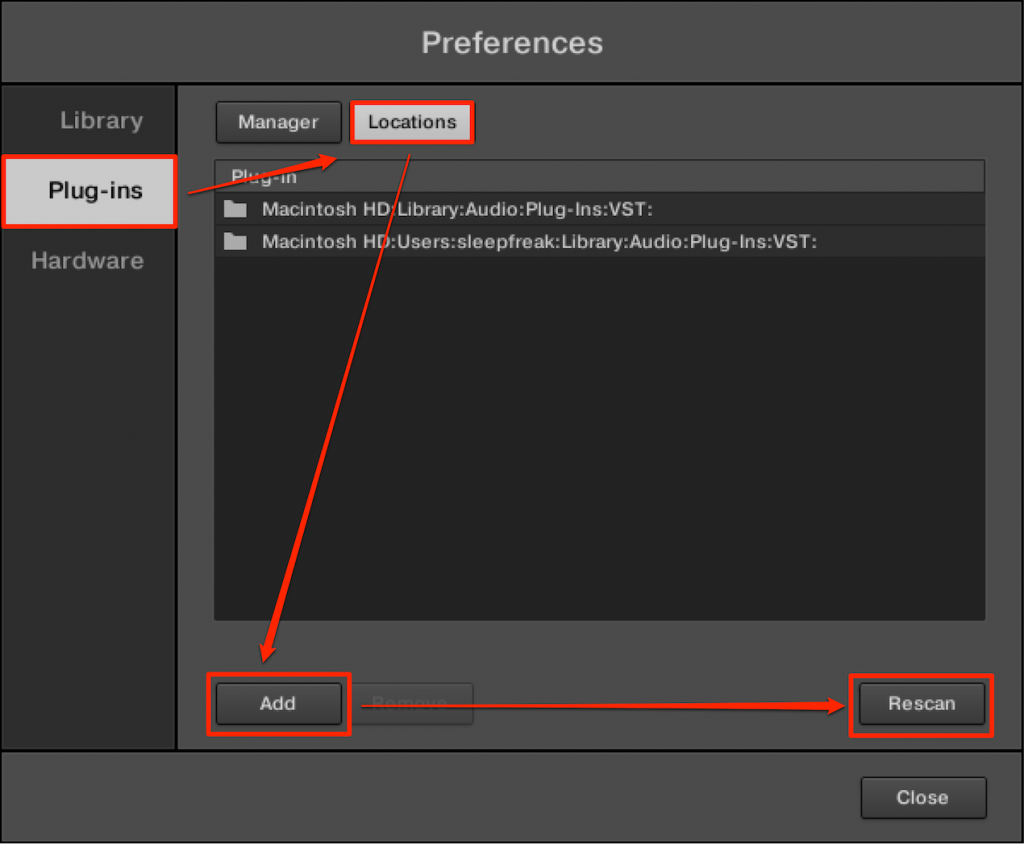
Select "Locations" under "Plugin," click "Add," and specify the VST folder you want to add.
Finally, click "Rescan" to load the plug-ins.
*Scanning may take some time

Frequently asked questions
Q1. I want to use VST plug-ins in Logic Pro. What should I do?
Installing KOMPLETE KONTROL Ver 1.5 or later lets you use VST instruments in Logic. If you own Komplete 9 or later, you can download it for free.
Q2. What should I do if instruments don't appear after installing KOMPLETE KONTROL?
Add your VST folder under "Plugin" → "Locations" in Preferences and run "Rescan." The plug-ins will be loaded. Scanning may take some time.
Q3. What features can I use in KOMPLETE KONTROL?
You can use the scale function to map the keyboard to your key, the chord function to generate chords automatically, and the arpeggiator function to create new chord-based arpeggios.
Q4. Can I use free VST instruments in Logic Pro too?
Yes, free VST instruments can also be used via KOMPLETE KONTROL. Specify the plug-in folder and scan.
NEW ARTICLES
Latest English Articles











