
When sharing a song session with someone else in DTM production, software version compatibility, the instruments you use, and including the audio files are all important. The three main reasons the other person cannot play your session are a different DAW version, the use of plug-in instruments they do not own, and missing audio files. To prevent these problems, the safest and most efficient approach is to check the other person's environment in advance and send the entire session folder.
Why Won't My Song Open on Someone Else's Computer?
A question we often get from students
is: "I gave someone my song session, but they could not play it in their environment."
Many people run into this.
This time, we explain the causes and solutions.
There are three main causes to consider.
Causes and Solutions
Cause 1: "The software version is different"
If your version is older and theirs is newer, the session is compatible,
but if theirs is older, you can solve it by asking them to upgrade.
Always ask the other person which version they have before sending a session.
Cause 2: "You used software synths or hardware instruments the other person does not own"
Since they do not have the instruments you used, they naturally cannot play the session.
In this case, you can solve it by converting your MIDI parts to audio files before handing them over.
We explain how to convert MIDI to audio files in a separate article.
To prevent this kind of problem, it is good manners to hand over both the MIDI files and their audio files
when sharing. Doing this casually makes you look a little professional (lol).
Cause 3: "You did not send the audio files"
This is the most common mistake.
You sent only the session (1) and not the audio files (2).
Then the other person cannot play it. The audio files you converted
as the countermeasure for Cause 2 above also go in here.
Example: Pro Tools (the same applies to other DAWs!!)
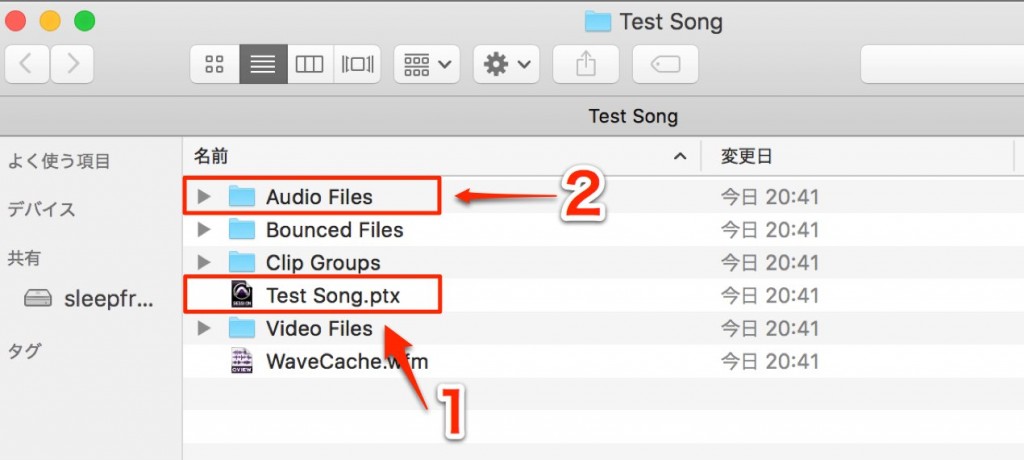
The safest method is to send the entire session folder
. That is all it takes.
If you watch out for these three points, your session should never fail to play on the other end.
How to Gather a Song in Each DAW
 Logic
 Cubase
 Ableton Live
 Studio One
 FL Studio
How to Make Songs Compatible Between Different DAWs
1_Understanding DAW Structure
Here we explain the knowledge and methods for exchanging files smoothly. First, let's look at the basic structure to understand DAWs properly.

2_MIDI and Audio Compatibility
We explain MIDI and audio compatibility, summarizing the points to watch for when making them compatible regardless of DAW.
Please make use of it.
3_Importing Data
Let's import into a different DAW. We explain this, including points to note when sending or receiving data.
Frequently asked questions
Q1. What should I do when sending a session to someone with an older DAW version?
If the other person's version is older, the best solution is to ask them to upgrade. Always check their version before sending a session. A newer version is almost always compatible.
Q2. What should I do if I used instruments the other person does not have?
You can solve it by converting the MIDI parts to audio files and sending them together with the session. Handing over both MIDI and audio is professional etiquette.
Q3. What is the safest way to share session data?
Sending the entire session folder is the most reliable. This ensures that all the audio files, MIDI files, and presets related to the session play correctly in the other person's environment.
NEW ARTICLES
Latest English Articles











