
After finishing a song in Studio One, the most important step is organizing and backing up your data. This article explains an efficient backup method for protecting your precious songs from computer trouble and mistakes. Because Studio One also keeps rejected takes you are not using, it is important to use the "Save to New Folder" function to automatically remove unneeded audio files and save the project in a clean state. This lets you store your production data safely while reducing file size.
Organizing and Backing Up Your Data When a Song Is Finished in Studio One
Once you have finished a song, the one thing you should always do is back it up.
Store your data in case of computer trouble or mistakes.
Most of a song's file size is taken up by
the audio files, such as vocals and guitar.
Studio One keeps not only the files used in the song but also every rejected take.
Here, we introduce an efficient backup method that removes these unused takes
and saves the project in a clean state.
Saving the Song
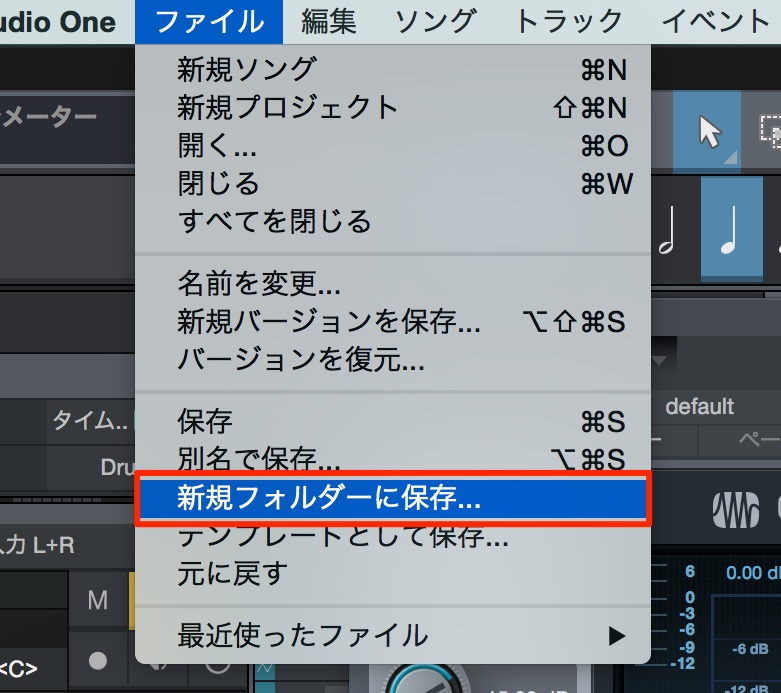
↑ From the menu bar, select "File" → "Save to New Folder."

↑ Choose a name and location and click "Save."
A new song is now saved in the location you specified.
Unneeded audio files have also been removed automatically.

Frequently asked questions
Q1. What should I do first after finishing a song in Studio One?
Back it up. Choose "Save to New Folder" from the "File" menu and save the project to a new location. Unused rejected takes and audio files are removed automatically, so you can organize your data efficiently.
Q2. Why do song files get so large in Studio One?
Most of the file size is taken up by audio files such as vocals and guitar. Studio One remembers not only the audio you used but also the rejected takes you deleted, so removing unneeded takes can greatly reduce the size.
Q3. Is there a difference between "Save to New Folder" and a normal save?
"Save to New Folder" organizes only the files in use, saves them to a new location, and automatically removes unneeded audio files. A normal save, on the other hand, keeps all data including rejected takes, so the size stays large.
NEW ARTICLES
Latest English Articles











