
Melodyne is pitch correction software that is indispensable for producing vocal songs. It is known for an excellent feel that even beginners can use intuitively and for natural-sounding results, and its graphical display of pitch lets you edit visually. Beyond basic pitch correction, you can adjust timing, create the robotic "Auto-Tune effect" vocal, and even split chords and change individual notes with the innovative DNA feature. This lets you make use of sampled material that was technically difficult to work with before, giving you more creative freedom.
Melodyne: Very Easy to Use, Even for Beginners
Pitch correction software has become indispensable for vocal songs.
Many manufacturers now release pitch correction software.
Among them, Melodyne has an excellent feel and produces natural results,
so even beginners can use it without difficulty.
Let's look at its features.
- 1Overview and Usage of Melodyne 4 essential
- 2Overview and Usage of Melodyne 4 assistant
- 3Overview and Usage of Melodyne 4 editor/studio
- 4New Features of Melodyne 5, the Standard Pitch Editing Software
- ◆ Manufacturer site: http://urx.space/Rgab
- ◆ Buy here (affiliate link): http://urx.space/Rgab
Melodyne Editor 1_Basic Operation
Selected questions and answers from the YouTube video

I wonder how Assistant and Editor differ

Thank you for your support. The biggest difference is whether DNA, which can split chords, is included. The manufacturer publishes a comparison chart, so please take a look. http://www.celemony.com/ja/melodyne/functions We look forward to your continued support.
https://sleepfreaks-dtm.com/softsynth/melodyne1/
Melodyne Editor 2_Amplitude Tool and Separation Tool
https://sleepfreaks-dtm.com/softsynth/melodyne2/
Melodyne Editor 3_Modulation and Formants
https://sleepfreaks-dtm.com/softsynth/melodyne-editer-2-3/
Melodyne Editor 4_Timing Correction
https://sleepfreaks-dtm.com/softsynth/melodyne-editor-2-4/
Melodyne Editor 5_The DNA Feature
https://sleepfreaks-dtm.com/softsynth/melodyne-dna/
Melodyne Editor 6_Converting Audio Files to MIDI
https://sleepfreaks-dtm.com/softsynth/melodyne-ex-midi/
- 1Overview and Usage of Melodyne 4 essential
- 2Overview and Usage of Melodyne 4 assistant
- 3Overview and Usage of Melodyne 4 editor/studio
- 4New Features of Melodyne 5, the Standard Pitch Editing Software
- ◆ Manufacturer site: http://urx.space/Rgab
- ◆ Buy here (affiliate link): http://urx.space/Rgab
Pitches Are Displayed Graphically
When you load a vocal track, analysis begins.
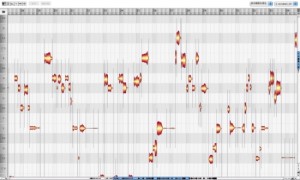
↑ After analysis,
each pitch is displayed graphically.

↑ You can move each note up or down to the pitch you want.

↑ You can also split a note and move each part to a different pitch.

↑ You can also change the volume, which is handy for vocal takes with large swings in dynamics.
As you can see, you can perform many kinds of edits intuitively.
You Can Also Create the Popular Robotic Vocal
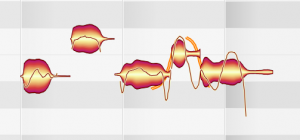
↑ Simply straightening the wavy pitch modulation
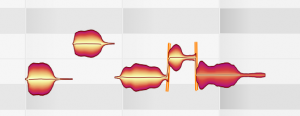
↑ gives you the robotic "Auto-Tune effect" vocal with ease.
A Revolution!! Split Chords and Change Their Notes
Using Melodyne's DNA feature,
you can split chords and rebuild them, which used to be technically impossible.
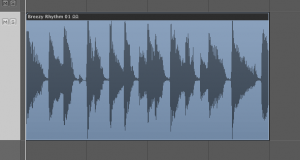
↑ A chord file like this
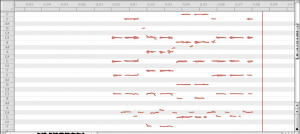
↑ can be analyzed note by note, letting you change the chord.
Material such as sample CDs that you had given up on because the key or chords did not match
can now be put to full use.
- 1Overview and Usage of Melodyne 4 essential
- 2Overview and Usage of Melodyne 4 assistant
- 3Overview and Usage of Melodyne 4 editor/studio
- 4New Features of Melodyne 5, the Standard Pitch Editing Software
- ◆ Manufacturer site: http://urx.space/Rgab
- ◆ Buy here (affiliate link): http://urx.space/Rgab
Frequently asked questions
Q1. Can DTM beginners use Melodyne?
Yes. Melodyne has an excellent feel and produces natural results, so even beginners can use it without difficulty. Pitches are displayed graphically, allowing intuitive editing.
Q2. What can I do with Melodyne?
You can correct pitch, adjust volume, correct timing, create the robotic vocal effect, and more. With the DNA feature, you can also split chords and change individual notes.
Q3. What is the DNA feature?
It is an innovative feature that analyzes a chord file note by note and lets you change the chord. It makes it possible to change the key or chords of material such as sample CDs, which used to be impossible.
Q4. Can I easily create the robotic vocal effect with Melodyne?
Yes. Simply straightening the wavy pitch modulation easily gives you the robotic vocal effect.
NEW ARTICLES
Latest English Articles











