
This article explains an automation technique essential to producing club music. It shows how combining EQ with automation brings dynamic movement to a song. By switching the track to Write mode and moving the EQ frequency by hand, you create an automation curve you can view and edit visually. It is a practical sound-design technique that even beginners can use, and it works in all major DAWs, including Pro Tools, Logic, and Cubase.
A Club Music Staple!! An Automation Technique
How to Make It
To create this effect, we use automation and EQ.
It is easy.
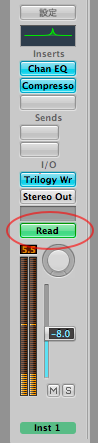
First, change the track's "Read" setting to "Write."
In other words, switch from read mode to write mode.
Open an EQ on the track.
As shown, boost the frequency at just one point with the EQ.
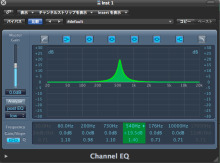
Play back normally and move the EQ frequency however you like.
That is all.
Setting the track to Write lets you record every knob and fader you move.
If you want to redo it, switch to Write mode again and try as many times as you like!!
By the way, you can also view and edit the automation visually like this.
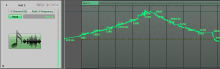
It is a little wobbly (lol), but it moves like a series of peaks.
When you get something good, switch back to Read mode
so you do not accidentally overwrite the automation.
This way, the automation will not be changed by mistake.
You could draw it neatly with the Pencil tool, but that is no fun.
The point is in turning the knob yourself.
Feel like Fatboy Slim!!
Using Automation

 Logic
 GarageBand
 Cubase
 Ableton Live
 Studio One
 FL Studio
Frequently asked questions
Q1. What is the difference between Read mode and Write mode for automation?
In Read mode, the DAW simply plays back automation that has already been recorded. Switching to Write mode automatically records your fader and knob moves so you can view and edit them visually later.
Q2. How can I avoid accidentally overwriting automation?
When you finish, switch the track from Write mode back to Read mode. This prevents accidental changes to the automation. Switch back to Write mode when you need to edit.
Q3. Besides recording automation, is there another way to change the EQ frequency over time?
You can also draw the automation curve by hand with the Pencil tool. However, recording while actually turning the knob produces a more expressive and fun sound.
NEW ARTICLES
Latest English Articles











