Ultrabeat is a powerful drum instrument equipped with side-chain and sample loading functions. This article explains in detail how to use these functions to process and edit audio material. After applying the side chain, you can freely create sounds with effects such as the filter, LFO and distortion, and with the sample function you can generate a wide variety of variations from the same material by changing the start position according to velocity. It can greatly broaden the range of DTM production for everyone from beginners to advanced users.
Controlling the side chain in Ultrabeat
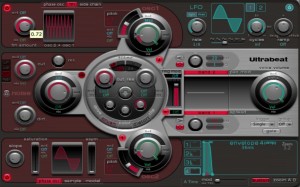
Side-chaining is a technique that applies the sound of another track to an effect or device that is processing a sound.
The wobbling sound famous in club music also uses side-chaining.
In Ultrabeat, using this side chain lets you process material easily.
It can greatly expand the possibilities of your samples, so please give it a try!!
Ultrabeat video index
- 1Loading and saving kits
- 2Step sequencer 1
- 3Step sequencer 2
- 4Creating a kick
- 5Creating a snare and hi-hat
- 6Using side-chaining and samples *This article
Video point: Applying the side chain
First, prepare the audio track you will use in Ultrabeat.
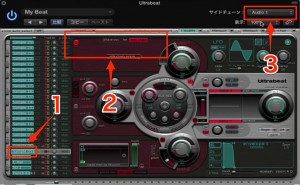
- 1_Select an unused key
- 2_Change the tab to "side chain" and light up the "power" button
- 3_Select the audio track you prepared for the material
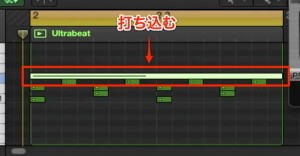
Program notes on the pitch selected in step 1 above.
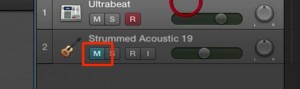
You can mute the original audio track.
That's it.
The audio material you prepared now goes into Ultrabeat, and you can play and edit it.
Video point: Editing after side-chaining
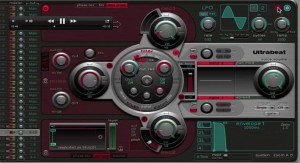
Then, as usual, you can apply "Filter", "LFO", "distortion" and so on to create sounds.
Video point: Using samples
You can easily load audio files you have prepared yourself into Ultrabeat.
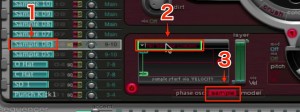
- 1_Select an unused key
- 2_Select sample mode
- 3_Click the area outlined in red, choose "Load Sample" and select the sample you want to use
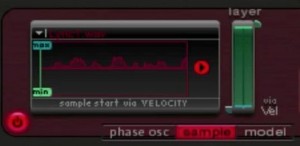
The selected sample is loaded like this.
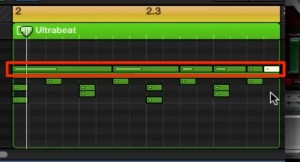
Then you can play and edit as usual.
Video point: Changing the start position with velocity
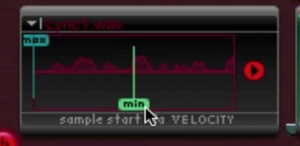
By dragging "max" and "min",
you can change the sample start position according to velocity.
- max: the start position when velocity is at its maximum (127)
- min: the start position when velocity is at its minimum (1)
The sample position then changes between these according to velocity.
You can give the same sample many different variations.
Frequently Asked Questions
Q1. What is Ultrabeat's side-chain function?
It is a technique for applying another track's sound to an effect or device. This lets you process material flexibly. The "wobbling sound" of club music is also achieved with this technique.
Q2. How do I load a sample into Ultrabeat?
Simply select an unused key, change it to sample mode, choose "Load Sample" from the area outlined in red and specify the sample file you want to use.
Q3. What are the benefits of changing the sample position with velocity?
Because you can set start positions according to velocity with the max and min values, you can create many variations from the same sample, greatly increasing your creative freedom.
NEW ARTICLES
Latest English Articles