
Melodyne Editor 2 can convert audio files, including material from sample CDs or instruments you have played, into MIDI data. This article explains the steps from audio analysis to MIDI export for both chords and single notes. By choosing “Export MIDI” from the Settings menu and dragging to set a range, you can export just the portion you need, helping you reuse sample material and streamline your DAW workflow.
Create a MIDI File from Audio with Melodyne
You can convert audio to MIDI whether it contains chords or single notes.
This includes your favorite sample CDs and recordings of instruments you have played.
Melodyne Editor Video Tutorials
- 1Basic Operations
- 22. Amplitude and Separation Tools
- 3Modulation and Formants
- 4Correcting Timing
- 5DNA
- 6Convert Audio Files to MIDI (this article)
- 1Melodyne 4 essential: Overview and Tutorial
- 2Melodyne 4 assistant: Overview and Tutorial
- 3Melodyne 4 editor/studio: Overview and Tutorial
- 4Melodyne 5: New Features in the Popular Pitch Editor
- ◆ Manufacturer’s website: http://urx.space/Rgab
- ◆ Buy here (affiliate link): http://urx.space/Rgab
Video Highlights: Convert Analyzed Audio to MIDI
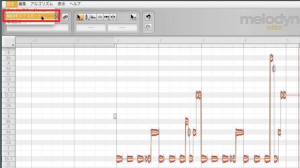
After analyzing the audio you want to convert,
select “Settings” → “Export MIDI” from the menu.
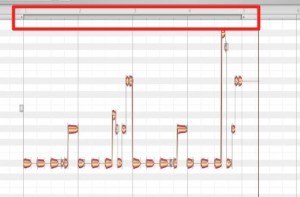
Drag to set the export range.
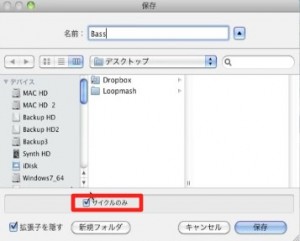
In the export dialog, select “Cycle Only”
to export only that section.
Buy the product here
View the product at Plugin Boutique

Plugin Boutique is an international music-production plug-in store with a wide selection, including products that can be difficult to obtain in Japan. From account creation to download…
Frequently Asked Questions
Q1. What kind of audio can Melodyne convert to MIDI?
The article describes converting both chords and single-note material, including sample CDs, instruments you have played, and vocals. Detection results depend on the source material and the Melodyne edition and algorithm used.
Q2. Can I export only part of the audio as MIDI?
Yes. Select “Cycle Only” in the export dialog to export only the range you set by dragging.
Q3. What do I need to do before converting audio to MIDI?
NEW ARTICLES
Latest English Articles











