
When producing in Logic Pro, reverb is a CPU-heavy plug-in. Using send/return lets you share one reverb among multiple tracks, greatly reducing CPU usage. This technique gives the song a sense of unity and also makes it easy to turn the reverb on and off. This article explains step by step how to set up send/return in Logic X and Logic 8/9, from creating an AUX track to setting buses and adjusting reverb depth, giving you knowledge that helps you build an efficient production environment.
Reverb Puts a Heavy Load on the CPU
Among plug-ins, reverb places a particularly heavy load on the CPU.
If you use it as an insert on every track as usual,
playback may stop or your computer may become sluggish.
That is where send/return comes in.
In short, it shares a single reverb among multiple tracks.
Benefits of Using Send/Return
- It saves CPU, as explained above
- Sharing one reverb gives the song a sense of unity
- Turning the reverb on and off is easy (since you only need to mute the one reverb)
Send/Return Explained
- Logic X
- Logic 8/9
Selected questions and answers from the YouTube video

Your videos are always helpful. My question: when I put an effect directly on the drum inserts as in the video versus putting it on an FX channel and sending to it, the effect sounds completely different (even with the send gain at max, the send version is weaker). Is there a way to prevent this while still using an FX channel?

When you use an FX channel, the dry sound before the effect is combined with the effected sound from the FX channel, so the effect sounds weaker (more natural). If you want to strengthen the effect, in addition to raising the send amount as you are doing, it is a good idea to raise the volume of the FX track itself. However, this can make the overall song too loud, so we also recommend lowering the volume of the tracks other than the FX track and raising your monitor volume.
When sharing a reverb among tracks, can settings such as decay be set per track?
Because a single reverb is shared, you cannot set reverb parameters individually; you can only set the amount of reverb applied to each track. If you want to change parameters such as decay per track, you need to create a separate reverb for each setting.
What is the difference between a group channel and an FX channel in Cubase?
An FX channel is a track for applying effects using send/return. https://sleepfreaks-dtm.com/for-advance-cubase/lesson5-5/ A group channel is a track for combining the outputs of multiple tracks.
Thank you for your help. Regardless of reverb, does sending sound from multiple tracks to a bus make everything play from the center? Is there a way to combine sounds into one channel while keeping how each track originally sounds? I would appreciate it if you could let me know.
The track you are combining onto the bus has probably become a mono track. Please try using a stereo bus (group channel track).
Logic X: How to Set Up Send/Return
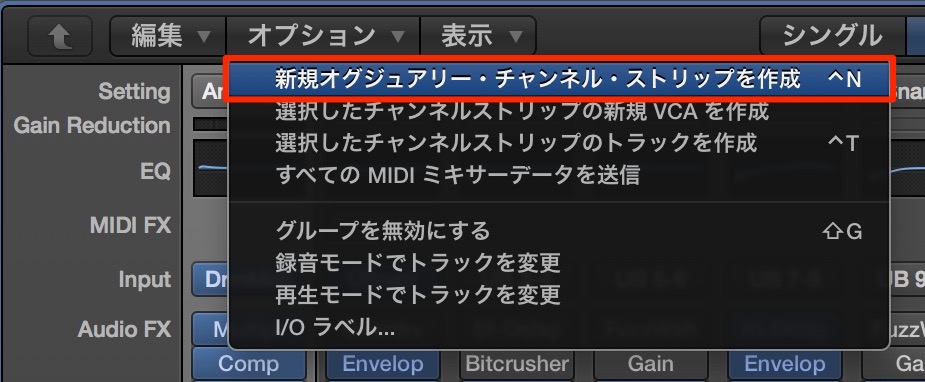
From Options in the Mixer window,
choose "Create New Auxiliary Channel Strip."
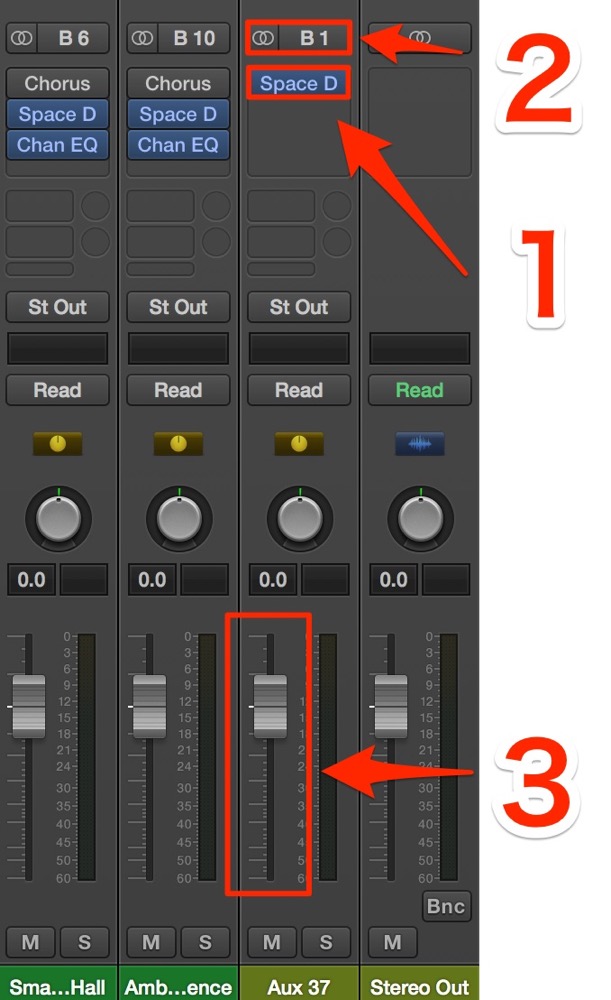
1. Insert a reverb on the AUX track you created.
2. Select any bus as the input of the AUX track (bus 1 here)
3. The volume starts at minimum, so set it to 0 dB.
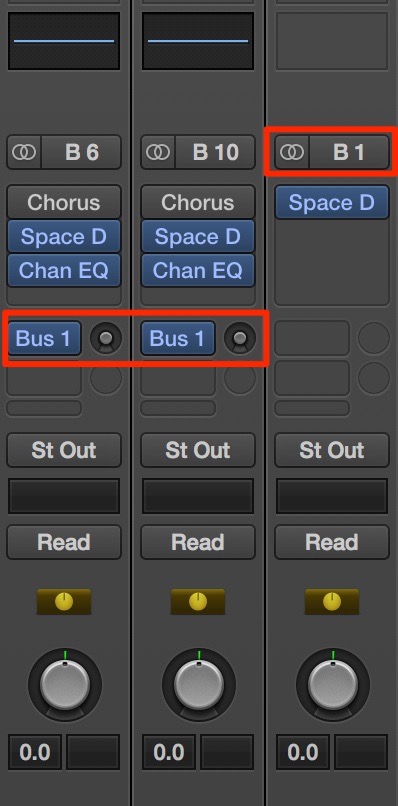
4. Set the send of each track you want to add reverb to so it matches the AUX input (bus 1).
Here we set sends on all tracks.
5. Adjust the reverb depth with the round knob next to the bus.
Logic: How to Set Up Send/Return

From Options in the Mixer window as shown in the image,
choose "Create New Auxiliary Channel Strip." Create it in stereo.

1. Insert a reverb on the AUX track you created.
2. Select any bus as the input of the AUX track (bus 1 here)
3. The volume starts at minimum, so set it to 0 dB.

4. Set the send of each track you want to add reverb to so it matches the AUX input (bus 1) set in step 2.
Here we set sends on all tracks.
5. Adjust the reverb depth with the round knob next to the bus.
- Logic X
- Logic 8/9
AUX Explained
Frequently asked questions
Q1. What happens if I use reverb as an insert instead of send/return in Logic Pro?
Inserting reverb directly on every track sharply increases the CPU load, which can stop playback or make your computer sluggish. Reducing this CPU load is why send/return is recommended.
Q2. Can I use several different reverbs with send/return?
Yes. By creating multiple AUX tracks and setting a different reverb on each, you can combine multiple reverbs for a three-dimensional sense of space.
Q3. Where do I adjust the depth of a reverb set up with send/return?
Adjust it with the round send knob next to the bus on each track you are sending from. This knob controls how much reverb is applied (the wet amount), allowing fine adjustments.
NEW ARTICLES
Latest English Articles











