
This article explains how to create snare and hi-hat drum sounds with Logic Pro's Ultrabeat plug-in. By fine-tuning effects with the "via" parameter of the modulation function and making use of the filter, you can design complex and expressive percussion sounds from simple waveforms. In particular, combining the noise generator makes a wide range of drum sounds possible, and this content lets everyone from DTM beginners to professionals learn practical techniques.
Creating a snare and hi-hat with Ultrabeat
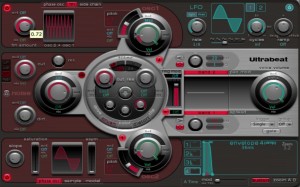
Last time we created a kick using the synthesizer section,
and this time we will create a snare and hi-hat.
Ultrabeat video index
- 1Loading and saving kits
- 2Step sequencer 1
- 3Step sequencer 2
- 4Creating a kick
- 5Creating a snare and hi-hat *This article
- 6Using side-chaining and samples
Video point: mod modulation and via modulation
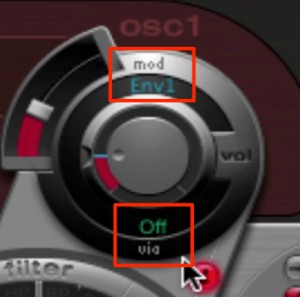
"via" is a modulation that affects "mod".
Using "via", you can finely adjust how the modulation effect is applied.
Video point: Using the filter
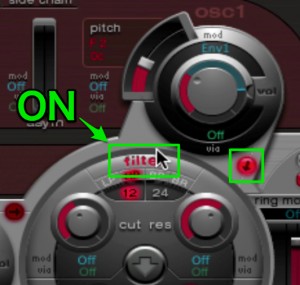
Ultrabeat's "filter" becomes available when you light up the "↓" button.
Here, "osc1" is routed through the "filter".
Video point: Using the noise generator
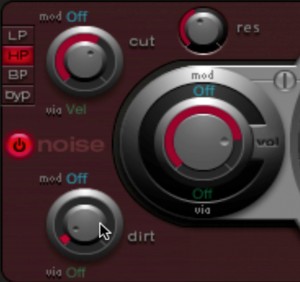
Using "noise", you can create a wide range of percussion sounds.
- "cut": after selecting "LP/HP/BP", use this knob to set the cutoff position.
- "res": gives the sound character.
- "dirt": at high values, clean white noise becomes quite rough and the sound becomes less defined.
For details on using filters, see the following URL ↓
https://sleepfreaks-dtm.com/synth-basic/synth-filter/
Frequently Asked Questions
Q1. What is the difference between via modulation and mod modulation in Ultrabeat?
mod is the base modulation effect, and via is a second stage of modulation that further affects mod. Using via, you can finely adjust how strongly the modulation effect is applied.
Q2. Is there anything to watch out for when using Ultrabeat's filter?
To enable the filter, you need to light up the "↓" button. Then choose from LP/HP/BP and adjust the cut, res and dirt parameters to shape the sound.
Q3. Any tips for creating a natural hi-hat sound with the noise generator?
Adjust the cutoff frequency with the cut parameter, add character with res, and control the roughness with dirt. Combining these lets you create a variety of percussion sounds.
NEW ARTICLES
Latest English Articles











