
VariAudio, included with Cubase, is a powerful feature for quickly and easily correcting the pitch of recorded vocals. With intuitive operations such as fine adjustment with Shift-drag, batch correction with the Quantize slider, adding a robotic Auto-Tune-style effect by flattening, and splitting notes, you can do detailed pitch editing. Professional vocal editing can be completed inside the DAW without buying a separate plugin, greatly improving the quality of your vocal recordings.
VariAudio: Cubase's Powerful Built-In Pitch Correction
VariAudio comes with Cubase.
It lets you correct the pitch of vocals quickly and easily.
VariAudio Video
Selected questions and answers from the YouTube video

Is this feature only in the Pro version?

Yes. VariAudio is a feature available only in Cubase Pro.
The percentage showing how far off the pitch is, like at 1:26, doesn't appear for me. Is there a fix?
Unfortunately, pitch deviation is only shown as a percentage.
Thank you for a very helpful video. I'm considering buying Cubase Pro 10. Can VariAudio in Pro 10 be used the same way as in this video?
The operation differs slightly, but you can use the features explained in this video. We also explain how to use VariAudio in Cubase 10 in the following article and video, so please take a look. https://sleepfreaks-dtm.com/for-advance-cubase/cubase10-new-feature-1/
I'm using Cubase AI 9.5 but can't find VariAudio. Is it not included?
VariAudio is a feature of Cubase Pro only, so unfortunately it cannot be used in AI.
I'm using Cubase 9.5. How do I hear the sound when I shift the pitch? (Sorry, I'm bad at explaining!) It's a bit inconvenient while working to know which note is correct, so I'd appreciate it if you could tell me.
This article explains how to get sound from the notes you edit. https://sleepfreaks-dtm.com/dtm-trouble/variaudio-mediabay-preview/
This is very easy to understand, thank you. I'm using Cubase 9.5, but there was no "Flatten Pitch" option... How can I make the robotic voice effect in Cubase 9.5?
Cubase 9.5 Pro also has "Flatten Pitch." Please check the part shown in the image. https://app.box.com/s/cv4ylellg4y7lzqv8t3kl0m4iayjcct5
Your videos are easy to understand and very helpful, so I watch every one. I'm using Cubase 8 Pro, but there was no sound when I moved the pitch up or down, so I looked it up and tried the preview method at the URL below, but there's still no sound. What else could be the cause? https://sleepfreaks-dtm.com/dtm-trouble/variaudio-mediabay-preview/
Thank you for always watching. We suspect the monitoring button shown in the image below is not lit. Please check it once. https://app.box.com/s/eubbzswoco3k0tc5qdhwd1pwhc3j9tgm
I can't decide whether to buy Cubase or Melodyne. Which do you recommend?
Cubase and Melodyne are both music software, but they are a little different. Cubase can be used as is for music production, whereas Melodyne is generally not used on its own but inside software such as Cubase, Logic, or Pro Tools (as a plugin). Cubase does have VariAudio, which is similar to Melodyne's features, but we feel Melodyne is more effective. So it is a good idea to consider buying Melodyne if the VariAudio included with Cubase is not enough for you.
Is this software free?
VariAudio comes with the DAW Cubase. There are several versions of Cubase, but VariAudio is included with the top version, Cubase Pro, so you can use it if you have purchased that. Here is the comparison chart on the manufacturer's site. https://japan.steinberg.net/jp/products/cubase/comparison.html
When I double-click, the bar on the left only shows Hitpoints. What should I do? Thank you!
It may be because you have a different edition. In Cubase, VariAudio is only included in the top editions, Pro and Artist.
I bought Cubase Elements 8. Does it include VariAudio?
Unfortunately, VariAudio is only included in the top edition, Pro. There is a comparison chart here. http://japan.steinberg.net/jp/products/cubase/lineup.html
I'm using 8.5, and there's no sound when I move notes up or down with pitch shift, and nothing changes on playback either... What's the problem?
How about the solution in this article? https://sleepfreaks-dtm.com/dtm-trouble/variaudio-mediabay-preview/
Thanks for the easy-to-understand video! I recently got Cubase Pro 8, but the note names and pitch percentages don't appear on the segments in VariAudio. Was the display feature removed when the version changed? Or can it be set somewhere? I've searched but can't find any relevant article.
In Cubase 8, VariAudio's parameters are shown in the info line. Please refer to the link below about the info line. https://sleepfreaks-dtm.com/for-advance-cubase/info-line/ Thank you for your continued support.
Video Point_Fine Pitch Adjustment
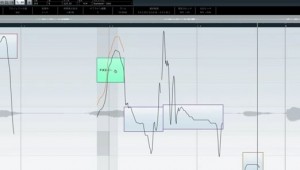
You can fine-tune note movement with Shift + drag up or down.
Video Point_Flattening Pitch
Select notes and raise the Quantize slider to correct their pitch all at once.
The slider below it flattens the pitch, giving you a robotic, Auto-Tune-style effect like Perfume's vocals.
Video Point_Splitting Notes
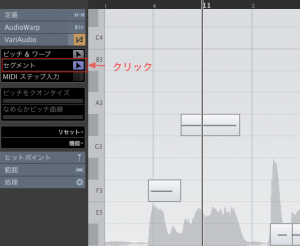
Click "Segments," outlined in red,
and move the cursor to the bottom of the note you want to split; it turns into a scissors icon.
Click to split the note.
Frequently asked questions
Q1. Is VariAudio a free feature that anyone with Cubase can use?
No. VariAudio is included with the higher editions of Cubase (Cubase Pro). No separate purchase is needed, but it is not included in lower editions such as Elements and AI, so check which edition you have.
Q2. My pitch correction ends up sounding robotic. What should I do?
Lowering the flatten slider reduces the robotic effect. Setting the slider to a low value gives a natural pitch correction.
Q3. Can I correct multiple notes at once?
Yes. Select multiple notes and raise the Quantize slider to correct their pitch all at once. This lets you edit large amounts of audio efficiently.
Q4. What is the difference between VariAudio and Melodyne?
Both are pitch correction tools, but VariAudio is a basic feature included with Cubase, while Melodyne Editor is a separate product with more advanced analysis and editing features. You can choose according to your needs.
NEW ARTICLES
Latest English Articles











