
VariAudio's step input and MIDI export features are powerful tools for correcting the pitch of vocal recordings more efficiently. With MIDI step input, you can correct notes directly from the keyboard, and with the MIDI extraction function, you can export the pitch data you corrected in VariAudio as a complete MIDI file. By including pitch bend data, you can even reproduce fine pitch changes, so you can use the corrected vocal on another track or edit it in another DAW, greatly improving your DTM workflow.
VariAudio's Handy "Step Input" Feature
There are handy features such as correcting notes from the keyboard and exporting MIDI from notes.
VariAudio Videos
Video Point_Input from the Keyboard
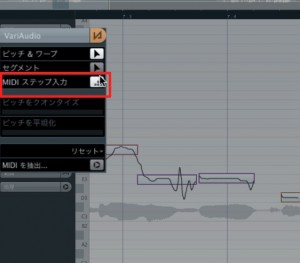
Using "MIDI Step Input,"
the selected note jumps to the pitch of the key you press on your MIDI keyboard.
Video Point_Extracting MIDI
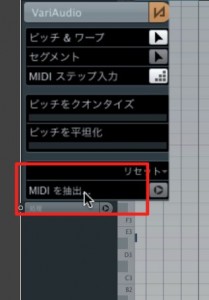
Selecting "Extract MIDI" exports all the VariAudio pitches as MIDI data.
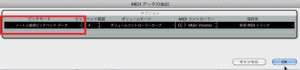
By choosing "Notes and Continuous Pitch-Bend Data" from the menu,
the fine pitch movements are reproduced with pitch bend data.
Frequently asked questions
Q1. What exactly is VariAudio's MIDI step input?
It is a feature that automatically moves the selected note to the pitch you play on a MIDI keyboard. It reduces fiddly manual adjustment so you can correct pitch efficiently.
Q2. What are the benefits of exporting a vocal corrected in VariAudio as a MIDI file?
You can use the corrected pitch data in other DAWs, have a synthesizer play it back, or use it to create vocoder effects, greatly expanding your creative freedom.
Q3. When should I choose "Notes and Continuous Pitch-Bend Data" when extracting MIDI?
Choose it when you want to reproduce fine nuances such as vibrato and small pitch changes without losing them. You get more precise pitch data.
NEW ARTICLES
Latest English Articles











