
Using RealGuitar 3's Bass'n'Pick function, you can efficiently reproduce the arpeggios essential to guitar playing. Normally you'd need to fine-tune note lengths, velocities, and guitar voicings, but with this plug-in you can quickly create authentic arpeggios without complicated settings. You can easily specify chords, bass notes, and individual strings from the keyboard, and Chord Position changes the fingering position automatically, giving you natural, convincing guitar programming. It greatly improves the expressiveness of guitar instruments for producers from beginners to experienced users.
Easily reproduce authentic playing! Bass'n'Pick
"Arpeggios" are indispensable to the guitar.
They're a standard technique used on both acoustic and electric guitar, in any genre.
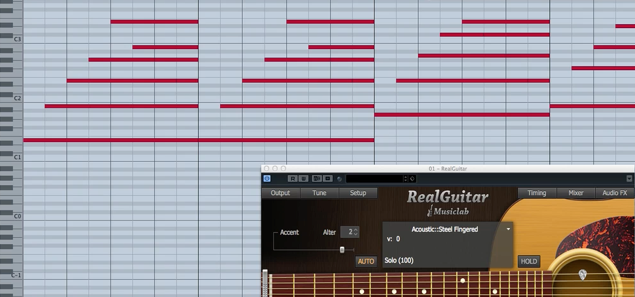
Of course, you can reproduce arpeggios on your own, but
- note lengths and velocities
- taking guitar voicings into account
creating them while paying attention to all this is very hard work.
That's when we recommend using "Bass'n'Pick".
It lets you reproduce authentic arpeggios quickly and easily.
RealGuitar videos
- 1Authorization
- 2Basics and patterns
- 3RealGuitar 3 in Practice: Chords and Articulations
- 4RealGuitar 3 in Practice: Playing Arpeggios (this article)
- 5RealGuitar 4: How to Use the New "SONG" Feature
Purchase the product
Using Bass'n'Pick

- E1 to B4: specify the chord. A single note plays a major chord.
(To use a minor chord, you also need to add the minor third; for Em, enter E and G) - C5: plays Bass I (the chord's root).
- D5: plays Bass II (alternate bass). (Basically not used when the root is on the 5th string)
- E5: plays the 4th string.
- F5: plays the 3rd string.
- G5: plays the 2nd string.
- A5: plays the 1st string.
About Chord Position
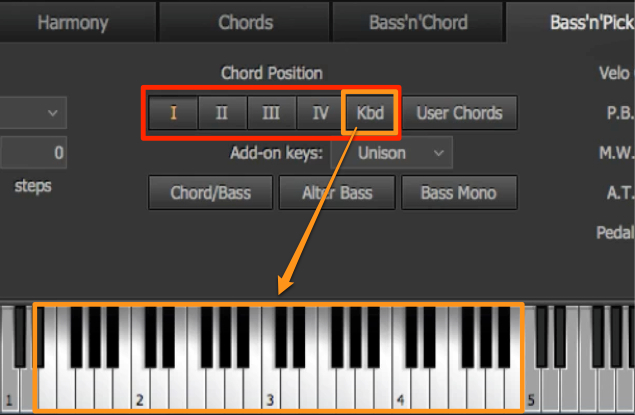
- I, II, III, IV: I plays in a low position.
The higher the number, II → III → IV, the higher the position played. - Kbd: the position changes according to the octave of the chord entered in the main zone.
Purchase the product
Frequently asked questions
Q1. How do I enter a minor chord with RealGuitar 3's Bass'n'Pick?
In the chord zone from E1 to B4, enter the minor third in addition to the root. For example, for Em, enter E and G at the same time to play a minor chord.
Q2. How can I change the guitar position (where it's played on the neck)?
Select "I, II, III, IV" in Chord Position, or select "Kbd" to change it automatically according to the pitch of the chord you enter in the main zone. The higher the number, the higher the position played.
Q3. Which keys do I use to play each guitar string individually?
C5 is assigned to the bass (root), D5 to the alternate bass, E5 to the 4th string, F5 to the 3rd string, G5 to the 2nd string, and A5 to the 1st string. Combining these lets you play any way you like.
NEW ARTICLES
Latest English Articles











