
RealGuitar is DTM software that lets you program high-quality guitar parts even without any guitar playing experience. This article explains how to switch between Solo and Chord modes and how to use its extensive pattern features. By mastering the basics, from single notes to chords, adjusting voicings, and dragging and dropping patterns, even producers with no guitar knowledge can bring realistic guitar sounds into their DAW. Besides acoustic guitar, the same company's RealStrat handles electric guitar programming too.
RealGuitar: Program Guitar Parts Even Without Guitar Knowledge
Guitar is said to be the most time-consuming and difficult instrument to program.
I'm always glad that I can play guitar (lol).
However, with this software,
you can program guitar easily and at high quality.
If you struggle with guitar parts, this is software we would really like you to try.
This time we are introducing RealGuitar, an acoustic guitar instrument,
but the same company has also released an electric guitar version called "RealStrat."
It is used in basically the same way, so we hope this video will be helpful for it as well.
RealGuitar Videos
- 1Authorization
- 2Basics and Patterns (this article)
- 3RealGuitar 3 in Practice! Chords and Articulations
- 4RealGuitar 3 in Practice! Expressing Arpeggios
- 5RealGuitar 4: How to Use the New "SONG" Feature
Purchase the Product
Video Point_Switching Modes
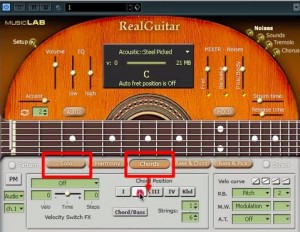
Solo mode plays single notes,
and Chord mode lets you play chords from the keyboard.
In that case, the chord voicing is converted to a true guitar voicing.
You can adjust the height of the voicing with the number below.
Video Point_Using Patterns
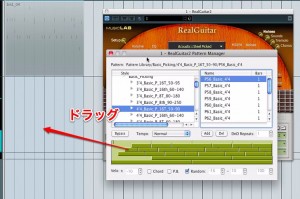
You can use many patterns from the "PM" button.
Drag and drop the pattern you like onto your DAW's sequencer to use it.
Purchase the Product
Frequently asked questions
Q1. Can I use RealGuitar even if I can't play guitar?
Yes. RealGuitar is designed to be beginner-friendly, so even without guitar knowledge or playing experience, you can easily program high-quality guitar parts from a MIDI keyboard.
Q2. What is the difference between Solo mode and Chord mode?
Solo mode is for playing single notes, and Chord mode is for playing chords. In Chord mode, notes are automatically converted to voicings typical of the guitar, and you can adjust the height with the number setting.
Q3. How do I use the pattern feature in my DAW?
Just choose the pattern you like from the PM button and drag and drop it onto your DAW's sequencer to work it into your song right away.
Q4. What is the difference between RealGuitar and RealStrat?
RealGuitar is for acoustic guitar, and RealStrat is for electric guitar. Their basic operation is the same, so what you learn in one applies to the other.
NEW ARTICLES
Latest English Articles











