
Producing high-quality songs in DTM requires not only technical skill but also an optimized production environment. This article introduces eight productivity applications that DTMers should adopt. By using tools such as MUTANT, iTunes, Dropbox, Droplr, Evernote and Skitch, you can manage audio material, convert files, sync to the cloud, share securely and manage information. All of them can be started for free, so bringing them into your production workflow can be expected to reduce trouble and greatly improve your efficiency.
Recommended Free Software for Working More Efficiently
As you have probably felt yourselves, music production is enjoyable, but it also requires considerable concentration and energy.
To focus on your work and create good pieces, you should minimize unnecessary worries and take steps to keep trouble from occurring.
You could say that creating this kind of environment is also an important production skill.
Here, we introduce recommended applications for making music efficiently with DTM.
Each program can be started for free, so try adopting the ones that seem to match your goals and needs.
1. MUTANT: Audio Material Management

An application that lets you quickly and efficiently manage audio files, which tend to pile up in huge numbers from sampling CDs, sample packs and the like.
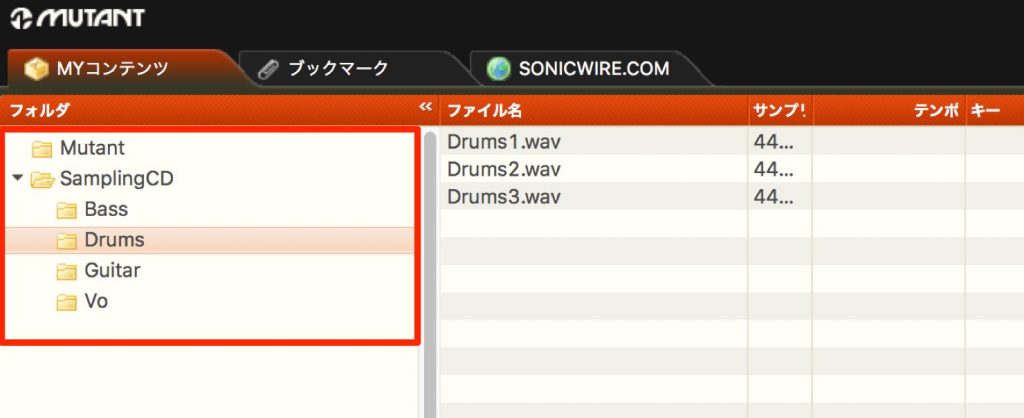
You can create folders by instrument or sound and manage audio files.
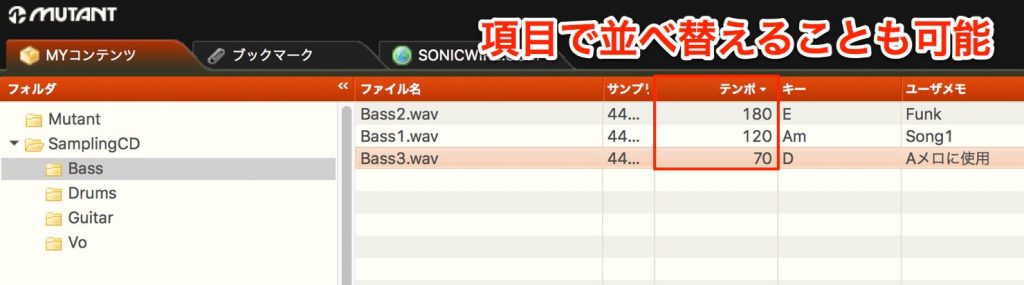
It offers plenty of tag and field settings for files, so it is highly customizable and designed to let you find sounds comfortably.
MUTANT Tutorial Video

2. iTunes: Converting Music Files

http://www.apple.com/jp/itunes/download/
iTunes is known as a music player, but it can also convert audio files.
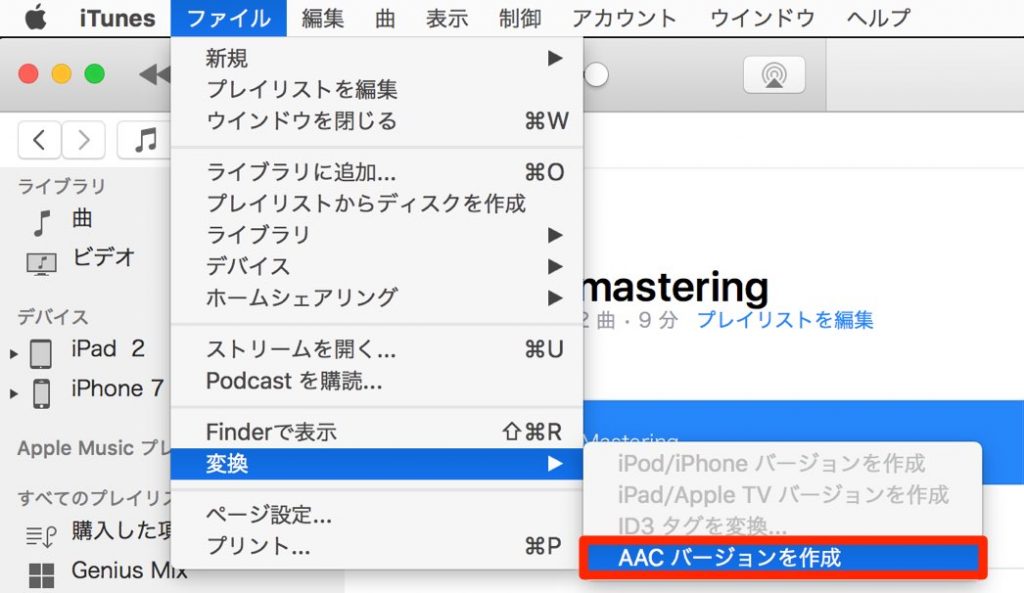
It is handy when, for example, you want to convert an uncompressed file to MP3 or AAC to send it by email.
iTunes also actually has a function for managing multiple libraries.
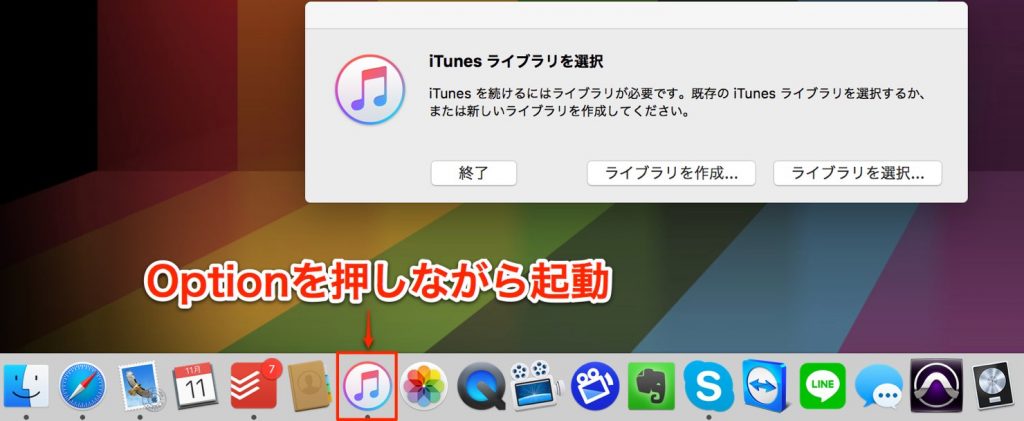
- Mac: Option
- Windows: Shift
By launching iTunes while holding these keys, you can create a new library.
For example, it is convenient to switch between multiple libraries for different situations, such as personal use, work and competitions.

3. Dropbox: File Sharing and Backup

Dropbox is a service that lets you share files across multiple computers.

When you install the software, a folder like the one in the image above is created.
Files placed in this folder are automatically synced to other computers that have Dropbox installed.
If you work with song projects in this folder, the results of your work are automatically reflected on your other computers.
For example, if you take a laptop to an outside studio and record vocals, the recording is reflected on your home computer so you can start editing right away, achieving very smooth file coordination.
Also, since files are uploaded online, you get a backup of your files at the same time.

You can also share specific folders in Dropbox with other users, which is handy when collaborating with someone.
Dropbox Tutorial Video
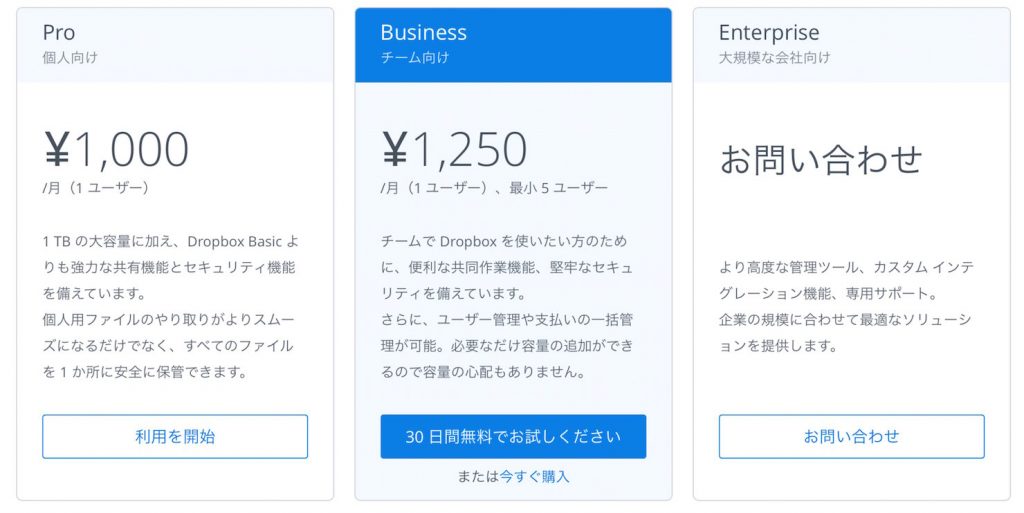
Benefits of the Paid Version
Dropbox offers paid plans, and subscribing lets you increase storage capacity and improve security.
4. Droplr: Quickly Send Songs and Data

A service that lets you quickly upload data from your computer and easily pass it to others.
It is also handy for passing along files that are too large to attach to an email.
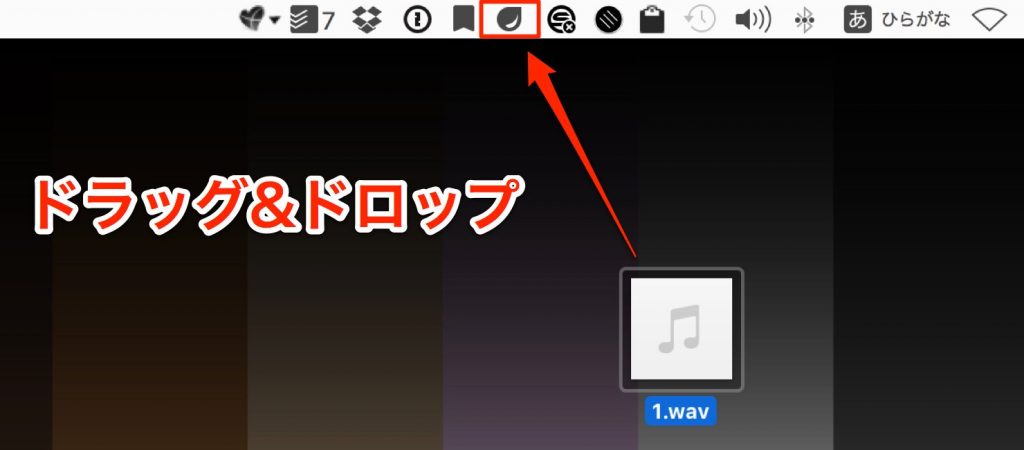
When you launch Droplr, an icon appears in the menu bar.
Then just drag and drop the file you want to upload.

A URL is generated automatically and saved to the clipboard.
By pasting this URL into an email or the like, the recipient can view and download the file from that URL.
It is also very helpful that it supports a wide variety of file types, such as video, ZIP and images.

Benefits of the Paid Version
Droplr offers paid plans that add features such as removing the upload limit, increasing upload capacity and improving security with passwords.

5. Evernote: Managing and Backing Up Important Text Information

Evernote is a cloud-based note-taking tool that lets you attach text, audio files, images, PDFs and more.
You can keep notes of the IDs and passwords for your DTM products, which tend to get messy, and share notes for plans and projects with multiple people.
It also supports PDFs, so you can create a notebook just for sheet music and view it on an iPad, for smooth coordination.
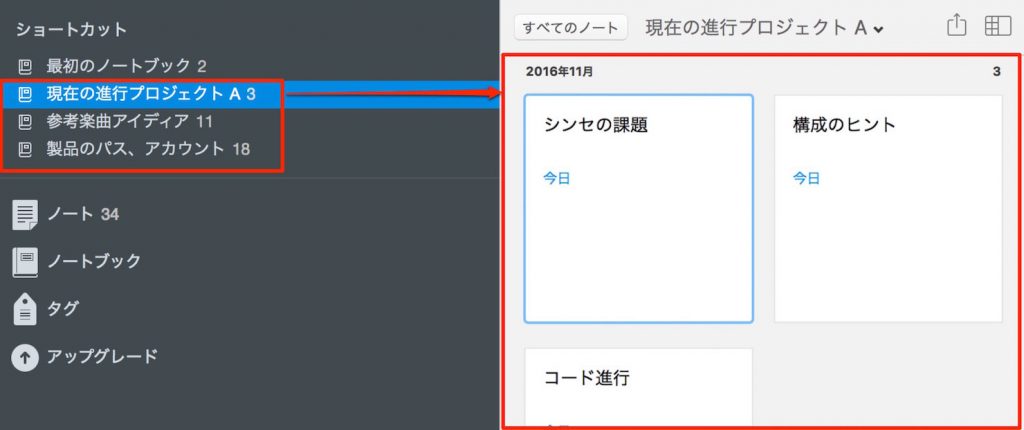
You can create a notebook for each topic and create related notes inside it.
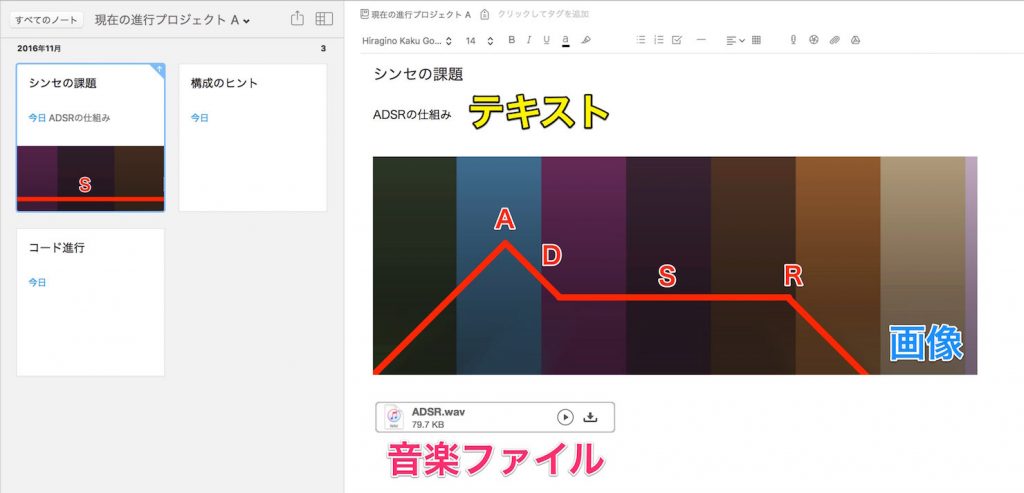
As shown, you can place text, images, audio and more in a note.
The notes you create can be accessed from PC, iOS and Android, so you can check them from anywhere.
Even if your device breaks, when you launch Evernote on a new device and log in, all your notes up to now are restored.
This greatly reduces the risk of losing important information.
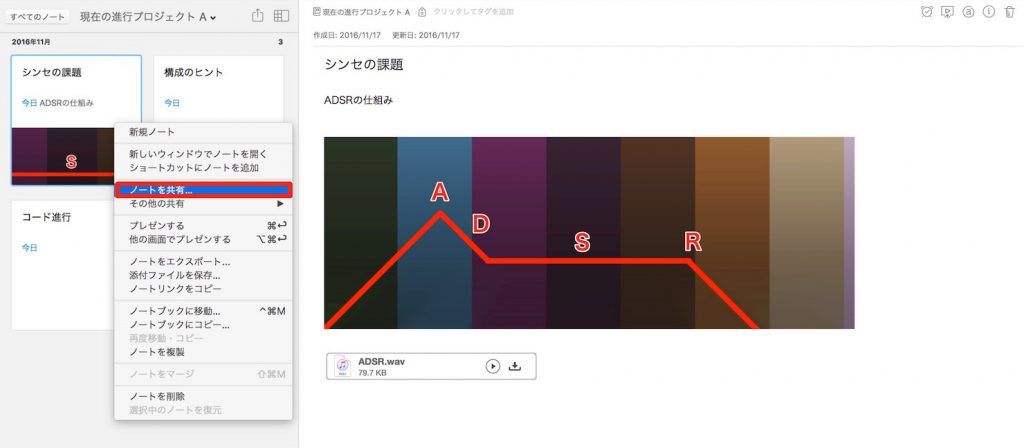
By right-clicking a note, you can easily share it with other Evernote users.
When the other person changes the content of a note, the change is reflected immediately.
Benefits of the Paid Version
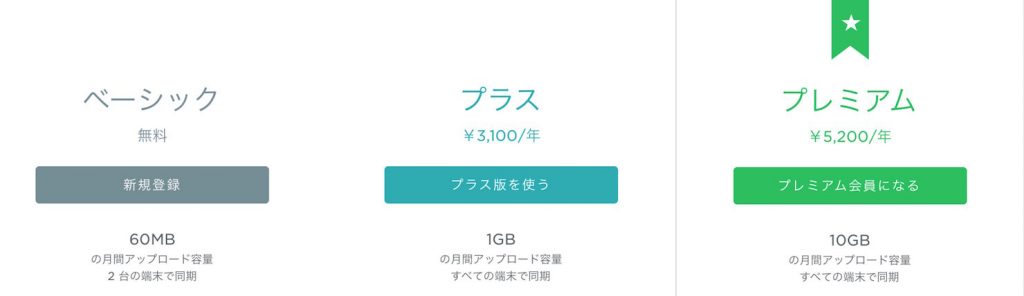
Evernote offers paid plans that add very attractive features, such as increased upload capacity, more devices that can be synced, and text search within PDF files.
6. Skitch: Smarter Screenshots

https://evernote.com/intl/jp/skitch/
Skitch is an application for taking screenshots of your computer screen.
You can specify the capture area, adjust the size after capturing, and add annotations such as text and symbols.
For example,
- Recording parameters and layouts in your DAW to check later
- Attaching an image to an email so that someone else can check the current state of your computer
It comes in handy in many situations like these.
The great thing about Skitch is that you can edit the image immediately after taking it.
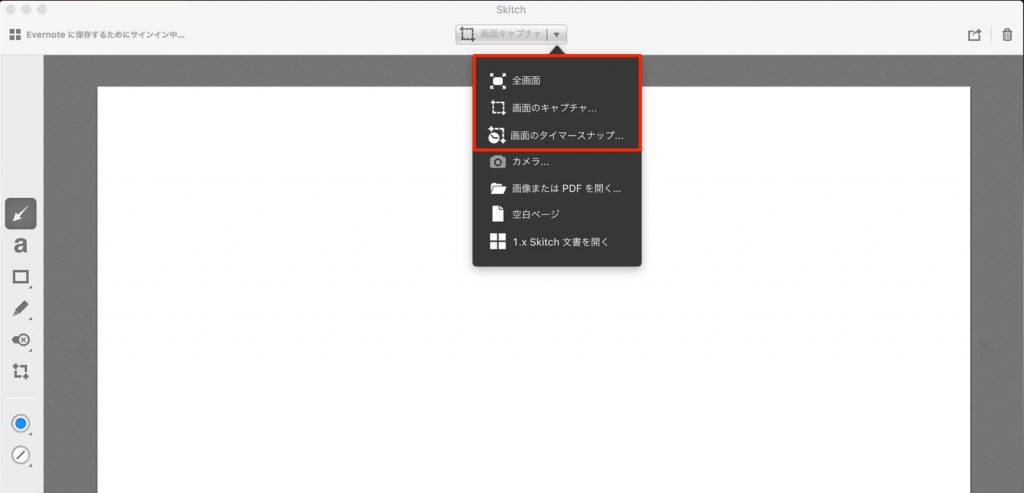
You can specify the capture format in detail.
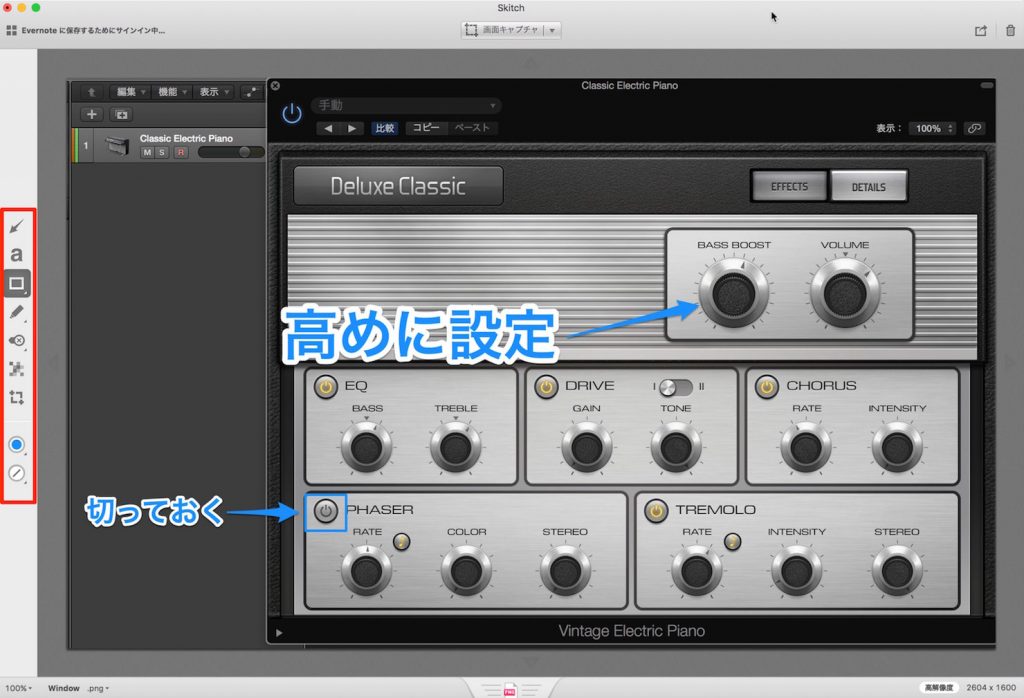
You can edit the captured image using the tools on the left.
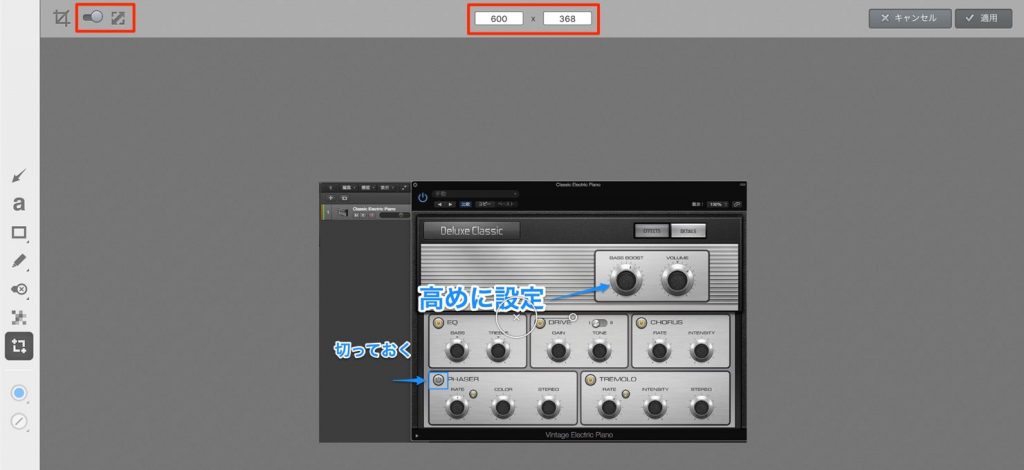
It also supports resizing images.
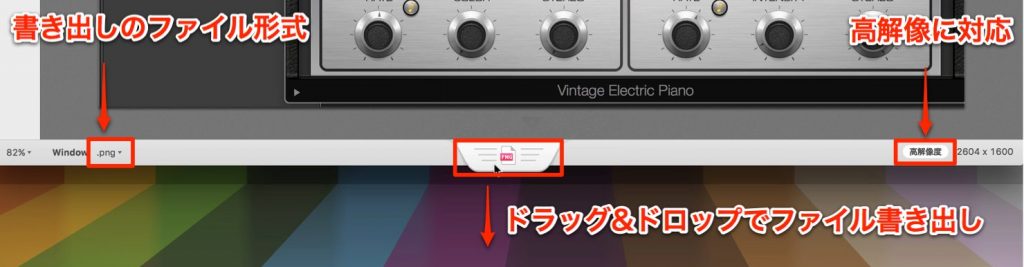
You can easily export the image you created by drag and drop.
You can export in various image file formats, including high-resolution images that support 4K.
7. Todoist: Manage Song Ideas and To-Dos

https://ja.todoist.com/premium
Todoist is a very refined to-do application.
It is a very useful tool for music production too, not only for noting what you need to do but also for managing song ideas and tasks.
These to-dos can be shared with others, so when working as a team you can see at a glance who is responsible for what and how things are progressing.
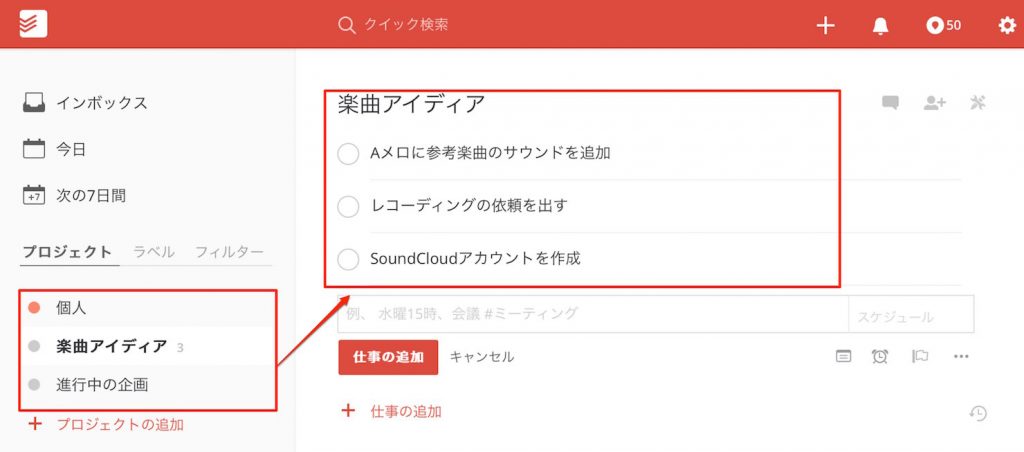
Create a to-do category and add the things you need to do inside it.
The layout is also very easy to understand visually.
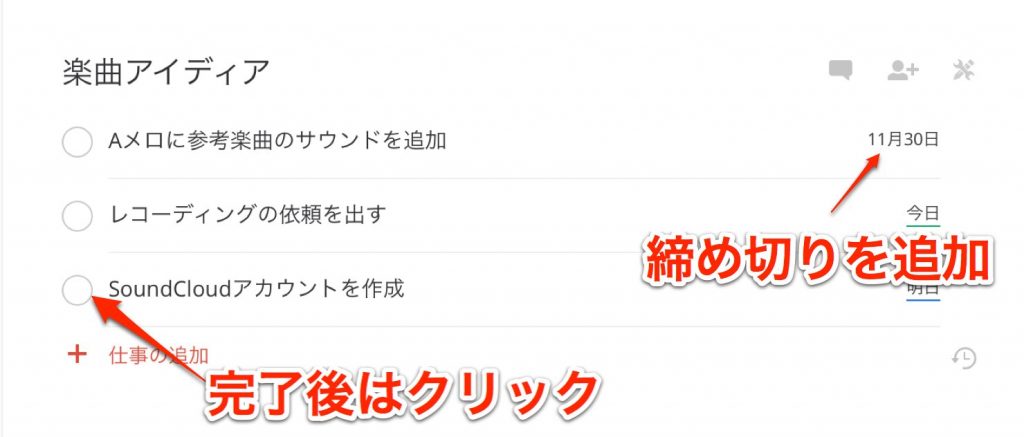
Setting due dates for items is simple, too.
You can click completed items to remove them from the list.
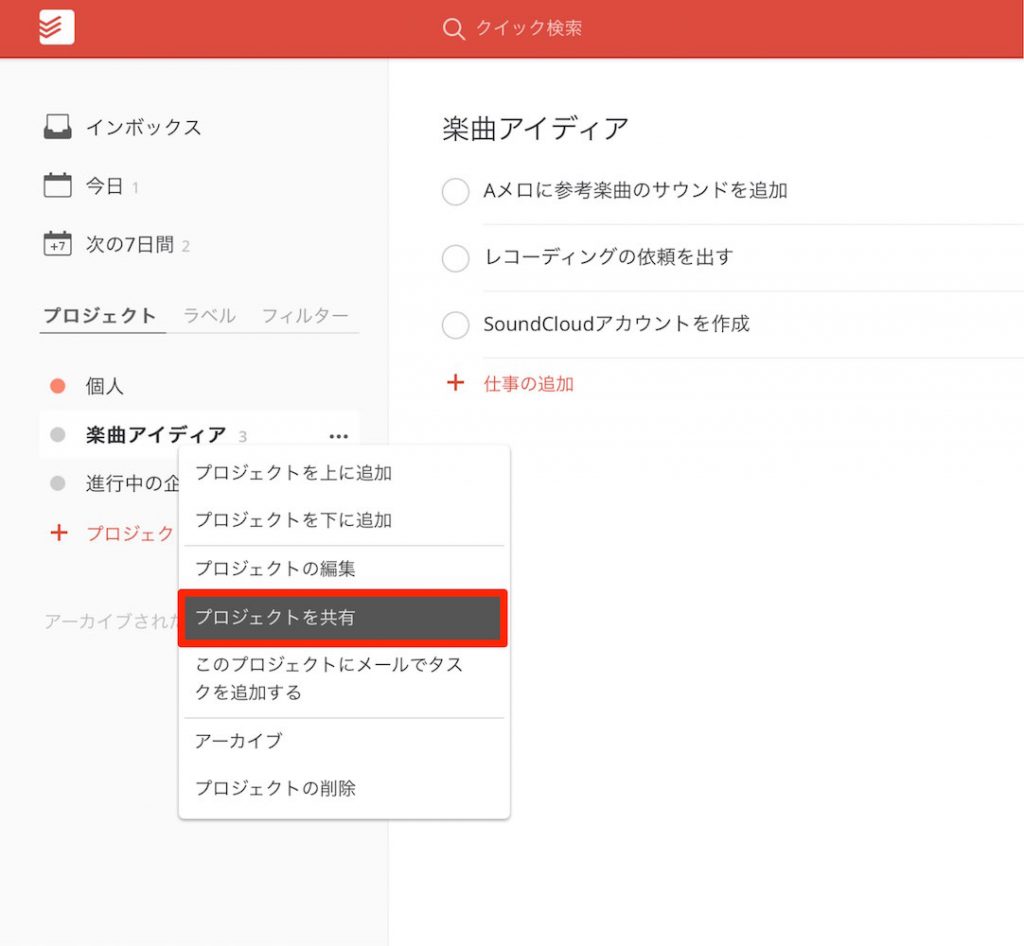
By right-clicking a project, you can share it with other users.
This makes the division of work clear and easy to check.
Todoist Tutorial Video
Benefits of the Paid Version
Todoist offers paid plans that enable features such as more projects and people, list backups, and comments and file attachments.

8. FreeFileSync: Folder Sync and Backup
"Backup" is indispensable for working efficiently.
Nothing is more wasteful than having to redo the same work because data was corrupted or lost.
FreeFileSync is a backup support application that syncs specified folders with each other and keeps them up to date.
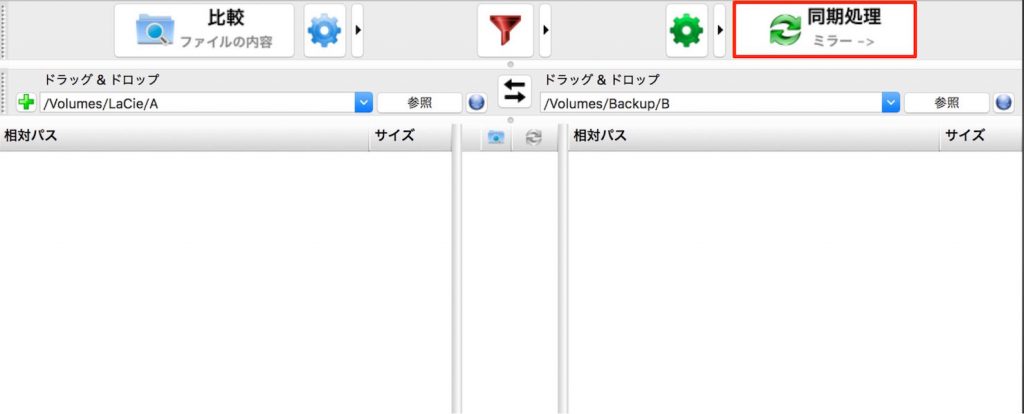
Once you set it up, future backups are completed with a single click.
Make a habit of creating backups regularly, such as after finishing a task or at the end of the day.
FreeFileSync Tutorial Video

What did you think?
All of these programs can be adopted right away.
Make full use of handy applications like these, and enjoy producing music efficiently!
Frequently Asked Questions
Q1. Can DTM beginners master the applications introduced here?
Yes. All the tools introduced can be used for free to start with and are designed with easy-to-use interfaces. Tutorial videos are available for each program, so even beginners can learn them step by step and adopt them at their own pace.
Q2. What is the best way to share production files across multiple computers?
We recommend Dropbox. With its automatic sync, material recorded on a laptop is automatically reflected on your home computer, enabling efficient file coordination between the studio and home.
Q3. How should I manage a huge amount of audio material?
With MUTANT, you can tag and categorize material by instrument or sound, and quickly search for and manage what you need. Its rich customization options make for comfortable use.
Q4. What should I do if I want to back up important project information?
Evernote is a cloud-based note-taking tool that can store text, images, PDFs and more, and syncs automatically across multiple devices. Even if a device breaks, everything is restored when you log in, minimizing the risk of losing information.
NEW ARTICLES
Latest English Articles











