

Waves V10 is the latest update, released in November 2019, adding new plug-ins such as Electric Grand 80 Piano and Eddie Kramer Drum Channel to each bundle. Upgrading to V10 is paid, but products purchased within the past year or covered by the Waves Update Plan can be updated for free. The article clearly explains the simple installation steps using Waves Central, how to check your licenses and how to uninstall, and also covers points to note when migrating from V9 in detail. It also presents cost-effective ways to upgrade, such as updating multiple products together for $225 with a bulk renewal.
Installing and registering Waves V11, released in November 2019, is explained in the articles below.

Installing and Registering Waves V11 Plug-ins (New Account): How to Use Waves Central
An article explaining every step from buying Waves V11 plug-ins new to starting to use them: how to create a Waves account, the difference between registering purchases from the online store and the Japanese distributor, Waves Cen...

Installing and Registering Waves V11 Plug-ins (Product Upgrade): How to Use Waves Central
Waves V11 is the latest version with major enhancements, including a redesigned interface for the Renaissance series, over 1,400 added artist presets and new plug-ins. Purchase...
New plug-ins added to each bundle, plus points to note when updating
Waves has released its latest update, V10.
https://www.waves.com/announcing-waves-v10
This version includes changes like these:
- Electric Grand 80 Piano is added to the Gold/Platinum/Diamond/Horizon/Broadcast & Production/Broadcast and Surround Suite/Sound Design Suite/Mercury bundles.
- Eddie Kramer Drum Channel is added to the Gold/Platinum/Diamond/Horizon/Broadcast & Production/Broadcast and Surround Suite/Sound Design Suite bundles.
- Improved CPU performance for Waves Tune Real-Time.
- Various other minor bug fixes.
From V10, you can open plug-ins/settings used in V9 and earlier versions.
Points to note when updating to V10
Upgrading to V10 is not free.
To use it, your products need to be covered by the "Waves Update Plan".
*If it's been less than a year since you bought the product, it's covered by the "Waves Update Plan."
There's a way to check whether your products are V10-compatible under the "Waves Update Plan."
Go to the URL below. (Login required)
https://www.waves.com/account/products#v9-and-above
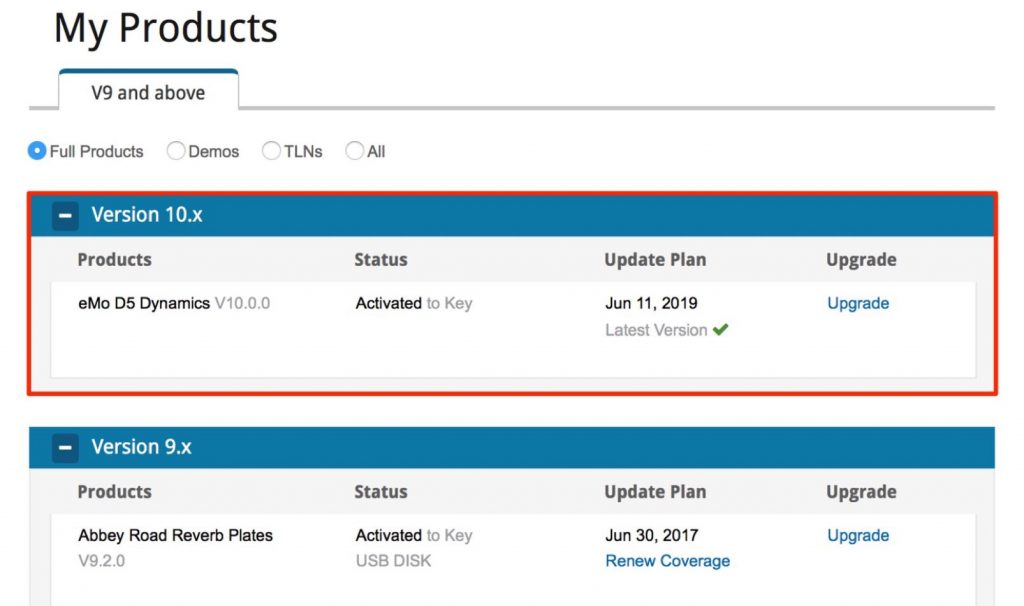
If your plug-ins are shown under Version V10, you can upgrade them to V10 free of charge.
- Added June 13, 2018
If products that should be eligible for the Waves Update Plan don't appear, try the following method.
Go to the URL below. (Login required)
https://www.waves.com/account
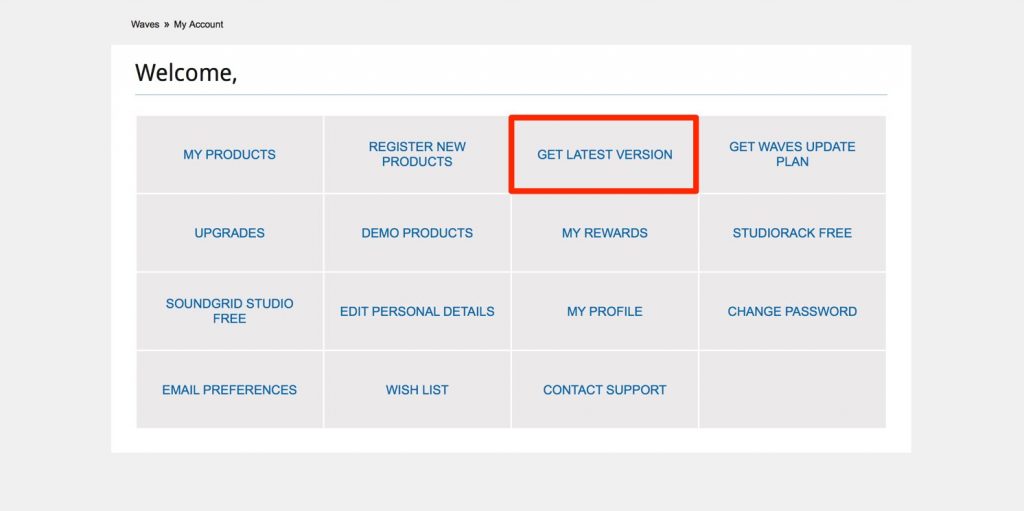
Select "GET LATEST VERSION."
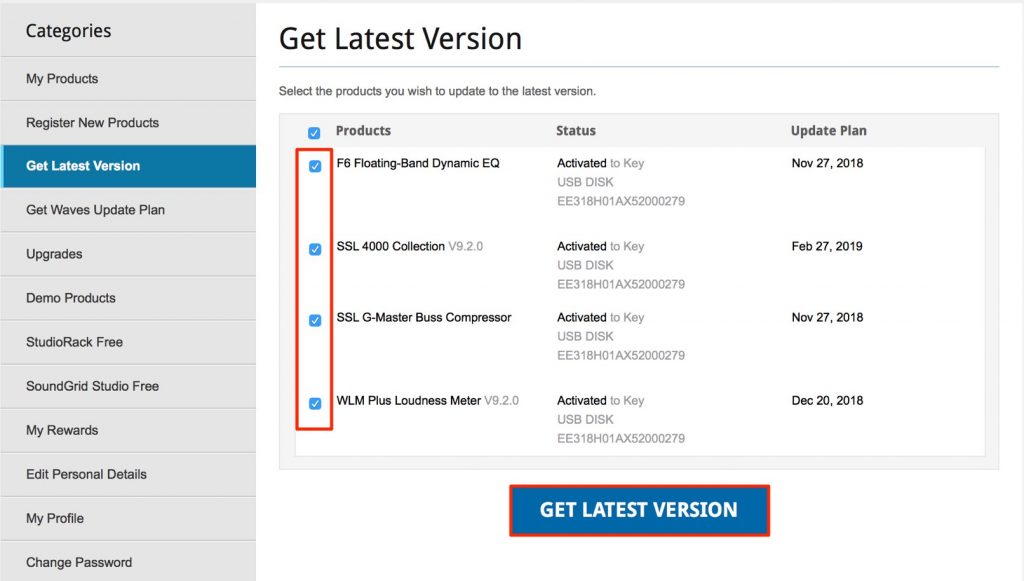
Check the products you want and click "GET LATEST VERSION."
The selected products can now be used with V10.
If no products are shown in the Version V10 section, you need to join the "Waves Update Plan".
Go to the URL below. (Login required)
https://register.waves.com/waves/wup/wupMain.aspx
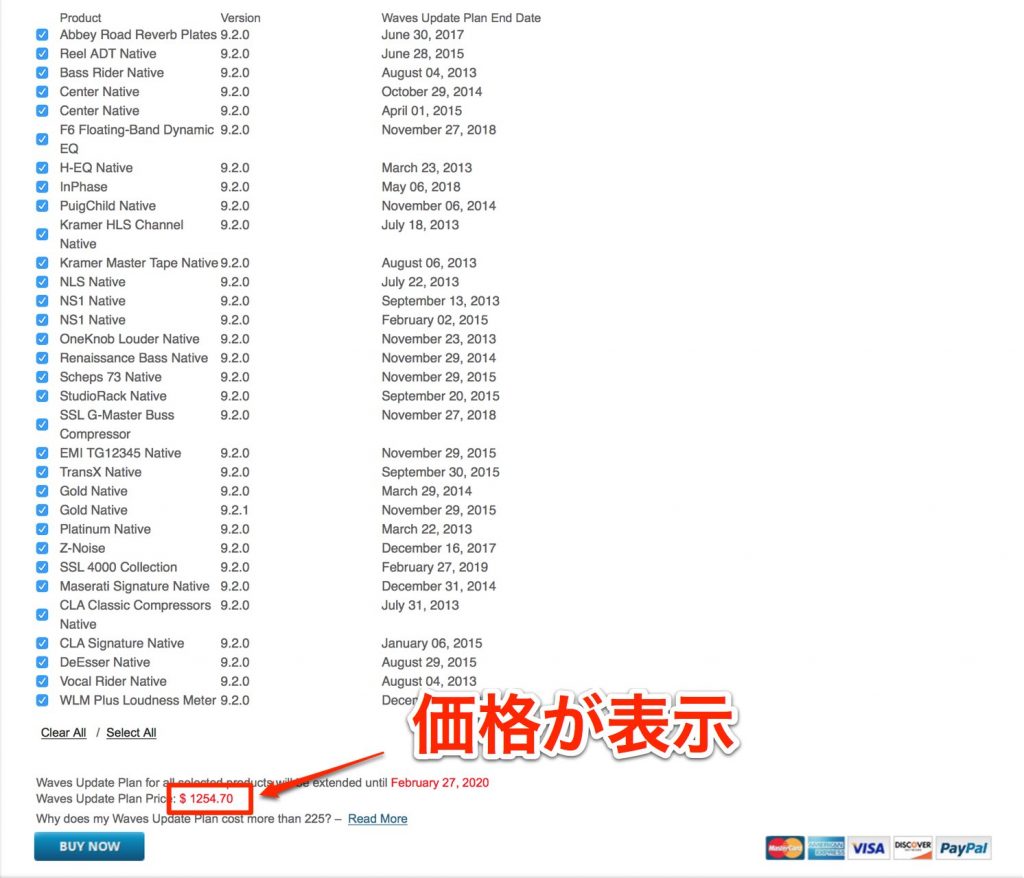
The plug-ins that need the Waves Update Plan to use V10 and their prices are displayed.
You can also join for specific plug-ins only.
Depending on how many plug-ins you own, it can add up to a considerable amount, so when buying you might want to consider whether it's really worth it.
To join the plan, click "BUY NOW" and complete payment.
Keep the "Waves Update Plan" to $225 with a bulk renewal
- Added June 13, 2018
If you renew all your products at once, you can keep the "Waves Update Plan" to $225.
Here are the points to note about bulk renewal:
- Only one of identical products, or products with overlapping contents, can be renewed
- Products can be used on only one computer at a time
- All licenses are consolidated onto a USB flash drive or a computer
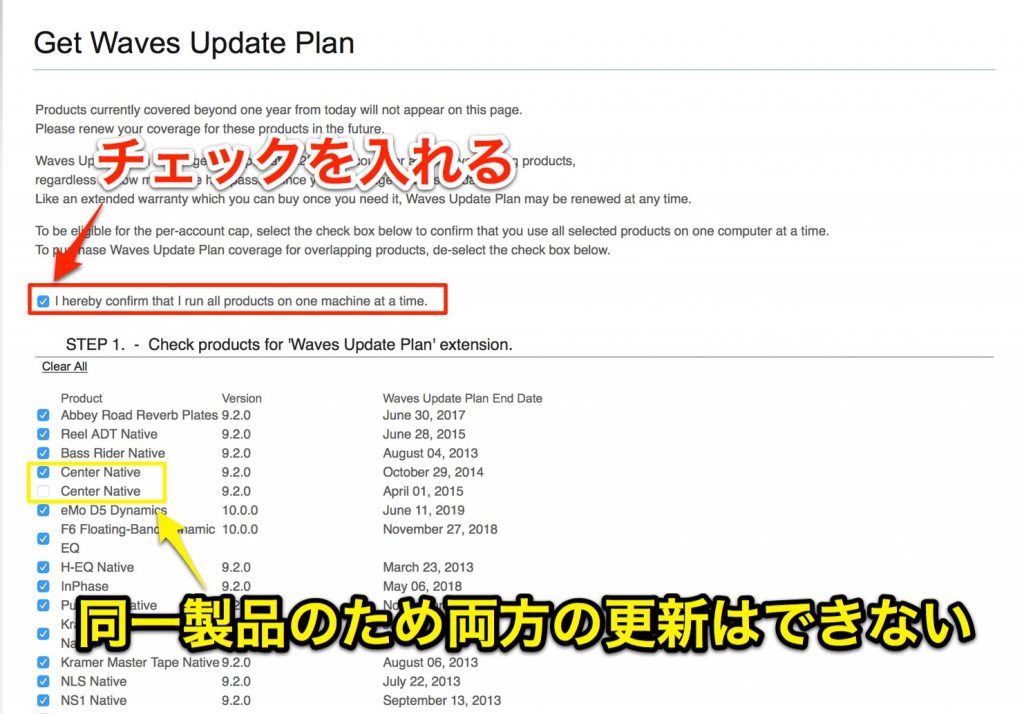
Check "I hereby confirm that I run all products on one machine at a time." and select the products to renew.
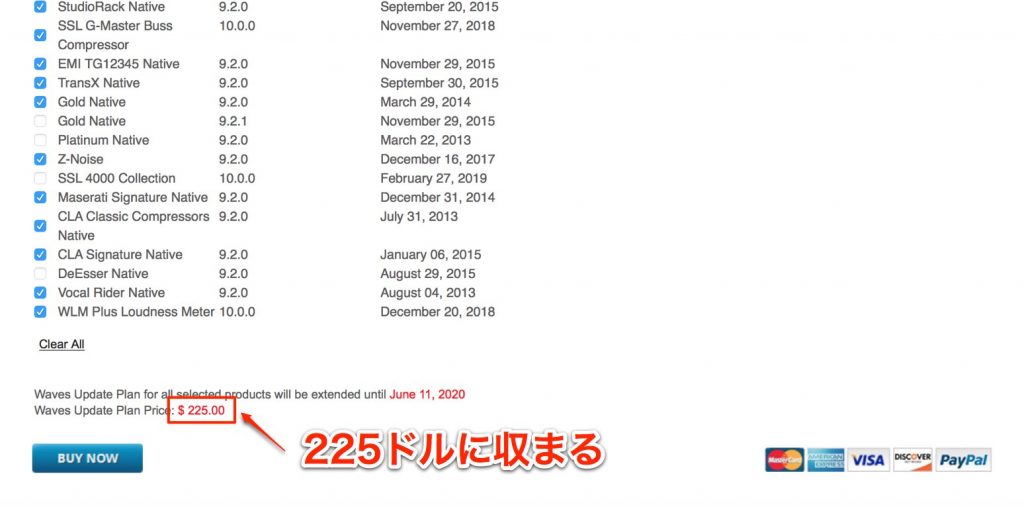
This keeps it to $225, as shown.
How to update to V10
Next, we'll explain how to update to V10.

Launch Waves Central.
An overview and how to use it are explained in the article below.


Select "Click here" to download and install the latest Waves Central.

Launch Waves Central and select "UPDATES AVAILABLE."
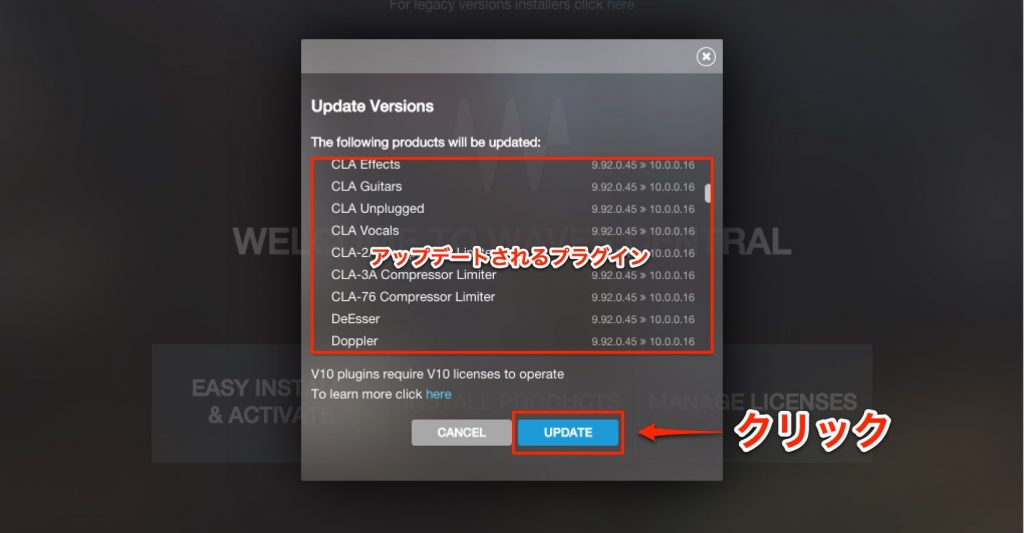
Check the plug-ins to be updated and click "UPDATE."
This completes the update.
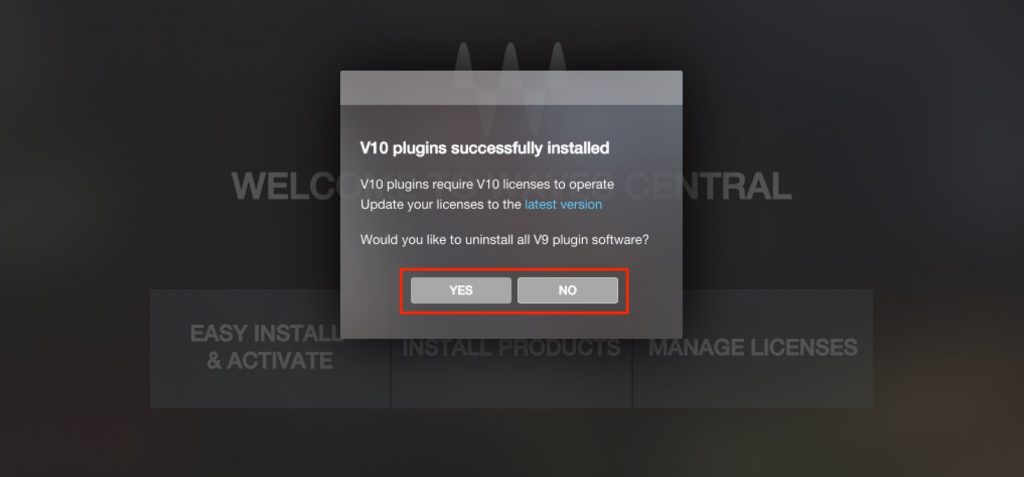
A dialog appears asking whether to remove your existing V9.
If you have a mix of products that can be used with V10 and products licensed only for V9, be sure to select "NO".
You can now use Waves V10 in your DAW.
How do I uninstall Waves V10?
There may be cases where you installed V10 but your product licenses turned out to be V9,
and you want to uninstall V10.

From the Waves Central menu, select "INSTALL" → "Uninstall."

Check V10 and select "UNINSTALL" to remove the products.
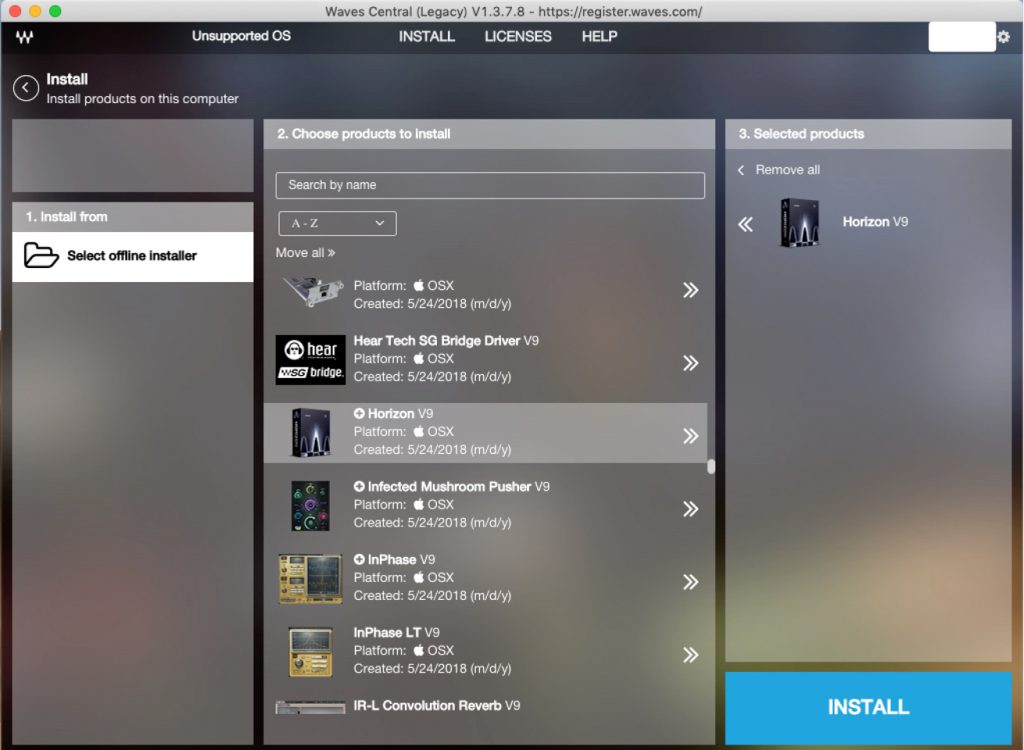
How do I reinstall Waves V9?
If you uninstalled V9 when installing V10 but want to reinstall V9,
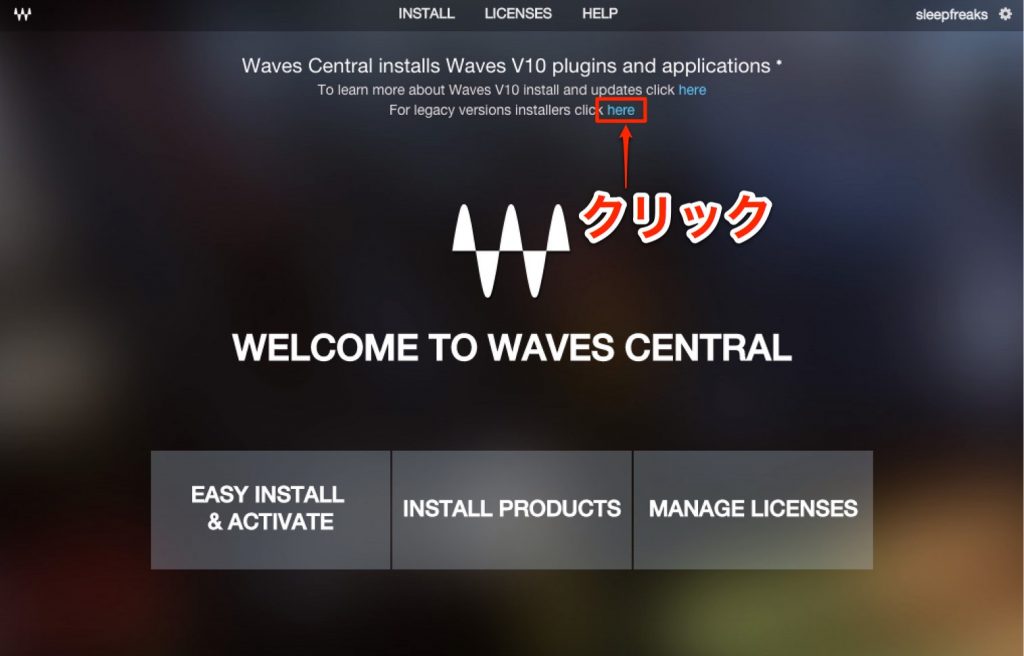
download the legacy installer from the area outlined in red in the image.

Download the installer for Mac or Windows.
Launch the downloaded Waves Central.

From "INSTALL," select "Install."
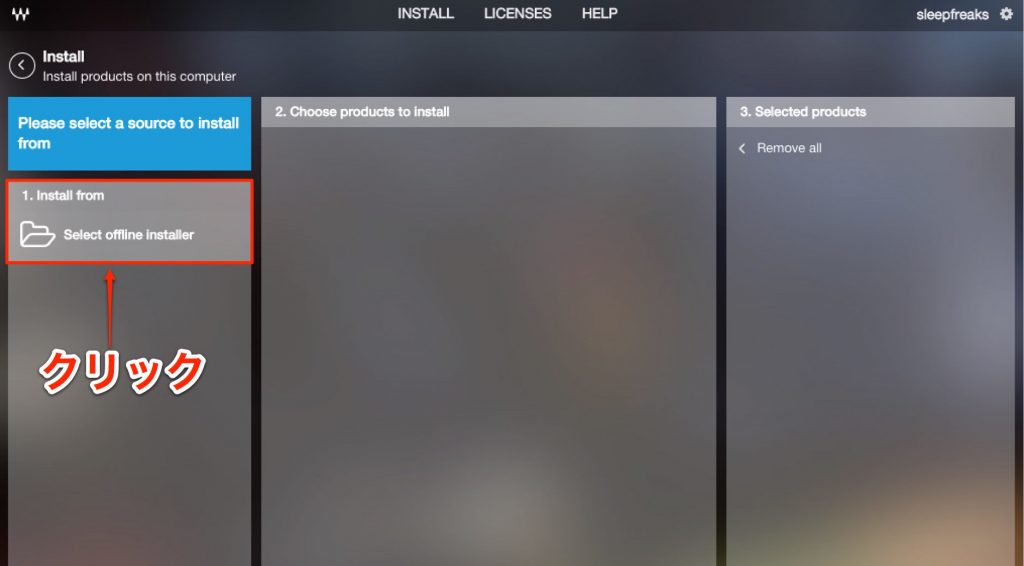
Click "1. Install from."

Select the "Installers" folder that came with Waves Central when you downloaded it, and click "Open."
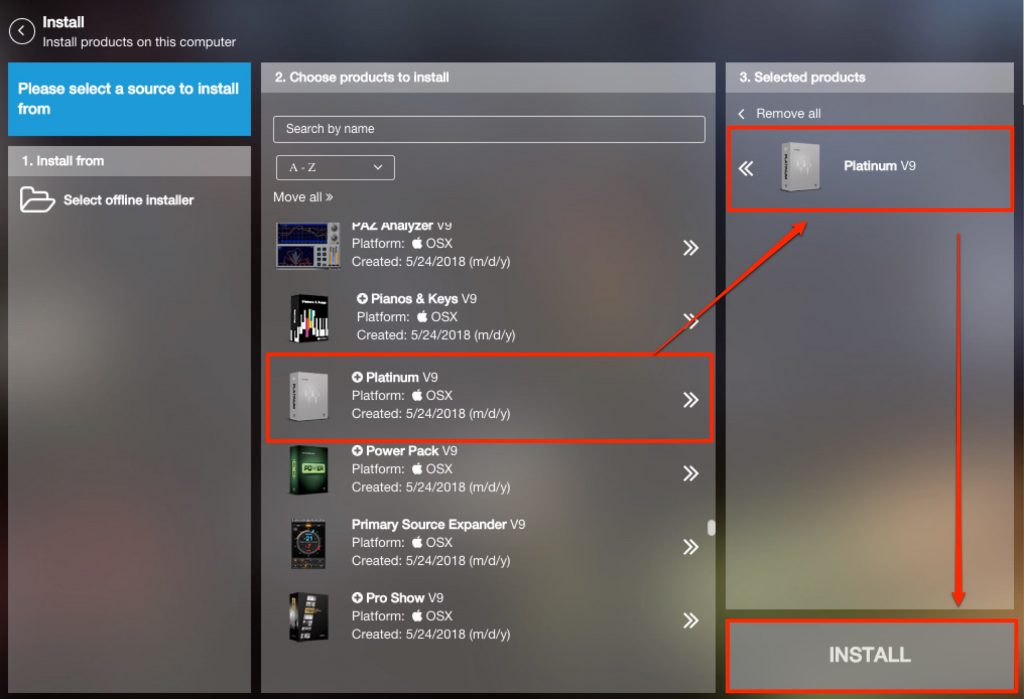
Select the products to install from those shown and click "INSTALL."
Once installation finishes, you can use V9 in your DAW.
*The following was added on November 19, 2018.
If you can't install Waves V9 on macOS Mojave (10.14)
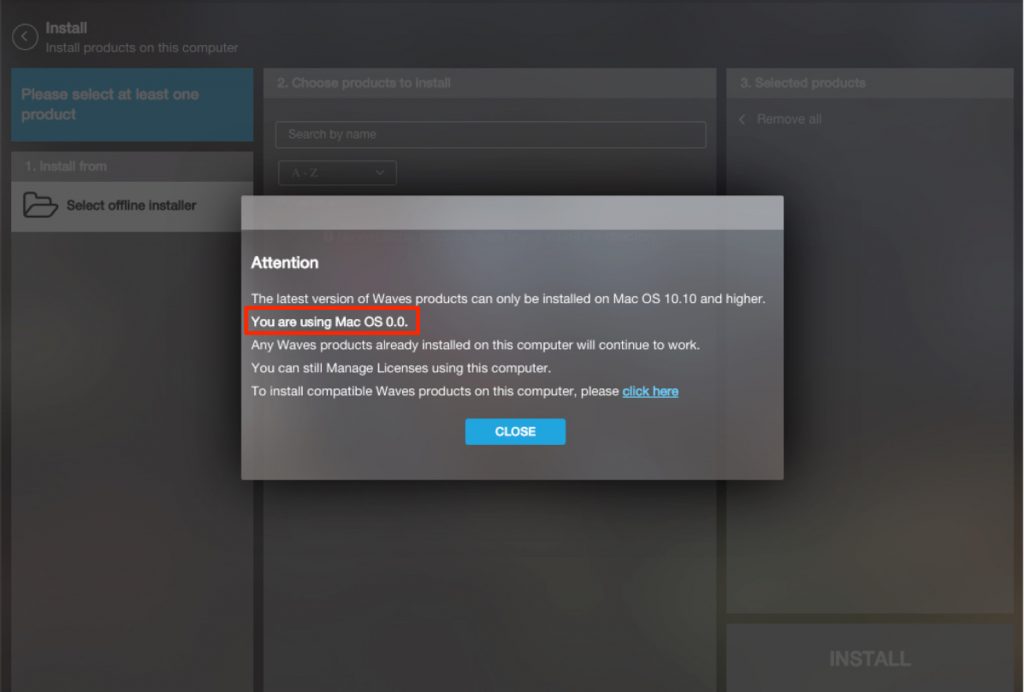
On macOS Mojave, trying to open the Waves V9 "Installers" fails with an error.
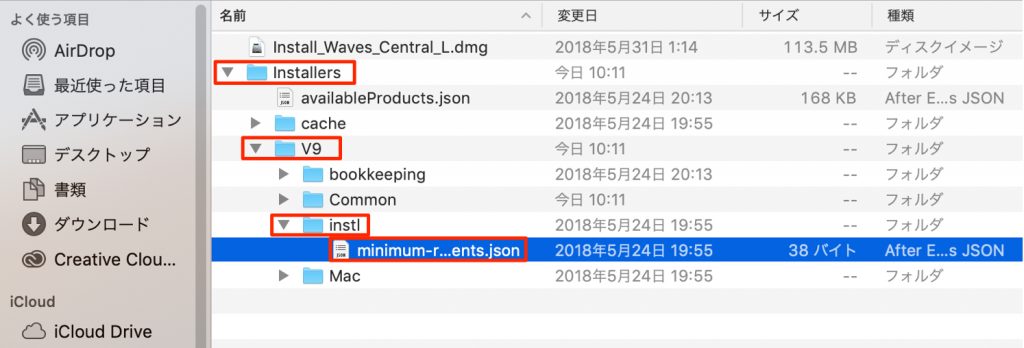
Go to the "Installers" → "V9" → "instl" folder.
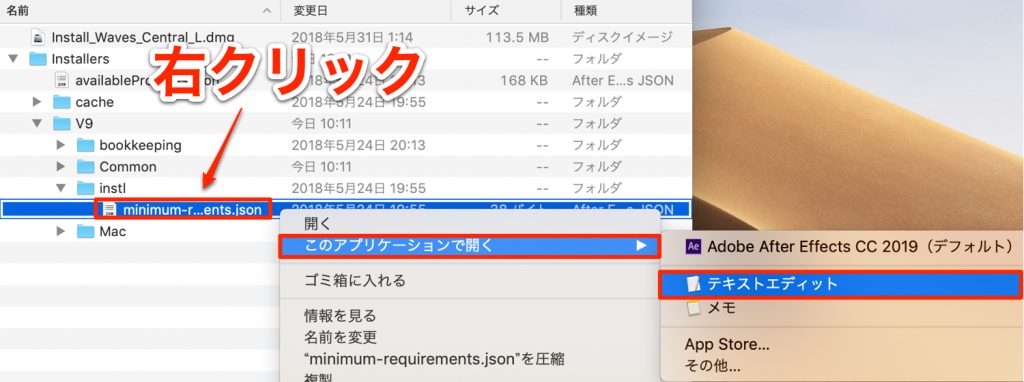
Right-click the file stored there and select "Open With" → "TextEdit."
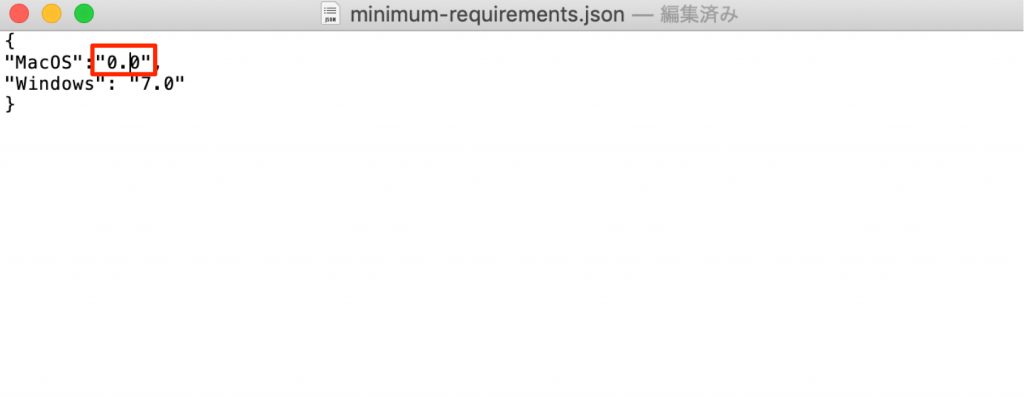
Rewrite the number shown, as in the image, to "0.0."
You can now open "Installers" from Waves Central L (Legacy).
If Waves V9 doesn't appear in Logic X
This is how to fix the symptom where Waves doesn't appear in the insert effects (the plug-in scan doesn't run) when you launch Logic.
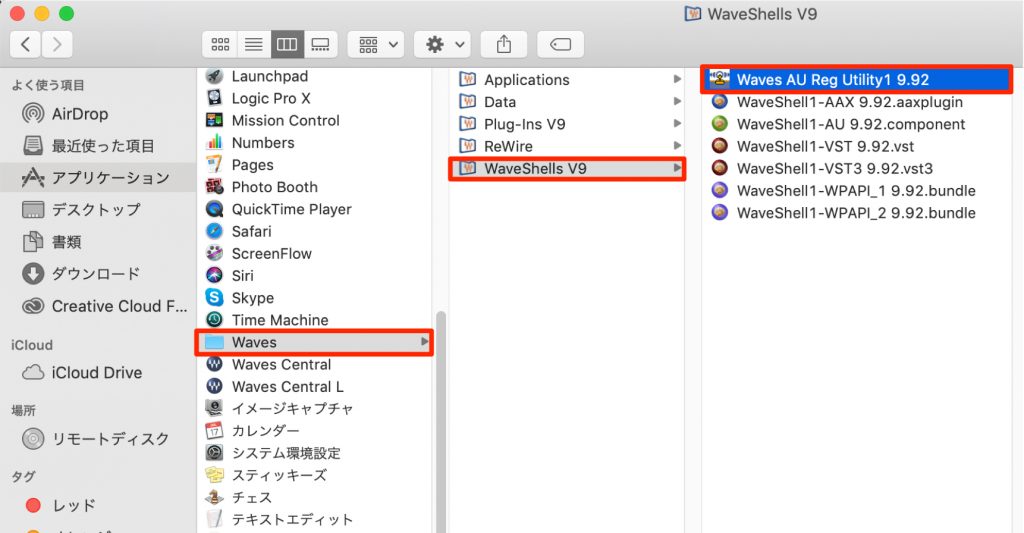
From the Applications folder, launch "Waves" → "WavesShells V9" → "Waves AU Reg Utility1.9.92."
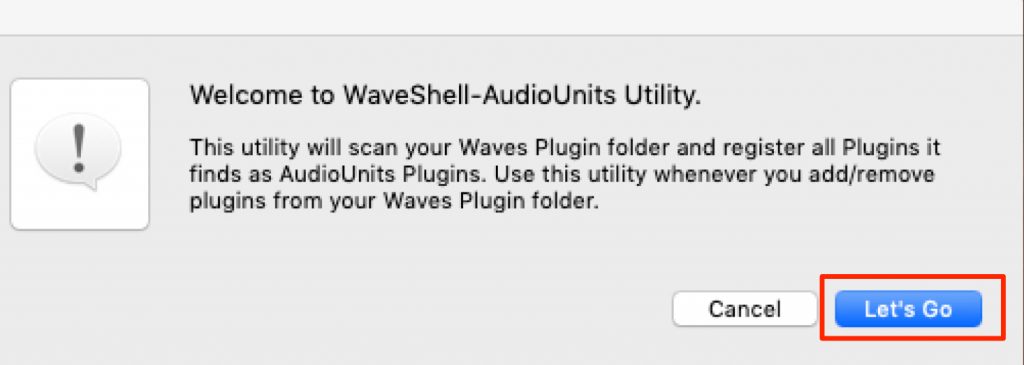
A dialog like this appears, so select "Let's Go."
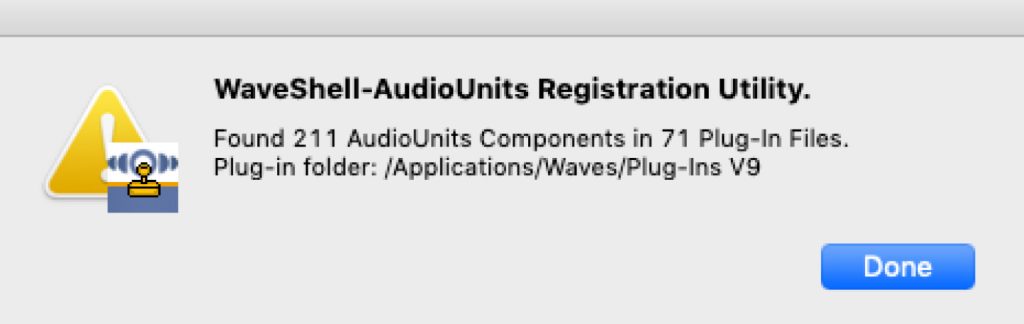
When a message like this appears, you're done.

After launching Logic, a plug-in scan runs, and if you go to "Audio Units" → "Waves" in the effects, the Waves V9 products are shown.
Frequently asked questions
Q1. Is upgrading to Waves V10 free?
Upgrading to V10 is paid. However, products purchased less than a year ago or covered by the Waves Update Plan can be upgraded for free. You can check eligibility on the account page of the official site.
Q2. Can I use V10 and V9 at the same time?
When installing V10 you're asked to remove V9, but if some products aren't supported in V10, selecting "NO" lets you use both side by side. If needed, you can also reinstall using the legacy installer from Waves Central.
Q3. How much does it cost to upgrade multiple Waves plug-ins together?
With a bulk renewal, you can keep the Waves Update Plan to a flat $225. However, there are conditions: only one of identical or overlapping products is updated, and products can be used on only one computer at a time.
NEW ARTICLES
Latest English Articles











