
Key follow is a parameter of a synthesizer's filter that automatically adjusts the cutoff range according to the pitch played. It solves the problem of low or high notes losing volume when you use a high-pass or low-pass filter, keeping the volume balance consistent no matter which key you play. By adjusting it from the default of 0 toward +100 or -100, you can finely control the nuance of a sound, and it is useful in many sound design situations, such as synth basses and arpeggiators.
Key Follow: Optimizing the Sound for Each Pitch
The filter, which we have explained several times before,
shapes a sound by cutting a specific frequency range.
Filter article
https://sleepfreaks-dtm.com/synth-basic/synth-filter/
However, filters have a small problem.
For example, suppose you use a high-pass filter set to cut the low end.
Low notes lose more of their sound to the filter, so their volume drops.
That is the problem.
Exactly the same applies, in reverse, to a low-pass filter.
The solution is key follow.

It adjusts the cutoff range according to the pitch played.
This ensures a reasonable volume whichever key you play.
The default is 0, in the center.
Adjusting it lets you fine-tune the nuance of the sound.
First, here is the sound at the default setting of 0.
Next is 100.
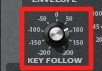
Compared with the default, the higher range is easier to hear.
This is with key follow emphasized.
And here is -100.
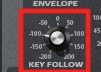
The higher the notes go, the harder they become to hear.
Opposite to key follow, the filter's effect is emphasized.
- You are making a synth bass phrase, and
the low notes sound good, but you want the high notes to cut through more - Conversely, the high range of an arpeggiator stands out too much
You can use it for adjustments like these.
After creating the main sound,
check it with the phrases that appear in the song and try adjusting the key follow.
You Can Apply It Like This

Frequently asked questions
Q1. What is key follow?
Key follow is a function that automatically adjusts the filter's cutoff range according to the pitch played. It compensates for low notes tending to lose volume and high notes becoming hard to hear, giving you a well-balanced sound overall.
Q2. What changes when I change the key follow value?
Setting it to +100 makes the high range easier to hear, while setting it to -100 emphasizes the filter's effect and makes high notes harder to hear. The default is 0, and you can create the ideal sound by fine-tuning it to fit the phrases in your song.
Q3. When should I use key follow?
It is effective whenever you need to balance a sound, such as when a synth bass sounds good in the low notes but you want the high notes to cut through more, or when an arpeggiator's high range stands out too much.
NEW ARTICLES
Latest English Articles











