
This article explains techniques for arranging drum fills in music production. A fill is a drumming technique that helps connect the sections of a song, and adding fills to the main drums makes the song flow more smoothly. You'll learn a full workflow: use time stretch to adjust the tempo, use quantize and swing to adjust the rhythmic feel, and finally differentiate the sound with effects such as EQ and distortion. Specific operations for major DAWs such as Pro Tools, Logic, and Cubase are also shown, giving practical knowledge for beginners and intermediate users.
Use fills to connect song sections smoothly
The "fill" is a well-known drumming technique.
It is used to connect the sections of a song smoothly.
Here, we explain a technique for adding new fill material
on top of the "main drums."
"Result"
Creating the sound
Matching the tempo
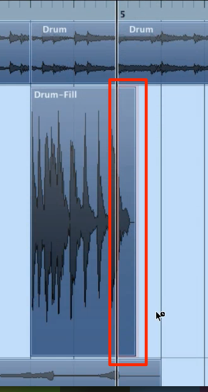
If the fill material doesn't match the song's tempo like this,
use "time stretch."
How to time-stretch in each DAW

 Logic
 Cubase
 Ableton Live
 Studio One
 FL Studio
Adjust the rhythmic feel with quantize
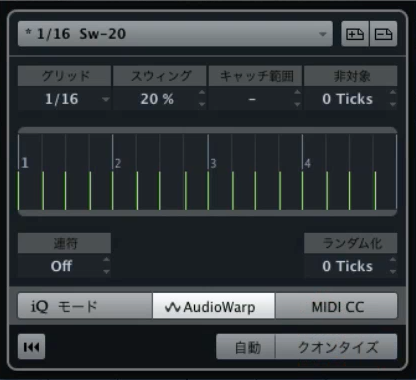
If the fill's groove doesn't match the song, using "audio quantize" is also effective.
Using swing to make the rhythm bounce a little often gives good results.
Swing-related quantize in each DAW
 GarageBand
Applying effects
When you layer a fill, you need to differentiate it from the original drums' sound.
Processing it boldly with effects is also effective.
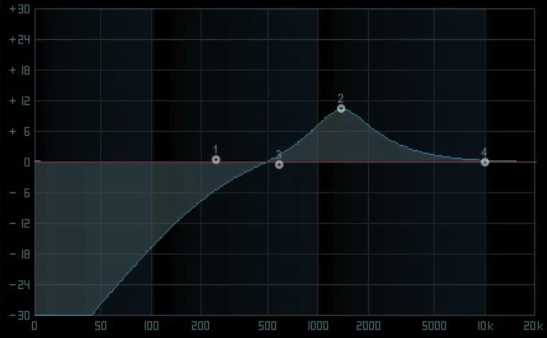
Applying a "low cut" with EQ
resolves clashes in the low end.
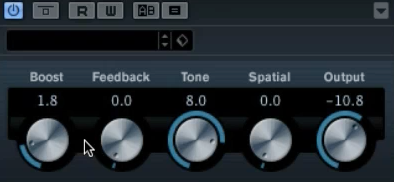
Adding distortion can be fun too!
Try all kinds of flavoring, such as modulation and spatial effects!
Frequently asked questions
Q1. What is the purpose of using drum fills in music production?
Drum fills are used to smooth the connections between different sections of a song. They're effective at transition points in the structure, such as building up into the chorus or moving from the verse to the pre-chorus.
Q2. What should I do when fill material doesn't match the tempo?
Adjust the tempo with the time stretch function, which is built into every DAW. Correcting it with audio quantize is also effective.
Q3. What should I do if the fill and the main drums clash?
Remove low-end interference with an EQ low cut, or differentiate the sound with effects such as distortion. Adding swing to change the rhythmic feel is also effective.
Q4. Can the same technique be applied in any DAW?
The basic idea is the same, but the specific operations for time stretch and quantize differ by DAW. The article covers the differences among major DAWs such as Pro Tools, Logic, and Cubase.
NEW ARTICLES
Latest English Articles











