"T-RackS 6," released by IK Multimedia, is a tool that transforms mixing and mastering, centered on "Master Match X," an automatic mastering function powered by AI. By automatically analyzing the characteristics of reference songs and optimizing EQ, compression and balance, it delivers professional sound quality in a short time. In addition, new modules such as "Channel Strip X," "Bass ONE" and "Lo-Fi Punch" create an integrated environment that covers every music production need, from vocals and low-end processing to creative sound design.
A Mixing and Mastering Tool for Every Kind of Music Production
IK Multimedia has released the new "T-RackS 6."
With the latest sound engine and a redesigned interface, sound quality, working speed and ease of use have improved significantly.
This article explains the notable new features of T-RackS 6 in detail.
Automatic Mastering with Master Match X
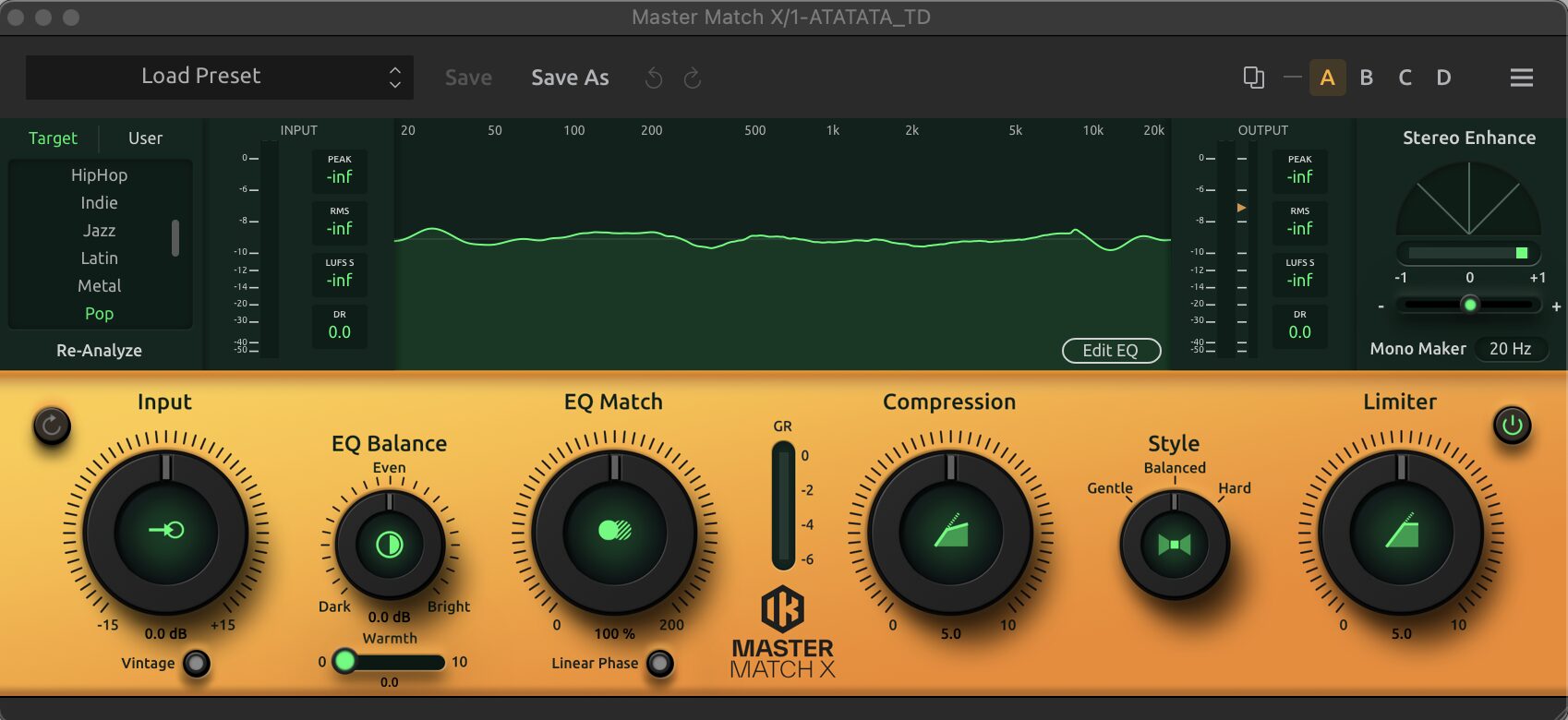
"Master Match X" is a new automatic mastering tool that uses AI technology to analyze the characteristics of reference songs and automatically optimize the EQ, compression and balance of the target track.
You can easily get professional-quality sound and finish tracks quickly.
In addition, presets for different music styles are provided, so you can quickly apply more detailed settings.
How to Use Master Match X
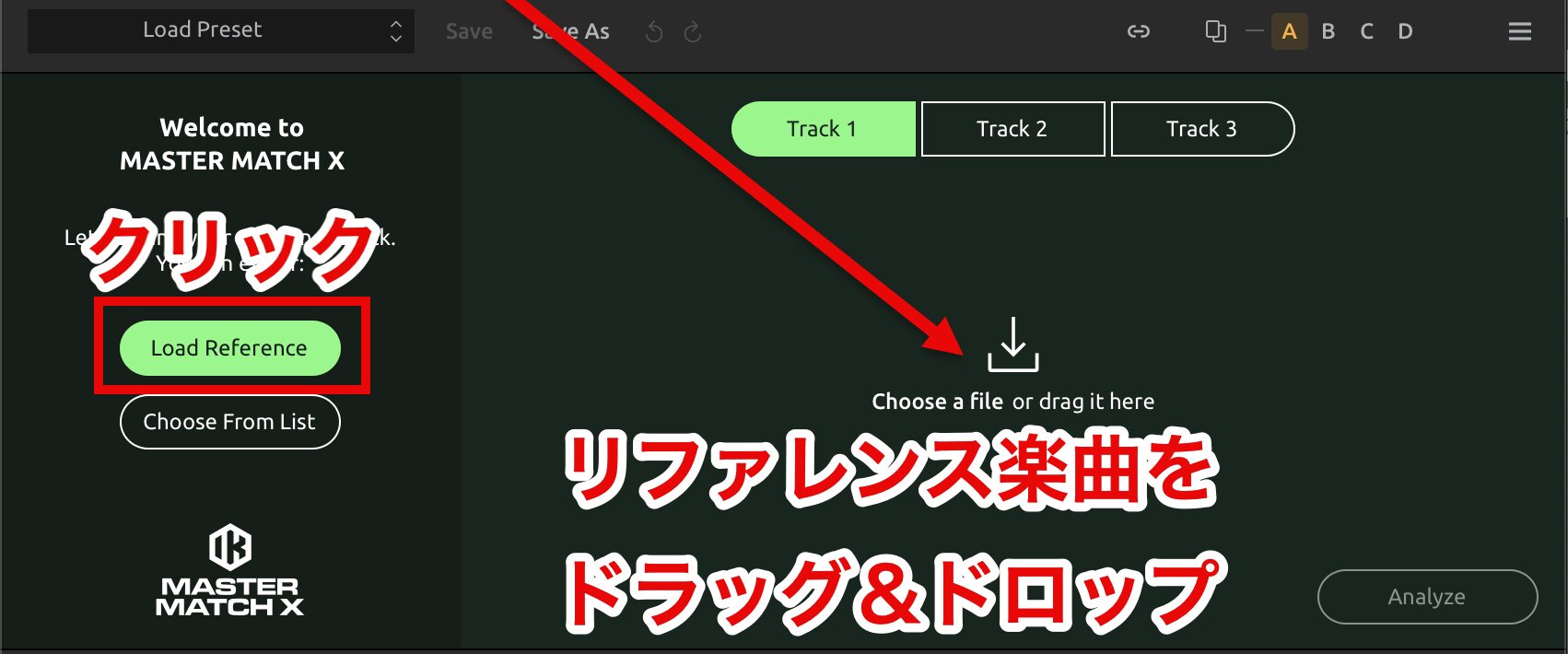
Click the "Load Reference" button and drag and drop the reference songs you want to analyze.
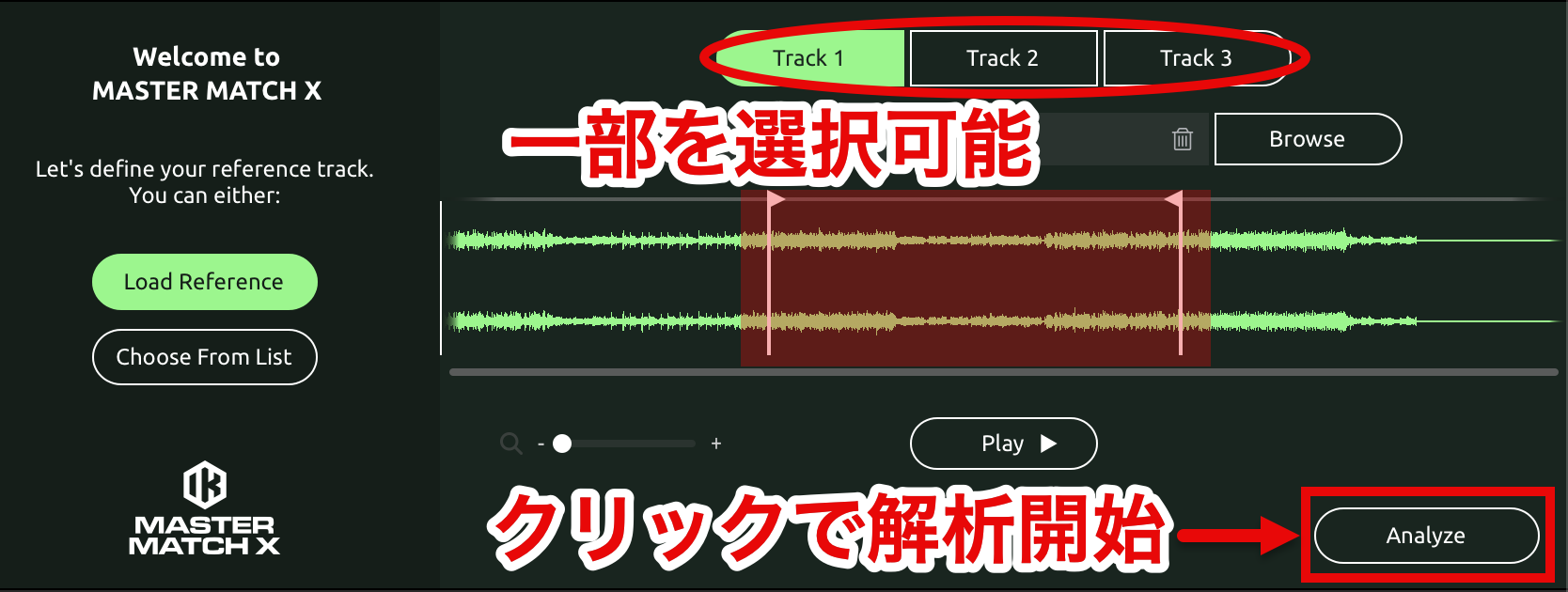
You can load up to three tracks as references (Track 1, 2, 3).
If needed, you can also select part of a reference for analysis.
Once the references are set, click the "Analyze" button.
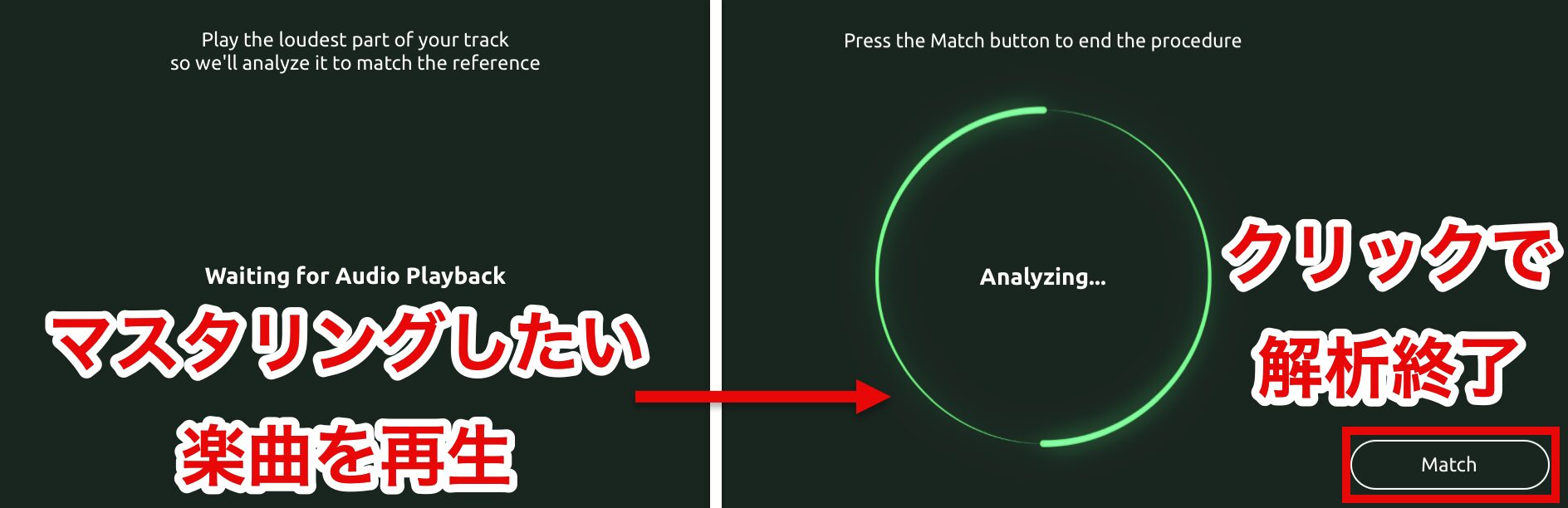
On the next screen, play the song you are working on in your DAW, and analysis begins.
To finish the analysis, click the "Match" button.
For the analysis and playback ranges of the references and your song, choosing the sections with the greatest impact on the track's sound (such as the chorus or melody sections) allows effective mastering.
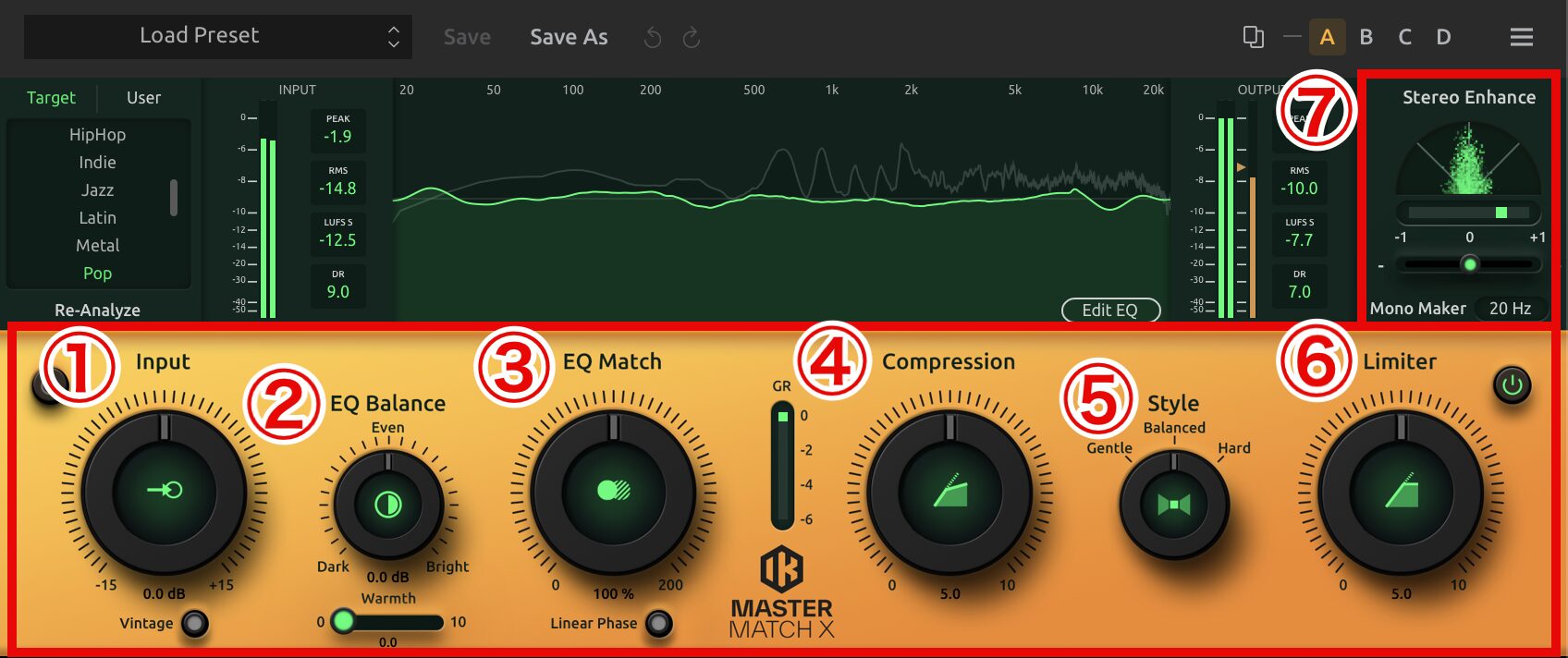
When the analysis finishes, an automatically generated EQ curve is applied to the song you are working on.
Adjust each parameter as needed.
- 1. Input: adjusts the input level of the song you are working on
- 2. EQ Balance: adjusts the EQ balance relative to the reference
- 3. EQ Match: sets how closely to match the reference's EQ
- 4. Compression: brings the dynamics closer to the reference
- 5. Style: selects the tonal style of the mastering
- 6. Limiter: limits level peaks to prevent clipping
- 7. Stereo Enhance: widens the stereo image to create a spacious sound field
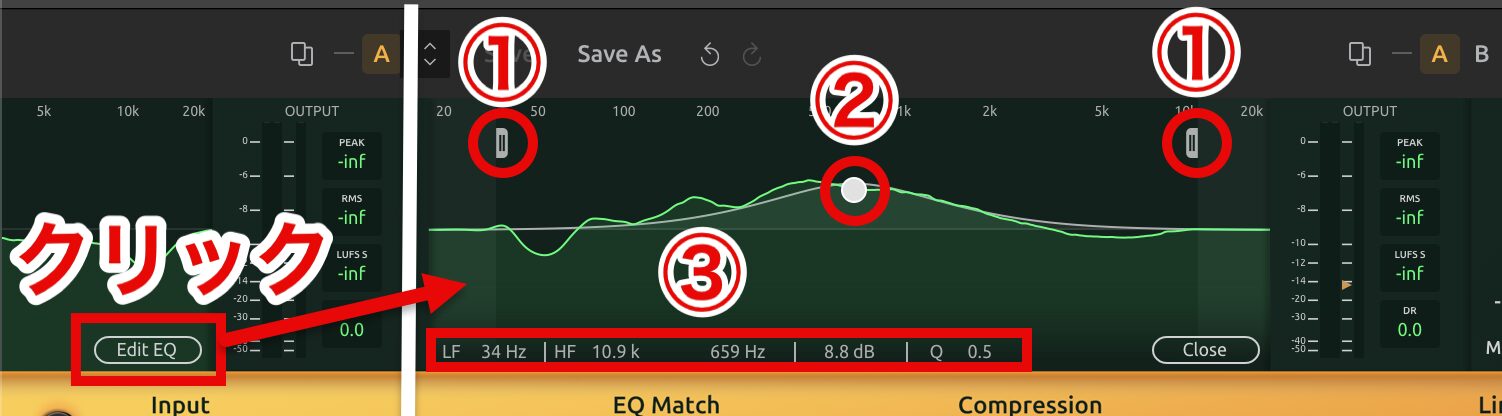
In addition, clicking "Edit EQ" lets you fine-tune the EQ curve more precisely and intuitively.
- 1. Slider icon: a bypass button for EQ points. Drag left or right to set the range of EQ bands to disable and compare the change in sound
- 2. EQ points: EQ adjustment points. Drag up, down, left or right to adjust frequency and gain to boost or cut specific bands. Double-click to create a point and right-click to delete one
- 3. EQ value display: shows the current EQ settings (frequency, gain, bandwidth, etc.) in real time. Values can also be entered numerically
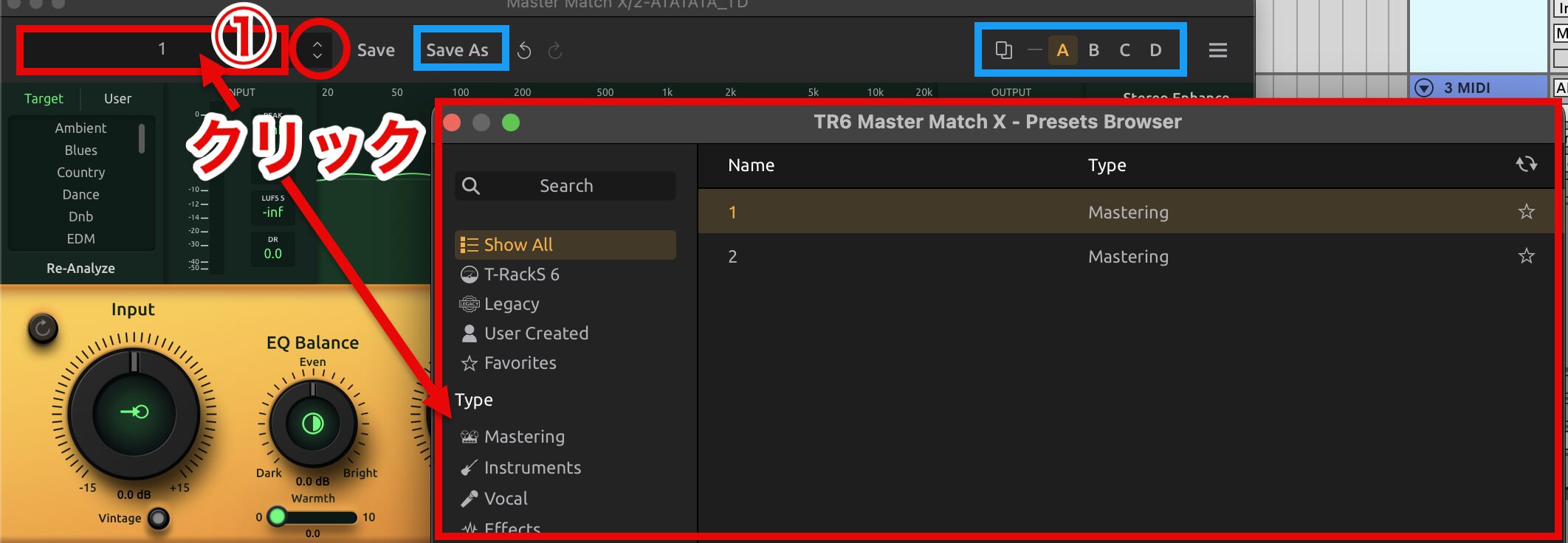
The "preset slots (A, B, C, D)" let you store different settings in each and switch between them instantly to compare.
Save adjusted settings with the "Save As" button so you can use the same settings next time and beyond.
The preset selector (1) shows the currently selected preset, and clicking it opens the preset browser.
Saved settings are also shown as presets, and you can use the filtering function to search for presets in specific categories.
You can also switch presets with the "∧∨" buttons to the right of the preset browser.
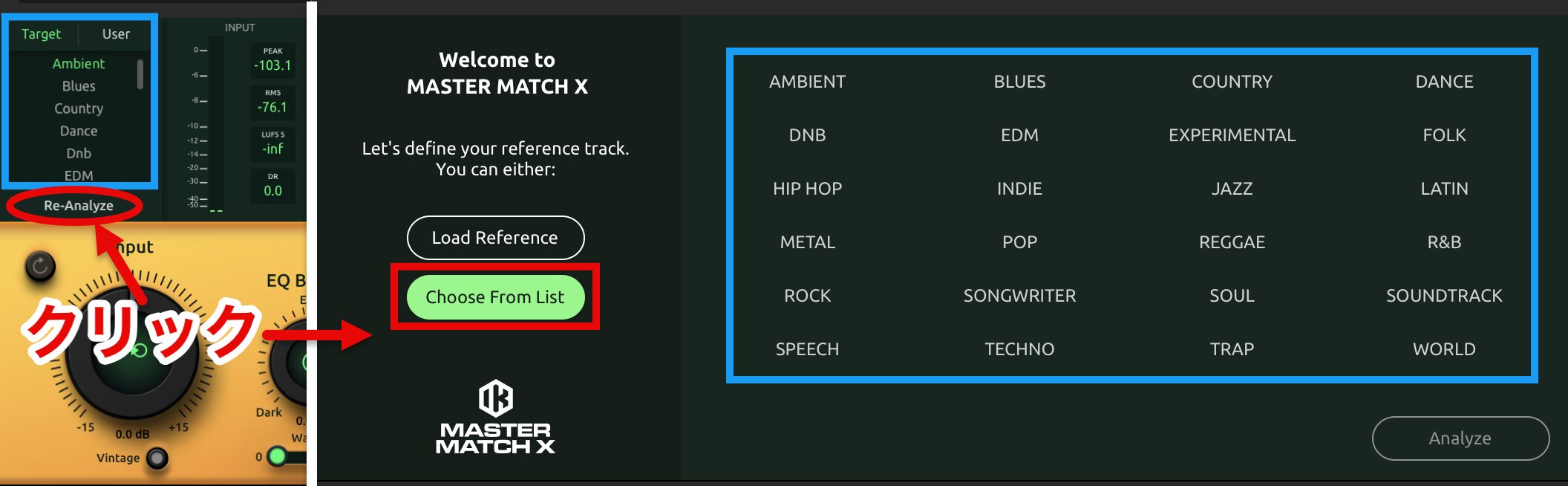
"Target" offers presets optimized for specific music styles, and automatically applies the optimal mastering settings based on the selected genre.
To analyze the acoustic characteristics again, click "Re-Analyze."
"Choose From List" shows the same presets as Target, and if you do not have a specific reference song, you can choose a preset and use it as the reference.
Other New Modules
In addition to Master Match X, T-RackS 6 adds the following new modules that enable creative sound design.
Channel Strip X
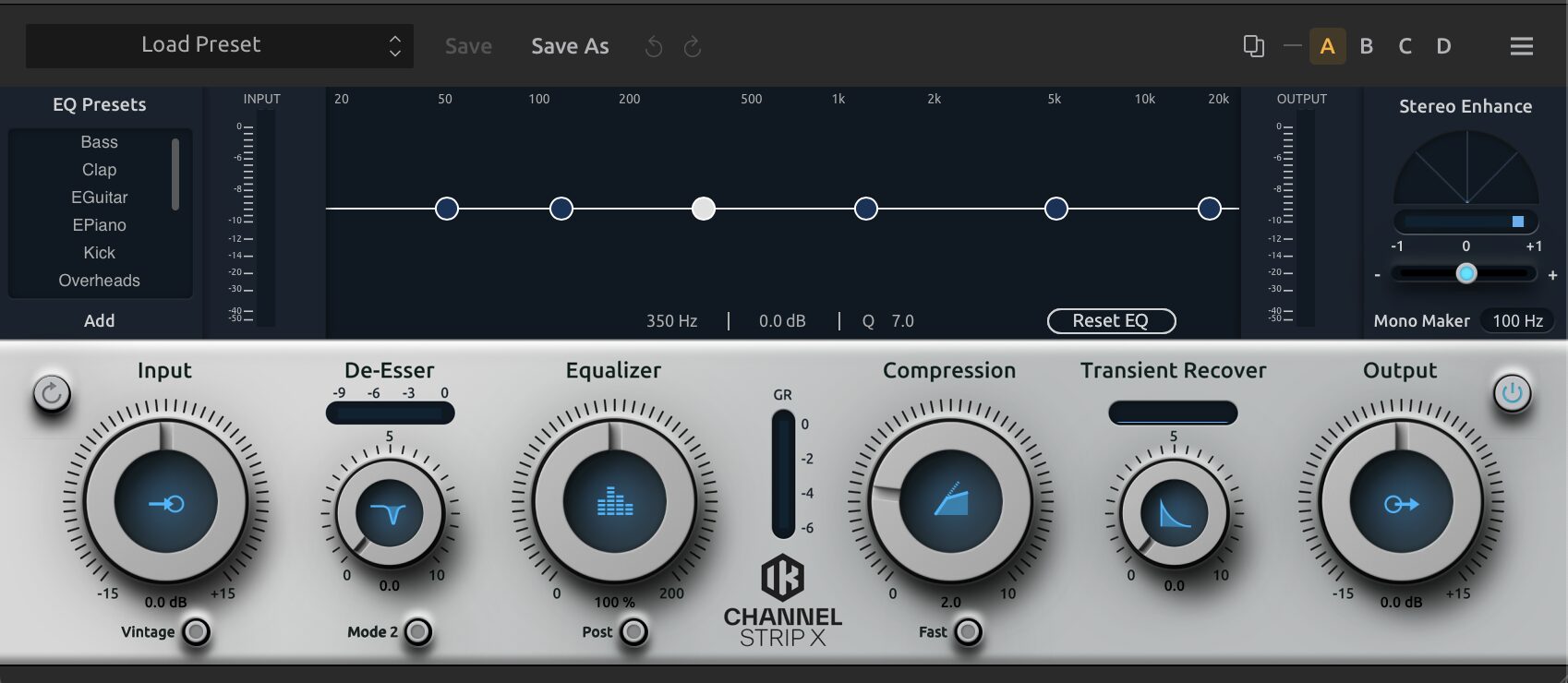
This is the most advanced channel strip module in T-RackS history.
It integrates a vintage preamp, EQ, de-esser, multiband compressor, transient shaper and stereo enhancer in one, and includes customizable EQ presets tailored to various instruments and ensembles.
It allows professional tone adjustment with simple operation, and its vintage emulation adds analog warmth and depth.
It performs dynamic de-essing, precise transient shaping and enhanced stereo imaging, and visual feedback and monitoring let you check adjustments in real time.
Bass ONE
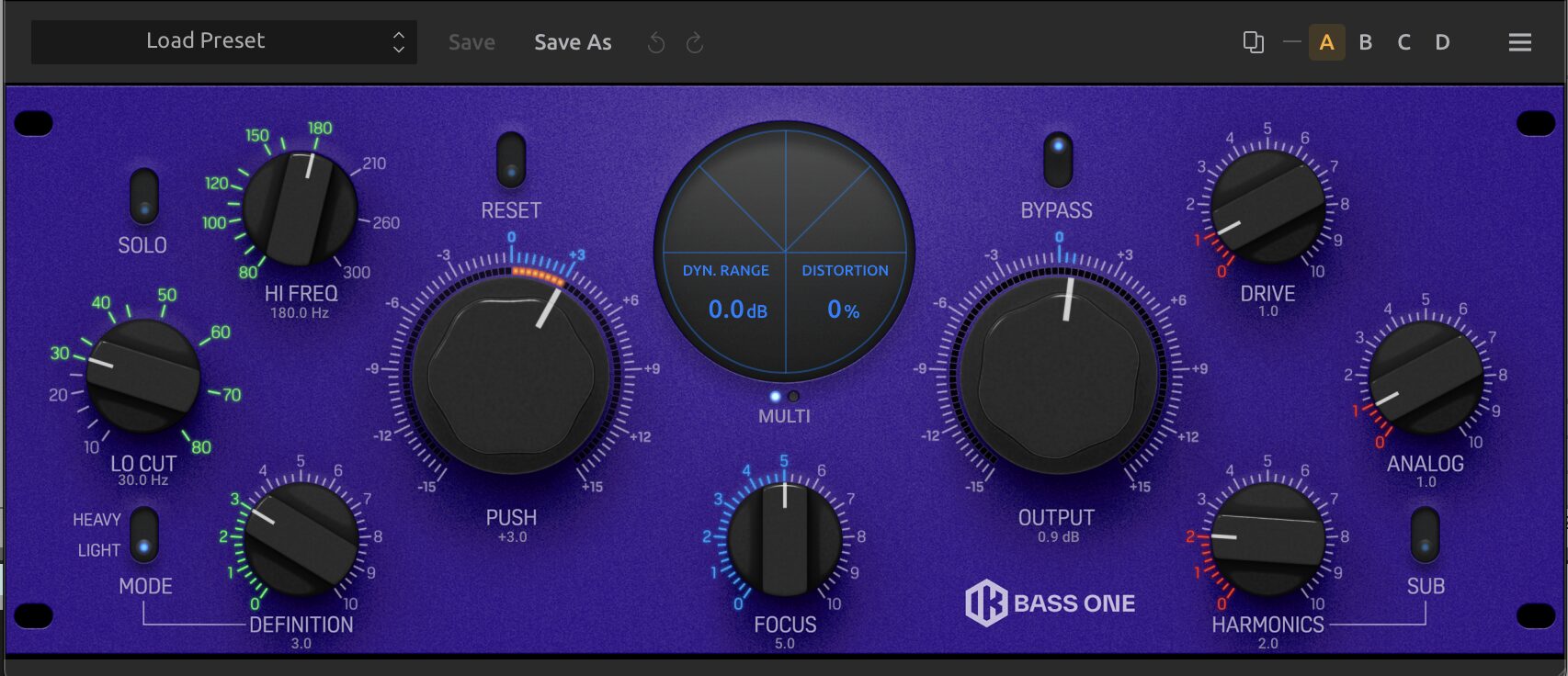
This is an all-in-one module specialized for low-end processing.
With precise control of frequency ranges and its expander, compressor and harmonics generation, you can make the low end clean and powerful.
You can freely adjust the level and texture of the low range to optimize the balance of the whole song.
Lo-Fi Punch
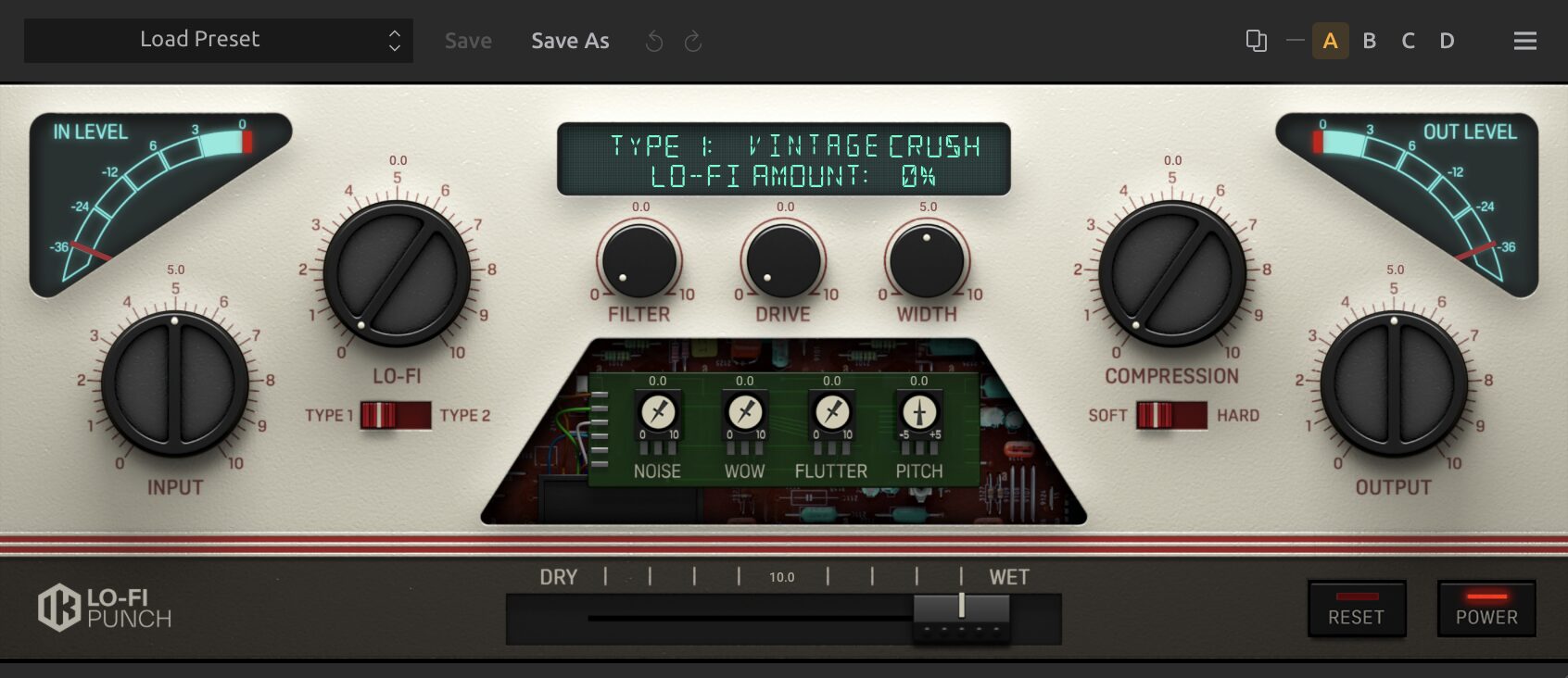
This is an all-in-one module for adding a distinctive lo-fi texture to your sound.
It includes two unique lo-fi algorithms, a compressor, filters, drive and pitch shifting, letting you express a wide range from subtle coloration to gritty, bitcrusher-like textures.
With creative effects such as noise, wow and flutter, you can add the character of vinyl or tape, and by freely controlling pitch and dynamics, it lets you quickly shape soundscapes that transcend genres.
Dual Spring
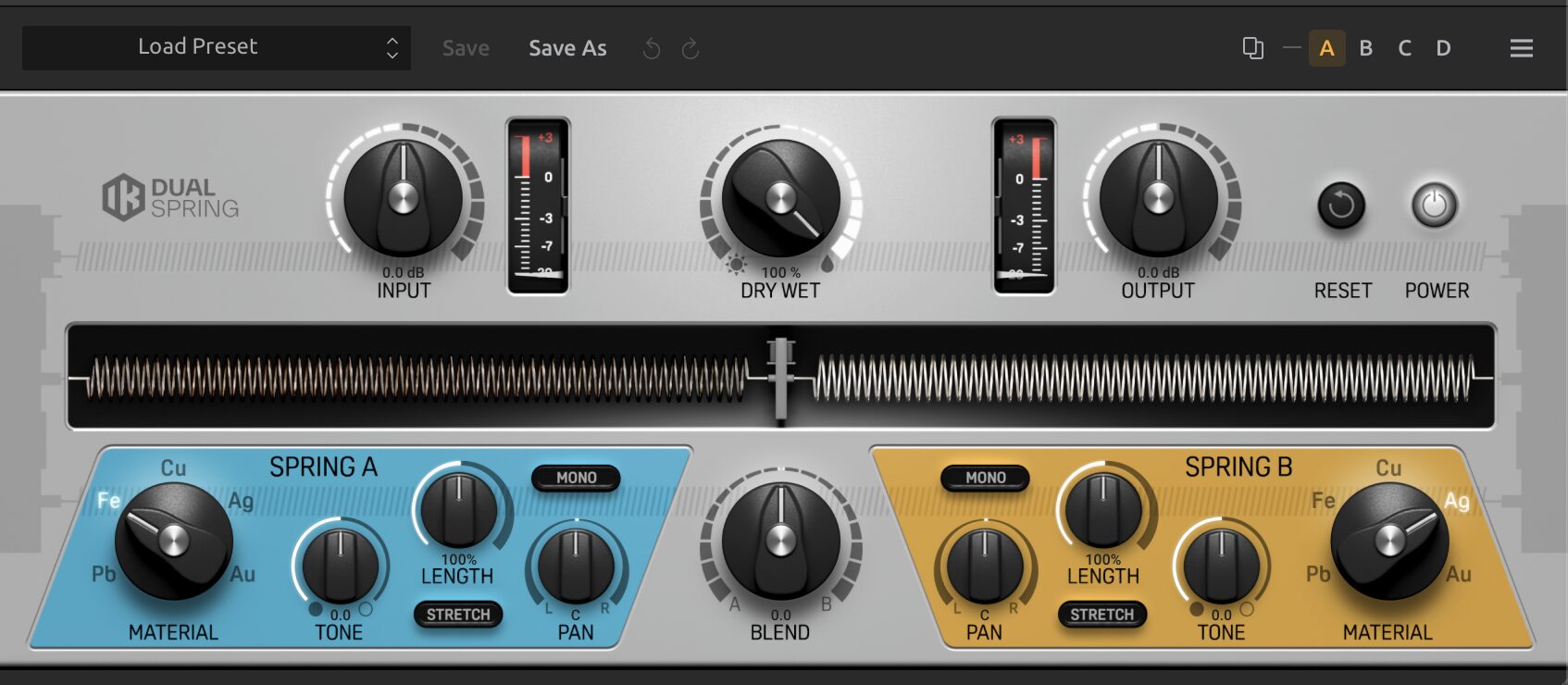
This is a reverb module for adding deep reverb effects to vocals and instruments.
Using two spring modules, you can finely adjust material, tone, decay, stereo positioning and more to achieve a variety of reverb effects, from vintage warmth to modern sparkle.
You can customize material selection, tone, reverb length and stereo settings in detail, and the blend ratio of the two springs can also be adjusted freely.
Delay Lab
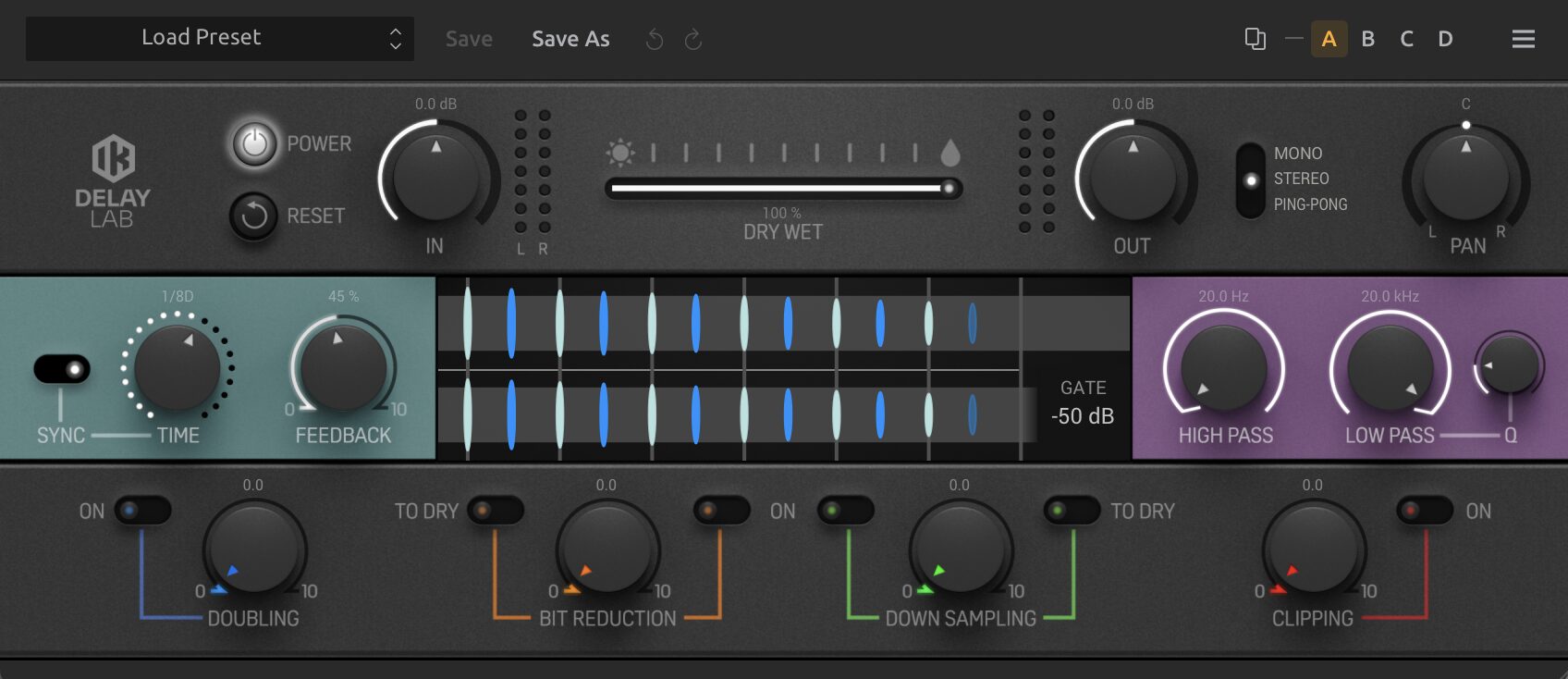
This is a multifunctional digital delay module that brings out your creativity.
It offers a wide range of delay effects, including tape delay and digital delay, and adding echoes and repeats to vocals and instruments creates a sound with depth and space.
The pan function lets you place the delayed signal freely in the stereo field, and BPM sync lets you set delay intervals precisely.
In addition to choosing mono, stereo or ping-pong mode, effects such as filtering, doubling and bit reduction let you create unique rhythmic patterns and sonic effects.
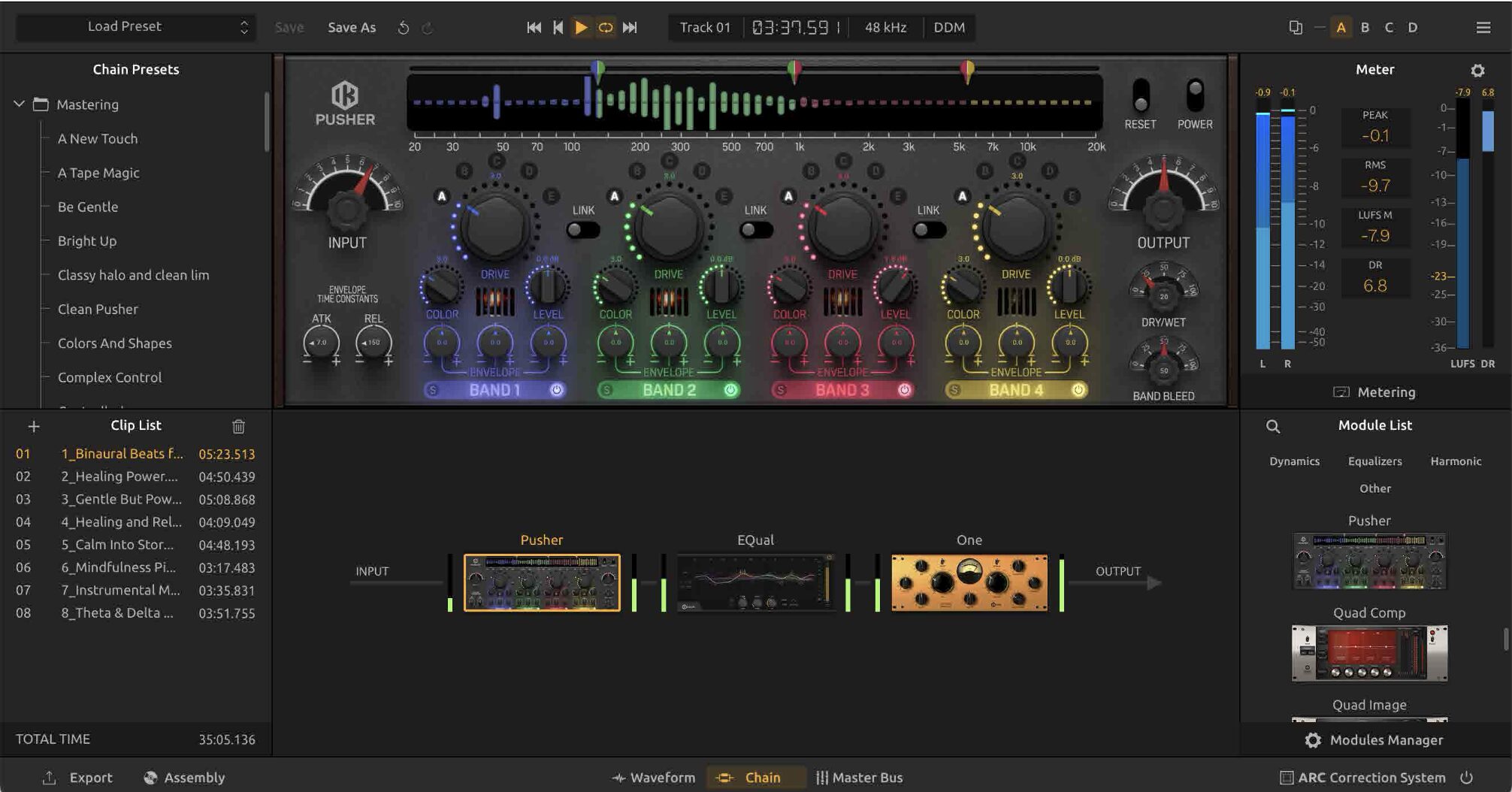
Pusher
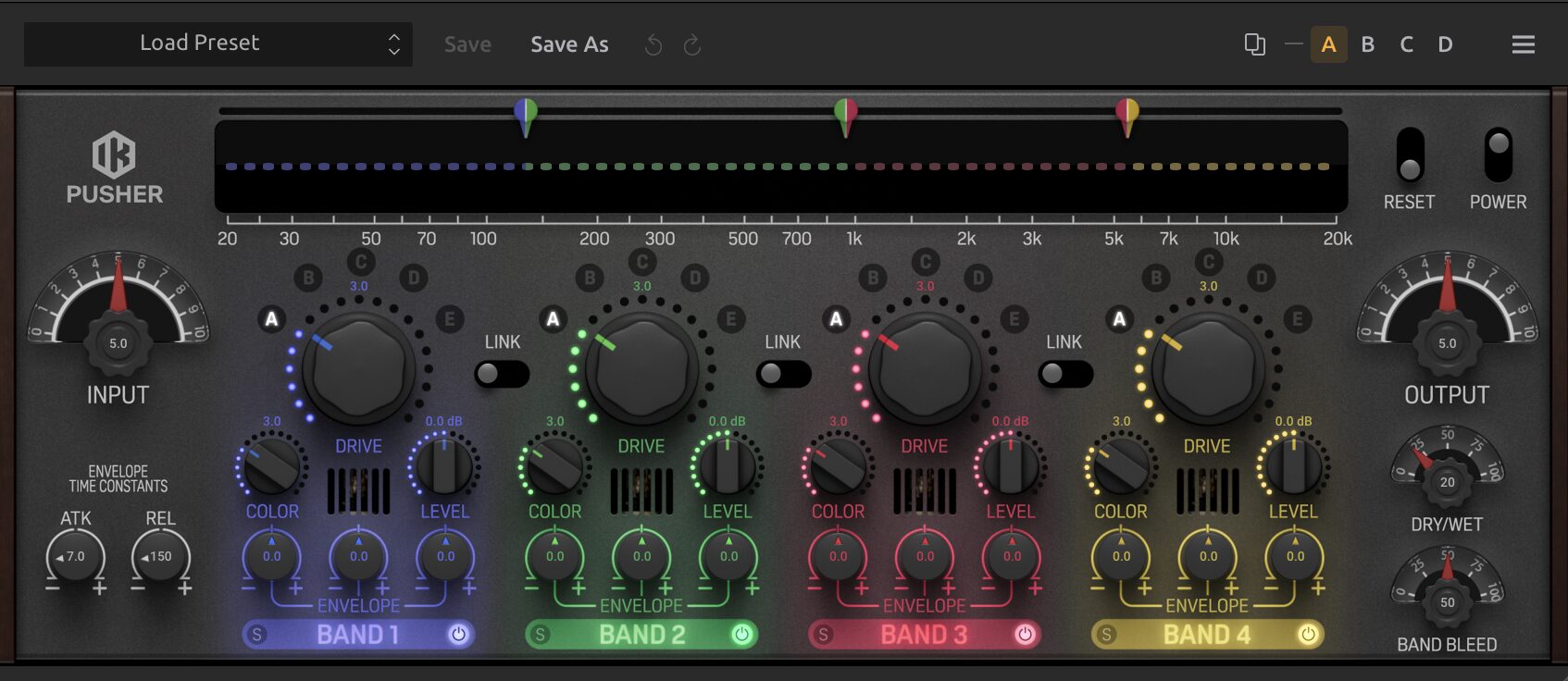
This is a 4-band saturation module with five saturation algorithms.
By adjusting drive and color, you can freely control everything from soft distortion to intense saturation, adding thickness and presence to the sound.
In addition, an envelope follower dynamically controls the sound's dynamics, and solo and band on/off settings let you manage the effect of each band precisely.
With Pusher, you can create musical, creative sounds.
Filter Fusion
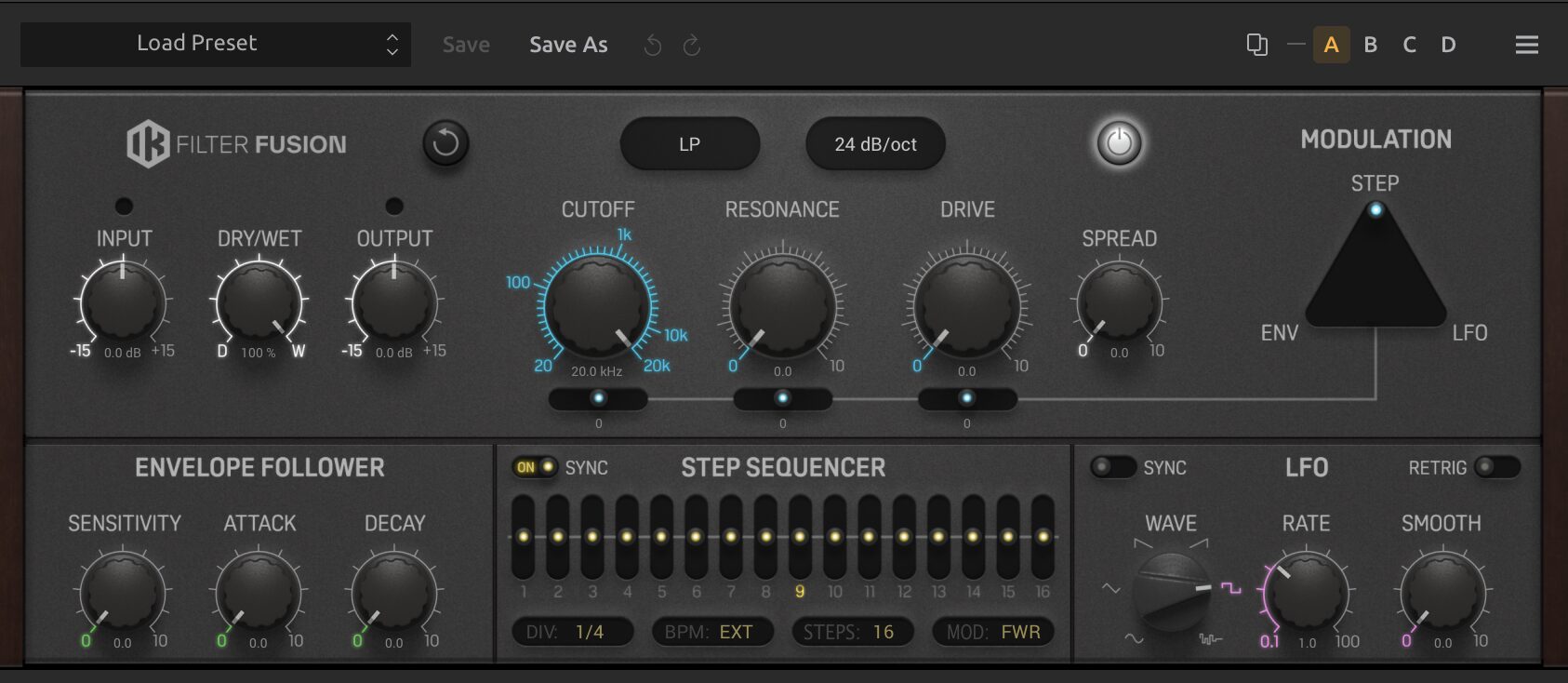
This is a filter module with five filters inspired by the Moog® transistor ladder.
It offers low-pass, high-pass, band-pass, peak and notch filters, with slopes adjustable from 6 dB/oct to 24 dB/oct.
While adjusting input/output levels and the dry/wet balance, you can control the filter cutoff and resonance to precisely design the tone you are after.
A multifunctional LFO also adds modulation, and by choosing waveforms, setting the rate and fade-in time and using DAW sync, it enables free expression in music production.
New Modules Also Available as Single Plug-ins
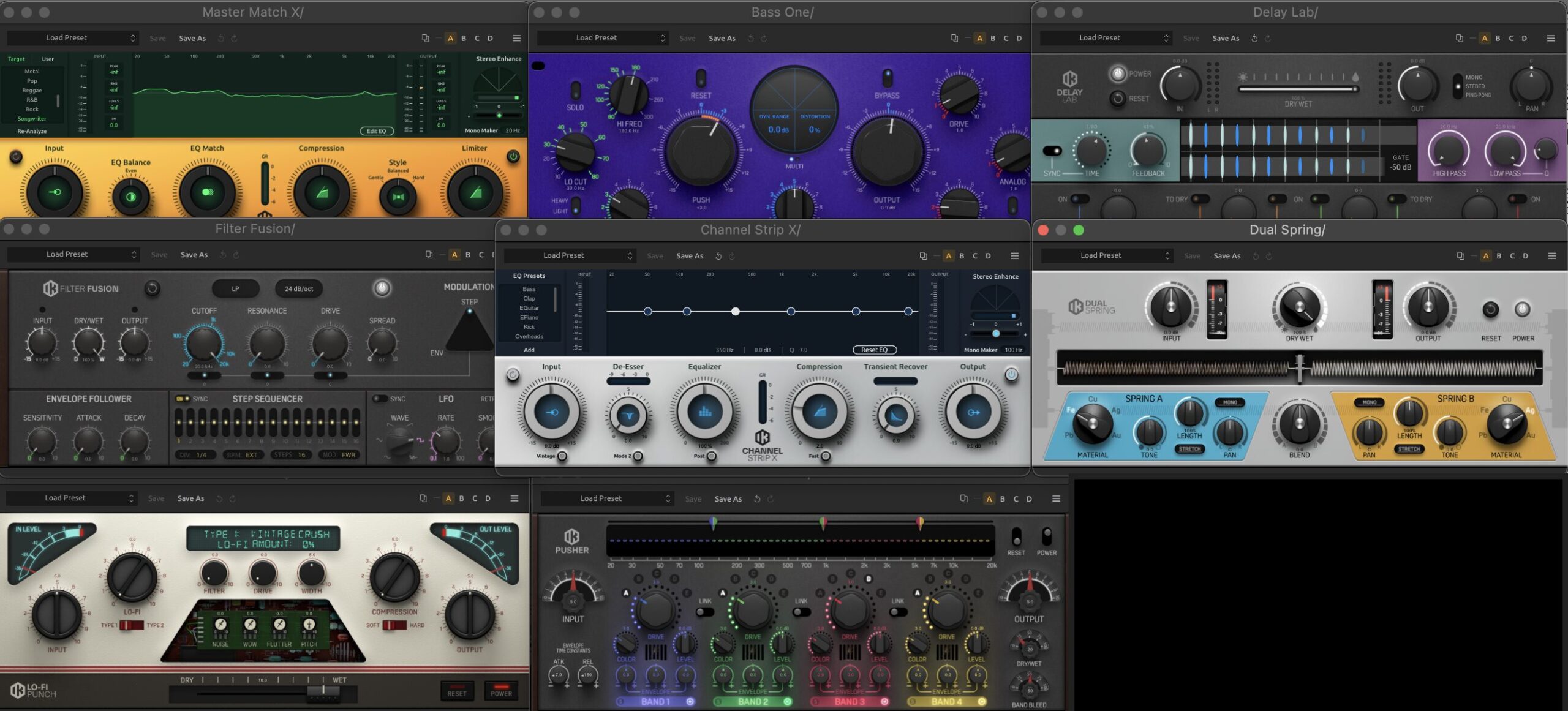
Each T-RackS module can be used in your DAW as an individual plug-in.
The newly added modules are also available in VST, AU and AAX formats and can be operated seamlessly within your DAW.
You can load only the modules you need into your DAW for flexible sound design.
Managing the Modules You Need Efficiently: The Modules Manager
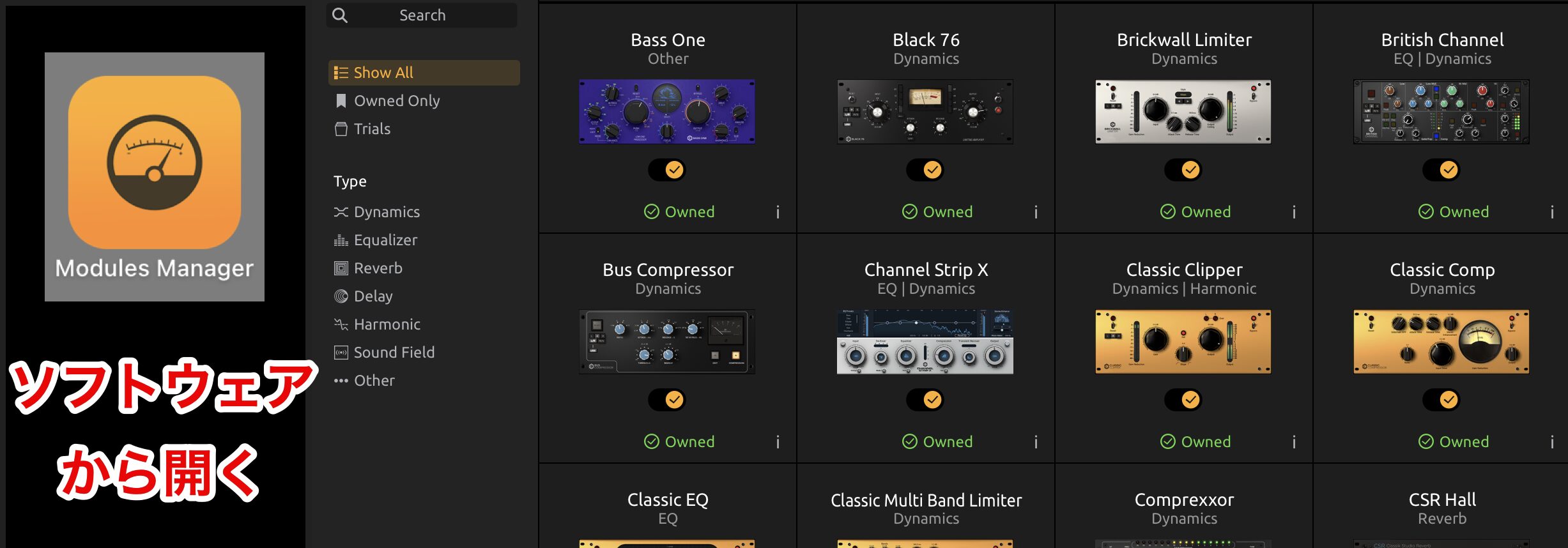
T-RackS 6 introduces a new Modules Manager that makes it easy to display and manage modules.
The Modules Manager can be opened from the T-RackS 6 software or from your DAW.
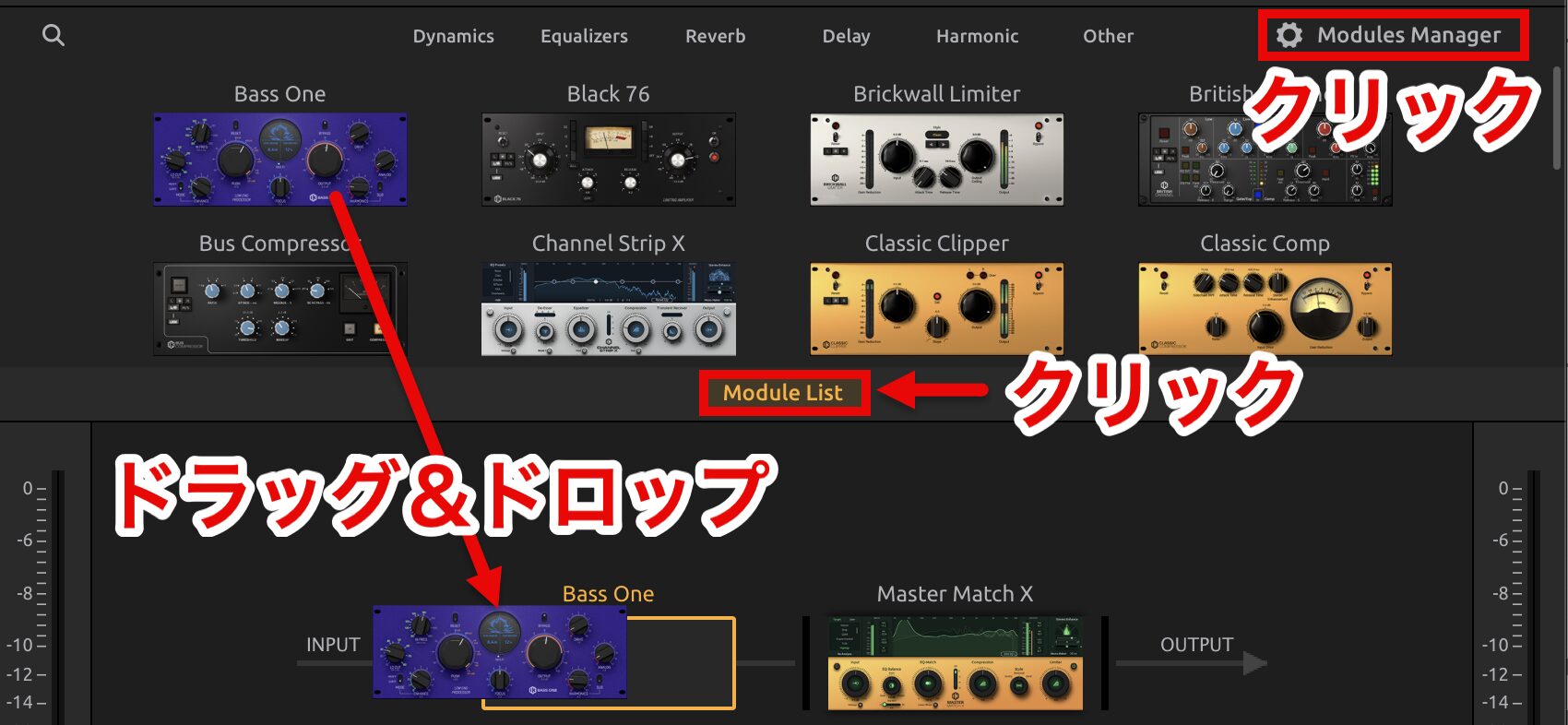
Launch T-RackS 6 in your DAW and click "Module List" to show the available modules.
On this screen, you can add each module to the effects chain by drag and drop.
Click "Modules Manager" at the top right to open the same Modules Manager screen as in the T-RackS 6 software.
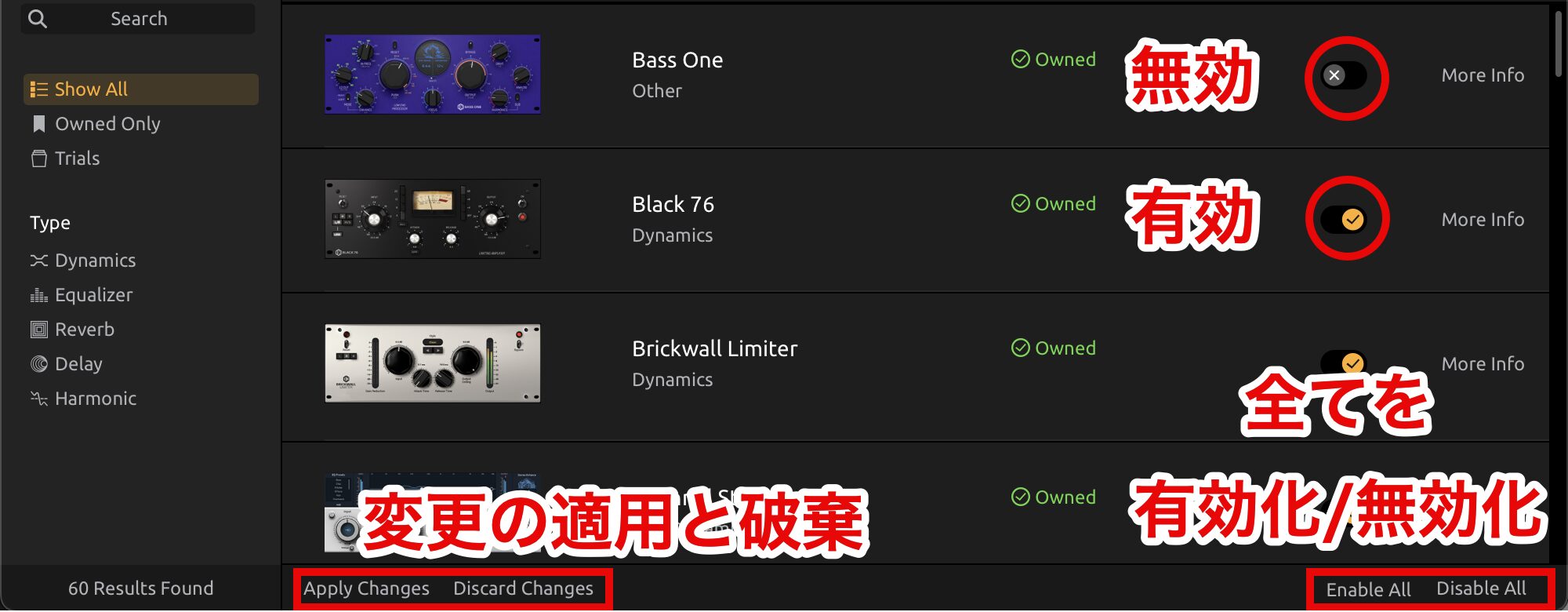
When you open the Modules Manager, a list of modules is shown.
Use the checkbox next to each module name to enable or disable the module.
(Disabled modules no longer appear in the module list of the T-RackS plug-in.)
After making changes, click "Apply Changes" to apply them, or click "Discard Changes" to return to the previous state.
"Enable All" and "Disable All" are buttons for enabling or disabling all modules at once.
You can also add trial modules with one click, and purchase or restore them easily as needed.
Adjusting the Overall Balance at Once: The Master Bus Panel
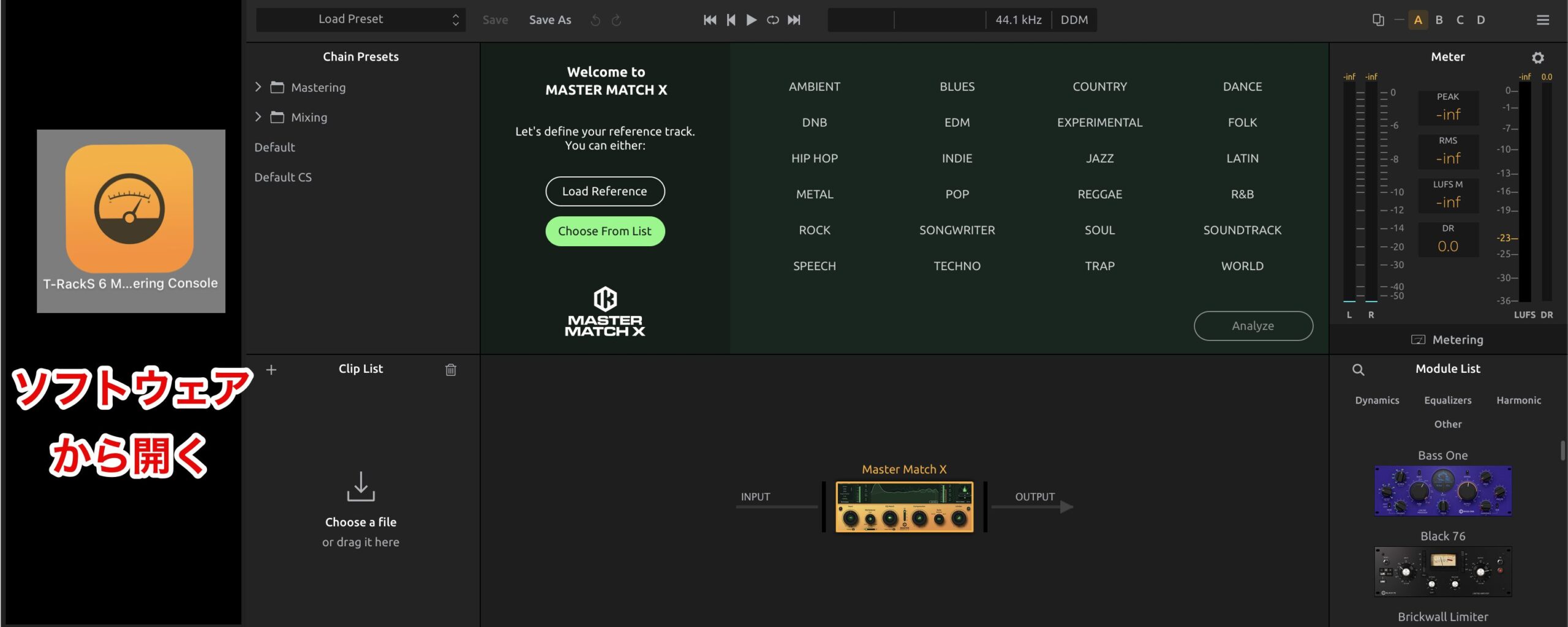
The Master Bus panel is a new feature in T-RackS 6 exclusive to standalone mode that lets you adjust the sound quality and level of the whole project at once, making high-precision mastering possible.
Standalone mode means software that runs on its own without working with a DAW.
In T-RackS 6, you can load audio files directly to edit and process them.
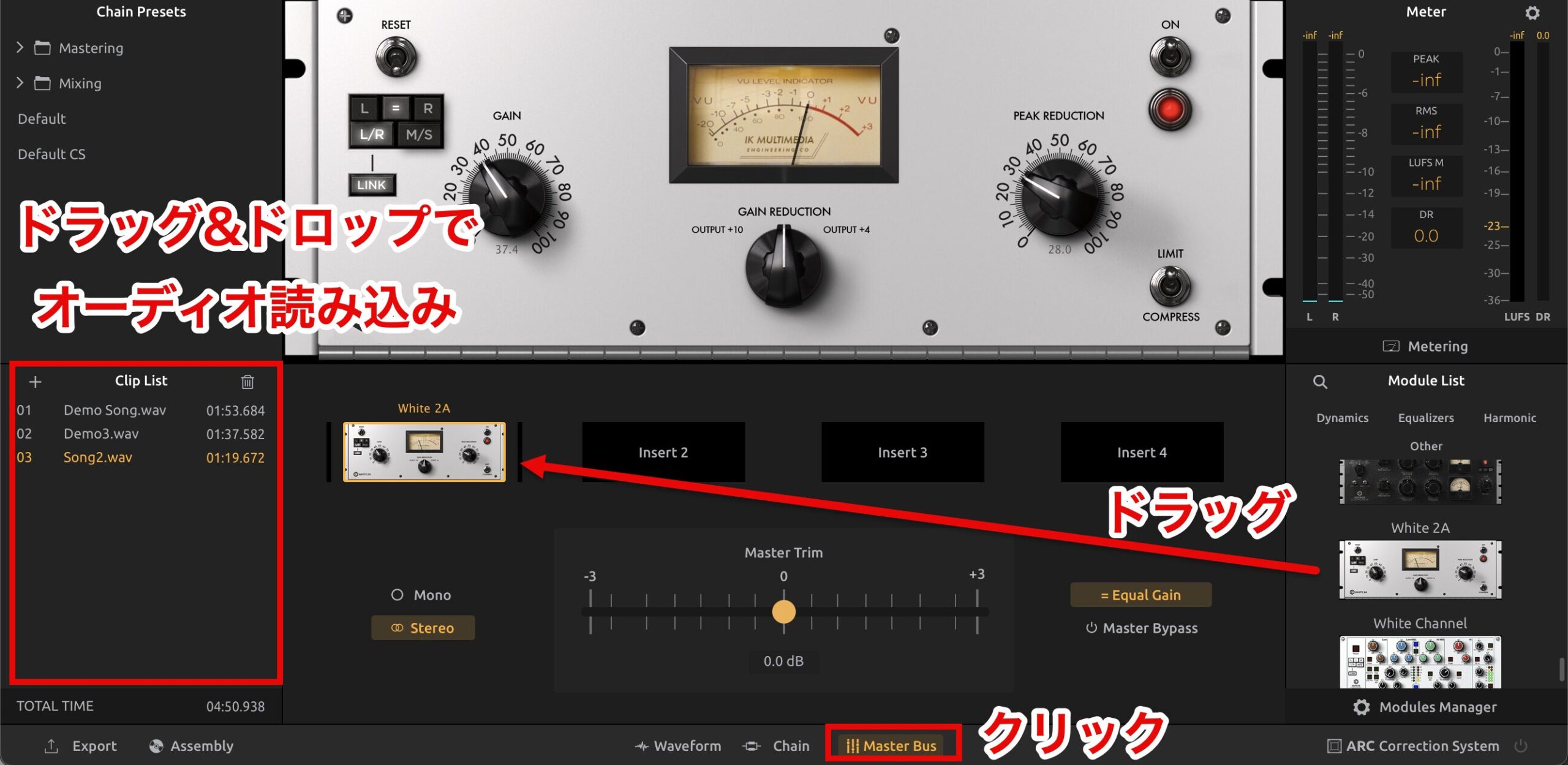
The Master Bus panel opens when you click "Master Bus" at the bottom.
Drag and drop audio files into the "Clip List" to import them into the Master Bus panel.
The panel has four insert points, and you can drag effects to add them, such as EQ, compressors and reverbs, from the "Module List."
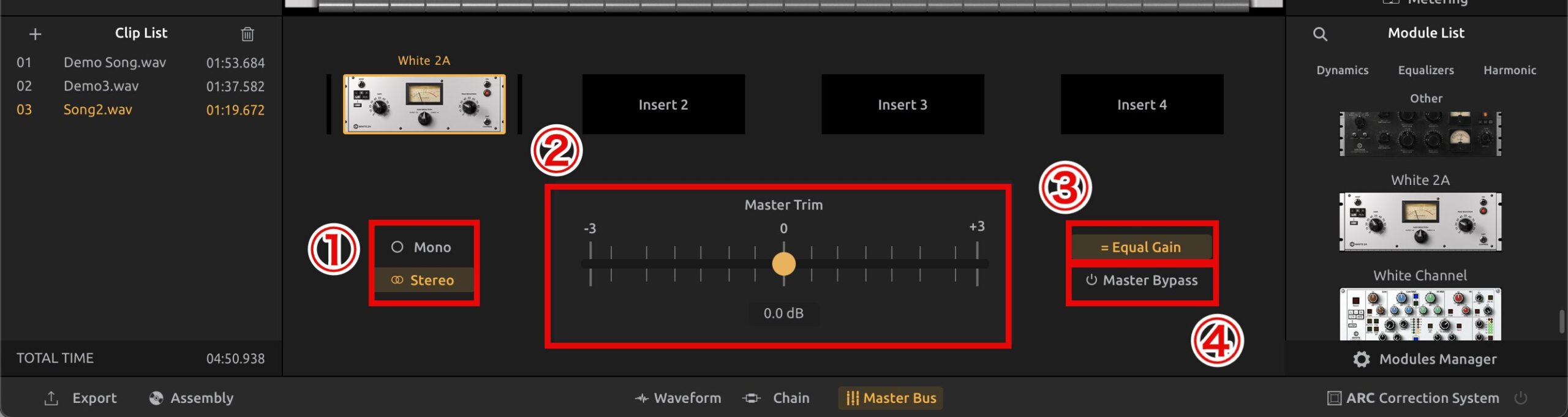
- 1. Mono/Stereo: switches between mono and stereo to check the sound and balance for different playback environments
- 2. Master Trim: a slider for adjusting the overall level, optimizing level balance and preventing clipping
- 3. Equal Gain: automatically compensates for the level difference before and after effects to remove level mismatches
- 4. Master Bypass: bypasses all effects to play the original, unprocessed sound
Using these functions, you can use the Master Bus panel to manage and optimize the sound quality of the whole project in detail.
Sidechain Support
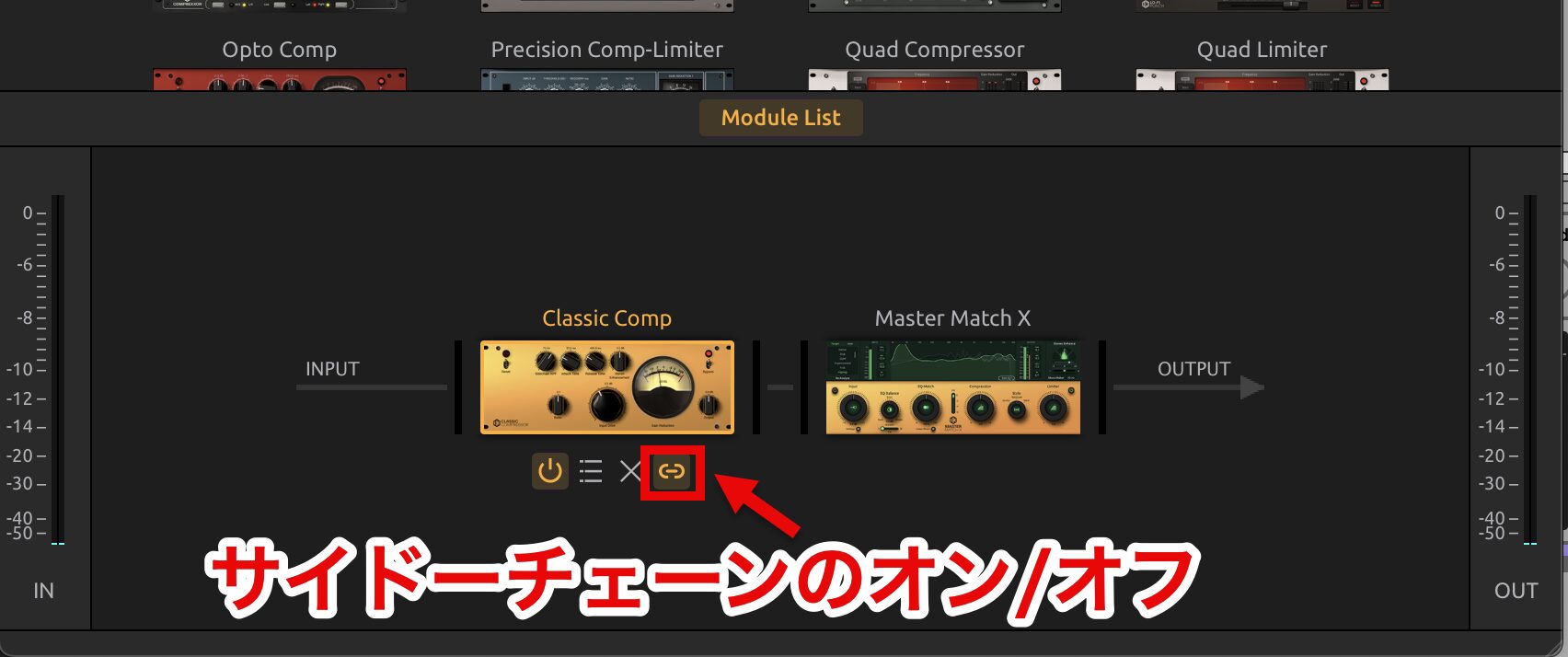
In T-RackS 6, a sidechain function has been added to all compressor modules.
This lets you use a specific track as a trigger to control the dynamics of other tracks.
System Requirements and Compatibility
- macOS 10.15 or later
- Apple M1 or Intel Core i5 or higher
- 8 GB or more of RAM
- 9 GB of hard drive space
Windows
- Windows 10 or later (64-bit)
- Intel Core i5 or higher, or an equivalent processor
- 8 GB or more of RAM
- 9 GB of hard drive space
Product Lineup and Prices

T-RackS 6 comes in four versions, and all of them are available as standalone software (Mastering Console) and as plug-ins (T-RackS 6 plug-in and single plug-ins) for use.
They can be purchased in euros from the IK online store and in Japanese yen from beatcloud.jp.
T-RackS 6 INTRO (Free Version)
Includes three modules, including Match X Lite.
You can try basic mixing and mastering functions for free.
Modules you have not purchased can also be tried for 14 days with the same functions as the full versions.
If you are registered with an IK account, you can download and install it from IK Product Manager.
For account registration and authorization, please refer to the article below.
* Modules purchased with older versions such as T-RackS 5 are not unlocked.
T-RackS 6
Includes 19 modules.
Standard mixing and mastering functions allow flexible sound shaping to suit the needs of your project.
- IK online store regular price: €99.99
- beatcloud regular price: ¥16,490 (tax included)
T-RackS 6 PRO
Includes 40 modules.
With advanced audio processing functions, it is suited to professional mixing and mastering.
- IK online store regular price: €199.99
- IK online store upgrade price: €149.99
- beatcloud regular price: ¥32,990 (tax included)
- beatcloud upgrade price: ¥24,740 (tax included)
* For upgrades at the IK online store, log in to your IK Multimedia account and check "Crossgrade / Upgrade."
* For upgrade eligibility at beatcloud, please check the sales page.
T-RackS 6 MAX
Includes all 60 modules.
With the most comprehensive feature set, it is ideal for professional mixing and mastering.
- IK online store regular price: €299.99
- IK online store upgrade price: €199.99
- beatcloud regular price: ¥49,490 (tax included)
- beatcloud upgrade price: ¥32,990 (tax included)
- beatcloud Maxgrade price: ¥16,490 (tax included)
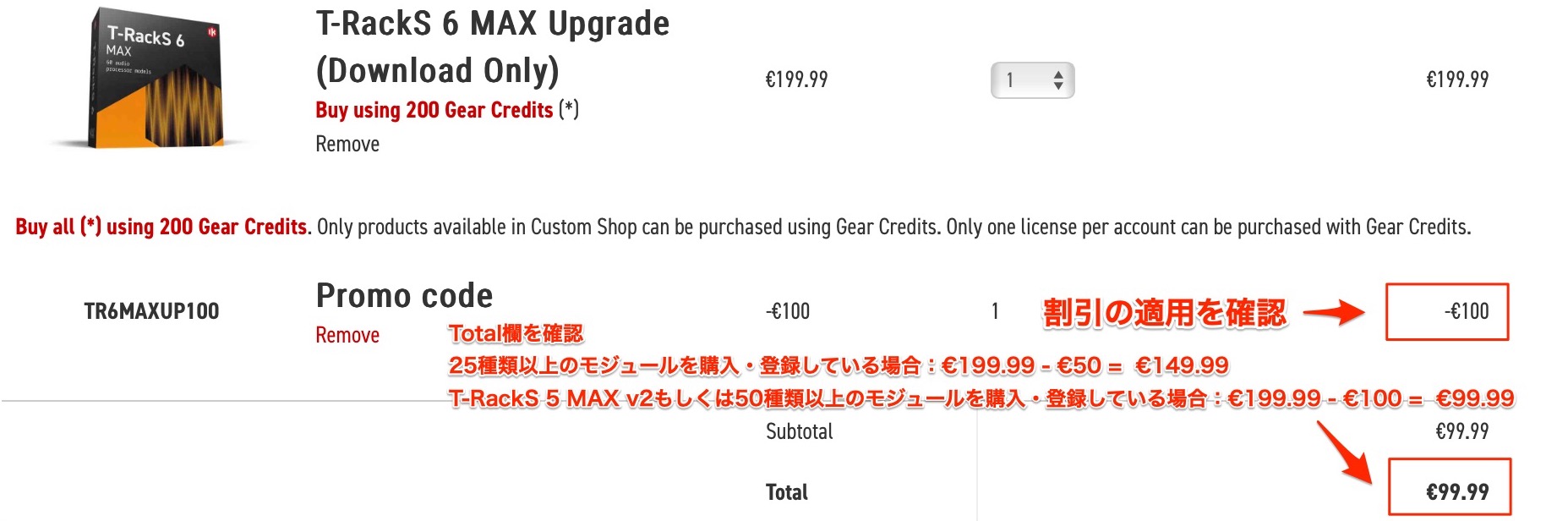
- If you own 25 or more modules: €199.99 → €149.99
- If you own T-RackS 5 MAX v2 or 50 or more modules: €199.99 → €99.99
* For upgrades / Maxgrades at the IK online store, log in to your IK Multimedia account and check "Crossgrade / Upgrade."
* For upgrade / Maxgrade eligibility at beatcloud, please check the sales page.
Other Discounts
As a benefit at the IK online store, automatic discounts based on the number of modules you own are applied.
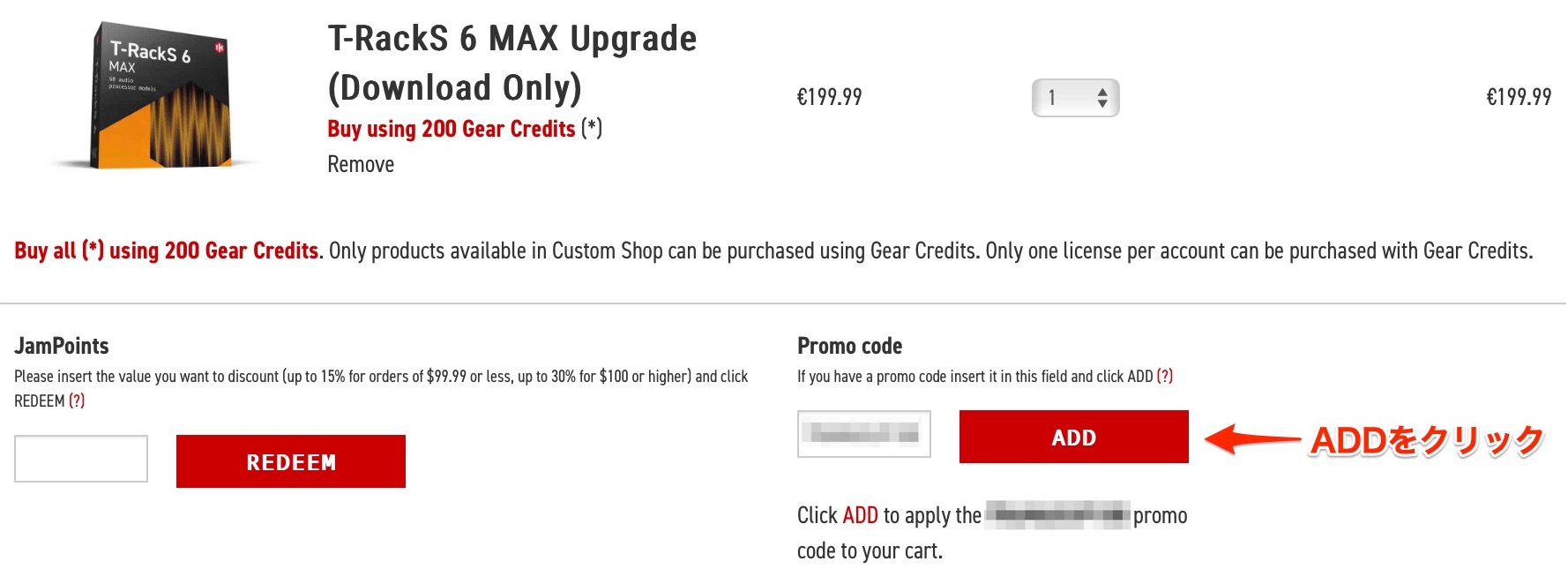
The discount promo code is applied automatically at checkout, so you can click the "ADD" button to check the discounted price.
What did you think?
There is a version suited to every user, from beginners to professionals, so if you are new to it, please start by trying the free version!
Frequently Asked Questions
Q1. How do I use "Master Match X" in T-RackS 6?
Drag and drop reference songs to select them and analyze them with the "Analyze" button. Then play the song you are working on and click "Match," and EQ and compression are optimized automatically. You can load multiple reference songs (up to three) at once for more precise mastering.
Q2. Can beginners easily achieve a professional sound?
Yes. T-RackS 6 offers AI-powered automatic mastering and genre-specific presets, so you can achieve pro-quality sound in a few clicks without complex knowledge. Fine adjustments are also possible as needed.
Q3. What is the difference between "Channel Strip X" and "Bass ONE"?
Channel Strip X is a channel strip for comprehensive processing of vocals and instruments in general. Bass ONE, on the other hand, specializes in low-end processing and uses an expander and harmonics generation to make the low end powerful and clean.
Q4. What kind of music production is Lo-Fi Punch suited to?
It is ideal for lo-fi hip-hop, retro-style sounds and productions that call for the texture of vinyl or tape. Bitcrushing, noise and wow effects enable creative sound design with a vintage feel.
NEW ARTICLES
Latest English Articles