
FabFilter Pro-Q 2 is a high-performance equalizer essential for audio production, but because official distribution in Japan was limited, many users were unsure how to buy it. This article explains, in a way even beginners can follow, how to purchase from the official FabFilter website, how to get the license key, and how to install and authorize it in your DAW. All you need is a credit card to purchase and set it up easily from the overseas site, so you can start high-quality audio editing right away.
How to buy Pro-Q 2

High-performance and easy to use:
that's the excellent equalizer "Pro-Q 2."
There is currently no distributor in Japan, so here we explain how to purchase it.
*Added May 13, 2016
For FabFilter products, Dirigent now handles sales and Japanese-language support as the distributor in Japan.
You can also purchase from them.
https://dirigent.jp/product_brand/fabfilter/
FabFilter Pro-Q 2 tutorial videos
- 1FabFilter Pro-Q
- 2FabFilter Pro-Q 2 New Features: Auto Gain and More
- 3FabFilter Pro-Q 2 New Features: Spectrum Grab & EQ Match
- 4FabFilter Pro-Q 3 New Feature: Enhanced M/S Mode
- 5FabFilter Pro-Q 3 New Feature: Dynamic EQ
- 6FabFilter Pro-Q 3 New Features: Brickwall Slope / Flat Tilt / Masking Detection
- 7FabFilter Pro-Q 4 Is Finally Here! A Selection of Its Key New Features
Purchase steps
*A credit card is required for purchase.

FabFilter's purchase page: go there.

Select the product you want.

Select "Buy Now."

Enter the required information and select "Buy Now."
The payment is then processed.

You'll receive an email from FabFilter.
Click the area outlined in red and log in on the page that opens.
Use the "Login" and "Password" listed below it.
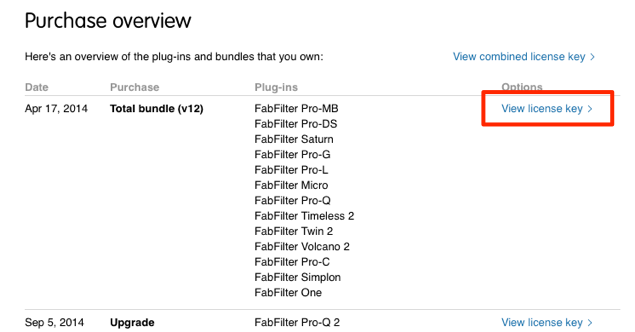
You can check the product's serial under "View license key."
Download, installation, and authorization

Click the area outlined in red.

Click the product to download it, then install it.
The installation is now complete.
Open the product in your DAW.

Select "Enter License."
Copy and paste the entire black area (the license) shown in the image above.
The product is now ready to use.
Frequently asked questions
Q1. Can FabFilter Pro-Q 2 be purchased officially in Japan?
Yes. There used to be no distributor, but Dirigent now handles sales and support as the distributor in Japan. Buying directly from the official site is still possible, and either way works without problems.
Q2. What payment methods can be used to buy Pro-Q 2?
A credit card is required. When purchasing on the official page, enter your card information to pay. After payment, the license information arrives by email.
Q3. Where can I find my license key?
Log in from the link in the email from FabFilter and click the "View license key" button to display the serial number. Entering this key in your DAW authorizes the product.
Q4. What should I do if Pro-Q 2 isn't recognized in my DAW after installation?
Restart your DAW, open the product, and select "Enter License." It is important to copy and paste the entire license key from the email. If it is entered correctly, the product is authorized and ready to use.
NEW ARTICLES
Latest English Articles











