
Studio One 3's Macro Controls feature lets you easily assign effect and soft synth parameters to up to 20 controls (8 knobs, 8 buttons, and 4 pads) and operate multiple knobs at once intuitively. It is especially valuable in electronic music production such as EDM, where parameters need to change frequently. You set it up simply by selecting "Connect to Macro Control" from the right-click menu, and it can also work with external MIDI controllers, making your production work more efficient and expressive.
Easily assign effect and soft synth knobs
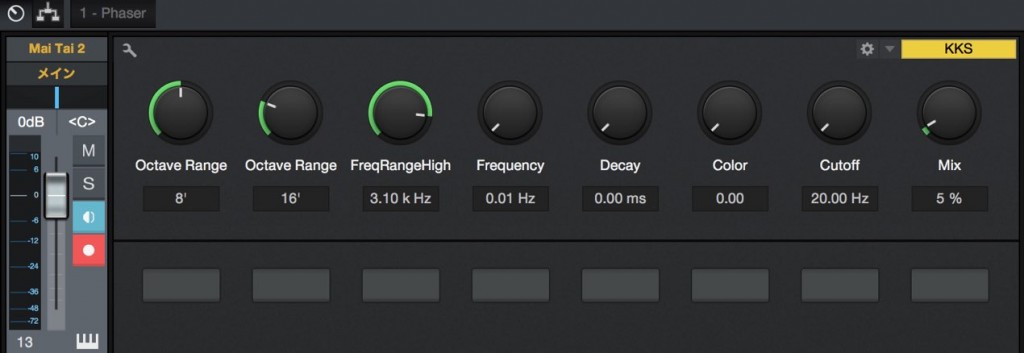
Studio One 3's new "Macro Controls" feature
lets you easily assign effect and soft synth parameters
and control them intuitively.
Electronic music such as EDM in particular
is built by changing parameters frequently, so this feature is extremely useful.
How to use Macro Controls
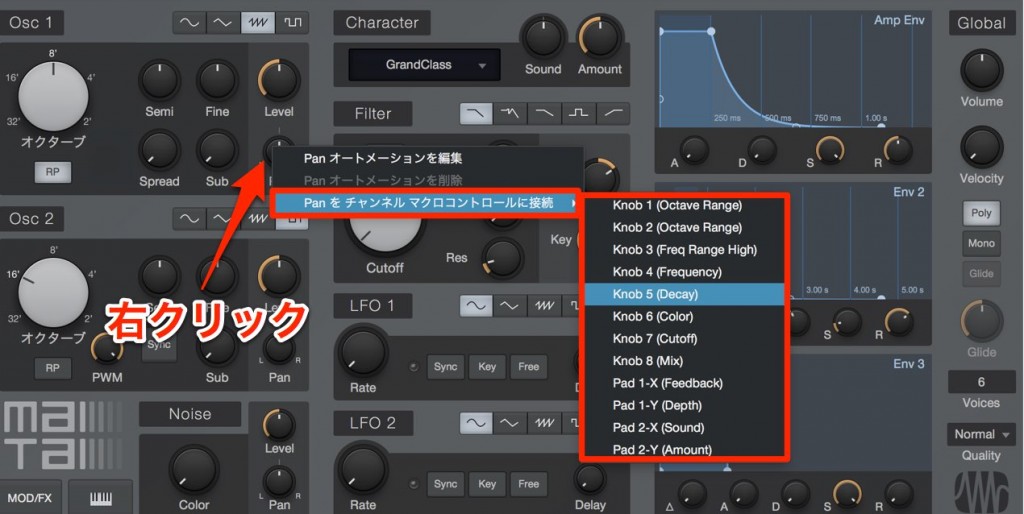
Right-click the parameter you want to assign,
then choose "Connect to Macro Control" → the macro control you want.
You can assign up to 20 controls in total: "8 knobs," "8 buttons," and "4 pads."
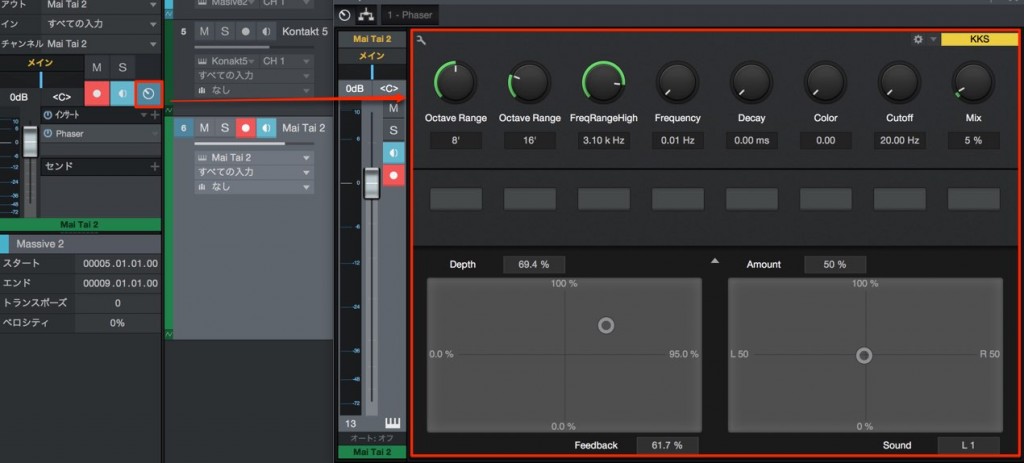
Click "Channel Editor" in the target track's Inspector.
The list of macro controls opens.
Moving these changes the assigned parameters together.
For settings that link an external controller with the macro controls, see below.

Linking an External MIDI Controller (Registration)
If you own a MIDI controller, we highly recommend linking it with Studio One. Operation becomes very intuitive and fast. First, we explain how to register an external device.
Linking an External MIDI Controller (In Practice)
If you own a MIDI controller, we highly recommend linking it with Studio One. Operation becomes very intuitive and fast. We explain actual assignments and how to use them.
Other new features
Studio One 3 New Feature: Scratch Pad
Studio One 3 New Feature: Arranger Track
Studio One 3 New Feature: Extended FX Chains

Frequently asked questions
Q1. What are Studio One 3's Macro Controls?
A feature that groups multiple parameters of effects and soft synths into a single control so you can operate several settings at once. You can assign up to 20 parameters, and it shines when frequent adjustments are needed, such as in EDM production.
Q2. How many controls can Macro Controls have?
You can assign up to 20 in total: specifically 8 knobs, 8 buttons, and 4 pads, which you can assign freely according to your needs.
Q3. Is setting up Macro Controls difficult?
Setup is very easy. Just right-click the parameter you want to assign, select "Connect to Macro Control," and specify the macro control you want.
Q4. Can it work with an external MIDI controller?
Yes. Linking an external MIDI controller with Macro Controls enables even more intuitive and faster operation. For detailed setup, refer to the official Studio One guide.
NEW ARTICLES
Latest English Articles











