
Logic Pro's reverse function flips an audio waveform to create a unique effect that does not exist in nature, and it is a staple technique in DTM production. The reverse cymbal in particular is used in many genres, and the technique can be applied not only to cymbals but to many instruments such as guitar, vocals, and rhythm parts. This article explains step by step how to create a reverse in Logic X and Logic 8/9, showing that you can do it easily just by choosing the Reverse function in the Sample Editor. This lets you add depth and atmosphere to your arrangements.
A Staple Technique for Every Genre
Reverse flips a waveform backward
to create a strange effect that does not exist in nature.
A famous example is the "reverse cymbal," a reversed cymbal.
This time, we will show you how to create a reverse cymbal.
Arrangement Techniques Using Reverse
- Logic X
- Logic 8/9
Logic X: How to Create a Reverse
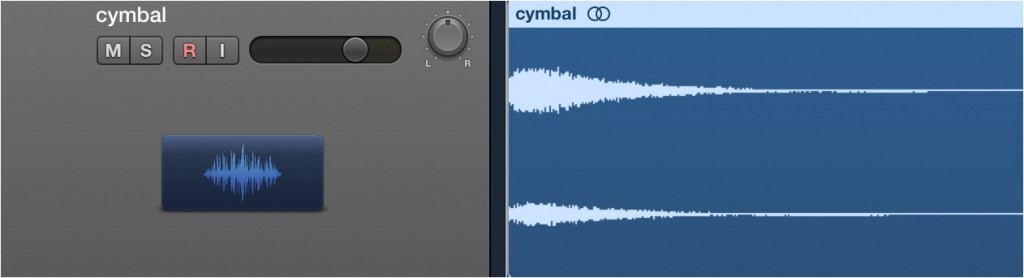
Here, we import a cymbal waveform.
"Sound"

Double-click the waveform you want to reverse to open the Sample Editor.
From the editor's top menu, choose "Functions" → "Reverse."
*If the audio Edit tab does not appear, you can solve the problem with the article below.
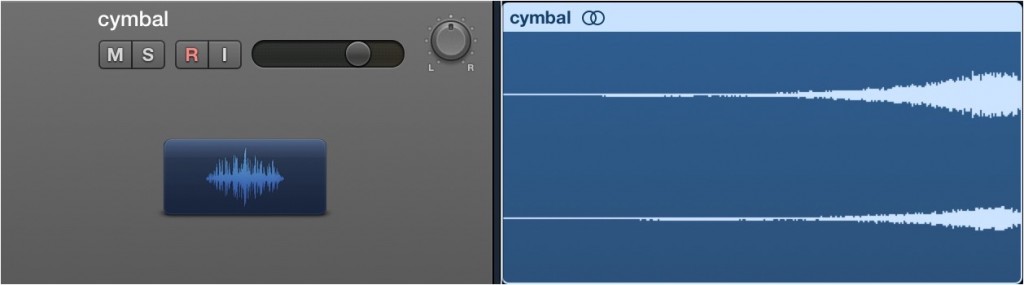
The waveform has been reversed.
"Sound"
This time we used a cymbal as an example,
but you can use it on many kinds of tracks, such as guitar, rhythm, and vocals,
so try it out in various ways.
*If the audio Edit tab does not appear, you can solve the problem with the article below.
Logic: How to Create a Reverse

↑ Import a cymbal waveform.
"Sound"

↑ Double-click the waveform you want to reverse to open the Sample Editor.
From the editor's top menu, choose "Functions" → "Reverse."

↑ The waveform has been reversed.
"Sound"
This time we used a cymbal as an example,
but you can use it on many kinds of tracks, such as guitar, rhythm, and vocals,
so try it out in various ways.
- Logic X
- Logic 8/9

Frequently asked questions
Q1. In what kinds of DTM productions is the reverse cymbal used in Logic Pro?
The reverse cymbal is a staple technique used in every genre. It is especially effective in pop, rock, and electronic music for building up to a transition or climax. The same technique can be applied to instruments other than cymbals.
Q2. What should I do if the Edit tab does not appear when using the reverse function in Logic X?
If the audio Edit tab does not appear, you can solve the problem by referring to the fix introduced in the article. This problem can occur when using editing functions such as Reverse and Normalize.
Q3. Can the reverse function be used on things other than cymbals?
Yes. It can be applied to any instrument or sound source, such as guitar, vocals, and rhythm tracks. Trying it on different sources lets you add a variety of expressive effects to your song.
NEW ARTICLES
Latest English Articles











