
Logic Pro's Environment is a powerful system for controlling MIDI processing freely, and by combining the arpeggiator and chord memorizer you can automatically generate complex and varied chord performances from a single MIDI note. Building this template lets you efficiently create automatically played tracks of professional quality, thanks to the snap function that automatically corrects timing deviations during real-time recording and fine adjustment of parameters such as note length and resolution. Once you master the setup, your creative range will expand greatly across many genres such as EDM and pop.
Logic's Environment, with endless possibilities
Logic includes a system called the "Environment",
which can perform complex MIDI processing.
The "arpeggiator" we explained last week also uses this "Environment".
Here, over several articles, we will explain how to operate and build the "Environment",
in connection with the "arpeggiator".
Watching the previous explanations before this video will deepen your understanding.

Video Tutorial
- Logic X
- Logic 8/9
Setting up the Chord Memorizer and Arpeggiator in the Environment

Select [top menu] → [Window] → [Open MIDI Environment].
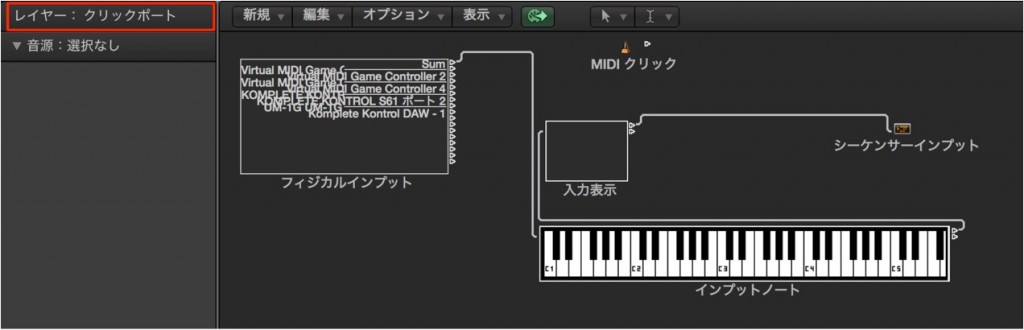
Select [Clicks & Ports] from [Layer].
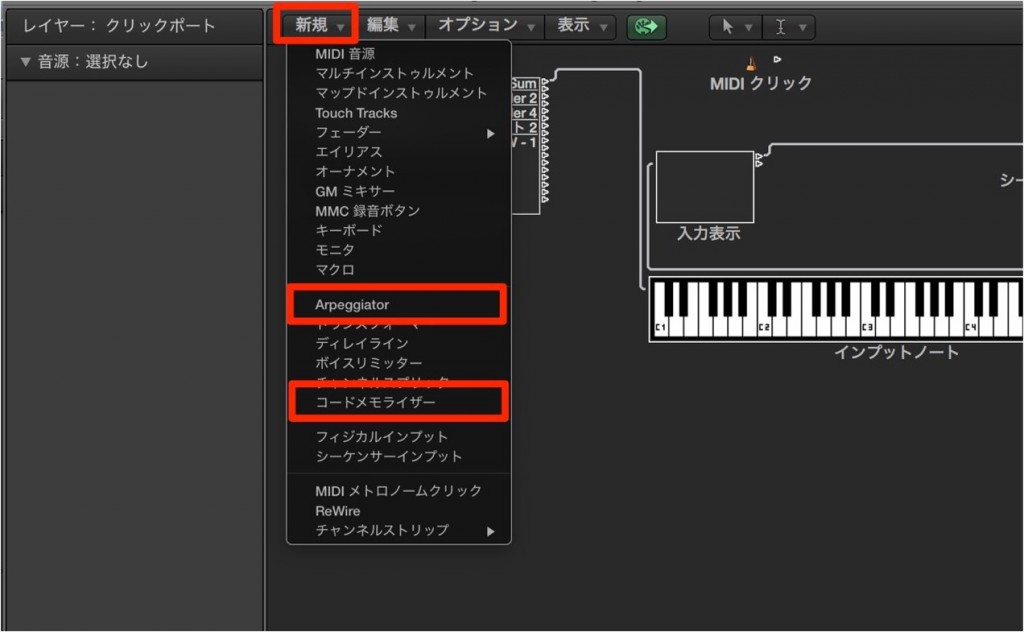
We confirmed that [New] → [Arpeggiator] and [Chord Memorizer] are available, just as in Logic 9.
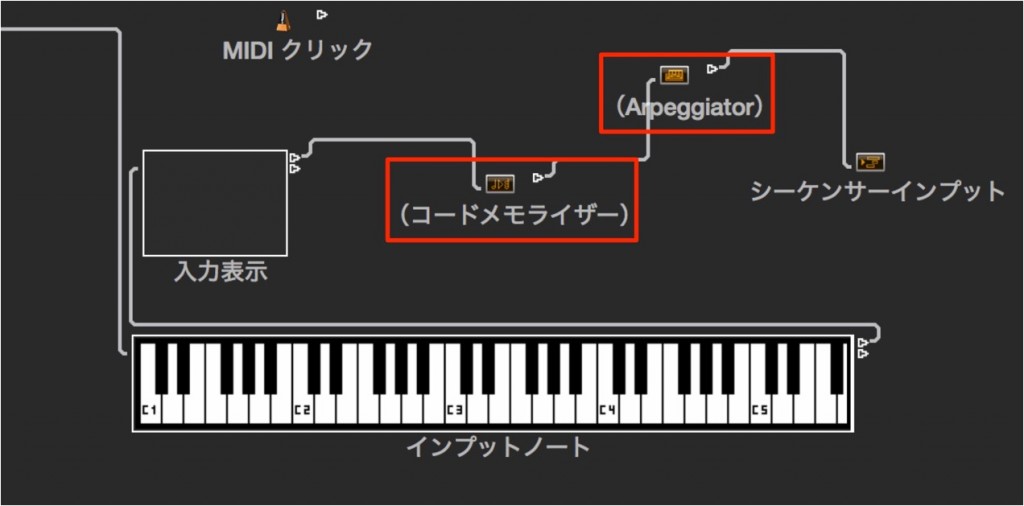
Then drag to connect them to the [Sequencer Input].
Chord Memorizer settings
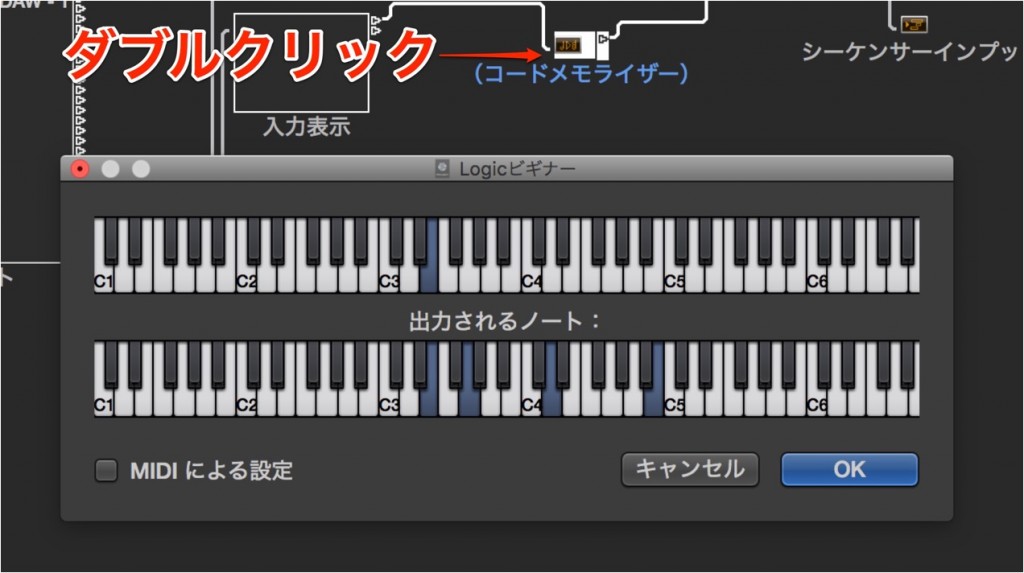
Any chord can be registered in the "Chord Memorizer".
Because you can combine and arrange "inversions", "7ths", "9ths" and so on,
its uses are greatly expanded.
Double-click the [Chord Memorizer] to set it up.
Here it is set so that playing [C3] sounds [CM7].
Arpeggiator settings
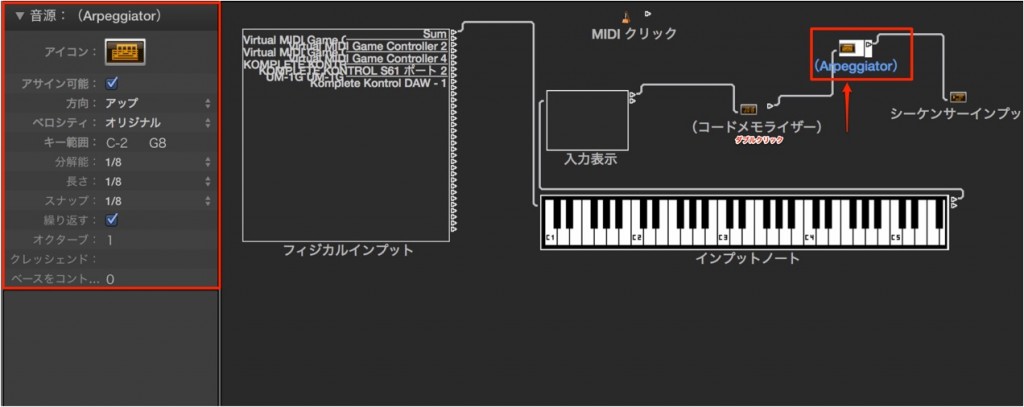
- Resolution: sets the rhythmic note value of the arpeggio (the speed of the broken chord).
Setting it to "Off" turns the arpeggiator off. - Length: lets you decide the length of the notes played,
and you can add various nuances with that length. - Snap: because playing/recording is done as real-time recording,
the performance may drift considerably in some cases.By setting this "Snap",
the playing/recording result is automatically adjusted to the correct beat
Let's actually record it.
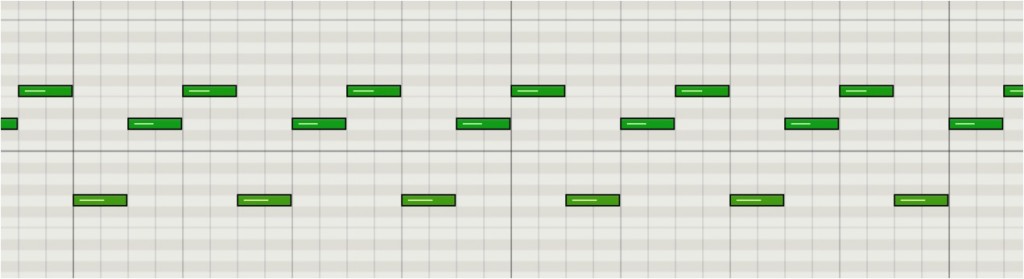
Like this, we got a recording that reflects the result of the Environment!
Combining the Arpeggiator and Chord Memorizer
You can combine the "Chord Memorizer", which plays a registered chord from a single "MIDI note",
with the "Arpeggiator".

↑ Wire them as "Chord Memorizer" → "Arpeggiator".

↑ In the "Chord Memorizer",
you can set the key you press at the top and the chord that actually sounds at the bottom.
The chord set here is sent to the "Arpeggiator"
and becomes the target of the automatic performance.
The possibilities of the Chord Memorizer

↑ Any chord can be registered in the "Chord Memorizer".
Because you can combine and arrange "inversions", "7ths", "9ths" and so on,
its uses are greatly expanded.
Arpeggiator settings

↑ In the "Arpeggiator" settings, in addition to "Resolution" introduced earlier,
- Length: lets you decide the length of the notes played,
and you can add various nuances with that length - Snap: because playing/recording is done as real-time recording,
the performance may drift considerably in some cases.By setting this "Snap",
the playing/recording result is automatically adjusted to the correct beat
- Logic X
- Logic 8/9

Frequently Asked Questions
Q1. Can MIDI beginners use Logic Pro's Environment?
Yes, if you understand the basic concept of wiring. We recommend starting with a simple combination of the Chord Memorizer and Arpeggiator and learning step by step with the help of the video explanations.
Q2. What is the difference between the Chord Memorizer and the Arpeggiator?
The Chord Memorizer plays a registered chord (7th, 9th and so on) from a single key, and the Arpeggiator plays that chord broken up at the specified resolution and rhythm. Combining them creates an automatic performance.
Q3. What can I do if the performance drifts during real-time recording?
Enable the "Snap" function in the Arpeggiator settings. The playing/recording result is then automatically corrected to the exact beat positions.
Q4. Can this template be applied to genres other than EDM?
Of course. Because you can freely register chord types such as inversions, 7ths and 9ths, you can turn it into a template and use it in any genre, such as pop, jazz or funk.
NEW ARTICLES
Latest English Articles











