Recording with Aux tracks in Logic Pro is a practical method that lets you capture audio with several different settings at the same time. By combining audio tracks and Aux tracks, you can record the processed sound and the dry sound simultaneously, or use different level settings for the verse and chorus of a vocal, getting several optimized recordings from a single take. It also works well with effects such as compressors and limiters, and because you can keep the dry performance as a backup while also securing the processed sound, the flexibility and safety of post-processing improve greatly. This technique lets you achieve a professional recording workflow.
Comfortable recording with auxiliary tracks
Here we explain a recording technique that builds on "recording with effects" from the previous section.
Using this method has many advantages:
you can record both the "processed" and the "dry" track,
or record at different levels.
Video point: Making multiple recordings
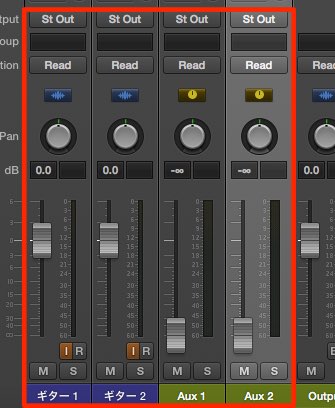
Prepare two "audio tracks" and two "Aux" tracks.
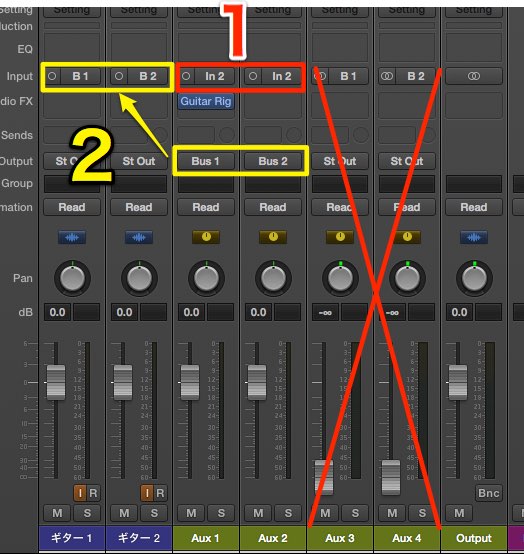
- 1_Set them to the audio interface channel where the sound
from the mic, guitar, etc. comes in.
Make settings such as applying an effect to one of them or adjusting the level to taste. - 2_Set the outputs of the "Aux" tracks to different buses such as "Bus 1" and "Bus 2".
Then assign each "Bus" to the input of an audio track to record. - The Aux tracks added during assignment are not used. Mute or delete them.
If you record in this state,
the recorded waveforms are captured with different settings.
If you set different levels for the vocal "verse" and "chorus",
you can optimize the recorded levels in a single recording.
When applying compression or using a limiter to prevent clipping,
you can also keep the dry performance as a backup.
Like this, there are many ways to use it depending on your ideas.

Frequently Asked Questions
Q1. What are the benefits of using Aux tracks in Logic Pro?
You can record with several different settings at the same time. The processed sound, the dry sound and sounds at different levels can be captured simultaneously in one take, giving you more options in post-processing.
Q2. Why route the Aux track outputs to separate buses?
Setting different bus outputs lets each audio track work independently on a different signal path, so you can record multiple versions at the same time while keeping their individual settings.
Q3. How can this technique be used for vocal recording?
By preparing different level settings for the verse and chorus in advance, you can record several optimally leveled versions at the same time in one take, making it easier to optimize the vocal level.
Q4. What is the benefit of keeping the dry performance as a backup?
Even if processing with a compressor or limiter does not work out, the original audio remains, so you can try different processing later and respond flexibly at the mixing stage.
NEW ARTICLES
Latest English Articles