
This article explains practical methods for exporting and importing MIDI files in FL Studio. Saving MIDI data in SMF format lets you share song material between different DAWs and reuse phrases such as drum patterns. The files contain no sound information and are very small, which can greatly improve production efficiency. It's easy to do from the piano roll menu, so even beginners can build an efficient production environment.
Saving MIDI Phrases as Files
These are the steps for using MIDI data created in a song in other songs and DAWs.
- You want to save a favorite drum pattern.
- You give someone just the MIDI file so they can swap in different sounds.
- You want to bring programmed parts into another song.
It can be used in all kinds of situations like these.
This MIDI file is called a "SMF" (Standard MIDI File).
The file contains no sounds, only "MIDI data," so it is very small.
SMF (Standard MIDI File) Explained
How to Export an SMF in FL Studio

Open the piano roll of the track you want to export,
and select "File" > "Export as MIDI file" from the left triangle menu.
Name and save it in the dialog.

A MIDI file containing the performance data is created like this.

By merging MIDI clips, you can also export the MIDI data for the merged section.

How to Import an SMF in FL Studio

Select "File" > "Export" > "MIDI file" from the menu,
and specify the MIDI file you want to import.
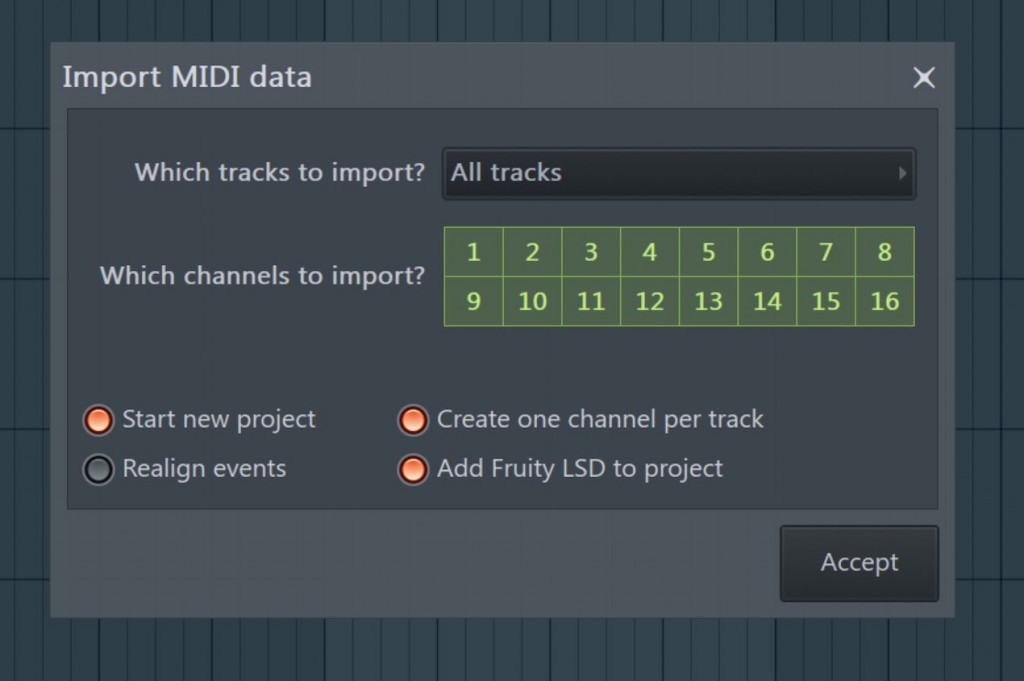
A dialog like this appears, so select "OK."

The MIDI phrase is imported into a channel.

Frequently Asked Questions
Q1. How do I export a MIDI file in FL Studio?
Open the piano roll of the track you want to export, select "File" > "Export as MIDI file" from the left triangle menu, and save it with a file name. Multiple MIDI clips can be merged and exported as a single file.
Q2. What is an SMF file?
A Standard MIDI File (SMF) is a MIDI file containing only performance data. Because it contains no sound information, it is very small. It is compatible across different DAWs and ideal for sharing MIDI data.
Q3. How do I import a MIDI file into FL Studio?
Select "File" > "Export" > "MIDI file" from the menu and specify the MIDI file you want to import. Select OK in the dialog, and the MIDI phrase is imported into a channel.
Q4. Can I save sounds together with a MIDI file?
The SMF format doesn't include sound information. Only performance data is saved, so when you open it in a different DAW, you need to choose sounds again.
NEW ARTICLES
Latest English Articles











