
HALion 7 is an all-in-one instrument that integrates multiple synth engines and sampled instruments. Compared with the HALion Sonic SE included with Cubase, it is far superior in articulation expression for acoustic instruments, velocity response, its wealth of loops, and automatic performance features such as FlexPhraser. Because a single plug-in achieves quality close to dedicated instruments, you do not need to prepare multiple instruments, and it brings depth and natural performance expression to the whole song. This enables high-level music production in terms of both the efficiency and the polish of composing and arranging.
Using the All-in-One Instrument HALion 7 Effectively in Your Songs
A multi-instrument with diverse engines and features, from synths to sampled instruments: "HALion 7"
This time, we look at the features of HALion 7 while comparing it with the HALion Sonic SE included with Cubase.
HALion 7 Song Production Video
Excerpt of a Question and Answer on the YouTube Video

Can HALion 7 be downloaded with Cubase AI 13 too?

HALion 7 can also be downloaded for Cubase AI 13 if purchased separately. Note that Cubase AI 13 comes with HALion Sonic 7 (a simplified version).
About HALion 7
HALion 7 is what is called an all-in-one instrument, a type of instrument with a wide variety of sounds, but its biggest feature is that it has various engines within a single instrument.
It integrates sampled instruments that excel at reproducing acoustic instruments with a wide range of synth engines, such as analog modeling, the popular wavetable, granular and FM, and its feature is that sounds that previously had to be created with multiple instruments on different tracks can be made inside a single plug-in.
Demo Song Playback
For the song below, made earlier as a video project, we did the arrangement using only the HALion Sonic 7 and SE library included with Cubase.
We will swap these for HALion 7 and compare.

The vocals, guitar and some FX are audio material, but everything else is HALion Sonic SE sounds.
Acoustic Instruments with Many Articulations and Variations
For the electric bass, the preset originally used had few articulation types, limiting slide and hammer-on expression, but the higher-tier library allows more detailed expression.


For acoustic drums, the SE library sounds lack dynamic expression, while in the higher-tier version the tone follows changes in velocity, enabling more natural expression.
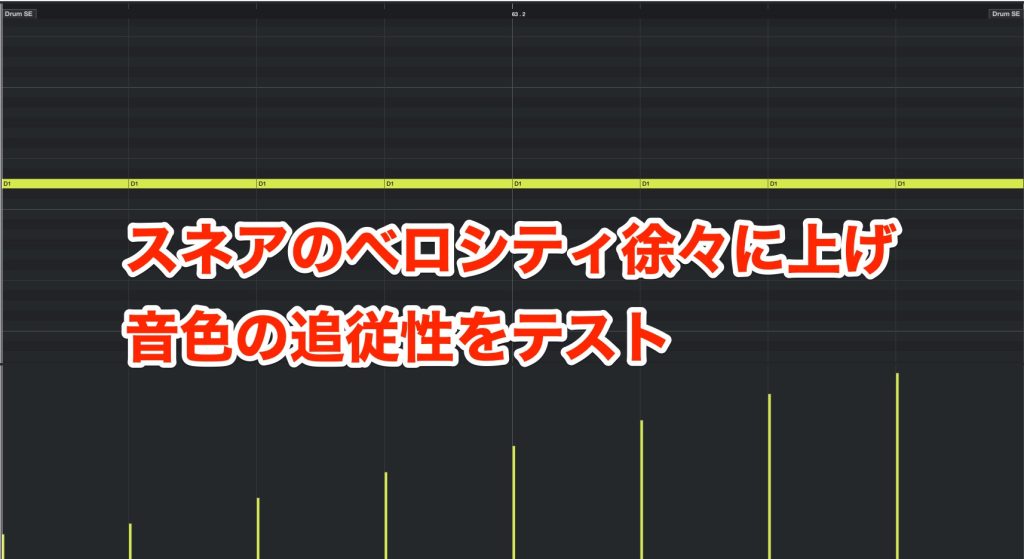
This time, we play repeated snare hits while gradually raising the velocity to compare how well they follow dynamics.
▶︎ Snare crescendo with HALion Sonic SE [SR Live Room Kit1]
We also compare string sounds, which are used frequently in pop.
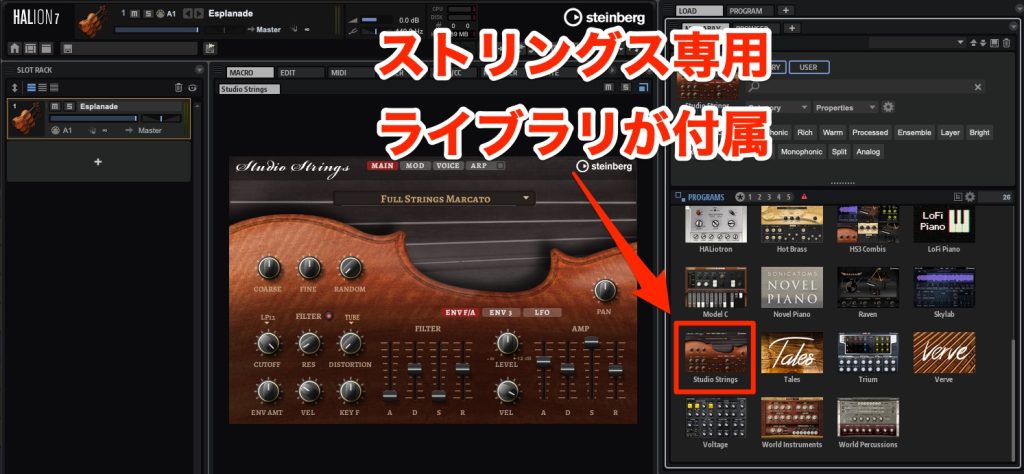
HALion 7 includes a library called [Studio Strings], with a wealth of presets close to those of dedicated instruments.
For sound realism, dedicated instruments with large samples win, but realistic sounds can sometimes be hard to blend into the arrangement.
This also applies to sounds meant to sit in the background or when layering with other tracks.
FlexPhraser, Which Recreates Acoustic Instrument Playing Techniques
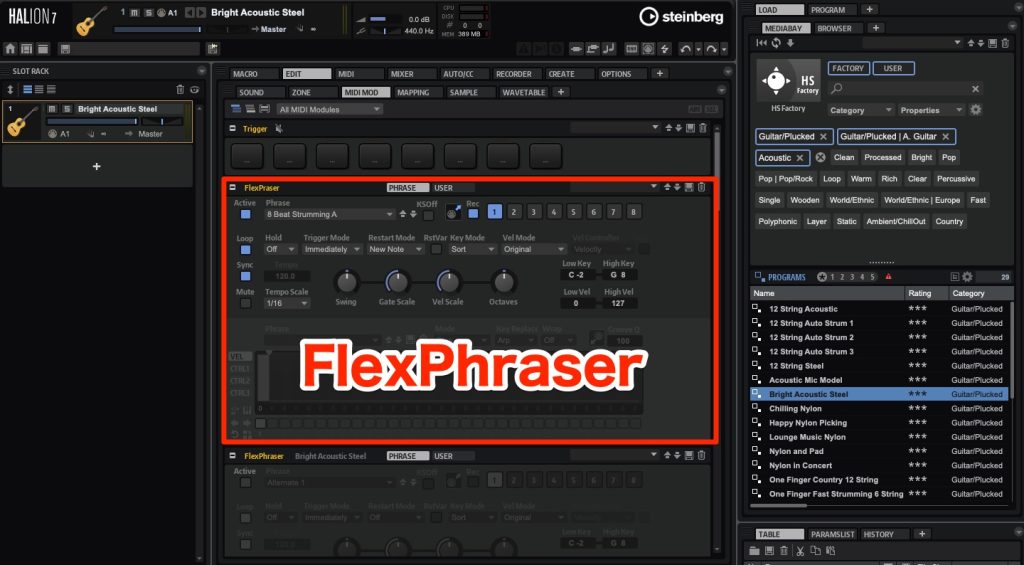
HALion 7 has an automatic performance feature called [FlexPhraser].
Using it, anyone can easily create a guitar-like performance.
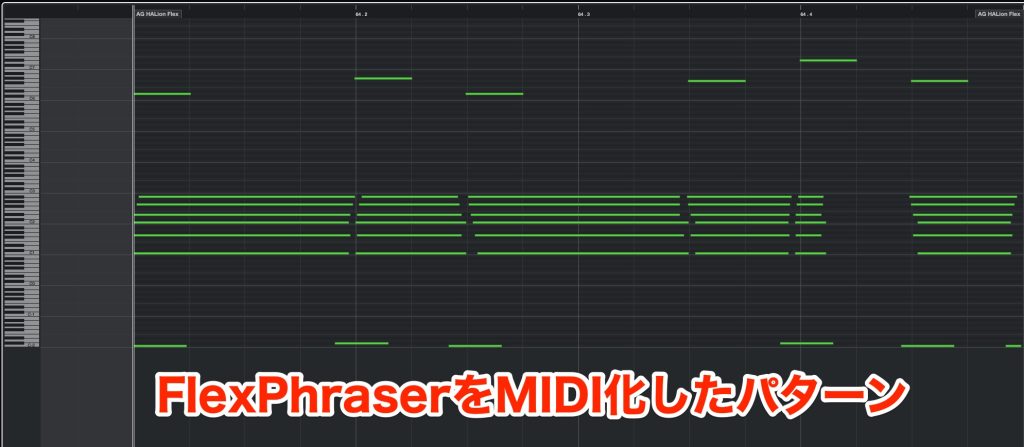
Performance patterns can be output as MIDI.
MIDI patterns are provided not only for guitar but also for piano, bass and more.
Creating a Kick Using Different Synth Engines

With the HALion Sonic SE library, we searched for a kick sound among the presets.
However, HALion 7 has multiple synth engines, so you can design sounds yourself.
To make a kick, we mix a [Sub Bass] component that provides the lows and a [Click] sound that provides the attack.

For the Sub Bass, launch the wavetable synth and load a sine wave.

Next, adjust the volume envelope so that the volume decays.
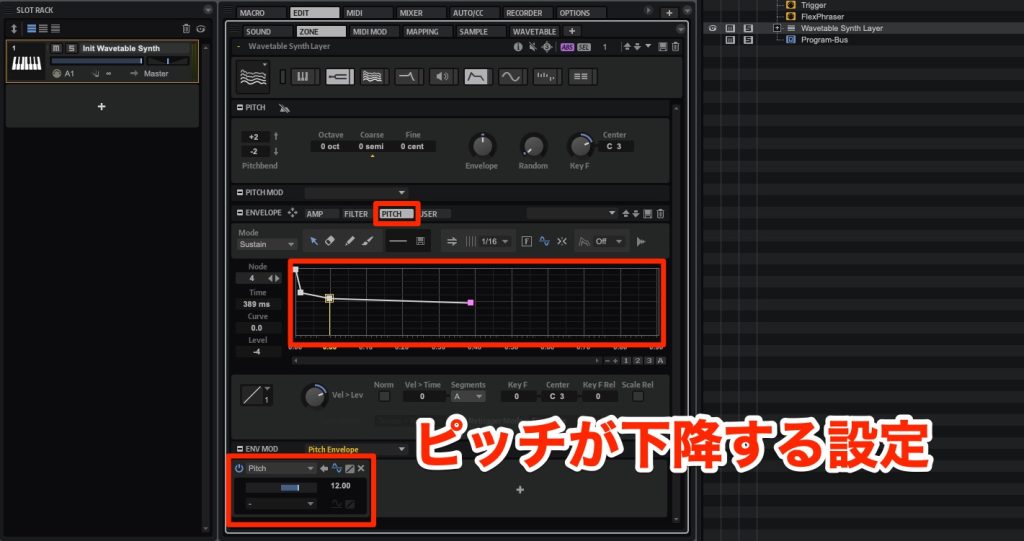
Create a curve with the pitch envelope and apply it, and the foundation of the kick is easily done.
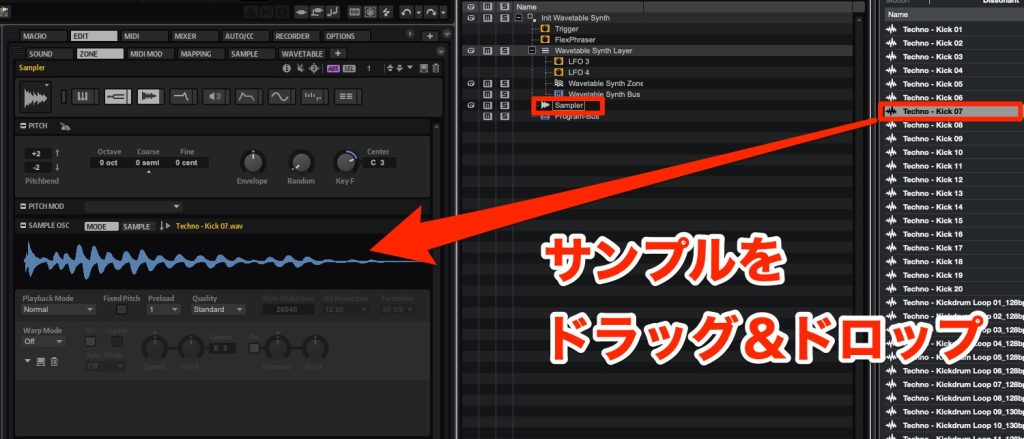
Next, to make the Click sound, add a sampler to the patch and load an existing kick sample.

Set the volume envelope so that the volume decays immediately, playing only the attack of the sample.
Finally, combine these two sounds and the kick sound is complete.
HALion 7's synth section has
- Lots of wavetable data provided
- Filter types modeled on various hardware
- An envelope section that is easier to see and use
Because of these features, it can be called a synth that makes sound design even easier.
Plenty of Loops Included Only with the Higher-Tier Version
In four-on-the-floor songs like the demo, it is common to add rhythm loops centered on the high range, called [Top Loops] and so on, but the HALion SE library does not include such material.
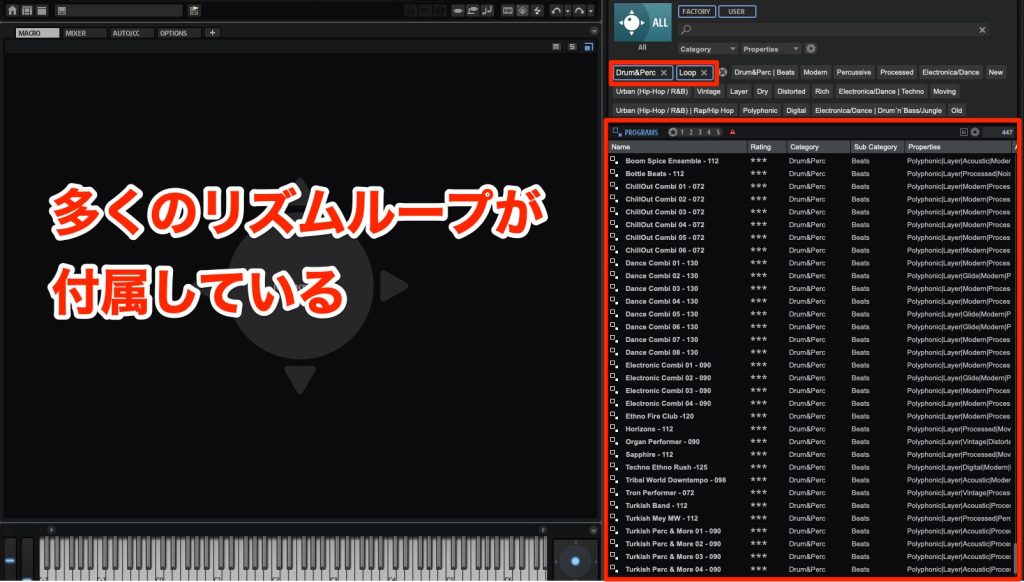
HALion 7 has a variety of rhythm loops by genre, so we used them.
Of course, these loops sync to the BPM automatically.
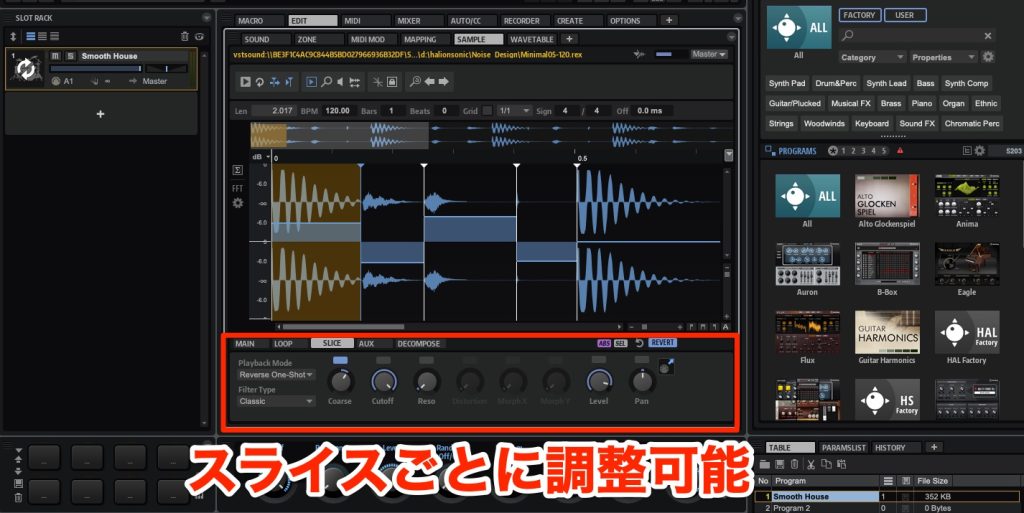
You can quickly make finer adjustments such as slicing, reversing and fading loops.
Comparing the Track Before and After the Swap
Please listen to the finished track made with HALion 7.
We did not change the sounds with insert effects on the DAW side, limiting ourselves to some tidying up with EQ, compression and so on.
This is the original state you heard at the beginning of the article.
HALion 7 gives the sound more depth, and the performance expression comes through well.
A Hybrid Retro × Digital Sound
One HALion 7 feature worth noting is its "reproduction of 90s sounds."
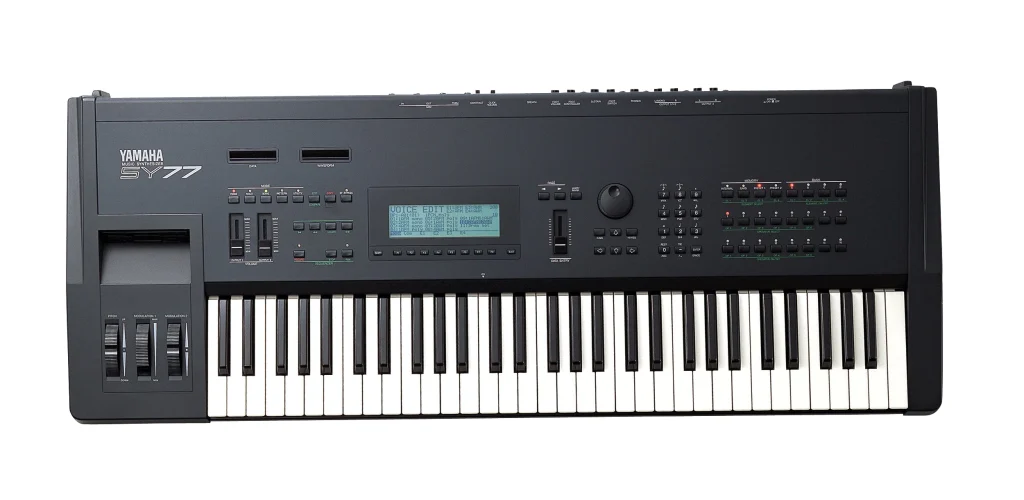
The sound of PCM synths popular in the 90s has been reevaluated in recent years, and various classic PCM synths have been released as plug-ins.
Many presets with this kind of retro texture are also included.
It can also fulfill the wish for this kind of texture in your songs.
How did you find it?
Compared with large sampled instruments with tens of gigabytes per preset, the sound realism is lower, but because the sounds are not overly assertive, they blend well and are easy to use in songs with many tracks like this one.
With more than 3,700 presets and the wide range of sounds you can create by combining multiple engines, it is a reliable product that will be useful in all kinds of situations.
If you want to raise the overall quality of your song's sound, please check it out!

Can the all-in-one instrument [HALion 7] alone produce high-quality songs?
This time, we look at the features of HALion 7 while comparing it with the HALion Sonic SE included with Cubase.
Article: https://t.co/jZCEd7BC1oVideo: https://t.co/iMnQ7aSUXU#dtm #daw #composing #halion7 pic.twitter.com/uXWsuBW8Wl
— SLEEP FREAKS (@SLEEPFREAKS_DTM) April 29, 2023
Frequently Asked Questions
Q1. How is HALion 7 different from HALion Sonic SE?
HALion 7 is the higher-tier version, with more detailed articulations, plenty of loops, multiple synth engines, and automatic performance features such as FlexPhraser. Sonic SE, on the other hand, is the entry version with a limited set of presets.
Q2. Can HALion 7 alone produce a polished song?
Yes. In the article's demo, apart from audio material such as vocals and guitar, all instruments were produced with HALion 7, achieving a high level of polish.
Q3. What is HALion 7's biggest feature?
Sampled instruments and synth engines are integrated within a single plug-in, enabling diverse, high-quality sound design without preparing multiple instruments.
Q4. Is sound design in HALion 7 easy even for beginners?
With automatic performance features such as FlexPhraser, even beginners can easily create expressive performances. The synth is also designed to be easy to see and use.
NEW ARTICLES
Latest English Articles











