
The Pitch function on a synthesizer's oscillator is an important feature that creates all kinds of tones and effects by freely changing the pitch. By using its three parameters, Octave, Coarse, and Fine, you can combine multiple oscillators to create thick sounds. Learning techniques such as layering in octaves, using slight pitch offsets for a chorus effect, and harmonizing at a fifth lets you quickly reach the tone you have in mind and greatly improves your sound design skills in DTM.
Creating Various Effects with Oscillator Pitch
A function every oscillator has is Pitch.
You can freely change the pitch to create tones and all kinds of effects.
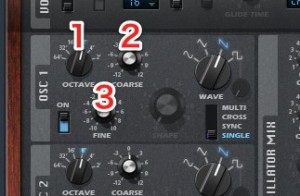
↑ The names may differ between synths, but the basic functions are the same.
- 1_Octave_Changes the pitch in octaves. Nothing difficult here.
- 2_Coarse_Changes the pitch in semitones. Note that it is semitones, not whole tones.
If you want a G to sound when you play a C on the keyboard, set it to "+7". - 3_Fine_Changes the pitch in fine steps smaller than a semitone.
The unit is the "cent," and 1 cent is one hundredth of a semitone.
Techniques Using Pitch
One technique that uses pitch
is using multiple oscillators.
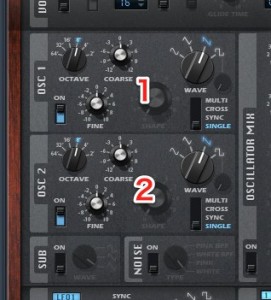
↑ Synthesizers usually have two or more oscillators,
so you can play two at once and change the pitch of one of them to shape the sound.
First, a single oscillator.
This is the normal sample.
Layering in Octaves
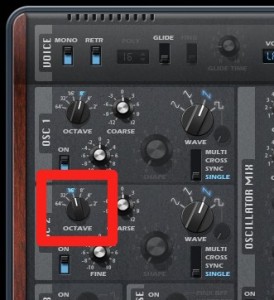
↑ This layers the second oscillator one octave lower.
You get a heavy, rich sound.
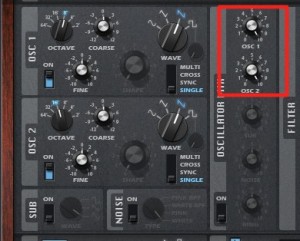
↑ You can also adjust the levels of the oscillators.
Problems such as the layered sound being too heavy can be improved with the volume balance.
Slightly Detuning the Pitch
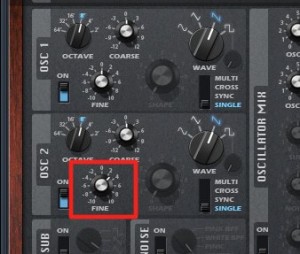
↑ Use "Fine" to shift the pitch by less than a semitone.
This creates a thick sound, as if a chorus effect were applied.
It's a sound common in trance.
Harmonizing at a Fifth and Other Intervals
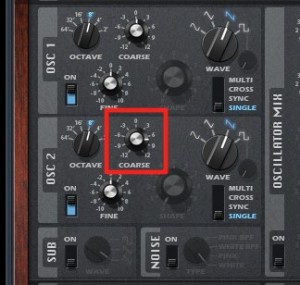
↑ This technique sets a completely different pitch
on the second oscillator to add a harmony.
It sounds wonderfully synth-like.
Summary
As you can see, pitch alone can create a wide variety of tones.
What matters is making these effects part of your toolkit.
That way,
when you hear a sound or think of one, you can reach the tone you want right away.
Next time, we will move on to the filter section, which shapes the waveform you have chosen.
Frequently asked questions
Q1. What is the difference between "Coarse" and "Fine" in a synthesizer's Pitch parameters?
Coarse changes the pitch in semitones; for example, to go from C to G, set it to "+7." Fine, on the other hand, adjusts the pitch in steps smaller than a semitone, using the cent as its unit, where 1 is one hundredth of a semitone.
Q2. Are there any tips for layering multiple oscillators?
When layering multiple oscillators, it is important not only to change the pitch but also to adjust the level (volume) of each oscillator. If the layered sound is too heavy, improve it with the volume balance to reach the sound you want.
Q3. What effect do I get by slightly detuning the pitch?
Using the Fine parameter to shift the pitch by less than a semitone creates a thick sound, as if a chorus effect were applied. It is a technique used often, especially in trance.
NEW ARTICLES
Latest English Articles











