
This article explains in detail how to control a synthesizer's filter with an LFO. Unlike an ADSR envelope, an LFO keeps repeating its waveform, so it produces more dramatic, dynamic effects. By setting Source to LFO and Destination to Cutoff in the Matrix section and adjusting the range of influence with the Depth parameter, you can change the filter frequency automatically. The stronger the Depth, the more pronounced the effect, greatly expanding your freedom in sound design.
Controlling the Filter with an LFO
In the previous article, we explained controlling the filter with ADSR.
Here, we explain controlling the filter with an LFO.
We explain LFOs in detail here.
The Crucial Differences Between ADSR and LFO

- It has a negative part (the center of the wave is 0)
- It repeats the wave endlessly
These are the differences.
Because the knob moves over a wide range and keeps repeating that movement,
the effect is more dramatic than with ADSR.
Applying an LFO to Filter Control

↑ In the "Matrix" section,
set "Source" to "LFO"
and "Destination" to "Cutoff."
*If the Depth value is 0, the LFO has no swing, so there is no effect.

↑ Set "Envelope" to 0, in the center.
Be careful, because if this value is too low or too high, you will not get the effect.
About Depth

The Depth mentioned above
sets the range over which the LFO affects the Cutoff.
To make it easier to picture,
we added a blue line to the Cutoff.
The Cutoff value is currently 1.
Picture the knob continuously moving left and right around this value.
Here is the current sound.
When the Depth is strong,

↑ the range the LFO affects widens like this.
The sound becomes this.
You can hear that the effect is stronger.
At the bottom of the sweep, the cutoff is so strong that it is almost silent.
Once you can picture how much the LFO affects a knob like this,
sound design becomes much easier.
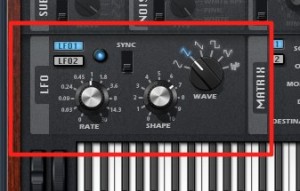
Next time, we will adjust the LFO section to control the filter in more detail.
Frequently asked questions
Q1. What is the biggest difference between an LFO and ADSR?
ADSR changes once each time a note is played, whereas an LFO keeps repeating a waveform that includes negative values. So an LFO gives more dramatic, periodic effects even with the same settings.
Q2. What happens if I set the LFO Depth to 0?
With a Depth of 0, the LFO has no amplitude, so it has no effect on the filter. To get an effect, you need to set a value other than 0.
Q3. Why set Envelope to 0, in the center?
If the Envelope value is too high or too low, you will not get the LFO effect. Setting it to 0 in the center lets the LFO move evenly left and right around the Cutoff value for the best effect.
Q4. What is the benefit of a stronger Depth in filter control?
The stronger the Depth, the wider the range over which the LFO affects the filter frequency, giving a bigger tonal change. However, if it is too strong, the sound can become nearly silent, so adjustment is important.
NEW ARTICLES
Latest English Articles











