
The arpeggiator, one of the synthesizer's best-known effects, takes the notes of a chord you play and plays them back one by one in order. This article explains in detail how to set one up easily in Cubase using the MIDI insert Arpache 5, and how to adjust its four main parameters: Play Order, Step Size, Length, and Key Range. Understanding these settings lets you add drive and depth to your performance and freely create arpeggios for songs in any genre.
The Synthesizer's Classic Performance Technique: The Arpeggiator
One of the most famous synthesizer sounds is the arpeggiator
. It is used in all kinds of songs, regardless of genre.
The idea behind the arpeggiator is simple:
it plays the notes of a chord separately.
First, let's listen to how it sounds.
Normal
Arpeggiator
You have surely heard this before, haven't you?
Now let's look at how to set it up.
Applying an Arpeggiator
First, I have to tell you that
Retrologue, which we have been using so far, does not have an arpeggiator (lol).
So we will start by explaining how to apply an arpeggiator.
In Cubase, you can easily apply an arpeggiator to any MIDI track.
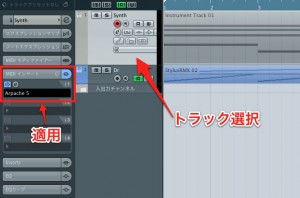
- 1_Select the MIDI track you want to apply the arpeggiator to
- 2_Apply "Arpache 5" in the MIDI Inserts
That's all there is to it.
The arpeggiator is now applied to everything you play.
Adjusting the Arpeggiator
Adjust Arpache 5 to create the arpeggio you want.
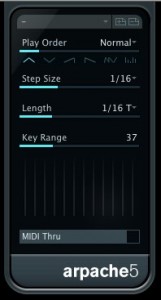
- Play Order: Sets how the arpeggio's pitches move.
You can choose patterns such as descending from the top, ascending, or ascending then descending - Step Size: Sets the note value the arpeggiator plays.
Sixteenth notes are the best known, but it is worth trying various values - Length: The length of the played notes, which is very important for creating groove.
It ranges from crisp to smooth - Key Range: Sets the range of pitches played.
The larger the value, the more it plays an octave above or below, beyond the keys you are holding.
You can also create flashy arpeggio effects.
Reference Video for Settings
The video uses Logic,
but it explains the concepts above. (From 3:15)
In Closing
As you can see, setting up an arpeggiator is easy,
so be sure to give it a try!
If you use another synthesizer,
it may already have an arpeggiator built in.
The concepts above are common to all arpeggiators,
so you should be able to apply much of this.
Please give it a try.
Frequently asked questions
Q1. In what situations are arpeggiators used?
Arpeggiators are used in all kinds of songs regardless of genre, and by breaking up chords they create dynamic, driving sounds. They are especially common in electronic music and modern music that makes heavy use of synthesizers.
Q2. Can't I use an arpeggiator with Retrologue?
Retrologue does not have a built-in arpeggiator, but in Cubase you can achieve the same effect by using the MIDI insert Arpache 5. Some other synthesizers do have one built in.
Q3. What Step Size value is commonly used?
The best-known Step Size for arpeggiators is sixteenth notes, but by trying various values, such as eighth or thirty-second notes, to suit the song's tempo and genre, you can create arpeggios with different nuances.
NEW ARTICLES
Latest English Articles











