
Arturia has released "SQ80 V," a model of the ENSONIQ SQ-80 released in 1988. While faithfully recreating this classic digital synthesizer, it adds a refined UI and modern features, evolving beyond a simple modeling synth. The Synthesis tab enables highly flexible sound design with wavetable controls and the MIXER feature, and with 15 effects in the Effect tab, it is a hybrid synth that keeps the glamorous sound of the '80s while also handling complex modern sound design.
Arturia "SQ80 V": More Than Simple Modeling
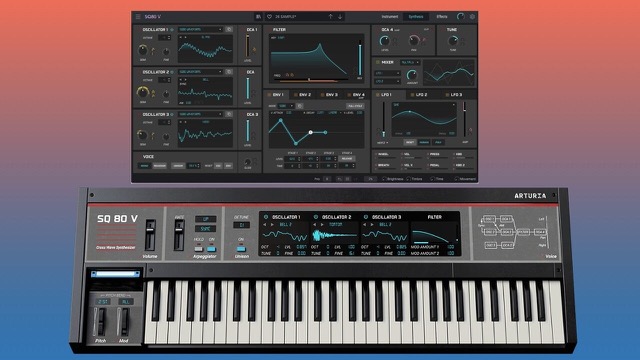
Arturia has released "SQ80 V," a model of the "ENSONIQ SQ-80" digital synthesizer released in 1988.
Analog synthesizers such as Moog are well known as modeling sources, but the source this time, the "SQ-80," is a digital synth that uses PCM sound sources.
Its sound, born in the late '80s, is fat and cuts through well, with a glamour that differs from analog, so it still holds a unique position today.
Arturia has faithfully recreated this classic digital synthesizer while also making it easier to use.
Here, we explain the main features along with sound examples.
A Refined User Interface and Sounds Derived from the SQ-80
First, please listen to a few presets.
1. Default preset
2. From the bass presets [Classic Rolling 80's Bass]
3. From the lead presets [Kradok]
With Arturia's typical high-resolution, finely detailed sound, it has a futuristic feel that never sounds dated. At the same time, it can also deliver a thick sound that rivals analog synths.
Such varied and modern sounds will no doubt be immediately useful in today's productions.
Next, let's look at the main interface.
The key points here are the beautiful visuals, which feel like touching a real synthesizer, and the simplified, easier-to-understand layout.
The oscillators and filter are at the top of the screen, and below each are Octave, Level, Semi Tune and Fine Tune.
On the left, in addition to Master Volume, an Arpeggiator, Unison and Detune, which the hardware did not have, have been added; anyone who knows synthesizer basics can operate them all intuitively.
In addition, there is a hidden panel on the right side above the keyboard.
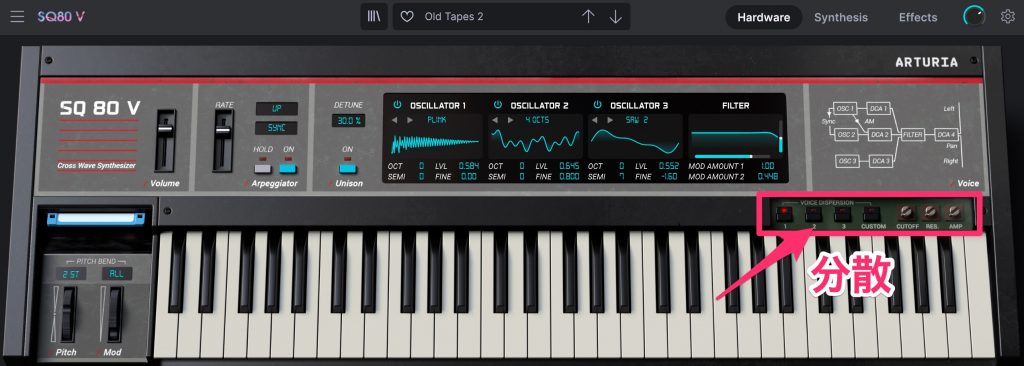
It contains a feature called "Dispersion," which recreates the "subtle differences that change randomly every time a note is played" that exist only in hardware. This gives the sound its unique character.
You can see Arturia's characteristic commitment to recreating the hardware as accurately as possible.
Synthesis and Effect Tabs for More Flexible Sound Design
This instrument does not stop there.
The Synthesis and Effect tabs at the top right of the screen enable even more detailed sound design.
Let's start with the Synthesis tab.
Opening it changes the keyboard-style screen into a UI similar to the wavetable synths common today.
It is an excellent feature that neatly overcomes the difficulty of hardware modeling synths.
In broad terms, in addition to the oscillators and filter, there are envelopes and LFOs, plus a MIXER that the hardware did not have.
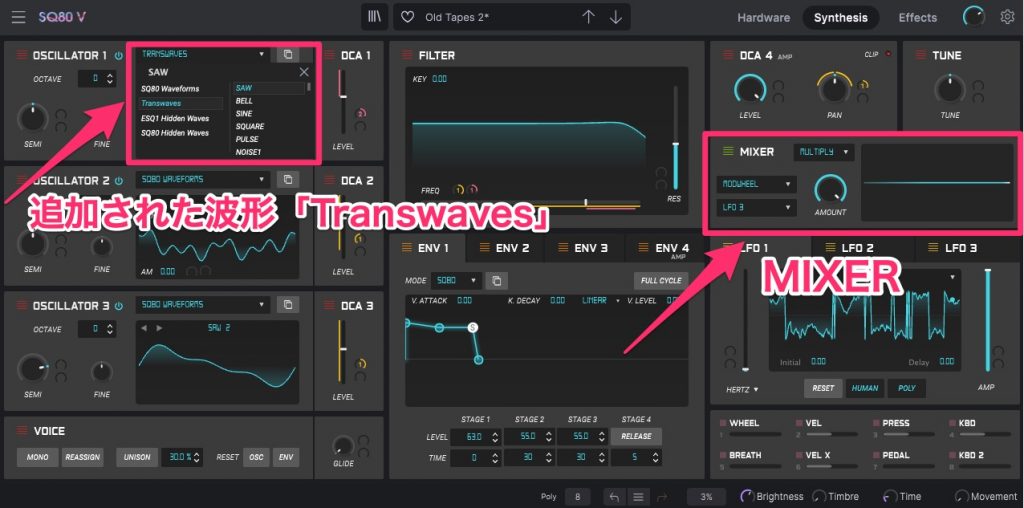
The first thing worth noting here is the oscillators.
In addition to the waveforms built into the hardware (SQ80 Waveforms), it adds a variety of Transwaves like those found in today's wavetable synths, as well as waveforms that were hidden in the hardware (ESQ1, SQ80 Hidden Waves).
The Transwaves waveforms in particular let you move the Position just like a wavetable synth, so you can create quite modern sounds.
Next, let's focus on the MIXER.
This feature is also found in Arturia's "Pigments" synth; you can mix any two waveforms, such as LFOs and envelopes, to create a new waveform.
Applying it to the oscillators or giving the filter complex movement further widens your sound design possibilities.
Finally, let's look at the Effect tab.
As the name suggests, this section adds various effects to the sound. Fifteen effects are available, and up to four can be applied at once.
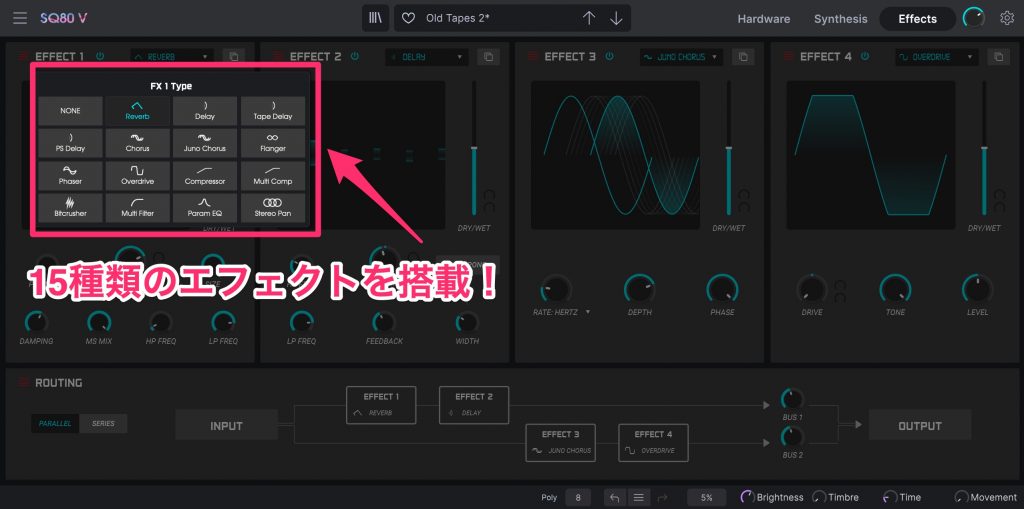
Starting with the basic Reverb, Delay, Chorus and Overdrive, there are effects with a somewhat distinctive flavor such as Tape Delay and Juno Chorus, as well as mixing-oriented effects such as Compressor, Multi Compressor, EQ and Stereo Pan.
In addition, a switch at the bottom lets you choose whether to route the effects in series or in 2-2 parallel.
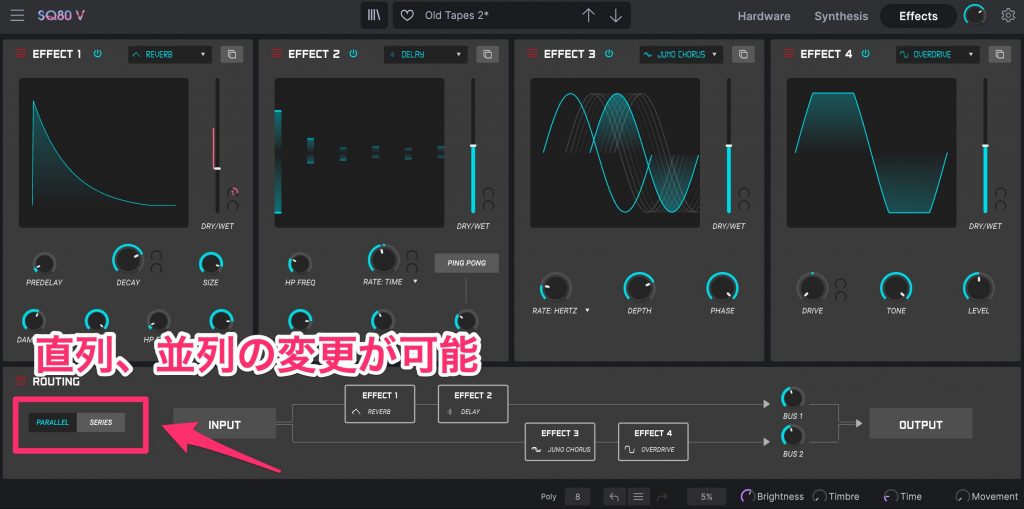
This makes it possible, for example, to add distortion only to the sound after the reverb.
As you have seen, it incorporates modern features the hardware naturally did not have, so you can see that "SQ80 V" is no mere modeling synth.
Simple modeling soft synths have a thick sound, but the range of sounds you can create is limited, so they struggle with today's complex sound design.
"SQ80 V," however, can be called a hybrid synth that faithfully recreates the hardware's unique sound while overcoming its functional weaknesses.
Please experience the new sound possibilities it opens up for yourself.
Frequently Asked Questions
Q1. How does SQ80 V differ from the ENSONIQ SQ-80?
SQ80 V recreates the hardware's sound accurately while adding features such as an Arpeggiator, Unison and Detune. It also offers wavetable editing and the MIXER feature in the Synthesis tab and 15 effects in the Effect tab, giving it modern sound design features the hardware does not have.
Q2. How does SQ80 V differ from models of analog synthesizers?
SQ80 V models a digital synthesizer that uses PCM sound sources. Unlike analog synths, it features a fat, glamorous sound that cuts through well, giving you the unique tones of the late '80s.
Q3. Can beginners master SQ80 V?
The main interface is laid out so that anyone who knows synthesizer basics can operate it intuitively. The Synthesis tab also reduces complexity with a wavetable-synth UI, and plenty of presets are included, so beginners can learn step by step.
NEW ARTICLES
Latest English Articles











