
"BIAS FX 2", released by Positive Grid, is the latest version of its guitar processor, delivering the ultimate guitar tone with a redesigned DSP engine. Its headline new feature, "GUITAR MATCH", can automatically make your own guitar emulate legendary sounds such as a classic American guitar or a vintage LP, so you no longer need to carry multiple guitars to recordings and gigs. With new amps and pedals, speaker IRs from its partnership with Celestion, and ToneCloud with more than 50,000 presets, it's an essential music production tool that greatly expands creative freedom for professionals and amateurs alike.
BIAS FX 2 Released
Positive Grid, popular for its guitar processors, has released "BIAS FX2".
There are quite a few changes compared with the previous version, so we'll introduce the new features as well.
BIAS FX 2 -New Era of Tone – Overview
What Is BIAS FX?
The BIAS series comes in the following three variations.
- BIAS Pedal: Lets you create stompboxes and pedalboards in software
- BIAS FX: Integrates amps and pedalboards
- BIAS AMP: Specialized in amp functions, with customizable components
Of these, BIAS FX is the one that lets you use amps and pedalboards in your DAW or standalone.
"BIAS AMP" is explained here.
What Has Changed in BIAS FX2?
For musicians who make music with the guitar, amp simulators and effects are important tools.
BIAS FX is a guitar processor popular with professionals and amateurs alike, guitarists or not, so how has it changed with the update? Here are the main changes.
A Redesigned DSP Engine
Although BIAS FX2 carries over the UI of the previous version, it is a completely redesigned processor.
Its high-resolution DSP engine, with hundreds of improvements, delivers guitar tones with ultimate responsiveness, detail and variety.
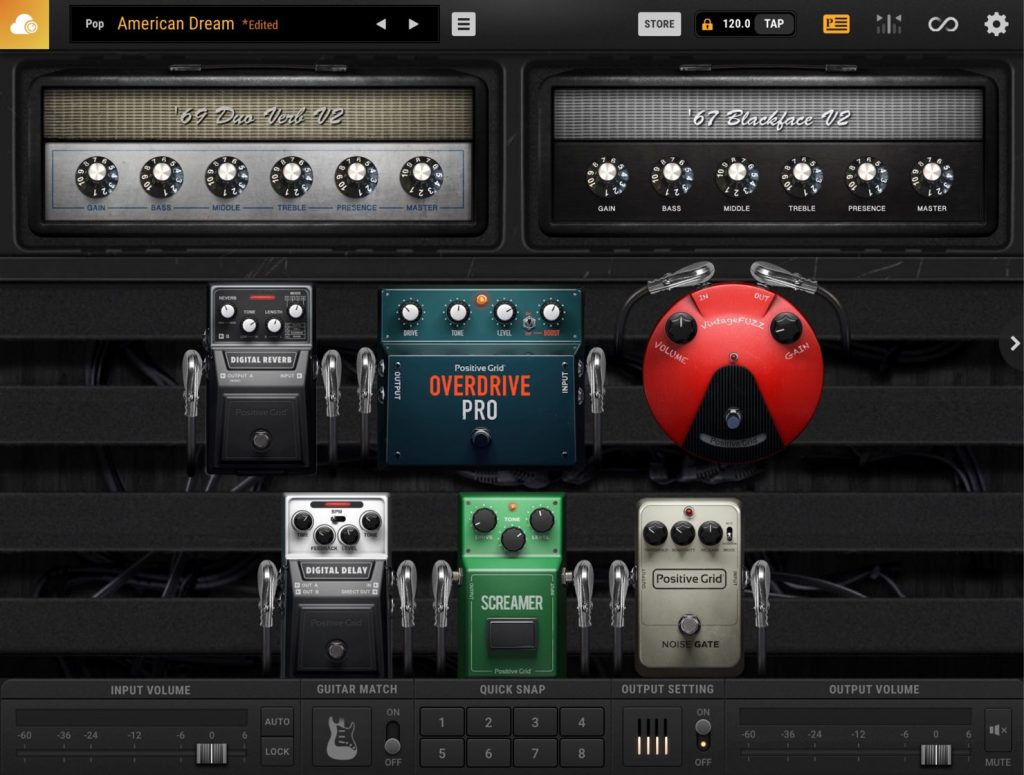
The redesigned UI also includes a new preset manager that makes it easy to organize, search, recall and preview your favorite pedal settings.
You can register pedalboard settings customized to your taste as snapshots, and even use snapshots to re-amp instantly.
The New "GUITAR MATCH" Feature
GUITAR MATCH is arguably the headline new feature of this version upgrade.
It analyzes the sound using emulation technology newly developed in-house by Positive Grid and turns your guitar (or guitar software instrument) into those well-known "legacy" sounds.
With BIAS FX 2's innovative GUITAR MATCH technology, you can turn any guitar into the classic "Legacy Collection", accurately reproducing the pickups, body type and even body thickness.
You don't need special pickups to make your guitar sound like a classic American guitar, a vintage LP and so on.
Have you ever swapped guitars to record the next track, or switched to a different guitar for the next song at a gig?

With GUITAR MATCH, you don't need to bring multiple guitars to the recording studio or the venue.
As long as you have a Mac with BIAS FX2 installed, you can handle any track or song.
New Amps, Pedals and Racks

The amps, pedals and racks have all been newly improved, giving your guitar sound unparalleled depth.
In addition, eight state-of-the-art studio rack processors, ranging from essential tools to creamy vintage effects, echo tape delay, tri-chorus, tube compression, spring reverb, wah and modern, glittering outboard gear, enable high-resolution, studio-quality production.
New Rack Modelers Too
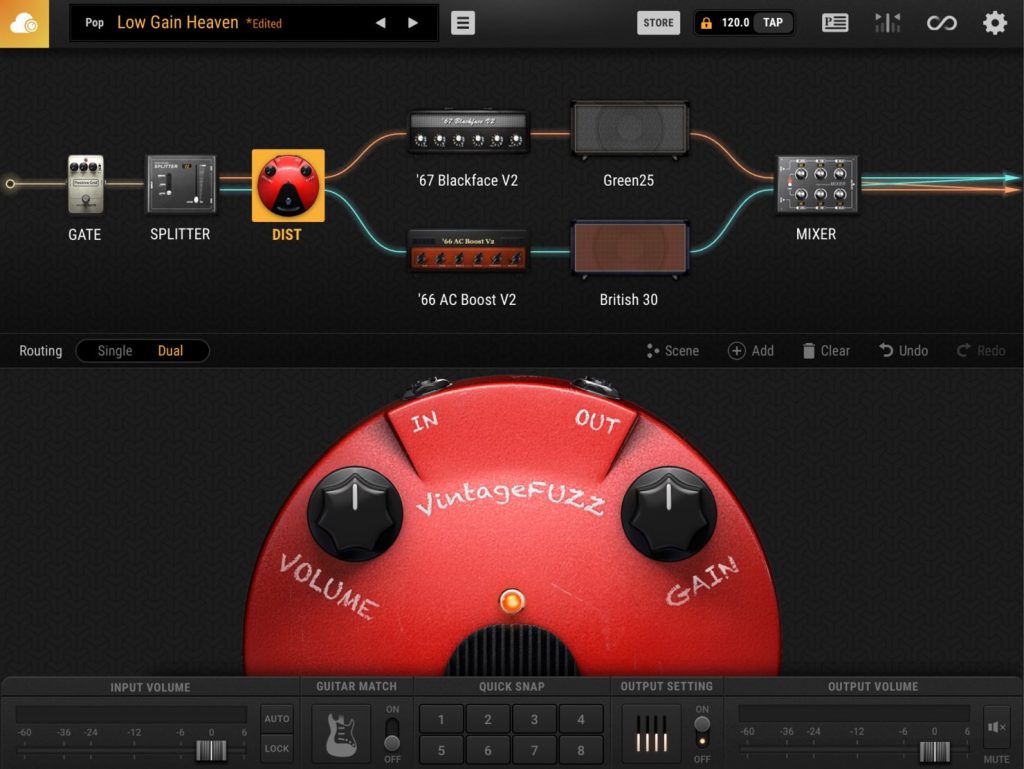
Fuzz, Time and Harmonizer have been added to the rack modelers. These new modelers raise the level of both recording and live performance.
With BIAS FX2's advanced modeling suite, both vintage and modern fuzz pedals improve grit and sustain, letting you instantly create deeper effects and ensemble lead lines.
The new, improved high-end rack collection (Echorec Drum Delay, Tube Multiband Compressor, Rotary Speaker) uses advanced DSP emulation to put the perfect finish on your sound.
Partnership with Celestion®
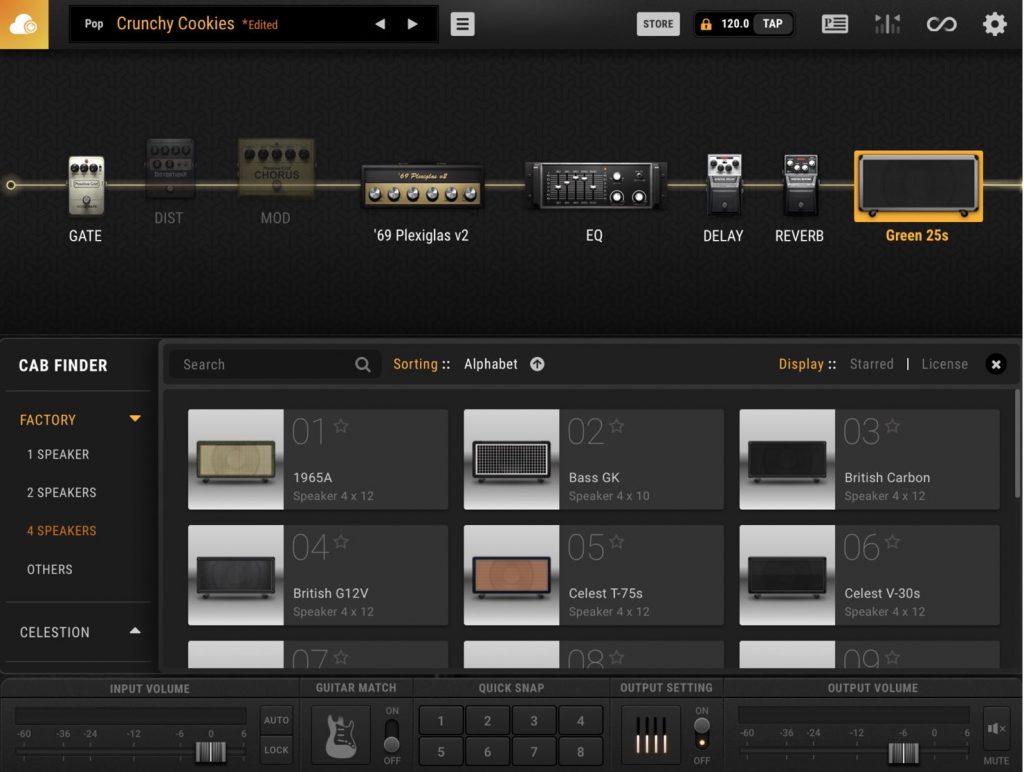
Positive Grid has partnered with "Celestion", the long-established maker of guitar amp speakers.
Celestion speakers are used in guitar amps from well-known makers such as MARSHALL, VOX and BOGNER, and Celestion is the world's most trusted speaker manufacturer.
Celestion drivers have been used for the "killer tone" of more classic songs than any other brand, supporting legendary performances by guitar heroes such as Jimi Hendrix and Slash.
Celestion impulse responses (IRs) are favorites of a wide range of guitarists, from Pete Thorn and Scott Henderson to George Lynch.
There's no need to buy several expensive cabinets. With BIAS FX2, you can easily bring the studio-class speaker sound that guitarists love into your work.
ToneCloud®
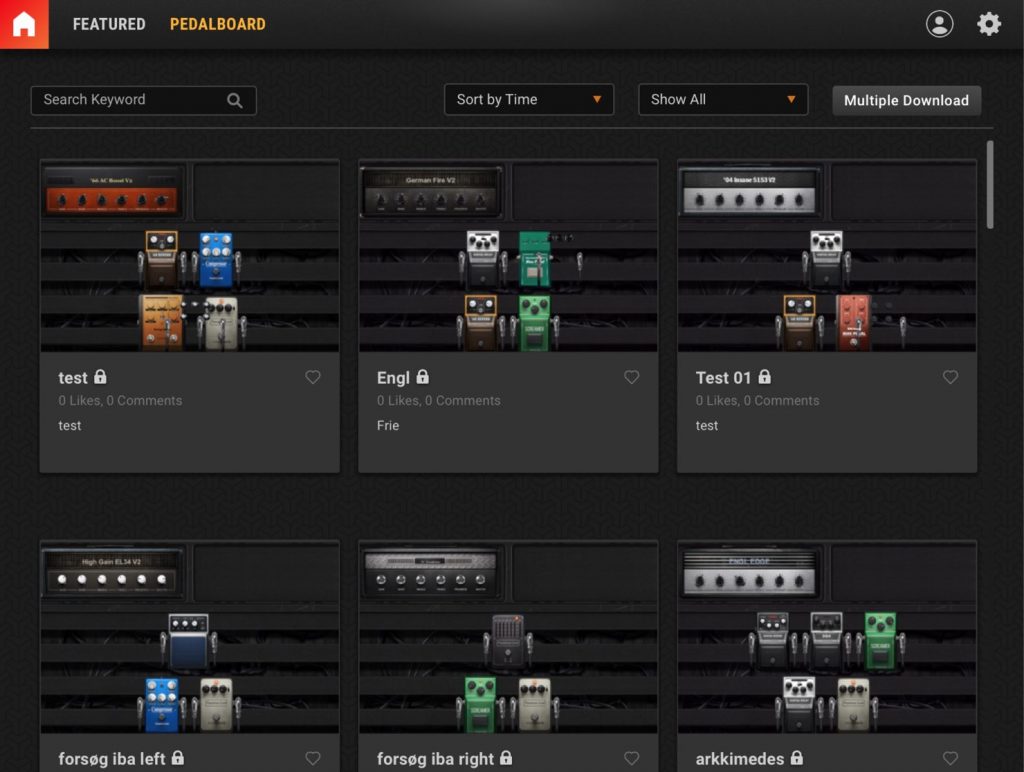
The ever-growing ToneCloud® online community gives you direct access to more than 50,000 presets for custom amps, pedals and pedalboards. You can also share and use them for free.
Find your favorite guitar tones and bring them into your work.
How to Use GUITAR MATCH
As explained above, "GUITAR MATCH" is a feature that analyzes your guitar or guitar software instrument and automatically emulates and shifts its sound to famous guitars such as a classic American guitar or a vintage LP.
Below we explain how to use GUITAR MATCH.
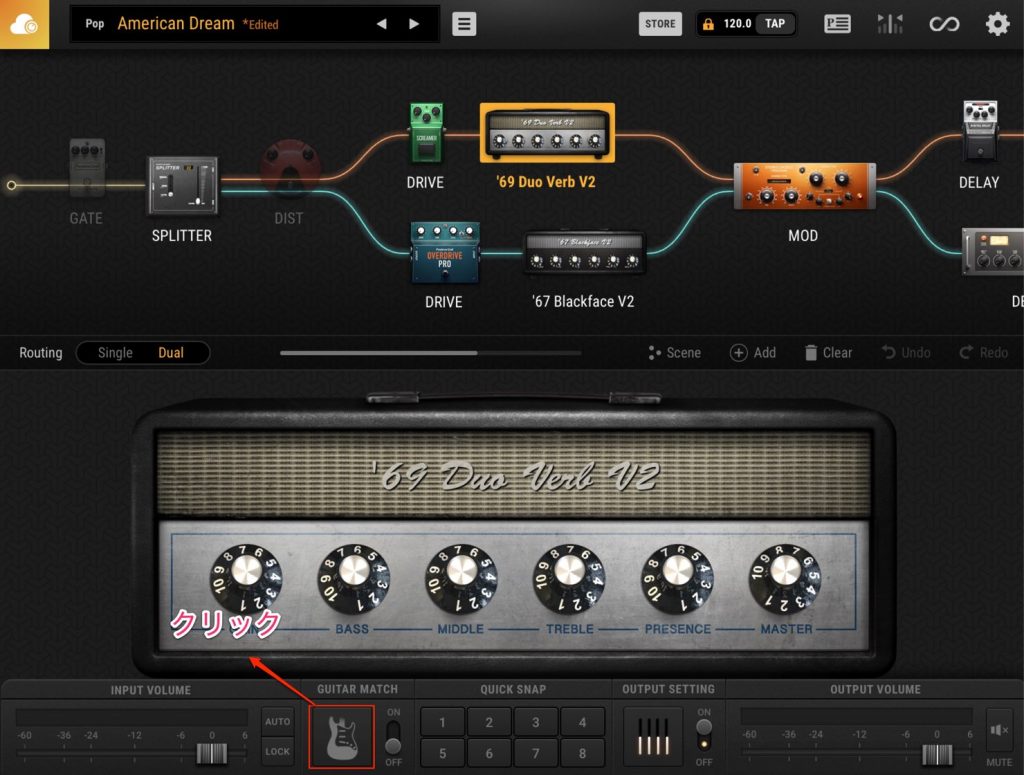
First, click the guitar icon shown at the bottom of the BIAS FX2 UI.
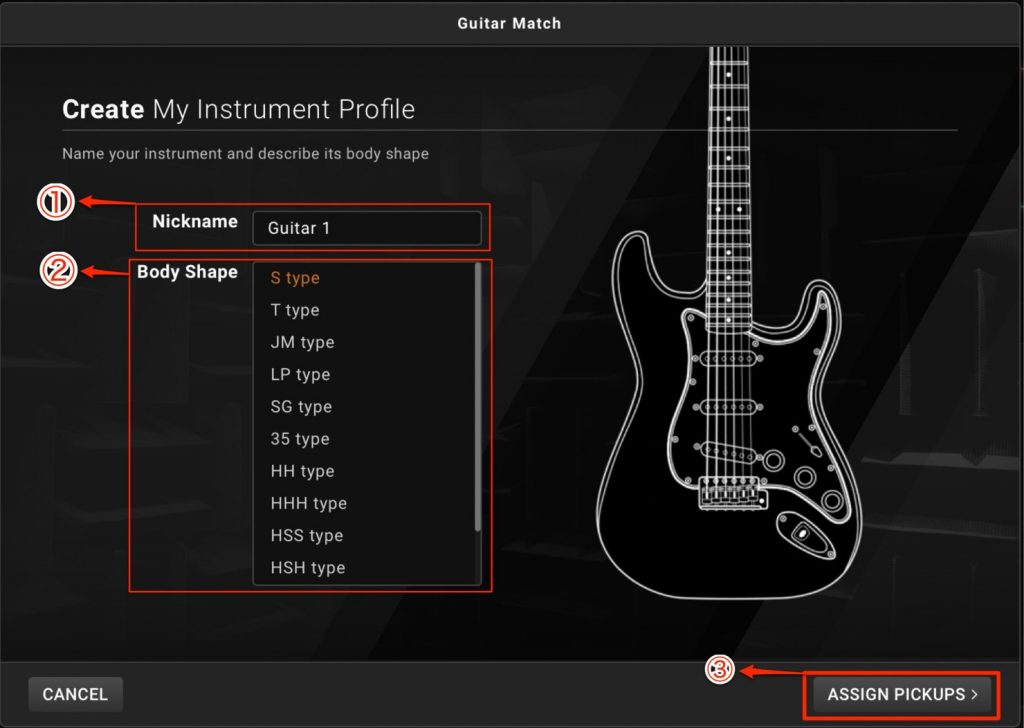
To use GUITAR MATCH, you need to create a profile.
Enter a profile name in (1) "Nickname" and select your guitar's body type in (2).
When you've finished selecting, click (3) "ASSIGN PICKUPS" to go to the next step.
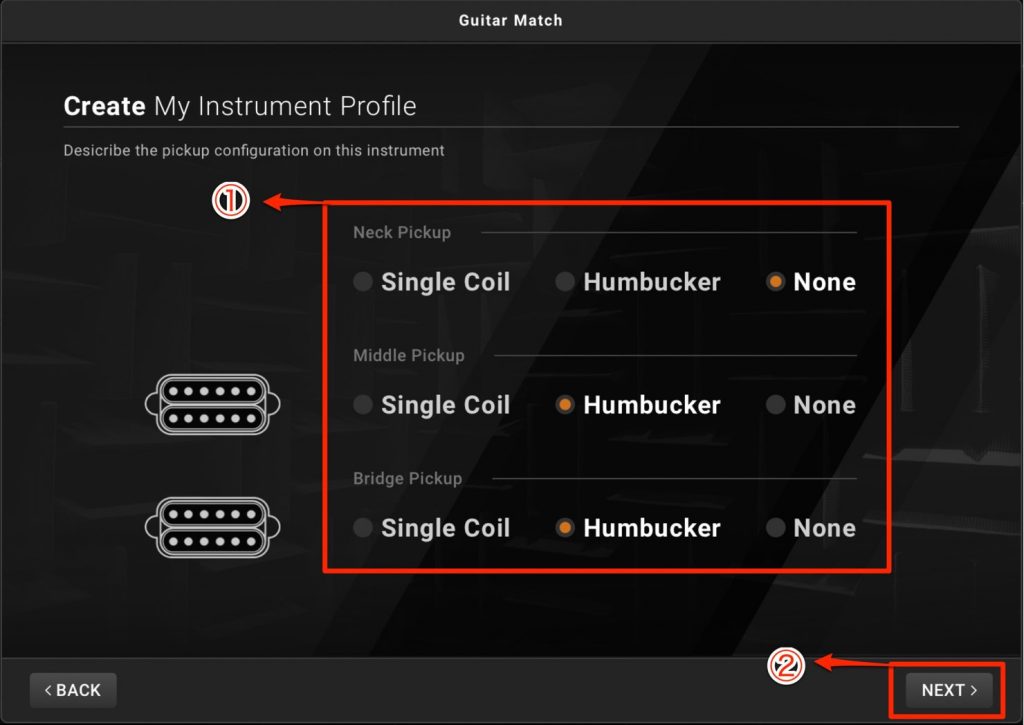
In (1), select your guitar's pickup type.
Depending on the guitar, there may be two or three pickups, or for example a single-coil at the bridge with humbuckers at the neck and middle.
Check the pickups on your guitar.
When you've finished selecting, click (2) "NEXT" to go to the next step.
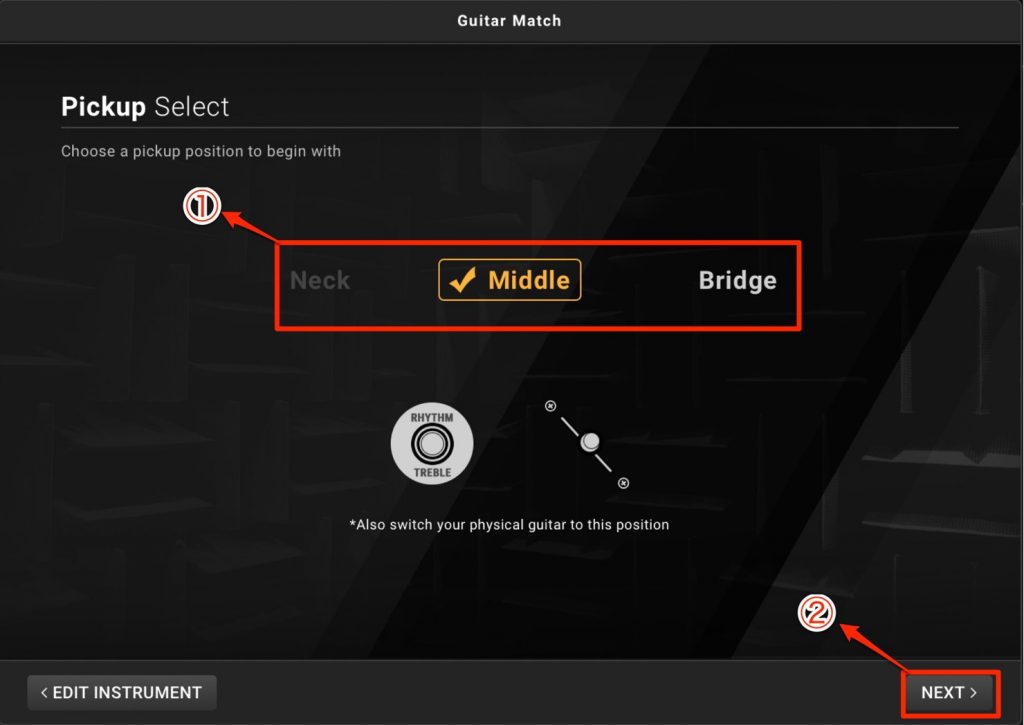
Next, set the pickup position.
When you've finished selecting, click "NEXT" to go to the next step.
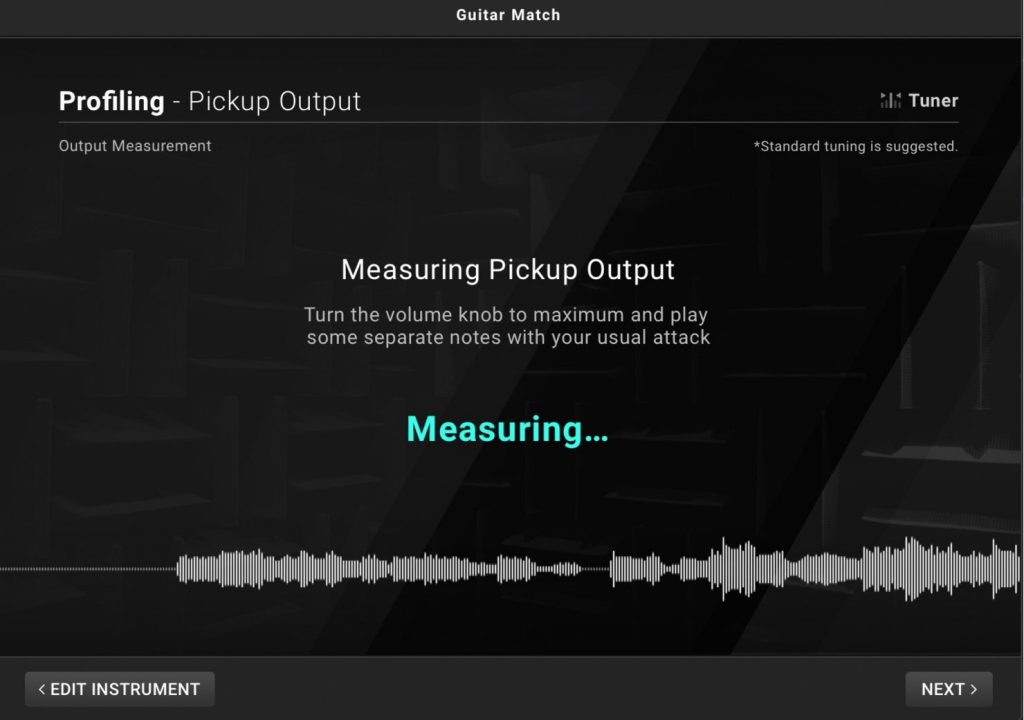
Next, measure the pickup output.
Turn the volume knob all the way up and play several different phrases.
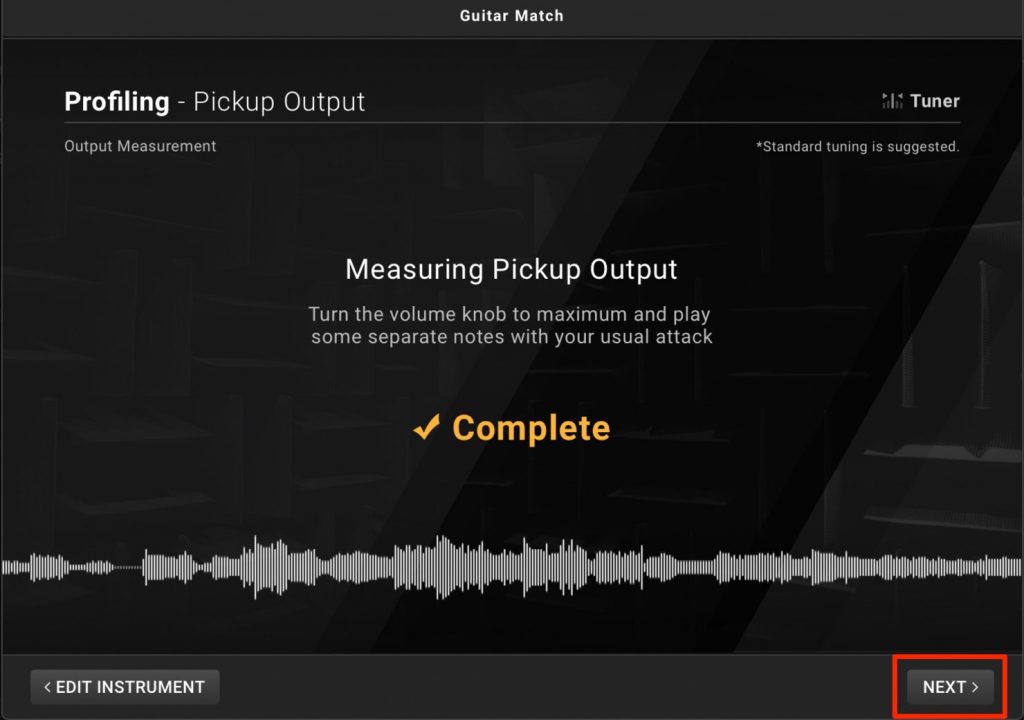
When the measurement is finished, "Complete" is displayed.
Click "NEXT" to go to the next step.
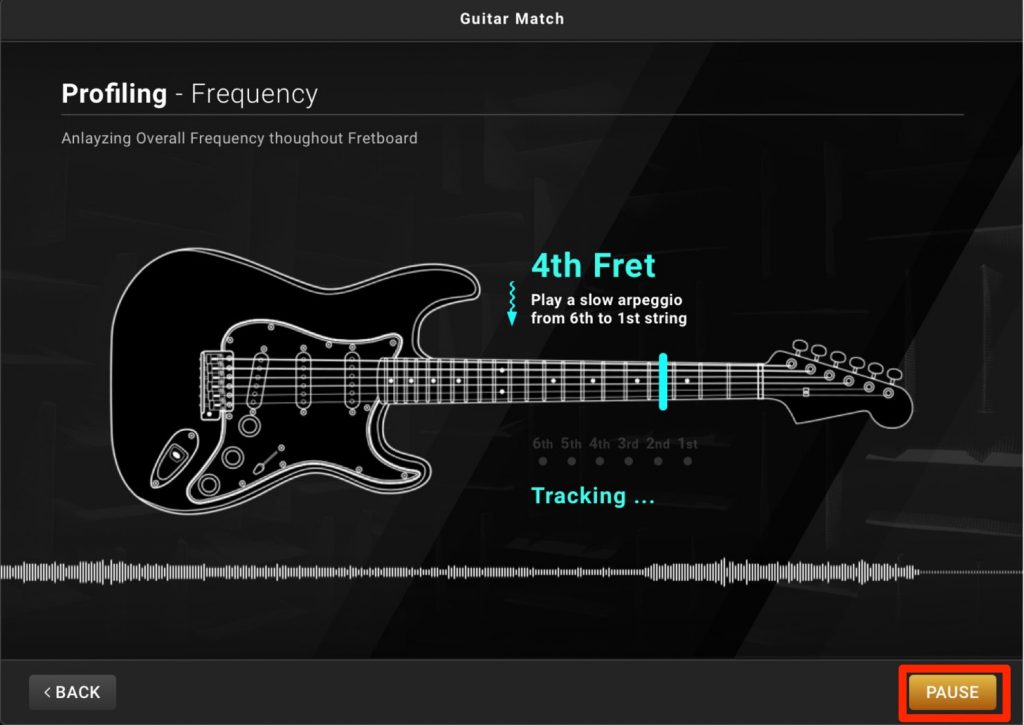
Next, an overall frequency analysis is performed for each fret.
Play slow arpeggios from the 6th string to the 1st string.
Start this from the 0th fret (open strings) and repeat it for several frets.
Clicking "PAUSE" stops the analysis temporarily.
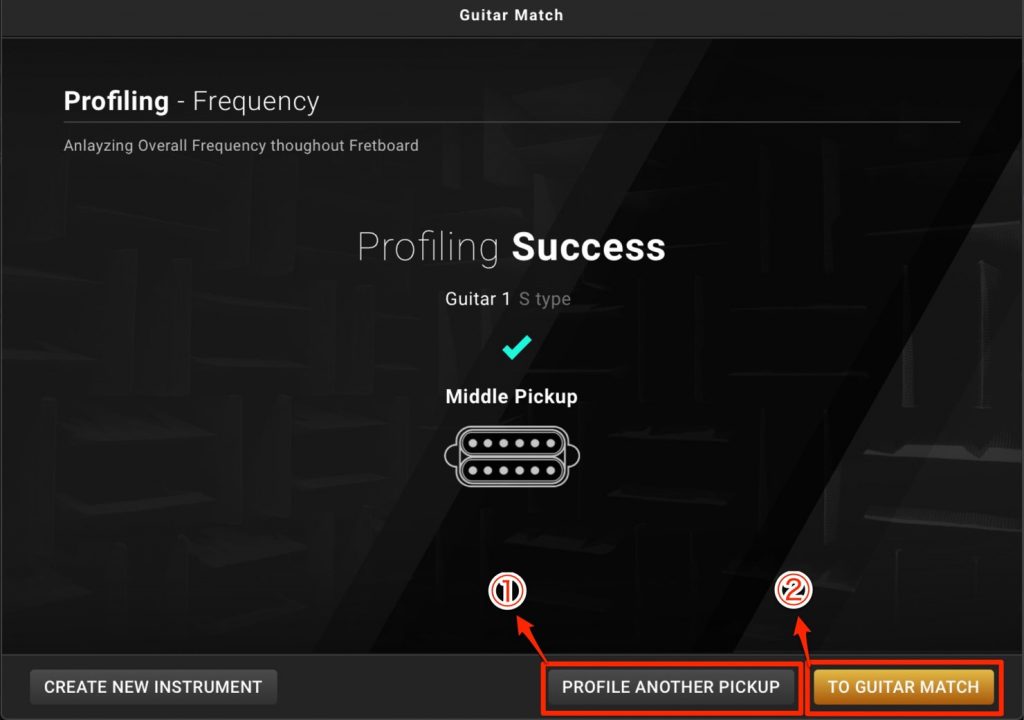
When the analysis is finished, "Profiling Success" is displayed.
Profiling is now complete, and you're ready to shift the sound to other guitars.
Click (1) "PROFILE ANOTHER PICKUP" to analyze a different pickup.
Click (2) "TO GUITAR MATCH" to go to the next step.
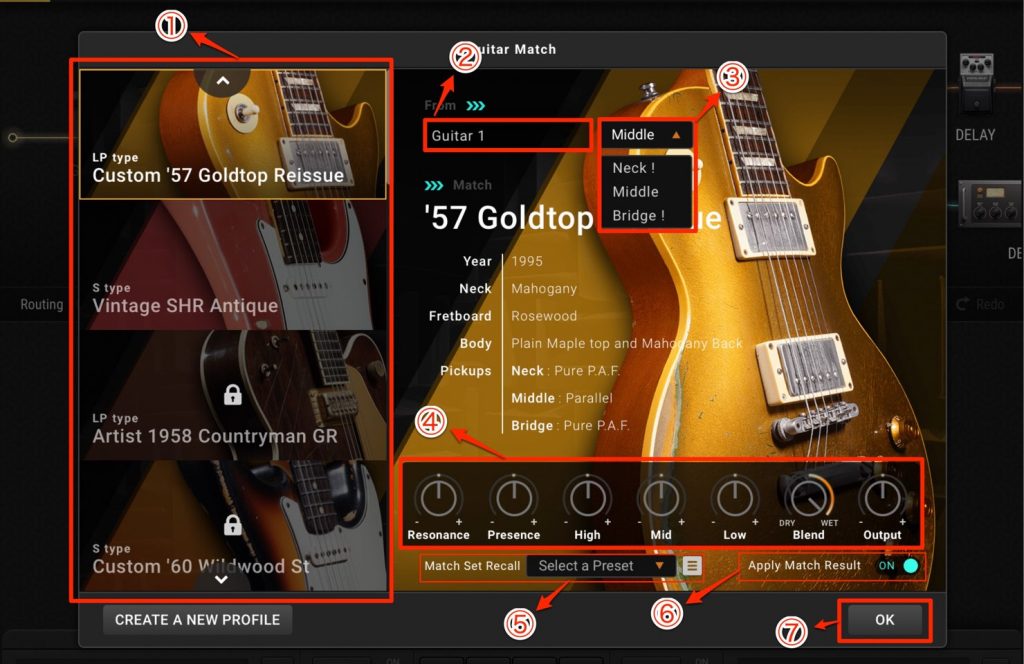
In (1), choose the type of guitar you want to use. The lineup includes plenty of famous "legacy" guitars, so you can choose the guitar type for each song or track.
(2) Under "From", the nickname you entered when profiling is shown. Clicking it takes you to a screen for switching to another profile.
(3) Select the pickup.
(4) Set the various parameters. The included lineup comes with sounds tailored to each guitar's character, but you can customize them freely.
(5) GUITAR MATCH can save and load the parameters you set in (4). It's handy to set these up in advance if you want to apply the parameters to other guitar types as well.
(6) When you've finished setting the parameters, turn "Apply Match Result" ON and click (7) "OK". This completes the GUITAR MATCH setup.
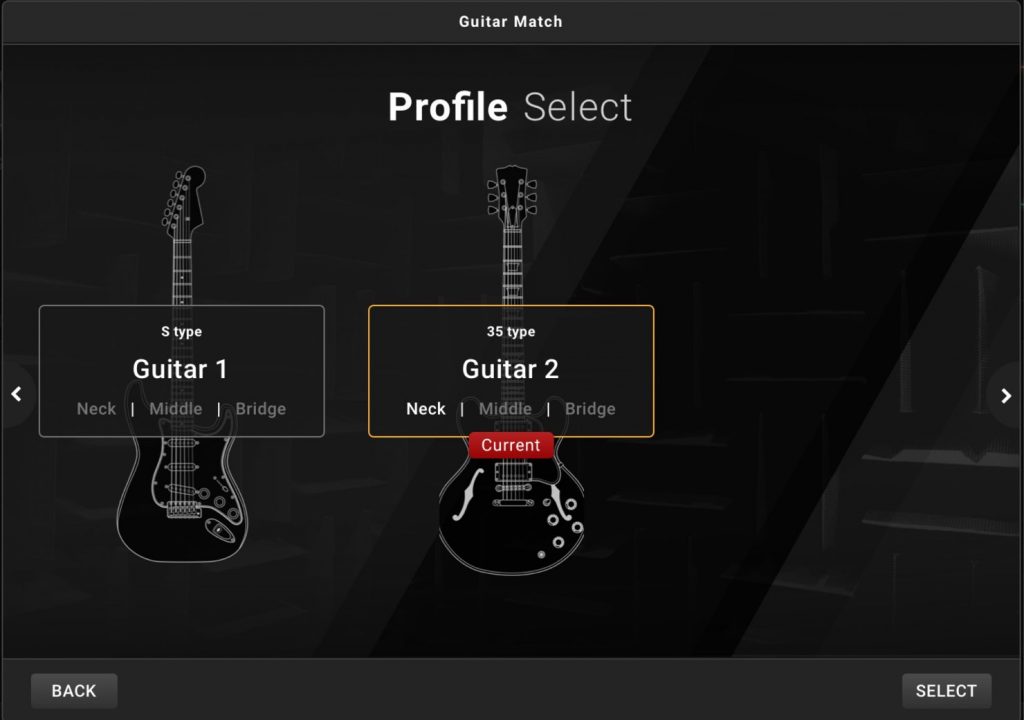
Pressing (2) switches to a screen like this.
If you want to try how other guitars sound too, it's handy to set up their profiles in advance.
What did you think?
When I'm not satisfied with my outboard gear during recording, I use BIAS alongside Guitar Rig, GTR Tool Rack and others, and I find the BIAS series far more stable than any other guitar processor.
For this review of BIAS FX2, I used the demo version, and my impression was that it feels more lifelike than the previous version.
It's also extremely intuitive to operate, and I recommend it for those using a guitar processor for the first time, and for anyone who wants to "make programmed guitar sound less programmed" or "improve the quality of their guitar sound".
Positive Grid recently released "BIAS FX2".
BIAS FX 2 has quite a few changes compared with the previous version, so here we also introduce the new "GUITAR MATCH" feature.
Details here: https://t.co/xtLgTMvNz3Explained by: Hironori Endo (@music_ebisu) pic.twitter.com/SioHMFJE9p
- SLEEP FREAKS (@SLEEPFREAKS_DTM) March 29, 2019
Frequently Asked Questions
Q1. What is the "GUITAR MATCH" feature in BIAS FX 2?
GUITAR MATCH analyzes your guitar or guitar software instrument and automatically converts it to legendary sounds such as a classic American guitar or a vintage LP. It accurately reproduces even the pickups and body type, so you don't need to buy expensive guitars or swap pickups.
Q2. What has changed in BIAS FX 2 from the previous version?
It adds a completely redesigned DSP engine, a new preset manager, the GUITAR MATCH feature, new amps and pedals, and new rack modelers such as Fuzz, Time and Harmonizer. Speakers from the partnership with Celestion are also integrated.
Q3. What environment do I need to use BIAS FX 2?
It can be used in a DAW or standalone. The article mentions using it on a Mac, but please check the official website for detailed system requirements. You can also access more than 50,000 presets on ToneCloud.
NEW ARTICLES
Latest English Articles











